PaaS & Middleware Partner YouTube Update May 2017


The May edition of the PaaS & Middleware Partner Update contains three key topics:

· Presentations & announcements from the PaaS Partner Community Forum 2017

· PaaS free trial services for partners

· SOA & BPM Partner Community Webcast May 23rd 2017

For regular updates please subscribe to our YouTube channel here. Thanks for your likes and sharing the video on YouTube and LinkedIn. For the latest SOA & BPM Partner Community information please visit our Community update wiki here (Community membership required).

SOA & BPM Partner Community

For regular information on Oracle SOA Suite become a member in the SOA & BPM Partner Community for registration please visit www.oracle.com/goto/emea/soa (OPN account required) If you need support with your account please contact the Oracle Partner Business Center.

Blog Twitter LinkedIn image[7][2][2][2] Facebook clip_image002[8][4][2][2][2] Wiki

FTP Adapter Configuration for SFTP by Emiel Paasschens

imageIntroduction

At my current project incoming data files, located at a third party FTP server, have to be read using SFTP.
Despite of several blog posts and the FTP Adapter documentation of Oracle, it took us a full day to get a working SFTP configuration. I use this blogpost to document this for myself in case I have to do it again, and for others who need to do (about) the same.
Prerequisite

First of all start with ensuring that no firewall is blocking traffic from the weblogic server to the FTP server using the specified SFTP port (default this is 22). On a linux (or unix) server you can verify this by opening a command prompt on the weblogic server (eg. with Putty) and use command “ssh “.

SFTP Configuration

Two configuration steps are required now:
A. Create a private and public key file
B. Add a FTP Adapter Outbound Configuration for SFTP

A. Create a private and public key file (linux/unix):

  1. Log in with a command prompt as the oracle user (the user under which weblogic runs) on the weblogic server
  2. Navigate to the .ssh directory under the user home directory: cd ~/.ssh
  3. Generate a public and private key with ssh-keygen (and accept defaults): ssh-keygen (4 x Enter).
    Two files are created: id_rsa and id_rsa.pub
  4. Add the public key to the ‘autorized keys’: cat id_rsa.pub >> authorized_keys

In a production environment these files should be write protected (even for the oracle account itself).

B. Add a FTP Adapter Outbound Configuration for SFTP:

  1. Log in with admin privileges on the weblogic console
  2. Click on “Deployments” (second item in menu on left side of page)
  3. Search in the list of deployments for the “FtpAdapter” (you may have to navigate to the next page with “Next”) and click on its name (it’s a link):        (hint: Customize this table -> Number of rows 100 -> Apply) Read the complete article here.
  4. SOA & BPM Partner Community

    For regular information on Oracle SOA Suite become a member in the SOA & BPM Partner Community for registration please visit www.oracle.com/goto/emea/soa (OPN account required) If you need support with your account please contact the Oracle Partner Business Center.

    Blog Twitter LinkedIn image[7][2][2][2] Facebook clip_image002[8][4][2][2][2] Wiki

    Technorati Tags: SOA Community,Oracle SOA,Oracle BPM,OPN,Jürgen Kress

Automating the Provisioning of Oracle SOA Suite on AWS by Fabio Douek

image1. Overview

Rubicon Red MyST delivers automated platform provisioning and continuous delivery for Oracle Middleware, enabling users to deliver a consistent and reliable platform in minutes.

MyST also provides infrastructure independence; enabling customers to deploy consistent middleware platforms across all infrastructure types: on-premise and various cloud providers including Oracle and Amazon Web Services (AWS).

In this post we will show how to provision an Oracle SOA Suite environment within minutes on AWS.

If you want to use an AWS Oracle RDS instance, you can follow the instructions in this post: http://blog.rubiconred.com/configuring-amazon-rds-as-the-oracle-soa-suite-database/ .

Alternatively, you can provision against an Oracle database running on an AWS EC2 instance.

We will provision the following, using the standards defined in the Oracle Enterprise Deployment Guide (EDG):

  • A two node cluster environment
  • OFMW Components: SOA, OSB, WSM, BPM, OHS

We will use MyST Studio to:

  • Discover the AWS resources, and define our Infrastructure Provider
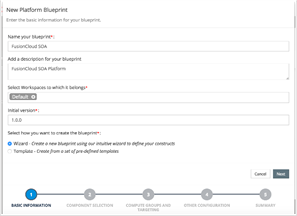
  • Define the Platform Blueprint
  • Define the Platform Model
  • Provision two EC2 instances On-Demand
  • Provision Oracle Fusion Middleware:
    • Install the required binaries
    • Run RCU to create the database objects against RDS
    • Create the WebLogic Domain
    • Apply the Oracle EDG recommended configurations, which is a MyST knowledge module

2. AWS Configuration Prerequisites

Security Groups:

A security group allows us to control access to specific inbound/outbound ports, as well as restrict access based on source address.

The following table details the Security groups we are using for the purpose of this blog post: Read the complete article here.

SOA & BPM Partner Community

For regular information on Oracle SOA Suite become a member in the SOA & BPM Partner Community for registration please visit www.oracle.com/goto/emea/soa (OPN account required) If you need support with your account please contact the Oracle Partner Business Center.

Blog Twitter LinkedIn image[7][2][2][2] Facebook clip_image002[8][4][2][2][2] Wiki

Technorati Tags: SOA Community,Oracle SOA,Oracle BPM,OPN,Jürgen Kress
SOA Suite 12.2.1.1.0: Create, configure and tune a SOA/OSB Domain by Neselovskyi, Borys

image

Introduction

This post focuses on the creation, configuration and tuning of an initial SOA Suite 12.2.1.1.0 Domain.

The WebLogic Server is a necessary requirement, and must already be installed. For instruction how to install the WebLogic Server 12.2.1.1 please refer to my previous post:  WebLogic Server 12.2.1.1.0: Installation on the Linux OS

The following tasks will be implemented:

  • Preparing the Operating System for the installation of the WebLogic Server 12.2.1.1, Installation JDK 1.8 and the WebLogic Server 12.2.1.1: WebLogic Server 12.2.1.1.0: Installation on the Linux OS
  • Creating of database schemas
  • Creating a SOA Suite Domain
  • Post-Installation Tasks:
    • Configuring of components
    • Creating of Start & Stop scripts for the automatic start/stop of components
  • SOA Suite Domain Tuning and Troubleshooting

The SOA/OSB Domain will be installed without BAM (different Domain) because of:

–    Oracle Best Practices and our experience

–    In order to stabilize the system (BAM is unstable at the moment)

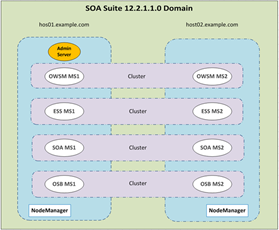
The Domain will be created on two servers (OS OEL 6.7):

  • host01.example.com
  • host02.example.com

We will configure four clusters:

  • OWSM Cluster (Oracle Web Services Management)
  • ESS Cluster (Enterprise Scheduler Services)
  • SOA Cluster
  • OSB Cluster (Oracle Service Bus)
Installation SOA / OSB 12.2.1.1 read the complete article here.

SOA & BPM Partner Community

For regular information on Oracle SOA Suite become a member in the SOA & BPM Partner Community for registration please visit www.oracle.com/goto/emea/soa (OPN account required) If you need support with your account please contact the Oracle Partner Business Center.

Blog Twitter LinkedIn image[7][2][2][2] Facebook clip_image002[8][4][2][2][2] Wiki

Technorati Tags: SOA Community,Oracle SOA,Oracle BPM,OPN,Jürgen Kress
Benefits of a Canonical Data Model (CDM) in a SOA environment by Emiel Paasschens

image

Introduction

The last few years I’ve been working in several SOA related projects, small projects as well as quite large projects. Almost all of these projects use a Canonical Data Model (CDM). In this post I will explain what a CDM is and point out what the benefits are of using it in an integration layer or a Service Oriented (SOA) environment.

What is a Canonical Data Model?

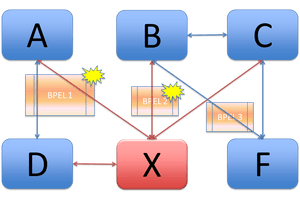
The Canonical Data Model (CDM) is a data model that covers all data from connecting systems and/or partners. This does not mean the CDM is just a merge of all the data models. The way the data is modelled will be different from the connected data models, but still the CDM is able to contain all the data from the connecting data models. This means there is always a one way, unambiguous translation of data from the CDM to the connecting data model and vice versa.
A good metaphor for this in spoken languages is the Esperanto language. Each living, existing spoken language can be translated to the constructed Esperanto language and vice versa.
In a CDM data translation, the translation is not restricted to the way the data is modelled, but will also be a translation of the values of the data itself.

Example Data

Let’s take as an example the country values for the US and The Netherlands in four connecting data models. Three of these models are ‘based’ on the English language and the last one on the Dutch language. The first two data models are of type XML, the third one is CSV and the last one is a JSON type model: Read the complete article here.

SOA & BPM Partner Community

For regular information on Oracle SOA Suite become a member in the SOA & BPM Partner Community for registration please visit www.oracle.com/goto/emea/soa (OPN account required) If you need support with your account please contact the Oracle Partner Business Center.

Blog Twitter LinkedIn image[7][2][2][2] Facebook clip_image002[8][4][2][2][2] Wiki

Technorati Tags: SOA Community,Oracle SOA,Oracle BPM,OPN,Jürgen Kress
API Catalog for RESTful Services by Richard Bingham

image

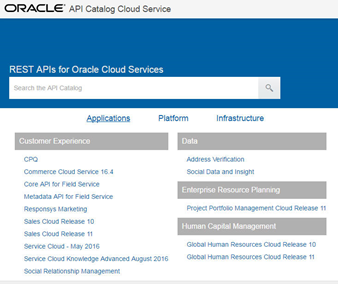
Since we looked at the retirement of OER, I am please to share another new set of resources for developers working with Oracle Cloud applications. The existing resources were extended recently with a centralized interface to information about the RESTful web services.

The new Oracle API Catalog provides a one-stop-shop for integration developers, including documentation, examples, and descriptive content in the Swagger standard format. As shown below for the HCM employee service (emps), the material includes resource usage details, and extensive descriptions on each supported method and their queries/parameters. Read the complete article here.

SOA & BPM Partner Community

For regular information on Oracle SOA Suite become a member in the SOA & BPM Partner Community for registration please visit www.oracle.com/goto/emea/soa (OPN account required) If you need support with your account please contact the Oracle Partner Business Center.

Blog Twitter LinkedIn image[7][2][2][2] Facebook clip_image002[8][4][2][2][2] Wiki

Technorati Tags: SOA Community,Oracle SOA,Oracle BPM,OPN,Jürgen Kress
Oracle Cloud Test Drive: Beeindruckend bessere Ergebnisse by Danilo Schmiedel

Danilo Schmiedel ist bei Opitz Consulting der Oracle- und Kunden-“Versteher”. Auf der Inspire IT 2017 hat er mit dem Oracle Cloud Test Drive eine pragmatische Alternative zu Keynotes und Vorträgen geschaffen. So konnten Kunden “hands on” erleben, wie einfach es ist, in 40 Minuten beeindruckende Ergebnisse zu erzielen. Watch the video hereOpitz Cloud consulting offerings.

Interested to showcase Oracle PaaS solutions to your customers? Get access to cloud services here and please contact us here.

SOA & BPM Partner Community

For regular information on Oracle SOA Suite become a member in the SOA & BPM Partner Community for registration please visit www.oracle.com/goto/emea/soa (OPN account required) If you need support with your account please contact the Oracle Partner Business Center.

Blog Twitter LinkedIn image[7][2][2][2] Facebook clip_image002[8][4][2][2][2] Wiki

Technorati Tags: SOA Community,Oracle SOA,Oracle BPM,OPN,Jürgen Kress

.

Implementing Oracle Integration Cloud Service book – trial chapter by Phil Wilkins, Robert van Mölken

image

Understanding Oracle’s Integration Cloud Service and how to get the most out of your implementation

Businesses are built on data, and applications that access that data. In modern businesses the same cloud-based data stores and applications might be accessed by hundreds of different applications from thousands of different devices via APIs. To make this happen, APIs must be wired together i.e. integrated. Oracle Integration Cloud Service provides a complete method for integrating enterprise applications in the cloud. Integration Cloud Service (ICS) provides a cloud hosted means to integrate systems together using a graphical means to define and represent integrations.

This book will be a comprehensive, hands-on guide to building successful, high-availability integrations on ICS. This book sets out to demonstrate how ICS can be used to effectively implement integrations that work both in the cloud and on-premise. It starts with a fast, practical introduction to what ICS can do for your business and then shows how ICS allows you to develop integrations not only quickly but in a way that means they are maintainable and extensible. Gradually it moves into more advanced integrations, showing how to achieve sophisticated results with ICS and work with external applications. Finally the book shows you how to monitor cloud apps and go beyond ICS to build even more powerful integrated applications. Get the book here and visit our SOA Book wiki here.


SOA & BPM Partner Community

For regular information on Oracle SOA Suite become a member in the SOA & BPM Partner Community for registration please visit www.oracle.com/goto/emea/soa (OPN account required) If you need support with your account please contact the Oracle Partner Business Center.

Blog Twitter LinkedIn image[7][2][2][2] Facebook clip_image002[8][4][2][2][2] Wiki

Technorati Tags: SOA Community,Oracle SOA,Oracle BPM,OPN,Jürgen Kress

SOA Cloud – Create Oracle Database Cloud Service Instance by Vivek Garg

image

Now days we hear lot about cloud and like to explore more on it. Recently Oracle launched cloud services that we can use to create service instances. This post is specific to Database Cloud service.

DBaaS (Database as a Service) is a service instance in Oracle Database Cloud. On premises setup we use to install Oracle database server on local hardware but in cloud, no need to have a setup, just need to confirm some parameters and we are good to use it.

In this post, we will show how you can create service instance of Oracle Database Cloud. Follow below steps for the same.

Step 1: Go to here

Login with your credentials that you have received from Oracle when you register for trial version.

Click on “Service Console” option as shown in below screen shot in “Oracle Database Cloud Service” section. Read the complete article here.

SOA & BPM Partner Community

For regular information on Oracle SOA Suite become a member in the SOA & BPM Partner Community for registration please visit www.oracle.com/goto/emea/soa (OPN account required) If you need support with your account please contact the Oracle Partner Business Center.

Blog Twitter LinkedIn image[7][2][2][2] Facebook clip_image002[8][4][2][2][2] Wiki

Technorati Tags: SOA Community,Oracle SOA,Oracle BPM,OPN,Jürgen Kress
SOA Cloud- Generate SSH Key Pair using Putty by Vivek Garg

image

In Oracle Cloud, we need to have public key when we need to create a service instance and private key is also required when we need to access it using SSH utility. In this post, we will show how we can create key pair (private and public keys).

For this post, we will use PUTTY to generate these keys as it is available for both windows and Linux.

Follow the below steps to generate key pair.

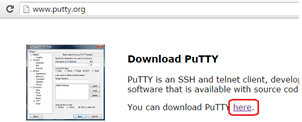
Step 1: Download the Putty key generator from www.putty.org link as shown in below screen shots.

Step 2: Open the puttygen.exe file and it opens another window as shown below. In parameters, select “SSH-2 RSA” and “2048” in Number of bits in the generated key as SSH 2 is most recent version of SSH. Read the complete article here.

SOA & BPM Partner Community

For regular information on Oracle SOA Suite become a member in the SOA & BPM Partner Community for registration please visit www.oracle.com/goto/emea/soa (OPN account required) If you need support with your account please contact the Oracle Partner Business Center.

Blog Twitter LinkedIn image[7][2][2][2] Facebook clip_image002[8][4][2][2][2] Wiki

Technorati Tags: SOA Community,Oracle SOA,Oracle BPM,OPN,Jürgen Kress