Financial Services Sector Demands Investment in BPM, SOA by Brandon Dean


clip_image001Recently we’ve talked a lot about the customer experience and why it’s so critical to ensuring the future of a business’ success. A perfect example of this can be found in the financial services sector. Customers are getting used to technologies that allow them to do things a certain way—and simply won’t settle for anything less.

People want to check their balance, deposit checks and transfer funds while sitting on the subway. An old-school online banking system or homegrown loan processing application from 2001 is likely to face a real uphill climb in the mind of today’s consumer. In order to differentiate your products and services in a timely manner, organizations need to be able to quickly launch new solutions that meet customer demands.

Business Process Management (BPM) technology offers incredible promise to companies in the financial services sector. BPM software promises to increase efficiency, visibility and agility. It removes the complexity from managing business processes. Integrated with Service-Oriented Architecture (SOA), disparate applications can be linked across diverse groups of business lines and functions, and IT architecture—improving overall process efficiency. BPM and SOA technology can: Read the complete article here.

SOA & BPM Partner Community

For regular information on Oracle SOA Suite become a member in the SOA & BPM Partner Community for registration please visit www.oracle.com/goto/emea/soa (OPN account required) If you need support with your account please contact the Oracle Partner Business Center.

Blog Twitter LinkedIn image[7][2][2][2] Facebook clip_image002[8][4][2][2][2] Wiki

Business Process Modelling and Business Activity Monitoring by Stefan Wörmcke


Objective

The objective of this exercise is make participants familiar how to prepare a BPM project for monitoring using BAM

Use Case Description

In this exercise participants will add measurements to a given BPM process:

Prepare BAM data structure

Open given BPM process

Enable BAM for the project

Create measurement indicators

Set measurement marks

Deploy process

Run process

Check BAM data objects

Prepare BAM data structure

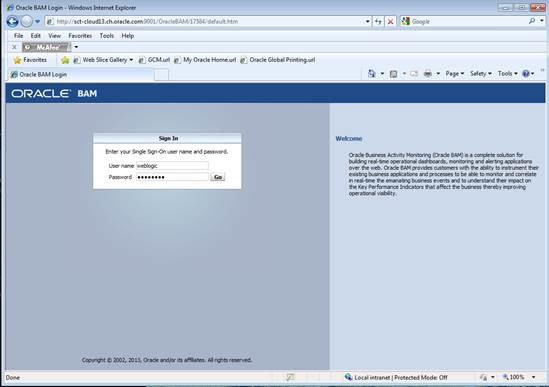
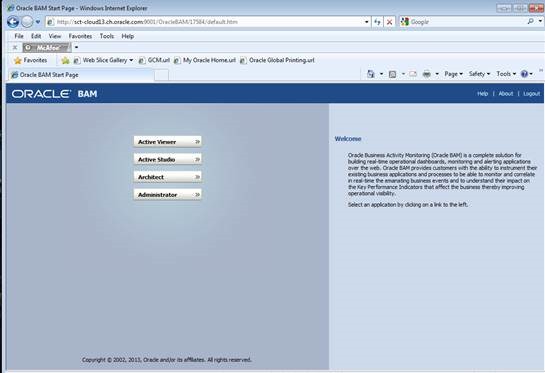
First step when using BAM is to organize the data you are gathering. For this you’ll have to log into BAM (http://hostname:9001/OracleBAM):
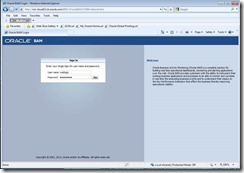
clip_image002

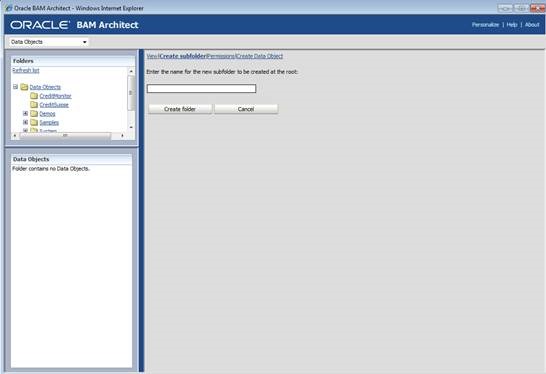
and from the menu choose the BAM architect:
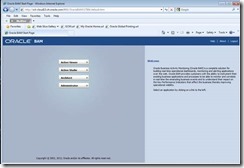
clip_image004

within the folder structure for data objects, create a new subfolder for storing your new data objects:
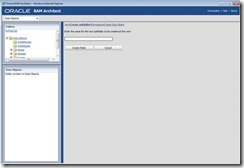
clip_image006

Open given BPM process

Your instructor should provide you with a file named “BAMTutorial.zip” Unzip the file and open the project using JDeveloper.

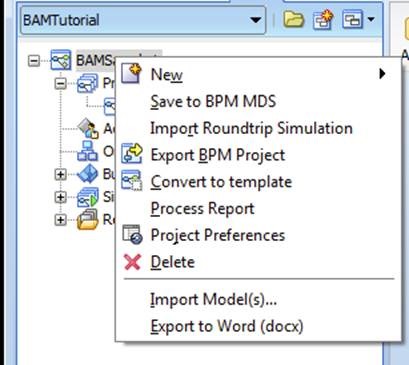
Select the project in the BPM navigation tree, and right click on the project to open project preferences:
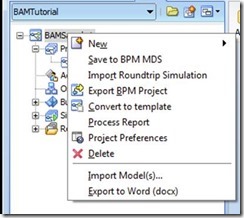
clip_image008

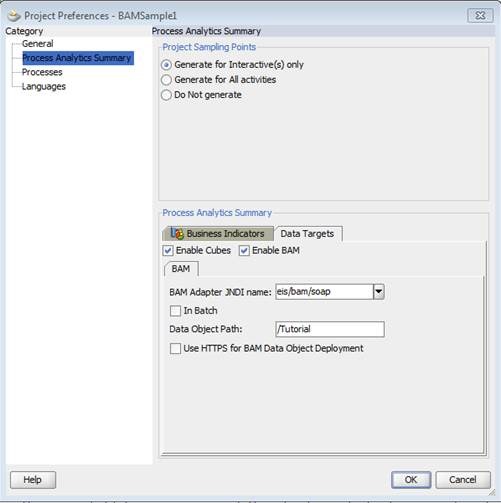
Select “Process Analytics Summary” on the left hand side and select the tab “Data Targets” below:
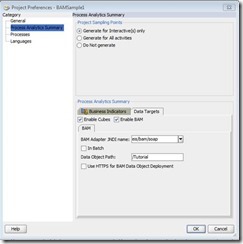
clip_image010

Here you have to check “Enable BAM” and enter the folder path you created in step 1.3

Click ok and your ready to deploy your project using BAM for monitoring!

Create Measurements Indicators

First step when using BAM in a process is to define what kind of data will be measured: you have to define business indicators. The basic indicators we use in this exercise are:

Dimensions: you use dimension to group data accordingly, e.g. grouping sales by region: North, East, South, West. If you base the dimension on numbers, you have to define ranges for grouping your data, like 0 – 1000, 1001 – 10000, etc.

Measurement: here you actually define the data you are interested in: quantity of ordered items, order total in USD, etc.

Counter: counter are somehow special in BPM: for each process instance their value will be 1 when set. Counters can be used for example to check which path of a process an instance was taken

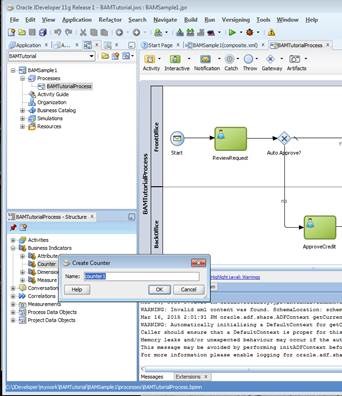
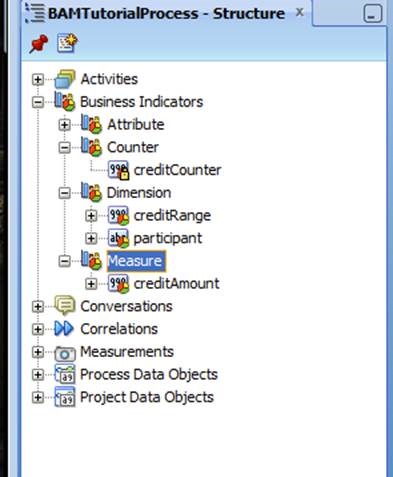
So for our demo process you will first create a counter: within the structure window of your process, expand “Business Indicators”, and right-click “counter” to create a new counter:
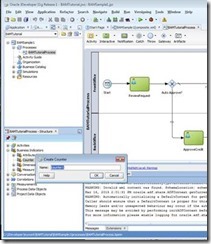
clip_image012

In the next step you’ll create two dimension:

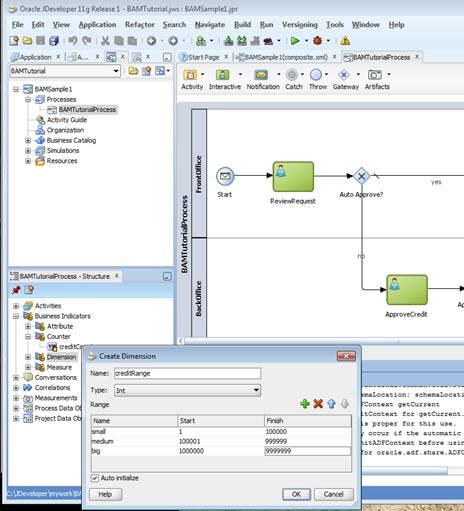
a dimension range (“credit range”):
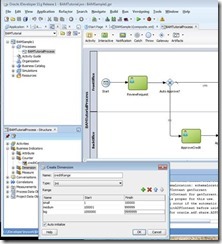
clip_image014

as you can see here, for a numeric dimension you have to define ranges for the numbers you’re interested in

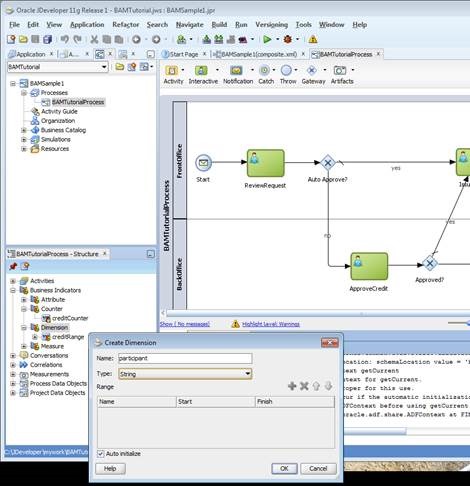
a dimension “Participant”:
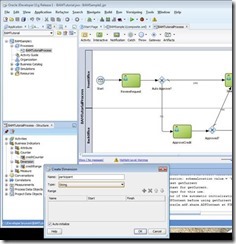
clip_image016

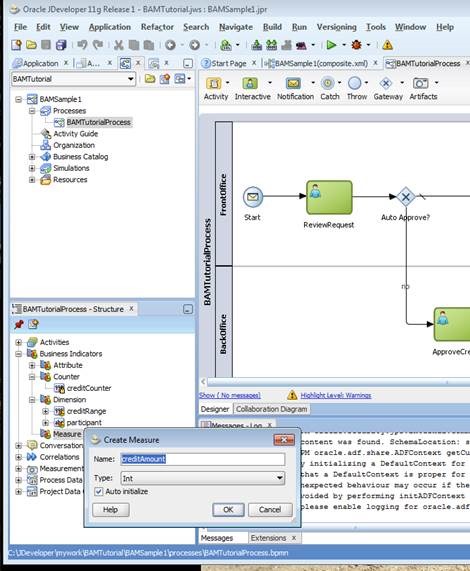
and finally you’ll create for measuring the amount within your process:
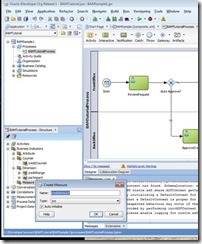
clip_image018

After completing each of the above steps, your list of business indicators should like this by now:
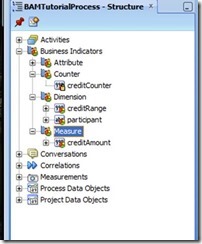
clip_image020

set measurement marks

As you have defined your indicators in the previous exercise, it’s now time set values when the process is executed.

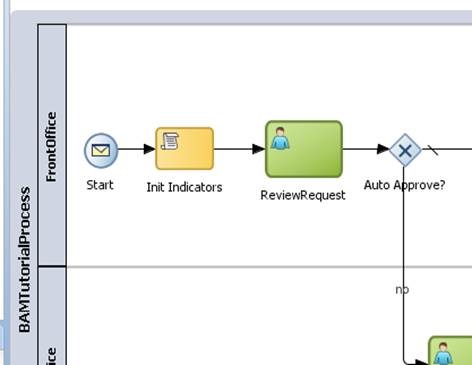
To set dimension, you will use a script task: from the pallet, drop a script task between the start node and “review request”, and call it “Init Indicators”:
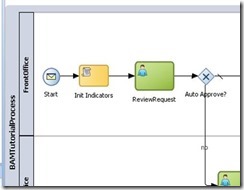
clip_image022

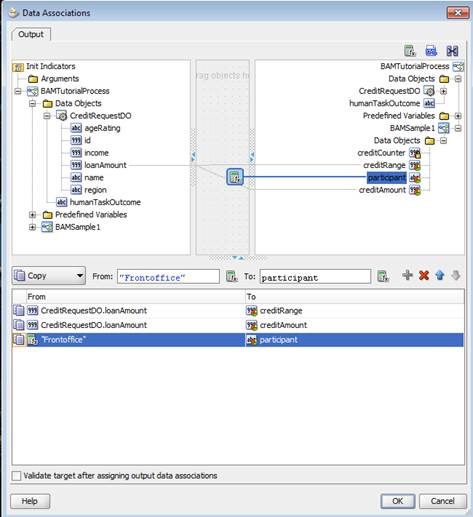
Double click the script task, got to implementation and set data associations:
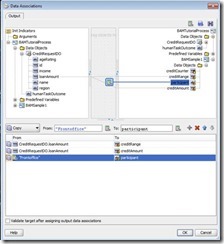
clip_image024

drag lines from left to right to do the associations:

drag a line from “loan amount” to “credit range” to set the dimension for the credit range

drag a line from “loan amount” to “credit amount” for setting the measurement for the credit amount

drop an expression on top of “participant” and assign the value “Frontoffice” to it. Although creating reports by human tasks is a standard measurement you’ll get when using BAM in a BPM process, this step is to demonstrate how to set various dimension you may want to use in future reports

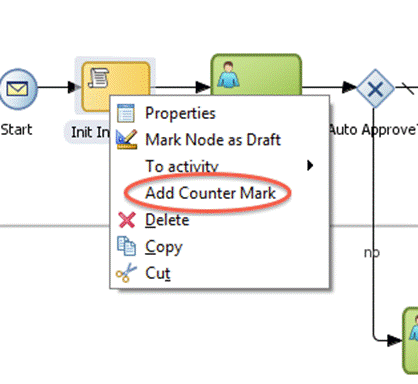
For setting counters, you will have to right click a flow object where you want to set the counter:
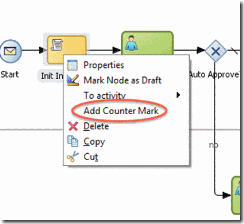
clip_image026

In the following dialog you will define which counter mark you want to set in this step.

Deploy the process

Deploying the process with BAM enabled is the same as deploying any other BPM process. The only difference is that you have to enable BAM in the project preferences before deployment.

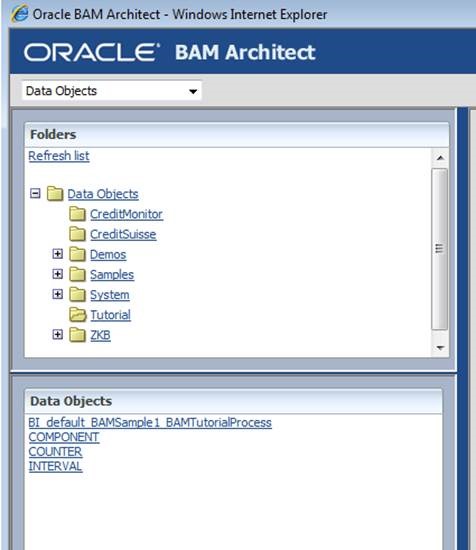
After successful deployment, log into BAM and start BAM Architect to verify that data objects for your process have been created:
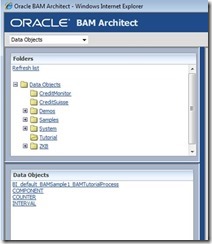
clip_image028

Run the process

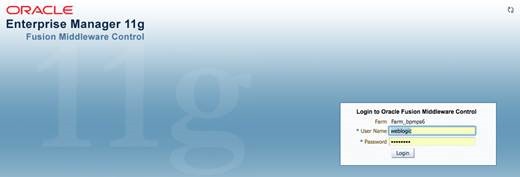
To check if data objects of BAM will be populated, you will have to run the process. You will use Enterprise Manager Fusion Control to test the process. Log into Enterprise Manager (EM), e.g. http://hostname:port/em:
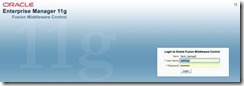
clip_image030

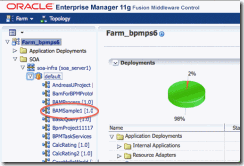
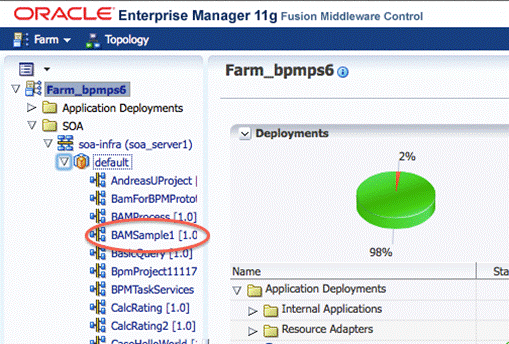
Select the BAMSample1 process in EM:

clip_image032

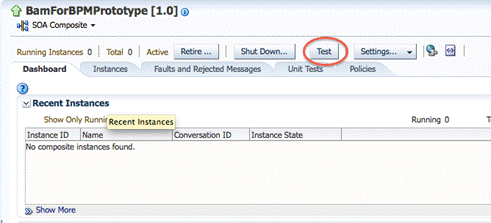
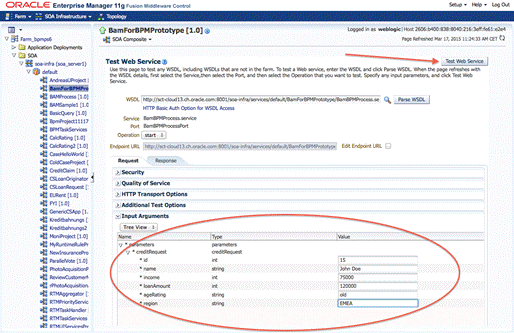
Cick on the TEST button for displaying the request form:
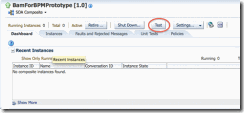
clip_image034

Enter some data for a credit request and start the process using “Test Web Service”:
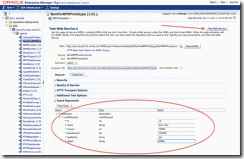
clip_image036

This process consists of two human tasks which have to be fulfilled to finish the process. To ease testing, both activities should be assigned to the same user. This way you won’t have to login and out several times to finish the process.

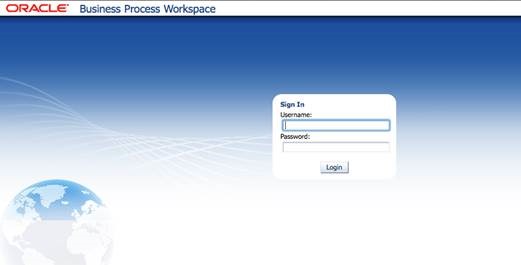
So log into BPM workspace (e.g. http://hostname:port/bpm/workspace) using the credentials of the user, to whom you assigned the human tasks:
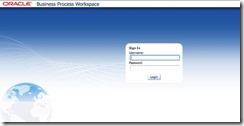
clip_image038

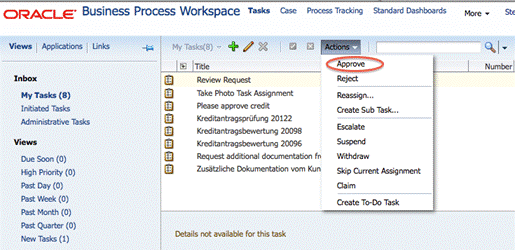
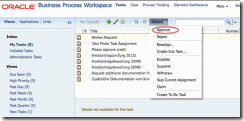
In your inbox, you’ll find the first assigned task “review request”:
clip_image040

Select the task in the list, click on “Actions” and approve it.

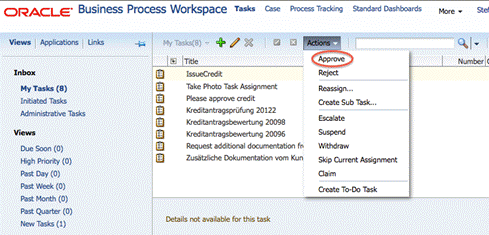
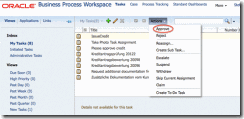
After approving the first task, you’ll find a second task in your inbox “Issue Credit”:
clip_image042

Like in the first part, do approve this task as well.

Now its time to check your data gathered by BAM. Start the BAM architect, and select the newly created Data Objects. Navigate around all data objects and observe the data.

Optional Exercise

Start the process several times with different data and different human tasks actions (approve or reject)

Add more business indicators to your project

Use the newly created business indicators in the project

Redeploy the project

Run the new version of the project and check the data objects

Objective

The objective of this exercise is make participants familiar how to create custom reports and dashboards

Use Case Description

In this exercise participants create a custom dashboard:

Create a dashboard

Add views to the dashboard

Format / change views

Doing a drill down into views

Learn about data objects

Create a dashboard

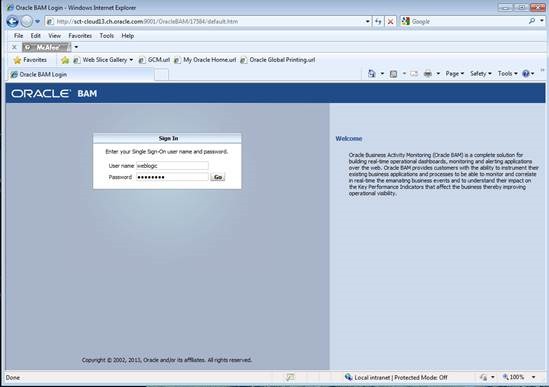
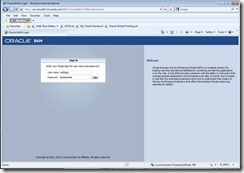
To create your first dashboard, you’ll have to log into BAM (http://hostname:9001/OracleBAM):
clip_image043

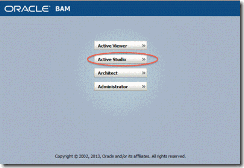
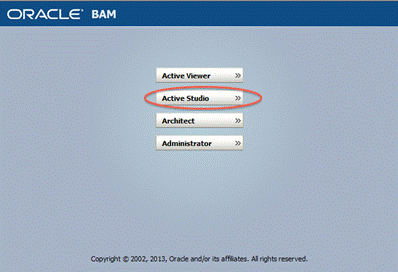
Then start active studio:

clip_image045

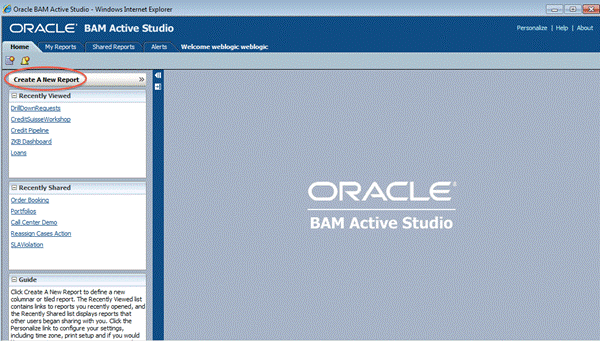
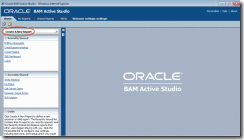
To create a new report, hit the button shown below:
clip_image047

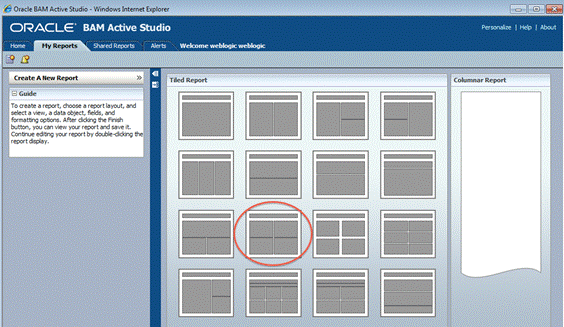
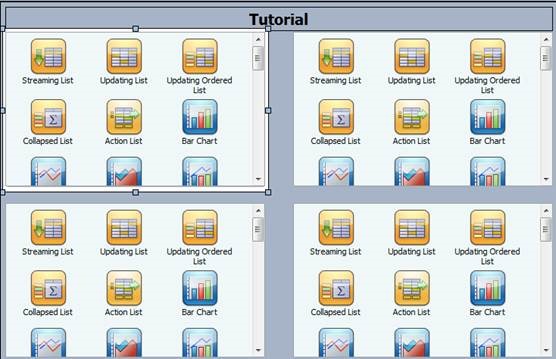
First you’ll have to choose the layout for your report, in our exercise we’ll choose a format with a title bar and 4 frames for the views we will insert later:
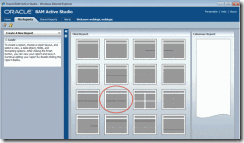
clip_image049

Click on the title bar to change the name of the title, for example: Tutorial

Within the 4 frames you’ll see icons for the various views for your report. “Streaming List, Bar Chart, Range Gauge,..” are all different kind of views you can create. You can also resize the frame of each view to fit your needs.

Start creating your first view by clicking on “Bar Chart” in the upper left frame:
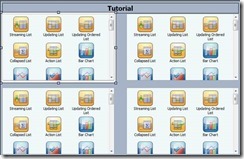
clip_image051

A wizard will start in the bottom guiding you through the definition of your view: data objects, data fields, formats, filters etc.

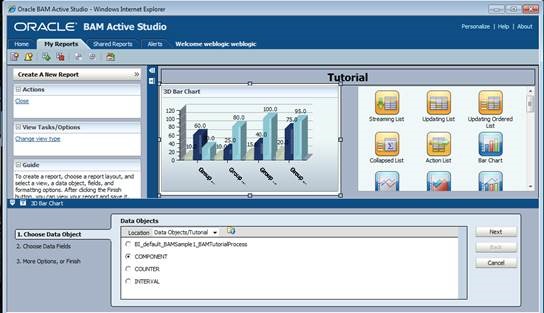
The first step is to define the data object for the report: navigate to the “Tutorial” folder and choose the “Component” data object, then click “Next”:
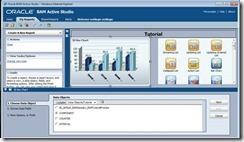
clip_image053

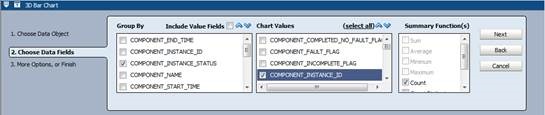
Next step is to define data fields and how we would like to group them: Choose “Component_Instance_Status” for grouping, and count the number of instances “Component_Instance_ID”:
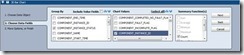
clip_image055

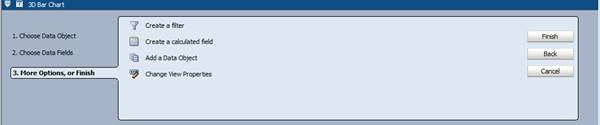
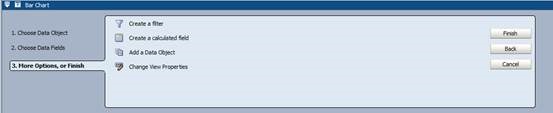
For this report, we don’t need e.g. a filter; finish your report by clicking the corresponding button:
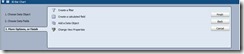
clip_image057

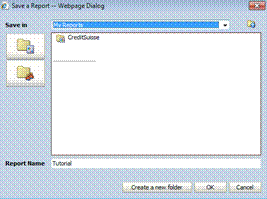
Before proceeding with the exercise, you should save your report. Hit “Save Report AS”, and create a new subfolder:
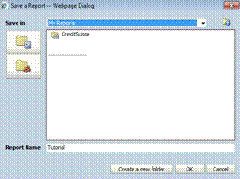
clip_image059

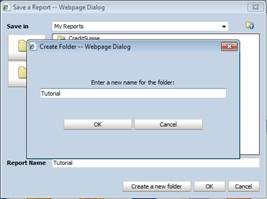
Enter e.g. “Tutorial” as the name for the subfolder:
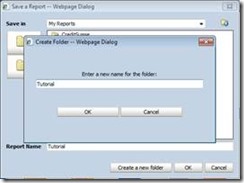
clip_image061

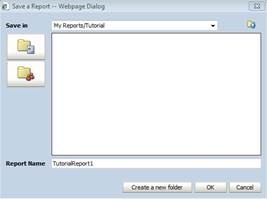
and finally give a name for your report and hit “Ok”:
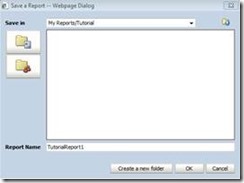
clip_image063

Let’s recap what we have done so far:

We created a new report by clicking on the corresponding icon. Then we defined where the data is located we want to use for reporting. At this point it is beneficial to make yourself familiar with the underlying data object(s) for your report. Therefor you can start the “Architect” from the Oracle BAM Start menu. For further details refer to your training material from the first BAM workshop.

For the data we want to show in the report, we’ve chosen to count the number of process instances, and group them by “Component_Instance_Status” – but why? Every instance we see in Oracle BAM can only have two conditions:

active: the process instances was started, but did not finish yet

completed: the process has finished

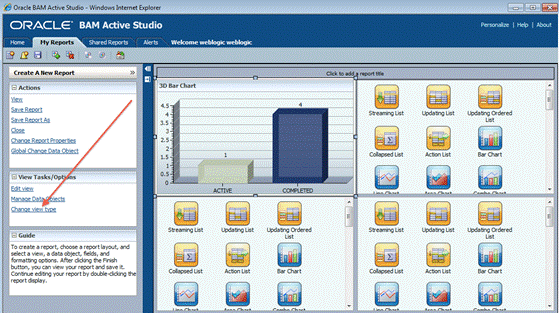
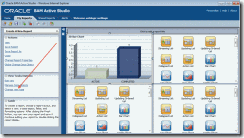
Now if we group the number of instances by status, BAM will count all instances with status “active”, and all instances with status “completed”. The result can be seen in our first view of our report:
clip_image065

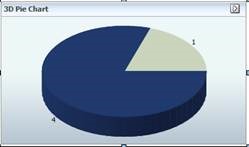
Next step is to change the view type: you will change the Bar Chart into a 3D Pie Chart. Therefor you will first click on “Change View Type” as illustrated in the screenshot above

And then choose the “3D Pie Chart” diagram:
clip_image067

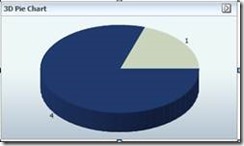
This will change the diagram into a 3D Pie Chart:
clip_image069

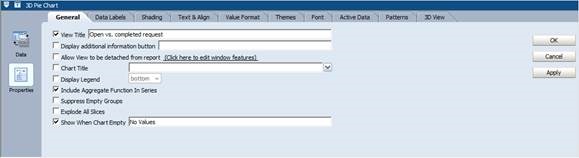
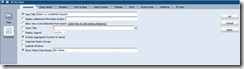
Double-click on the pie chart, and then choose “Properties” on the left hand side to change the title into “Open vs. completed request”:
clip_image071

Finally hit “OK” to apply your changes.

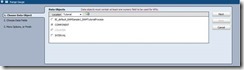
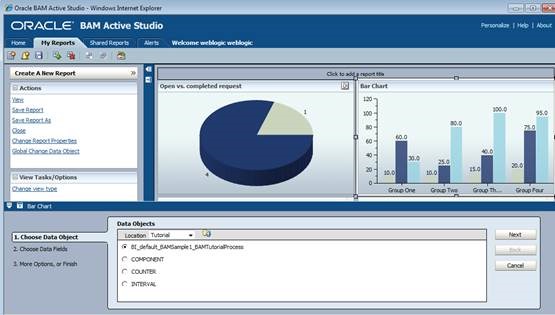
Now we will add another view. Therefor we will choose a “Bar Chart” in the upper right frame. The wizard will start, where you first define the underlying data object for the view, in our case “BI_default_BAMSample1_BAMTutorialProcess” (the actual name of the data object may vary, depending on the setup by your instructor):
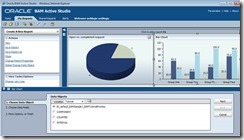
clip_image073

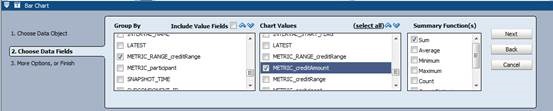
This time we will group our data by credit range, so we will display the sum of credit requests for each range:
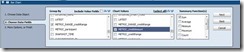
clip_image075

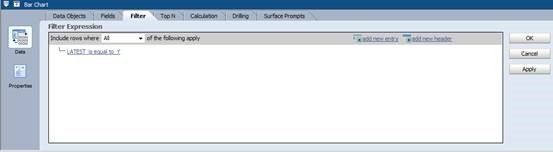
ATTENTION: at this point you have to add a filter – why? Because each time a process instance will send payload data to BAM, a new entry will be generated. So if a process contains more than one measurement marks or invocation of BAM, one process instances will have multiple entries in the data object with the same payload.

Now in order to make sure you won’t sum up the same amount multiple times for one process instance, we have to make sure we summarize over the latest entry for an instance, therefor checking the “LATEST” flag.

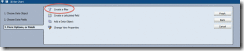
Click on “Create a filter”:
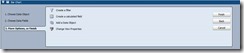
clip_image077

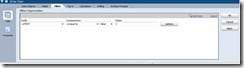
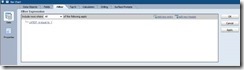
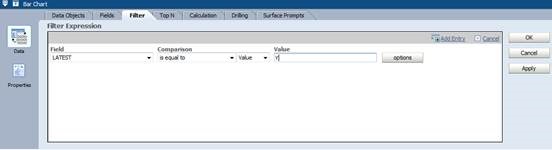
and then “Add Entry”. For the field, choose “LATEST”, set comparison to “is equal to” and enter “Y” as the value. When finished, hit “add entry” again:
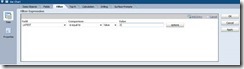
clip_image079

your resulting filter should look like this by now
clip_image081

Click ok to finish your 2nd view.

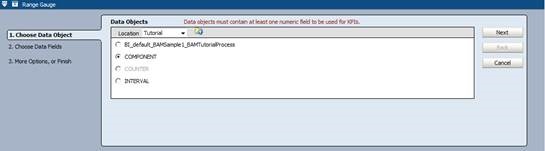
The third view (lower left corner) will be a range gauge. Select the range gauge icon:

clip_image083

set the data object to “COMPONENT”:

clip_image085

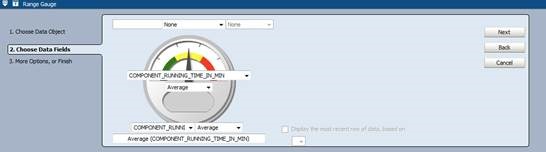
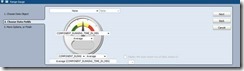
select “Component_Running_Time_In_Min” in the middle of the gauge and in the bottom, and select “Average”:
clip_image087

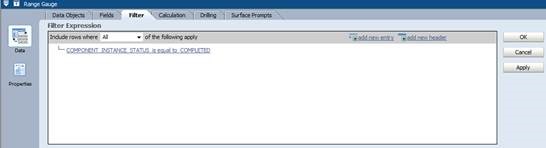
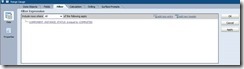
and filter for all instances, which are completed:
clip_image089

Click “Ok” to finish your settings.

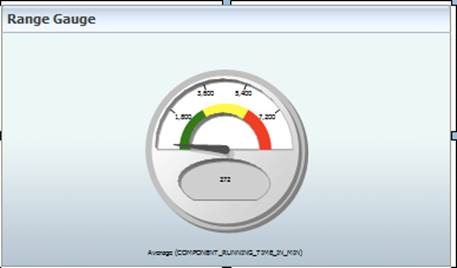
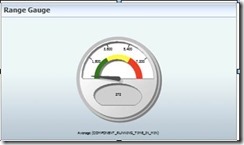
The resulting gauge may look like this (depending on the underlying data):
clip_image091

As you can see the scale doesn’t fit for our test data – the red area is around 7200 minutes, far too much for our purpose.

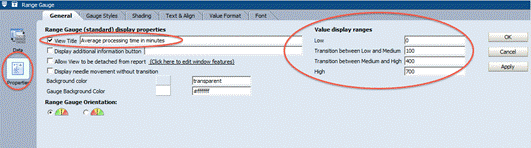
So we have to customize our green, yellow and read areas by customizing the low, medium and high ranges.

Double-click on the range gauge, select “Properties and set the values according to the screenshot below:
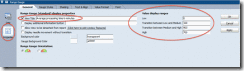
clip_image093

Depending on your test data, adapt values for the ranges accordingly, until you’re satisfied with the result.

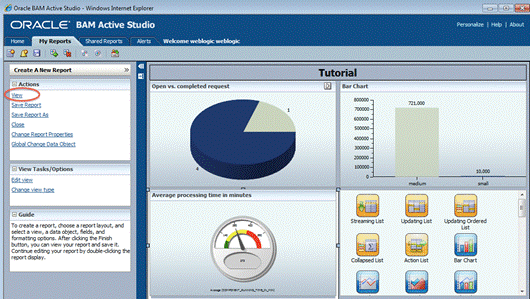
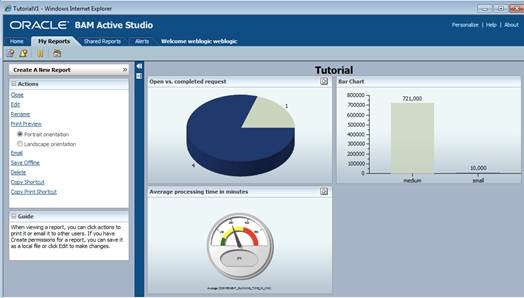
By now your report should look like the screenshot below. To exit the development mode and get a preview, click on “View”:
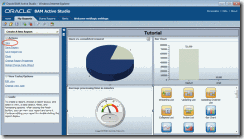
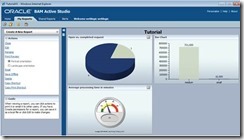
clip_image095

clip_image097

Optional Exercise – drill down

In order to do a drill down, we will first have to define a new report with exactly one view in it. Later this report will be exchange with the current view, from which you start your drill down.

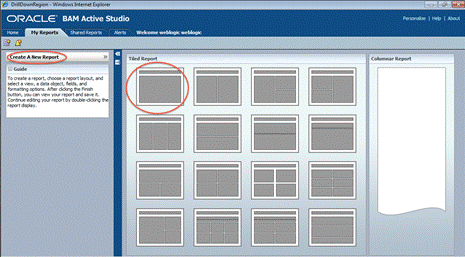
So let’s first start with creating a new report, selecting a template with one view:
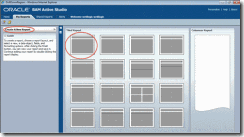
clip_image099

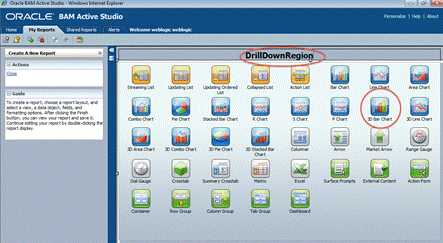
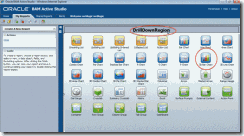
Change the name to “Drill Down”, and choose a “3D Bar Chart:
clip_image101

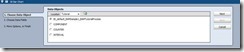
As data object, choose “BI_default_xx” (name depending on your data objects):
clip_image103

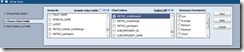
choose to group the sum of credit amounts by range:
clip_image105

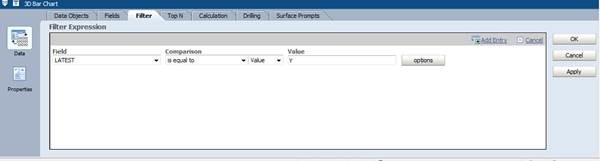
and create a filter:

clip_image107

to only select the latest entry:

clip_image109

We will start the drilldown from our previously created report, from the “active vs. completed requests” view in the upper left corner.

Depending from which part of the view (active or completed) the user will start the drill down, we will have to pass this information to the report being called.

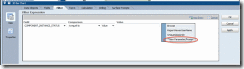
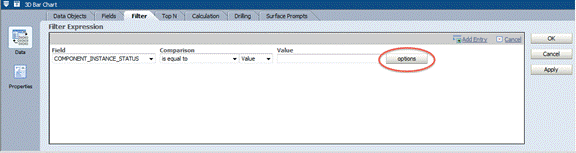
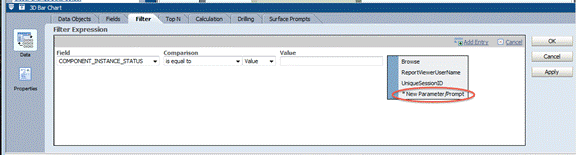
Therefor we will add another filter, the field we need here is “Component_Instances_Status”. To define the parameter, click on “Options”:
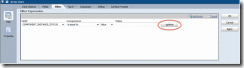
clip_image111

Choose “New Parameter Prompt”:

clip_image113

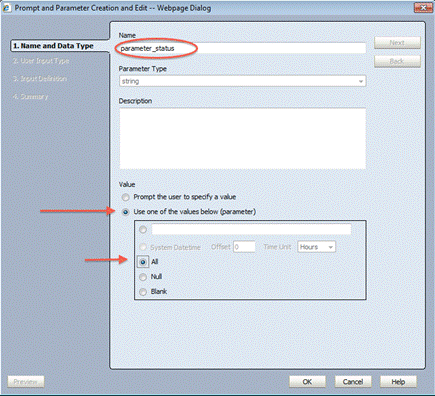
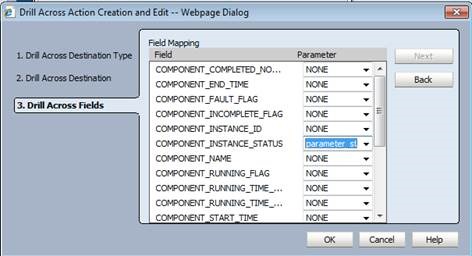
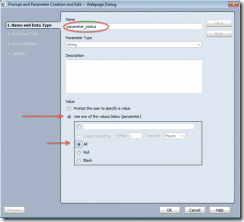
Give your parameter a meaningful name (e.g. “parameter_status”) , select “Use one of the values below (parameter) and then choose “All”:
clip_image115

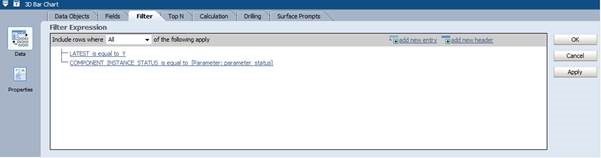
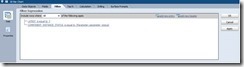
Now your filter should look like this:
clip_image117

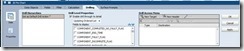
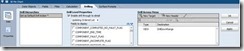
Now we can save the new report, and switch back to our first report. Edit the report, and double click the 3D Pie Chart in the upper left frame. Click on “Properties” and choose the tab “Drilling”.

To define your Drilling Target (the new report), click on “New Target”:
clip_image119

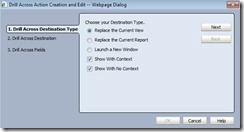
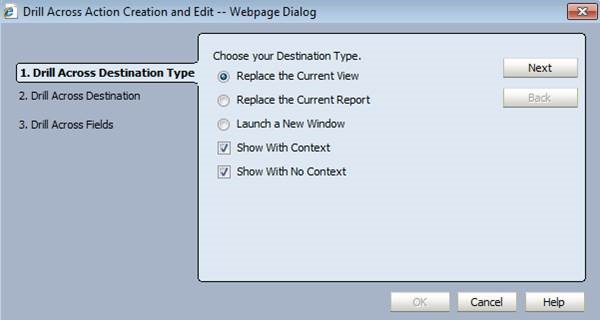
select “replace the current view”:

clip_image121

click on next

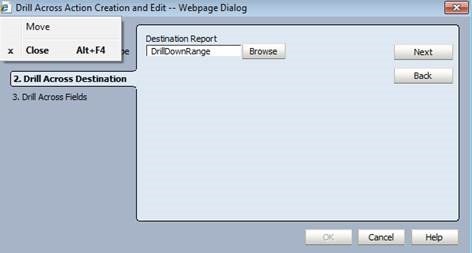
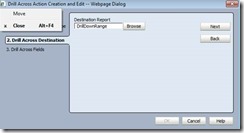
Clicke on “Browse” to select your new report”:
clip_image123

click next, and in the final page set the “Component_Instance_Status” to the newly created parameter (e.g. “parameter status”):
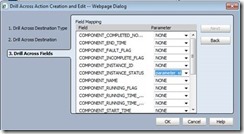
clip_image125

clip_image127

Stefan Wörmcke
Stefan Wörmcke is a Principal Sales Consultant at Oracle Switzerland focusing on SOA and BPM themes. Stefan started 15 years ago at Oracle Germany as a technical consultant for SQL and Java development, Oracle iStore (internet shop application), and application development using frameworks like Struts, Oracle ADF. As one of the first Middleware Sales Consultant for Oracle in Switzerland, he was covering the whole Oracle Middleware stack for some years, and is now focusing on BPM themes, helping customer enabling BPM initiatives throughout their organization. Architecture reviews, BPM best practices and hands-on workshops for customer and partner are just a few examples of Stefans’ activities to grow BPM adoption in Switzerland.

SOA & BPM Partner Community

For regular information on Oracle SOA Suite become a member in the SOA & BPM Partner Community for registration please visit www.oracle.com/goto/emea/soa (OPN account required) If you need support with your account please contact the Oracle Partner Business Center.

Blog Twitter LinkedIn image[7][2][2][2] Facebook clip_image002[8][4][2][2][2] Wiki

BPM Central at Oracle OpenWorld 2015

clip_image001Each year at OOW, we drive the best and most innovative sessions for our attendees. This year is no different. With over 30 speaking sessions reflecting strategy and perspectives from our executives, technology experts, customers, partners, user groups and industry thought leaders; 10 live product demos; and 7 hands-on-labs devoted to Oracle Business Process Management (BPM)  and our Cloud Content and Collaboration solutions, we are excited to showcase our product innovations, customer successes and vision at OOW 2015.
This Year’s Highlights:

· Over 30 sessions featuring customers and partners like Lincoln Financial Group, the Sherwin Williams Company, Nextel, South California Gas Company,  TekStream Solutions, Capgemini, Booz Allen Hamilton, Mythics and many more

· A Meet the Experts session on Tuesday, October 27 from 7:00 p.m. – 8:00 p.m. on “Oracle’s Digital Experience Strategy: Oracle BPM, and Oracle Cloud Services”

· 7 live product demo stations; 6 hands-on labs sessions, including Cloud labs  focusing on Documents Cloud, Process Cloud and soon to be launched Sites Cloud Service.

· Innovation Awards ceremony with winners and representation from Digital Experience, BPM, Documents Cloud Service and Process Cloud Service

Must Attend Sessions:

Don’t miss the Strategy and Vision sessions for the overall portfolio and each of the respective solution and cloud technologies. Invite your prospects and customers to attend these not-to-be-missed sessions that can help organizations plan their roadmaps. Attendees will also get an opportunity to hear from customer organizations on implementation successes.

Monday, October 26, 2015

Digital Experience and Collaboration Roadmap—Oracle WebCenter, BPM, and Cloud Services [CON9207]
11:00 am – 11:45 am | Moscone West—2024

Oracle Process Cloud Service and the Oracle BPM Suite—Vision, Strategy, and Roadmap [CON9181]
1:30 pm – 2:15 pm | Moscone West—2024

Tuesday, October 27, 2015

Oracle’s Digital Experience Strategy: Oracle WebCenter, Oracle BPM, and Oracle Cloud Services [MTE10051]
7:15 pm – 8:00 pm | Moscone South—301

There are PaaS General Sessions and many more sessions highlighting customer successes, product deep dives, partner discussions, persona and/or industry based discussions, Cloud/PaaS lessons, live product demonstrations and Hands-On-Labs (HOL) sessions so do bookmark the following links for a complete, up to date listing:

Focus on: Digital Experience, Content and Business Process Management

Focus on: Content and Collaboration in the Cloud

BPM Auxiliary Events at OOW:

In addition to regularly scheduled programs of sessions, hands-on labs and demos, we have planned additional events for our customers and partners to actively engage in product roadmap feedbacks and network with their peers. These auxiliary events include:

· Partner Advisory Council (PAC) – Friday 10/23 – 8:30am – 5:30pm (By Invitation Only |Event Contact)

· Customer Advisory Board (CAB) – Sunday 10/25 – 8:30am – 6:30pm (By Invitation Only |Event Contact)

· Customer Appreciation Reception – Monday 10/26 – 6:30pm – 8:30pm (Event Contact | Invite and RSVP | URL: http://tinyurl.com/wcappreception2015 | OOW Registration NOT Required)

· Innovation Awards Ceremony (CON10374) – Tuesday 10/27– 4:00pm – 5:30pm, YBCA Theater (Event Contact | OOW Registration Required)

· Oracle Appreciation Event at OOW 15 with Elton John, featuring Beck – Wednesday 10/28 – 6:30 pm – 12:00 am (Event Information)

Looking forward to a successful #OOW15!

SOA & BPM Partner Community

For regular information on Oracle SOA Suite become a member in the SOA & BPM Partner Community for registration please visit www.oracle.com/goto/emea/soa (OPN account required) If you need support with your account please contact the Oracle Partner Business Center.

Blog Twitter LinkedIn image[7][2][2][2] Facebook clip_image002[8][4][2][2][2] Wiki

Leveraging Agile and Scrum on SOA and BPM projects by Kris Nelson


Wclip_image002[5]ithin our implementation framework at AVIO, we use an Agile methodology called Scrum.  We have found this to be a great fit for Oracle Fusion Middleware projects in the SOA, BPM and WebCenter space — especially when projects seek to improve or bring innovative new approaches to an organization.

If you are new to Agile and Scrum, check out this great video which covers some of the key concepts: Agile methodologies like Scrum have several benefits over traditional waterfall methodologies, such as:

  • Seeking progress within each iteration (or sprint) to review the accuracy of requirements and adjust course
  • Implementing a simple structure and focus on the team’s effectiveness as primary goals
  • Encouraging breaking larger efforts into smaller, more manageable chunks
  • Emphasizing team collaboration — especially business and IT)

Read the complete article here.

SOA & BPM Partner Community

For regular information on Oracle SOA Suite become a member in the SOA & BPM Partner Community for registration please visit www.oracle.com/goto/emea/soa (OPN account required) If you need support with your account please contact the Oracle Partner Business Center.

Blog Twitter LinkedIn image[7][2][2][2] Facebook clip_image002[8][4][2][2][2] Wiki

Refining your BPM process by Red Mavericks


clip_image002Ah… The holiday season! Time to be with your family, eat like an elephant, getting stuck in endless traffic jams and moving in overcrowded shopping malls. No better time to write BPM articles, right? Actually, wrong! Curiously, a peak in activity actually absorbed me completely and we couldn’t do all the stuff that we wanted to. Anyway, we’re back.

Last time, we defined and modeled our first business process in BPMN. It modeled the “Request a parking space” process, with the behavior described in the textual process description. Now we’ll refine that process so that when we decide to implement it, we’ll take less time to do so.

Optimize before implementation VS implement before optimization

There’s an interesting debate as to whether or not should the first version of the BPM model be optimized before the implementation.

Some say “of course…why would you put a substandard process in production?”, while others argue “don’t worry and put the first version of the process in production ASAP, because the BPM lifecycle will guarantee an optimized version by itself in the second iteration, based on facts, not perceptions”.

Both approaches are valid and you can choose either one. Just don’t over do it if you go with the first one, or you’ll never get a version in production.

We typically choose the first approach, but we put a (half) day cap on the optimization work (one full day if the process is complex), to limit what we do. By the end of that (half) day the process goes on for implementation with whatever optimizations done in that time. This also help us focus and go for quick wins instead of nitpicking.
With our experience, we can look at a business process and quickly identify possible improvements. In time, you will too.

See any patterns?

If you look at the process version from the last article, you’ll see somethings that appear to be repeated. These are typically good candidates for optimization.
If you can factorize these into a reusable piece, you would only need to implement it once and then reuse it as many times as you want.
Check the notifications to the requester. Read the complete article here.

SOA & BPM Partner Community

For regular information on Oracle SOA Suite become a member in the SOA & BPM Partner Community for registration please visit www.oracle.com/goto/emea/soa (OPN account required) If you need support with your account please contact the Oracle Partner Business Center.

Blog Twitter LinkedIn image[7][2][2][2] Facebook clip_image002[8][4][2][2][2] Wiki

BPM Suite Marketing Update

clip_image002

Thanks to Mala Ramakrishnan for the detailed BPM Marketing update.

Featured

· BPM-CON an Online Conference: Intelligent Adaptive Processes for a New Digital Era

· Webcast: Intelligent BPM Systems with Oracle BPM 12c

· Event: Oracle at Gartner Business Process Management Summit 2014

· Resource Kit: Where do you learn more on Oracle BPM 12c?

Customer Success

· Engineers Australia Completes Enrollments up to 90% Faster with Middleware Platform

· Victoria State Revenue: Winner of the BPM Innovation Award

· Victoria State Revenue Has Direct Impact with Oracle BPM

· REDISA Orchestrates with Oracle Applications and Middleware

· KBACE Discusses Process Management with Oracle BPM

· Apex-Brasil Automates Project Workflow and Improves Monitoring of Foreign Trade Initiatives (Also in Portuguese)

· Panduit Delivers on the Digital Business Promise

· Total E&P Indonesie Cuts Time for Administrative Tasks by 90%

· eChartered Live for More Than 2000 Engineers

Content & Collateral

· Datasheet: Oracle BPM Suite 12c

· White Paper: Deliver on Intelligent Business Process Management

· White Paper: What’s New in Oracle BPM 12c

· Podcast Series: The Case for Adaptive Case Management

· eBook: Bridging the Gap Between Vision and Execution with BPM

· Launch Webcast: Introducing Oracle BPM12c

· Analyst Report: MWD Advisors Oracle BPM Technology Review

· Assessment: Discover if your company is lagging or leading due to BPM readiness

· Sessions from OOW14: Focus On BPM12c

On Demand Assets

Blog Series

· Oracle BPM’s Role in Delivering on the Digital Enterprise
· Straight from Engineering: Dive into Oracle BPM 12c
· Oracle’s View of Intelligent Business Process Management
· Bridging the Gap between Vision and Execution with Oracle BPM
· And more: blogs.oracle.com/bpm

Resource Kits

· Oracle BPM 12c

· Oracle BPM in the Public Sector

· Oracle BPM in Financial Services

· Kickstart your IT Service Center to Maximize Productivity

SOA & BPM Partner Community

For regular information on Oracle SOA Suite become a member in the SOA & BPM Partner Community for registration please visit www.oracle.com/goto/emea/soa (OPN account required) If you need support with your account please contact the Oracle Partner Business Center.

Blog Twitter LinkedIn image[7][2][2][2] Facebook clip_image002[8][4][2][2][2] Wiki

Intelligent BPM Systems with Oracle BPM Suite 12c – Available On Demand


clip_image002Intelligent BPM systems automate both structured and unstructured business processes and improves business operations. It is a unified and comprehensive solution for modeling, analyzing, executing, and optimizing business processes across divisions, systems, and applications. Oracle BPM Suite 12c helps create intelligent business processes. Watch the on-demand webcast here!

SOA & BPM Partner Community

For regular information on Oracle SOA Suite become a member in the SOA & BPM Partner Community for registration please visit www.oracle.com/goto/emea/soa (OPN account required) If you need support with your account please contact the Oracle Partner Business Center.

Blog Twitter LinkedIn image[7][2][2][2] Facebook clip_image002[8][4][2][2][2] Wiki

Adaptive Case Management Awards 2015 by WfMC

clip_image002We’re proud to announce the opening of the Adaptive Case Management Global Excellence Awards 2015!
The ACM Awards are the ideal way to be recognized by the industry, to publicly acknowledge and recognize the efforts of your team and to inject passion in to your case management excellence.

Adaptive Case Management (ACM) and Production Case Management (PCM) are new technological approaches to supporting knowledge workers in today’s leading edge organizations. The practice of ACM is rapidly growing. To help people learn and adopt this approach, the Workflow Management Coalition has instituted the ACM Global Excellence Awards to gather and recognize some of the best examples. Do you have an interesting Use Case? Start by simply submitting an abstract for the opportunity to win an award and publication in a new book on ACM to be published in the Fall. Previous years’ winners have been published in there two books: Taming the Unpredictable and How Knowledge Workers Get Things Done.

Abstracts are due on Feb 18, and completed submission is due in April. You still have time to get global recognition for the work you have been doing. Finalists and winners are selected by a panel of 16 volunteer judges drawn from experts in this field, headed by an Advisory Panel comprising Tom Koulopoulos, Delphi Group, Hugh McKellar, KMWorld and Connie Moore, Forrester Research. Visit www.AdaptiveCaseManagement.org to find out more.

SOA & BPM Partner Community

For regular information on Oracle SOA Suite become a member in the SOA & BPM Partner Community for registration please visit www.oracle.com/goto/emea/soa (OPN account required) If you need support with your account please contact the Oracle Partner Business Center.

Blog Twitter LinkedIn image[7][2][2][2] Facebook clip_image002[8][4][2][2][2] Wiki

Oracle Fusion Middleware @inspire|IT – May 11th & 12th Frankfurt Germany


image inspire|IT a Best Practices Conference will take place on May 11 & May 12 at the Radisson Blue at Frankfurt.

Besides the topics “Software Development”, “BI/ Analytics”, “Infrastructure & Services” and an Oracle BIG Data|Update, “BPM & Systemintegration“ will be a main theme at the conference. The topic will be discussed on May 11. Leading figures will explain their User Experience and Solutions. Don´t miss the opportunity and join sessions of e.g. W.L. Gore, Wincor Nixdorf and many more.

Celebrate with us the 25th anniversary of OPITZ Consulting during an exclusive evening event.

For more details, please visit www.inspireitcon.de. Save the date and register now for free! You are interested in the other topics as well? No problem! Join the other sessions and be up to date.

SOA & BPM Partner Community

For regular information on Oracle SOA Suite become a member in the SOA & BPM Partner Community for registration please visit www.oracle.com/goto/emea/soa (OPN account required) If you need support with your account please contact the Oracle Partner Business Center.

Blog Twitter LinkedIn image[7][2][2][2] Facebook clip_image002[8][4][2][2][2] Wiki

Thriving On Adaptability (Digital Edition) 80% Discount

image

Best Practices for Knowledge Workers

  • Digital Edition: Retail $34.95: Download the complete digital edition ( PDF) book immediately; enjoy live URLs, searchable text, graphics and charts in color. No shipping charges

Download ALL our Digital Editions at HUGE 80% discount.
Be quick, 80% discount ends on Friday March 27, no extensions

This is a once-in-a-blue moon chance to download unlimited books on Business Process Management, Process Modelling, BPMN and Adaptive Case Management.

Please join us in celebrating our new shopping cart and website at http://bpm-books.com/

  • Stunning 80% discount on ALL our Digital Edition books.
  • Download as many as you want, no limit.
  • Discount applies to already-reduced prices.
  • Complete books
  • Includes our newest titles released this year.

Digital BENEFITS:

  • Enjoy immediate download, live URLs, searchable text, graphics and charts in color.
  • No shipping charges.
  • Delivered in PDF format
  • Mobile device-friendly.

Click on the tab: Download Digital Books    

Use discount code: DIGITAL

For additional books please visit our BPM Books wiki here.

SOA & BPM Partner Community

For regular information on Oracle SOA Suite become a member in the SOA & BPM Partner Community for registration please visit www.oracle.com/goto/emea/soa (OPN account required) If you need support with your account please contact the Oracle Partner Business Center.

Blog Twitter LinkedIn image[7][2][2][2] Facebook clip_image002[8][4][2][2][2] Wiki