BPM 12c Events (Part 2 of 3): End Events by Antonis Antoniou


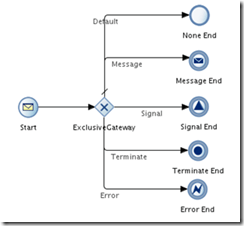
clip_image002End events define how a process should finish and just like with start events, processes can have more than one end event.

As you can see from the sample process below, we are provided with a plethora of end events that include a “None End” event, a “Message Send” event, a “Signal” event and a “Terminate End” and “Error End” event.

The “None End” event is the default end event in a manual and reusable process and as it’s name implies, it is used when your process doesn’t need to perform any action upon completion. When all process instance tokens reach the “None End” event, the instance is completed.

The "Message End" event, as the name implies, will send a message before an instance completion and is especially useful when you want to trigger another process or instance. The "Message End" event has one unique particularity, it can only be used with either a message start event or a message catch event.

The "Signal Event" will publish a signal before completion.

The "Terminate End" is used to terminate, immediately, without any error handling, a process.

The "Error End" will throw an error before completion. This type of end event is used most commonly in subprocesses to trigger an exception to a main process.

Let’s see how you can use these end events in practice.
Create the basic BPM application and BPM project (named both application and project "EndEventsDemo") and select "Composite with BPMN Process" in step 3. Read the complete article here.

SOA & BPM Partner Community

For regular information on Oracle SOA Suite become a member in the SOA & BPM Partner Community for registration please visit www.oracle.com/goto/emea/soa (OPN account required) If you need support with your account please contact the Oracle Partner Business Center.

Blog Twitter LinkedIn image[7][2][2][2] Facebook clip_image002[8][4][2][2][2] Wiki

Business Rules in BPM Suite 12c by Waslley Souza

clip_image001If you use the Business Rules feature in Oracle BPM Suite 12c, the business rules you created can be modified at runtime using the BPM Composer. This way you do not need to spend time changing and re-deploying your application. This feature works the same way in BPM Suite and SOA Suite.

As a starting point, I will use the BPM application created here: Creating a simple BPM Manual Process. Download the sample application: BpmBusinessRulesApp.zip.

In the WebLogic Console, create the president user.

In the JDeveloper, open the AddEmployee process.
Right-click HrOfficer swimlane, choose Add Role and add the President role.

Change the Canonical Model, adding JobName and Salary elements. Read the complete article here.

SOA & BPM Partner Community

For regular information on Oracle SOA Suite become a member in the SOA & BPM Partner Community for registration please visit www.oracle.com/goto/emea/soa (OPN account required) If you need support with your account please contact the Oracle Partner Business Center.

Blog Twitter LinkedIn image[7][2][2][2] Facebook clip_image002[8][4][2][2][2] Wiki

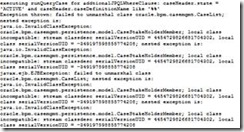
How to fix java.io.InvalidClassException error when accessing Oracle ACM Case API via Jdeveloper by Vikram Bailur


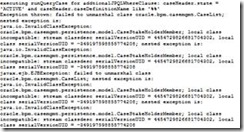
clip_image002Here is a quick and useful tip. This was an error I got when I was running a custom java client to query the Oracle Adaptive Case Management API.

From a sort-of related metalink on Oracle which says :

Although the problem couldn’t be recreated by the development team on demand, from the exception is clear that the root cause of the problem is the differnce of the version of the org.eclipse.persistence jar distributed with Oracle JDeveloper and Oracle WLS.

I figured this was something to do with the version of eclipselink libraries currently running on the soa server were different from Jdeveloper install.

In my JDeveloper project, I had some libraries and classpath pointing to my JDeveloper install and some others pointing to my SOA middleware home install for example. Read the complete article here.

SOA & BPM Partner Community

For regular information on Oracle SOA Suite become a member in the SOA & BPM Partner Community for registration please visit www.oracle.com/goto/emea/soa (OPN account required) If you need support with your account please contact the Oracle Partner Business Center.

Blog Twitter LinkedIn image[7][2][2][2] Facebook clip_image002[8][4][2][2][2] Wiki

Video on Team Collaboration Using Oracle BPM 12c PAM by Jaideep


clip_image002

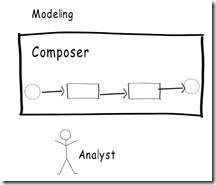
When teams work on an Oracle BPM project, they can use the Process Asset Manager (PAM) to collaborate on the project. Oracle BPM 12c PAM helps Process developers using BPM Studio (JDeveloper) to collaborate with analysts using the Oracle BPM Composer. Team members can ‘publish’ or ‘commit’ BPM artifacts into PAM and ‘check-out’ or ‘update’ BPM artifacts from PAM. The Oracle BPM 12c PAM also supports versioning functionality. It’s basically a subversion repository that is built into the product. It also includes support for Security and Access Control, Conflict Resolution, Diff and Merge, Reporting of business assets in the catalog and their history, and the ability to create project snapsots, so that you can revert back to a stable version of the project. Watch the video here.

SOA & BPM Partner Community

For regular information on Oracle SOA Suite become a member in the SOA & BPM Partner Community for registration please visit www.oracle.com/goto/emea/soa (OPN account required) If you need support with your account please contact the Oracle Partner Business Center.

Blog Twitter LinkedIn image[7][2][2][2] Facebook clip_image002[8][4][2][2][2] Wiki

Video on Business Architecture in BPM 12c by Jaideep

clip_image002

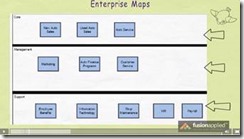
BPM 12c has introduced the capability to create business architecture projects in BPM Composer. Business architecture models help you to take a top-down approach to discover, refine and create a more formal link between the organization’s business goals and BPM projects.

Oracle BPM Composer 12c has introduced the capability to create the following types of business architecture models

  • Enterprise Maps
  • Value Chain Models
  • Strategy Models

This is an introductory video on business architecture in Oracle BPM 12c. It’s an excerpt from one of our self paced Oracle BPM Training courses. Watch the video here.

SOA & BPM Partner Community

For regular information on Oracle SOA Suite become a member in the SOA & BPM Partner Community for registration please visit www.oracle.com/goto/emea/soa (OPN account required) If you need support with your account please contact the Oracle Partner Business Center.

Blog Twitter LinkedIn image[7][2][2][2] Facebook clip_image002[8][4][2][2][2] Wiki

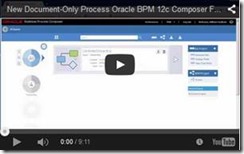
BPM Composer 12c New "Document-Only" Feature by Dan Atwood


clip_image002BPM 12c Business Process Composer has many new features, but one that is commonly overlooked is its "Document-Only" feature.

This makes it easy to create processes that are not validated or deployed when the other processes in the project are deployed.  This is useful when modeling the way things are currently working, and is commonly known as modeling the As-Is process.  An As-Is process’s purpose is to reach a common understanding of how things are working today and to determine through a consensus how the process should be improved.

With this goal in mind, always guard against spending an exorbitant amount of time modeling As-Is processes.  They should be left in a rough state, without any services, human tasks or user interfaces fully defined.  Because As-Is processes document problems in a business where work is lost, the process needs to be modelled with its sequence flows missing.  With this feature, you can leave your As-Is process intact in its inconsistent state and in the same project as your To-Be (or Should-Be) process models without impacting the project’s ability to be deployed.

This video demonstrates this feature as well as a best practice to help ensure that developers using Oracle BPM Studio understand that As-Is process models exist in a project. Watch the video here.

SOA & BPM Partner Community

For regular information on Oracle SOA Suite become a member in the SOA & BPM Partner Community for registration please visit www.oracle.com/goto/emea/soa (OPN account required) If you need support with your account please contact the Oracle Partner Business Center.

Blog Twitter LinkedIn image[7][2][2][2] Facebook clip_image002[8][4][2][2][2] Wiki

How to fix java.io.InvalidClassException error when accessing Oracle ACM Case API via Jdeveloper by Vikram Bailur


clip_image002Here is a quick and useful tip. This was an error I got when I was running a custom java client to query the Oracle Adaptive Case Management API.

From a sort-of related metalink on Oracle which says :

Although the problem couldn’t be recreated by the development team on demand, from the exception is clear that the root cause of the problem is the differnce of the version of the org.eclipse.persistence jar distributed with Oracle JDeveloper and Oracle WLS.

I figured this was something to do with the version of eclipselink libraries currently running on the soa server were different from Jdeveloper install.

In my JDeveloper project, I had some libraries and classpath pointing to my JDeveloper install and some others pointing to my SOA middleware home install for example. Read the complete article here.

SOA & BPM Partner Community

For regular information on Oracle SOA Suite become a member in the SOA & BPM Partner Community for registration please visit www.oracle.com/goto/emea/soa (OPN account required) If you need support with your account please contact the Oracle Partner Business Center.

Blog Twitter LinkedIn image[7][2][2][2] Facebook clip_image002[8][4][2][2][2] Wiki

Video on Team Collaboration Using Oracle BPM 12c PAM by Jaideep

clip_image002When teams work on an Oracle BPM project, they can use the Process Asset Manager (PAM) to collaborate on the project. Oracle BPM 12c PAM helps Process developers using BPM Studio (JDeveloper) to collaborate with analysts using the Oracle BPM Composer. Team members can ‘publish’ or ‘commit’ BPM artifacts into PAM and ‘check-out’ or ‘update’ BPM artifacts from PAM. The Oracle BPM 12c PAM also supports versioning functionality. It’s basically a subversion repository that is built into the product. It also includes support for Security and Access Control, Conflict Resolution, Diff and Merge, Reporting of business assets in the catalog and their history, and the ability to create project snapsots, so that you can revert back to a stable version of the project. Watch the video here.

SOA & BPM Partner Community

For regular information on Oracle SOA Suite become a member in the SOA & BPM Partner Community for registration please visit www.oracle.com/goto/emea/soa (OPN account required) If you need support with your account please contact the Oracle Partner Business Center.

Blog Twitter LinkedIn image[7][2][2][2] Facebook clip_image002[8][4][2][2][2] Wiki

Creating a simple BPM Manual Process by Waslley Souza

clip_image001

A Manual Process in Oracle BPM Suite 12c is a process that the user starts through a Human Task.
In this post we will create a BPM Process to add employees through a Human Task and generate a XML file through File Adapter.
Download the sample application: BpmHelloWorldApp.zip.

Create a new BPM Application, name it as BpmHelloWorldApp and click Finish.
Right-click the project name and choose New > BPMN 2.0 Process.
In the BPMN 2.0 Process Wizard, choose Manual Process, name it as AddEmployee and click Finish.

Our BPM application was created.
Before we start to model our process, we need to create a new user.
Start the WebLogic Server, go to Console and create the hrofficer user.

Read the complete article here.

SOA & BPM Partner Community

For regular information on Oracle SOA Suite become a member in the SOA & BPM Partner Community for registration please visit www.oracle.com/goto/emea/soa (OPN account required) If you need support with your account please contact the Oracle Partner Business Center.

Blog Twitter LinkedIn image[7][2][2][2] Facebook clip_image002[8][4][2][2][2] Wiki

Video on Business Architecture in BPM 12c by Jaideep

clip_image002

BPM 12c has introduced the capability to create business architecture projects in BPM Composer. Business architecture models help you to take a top-down approach to discover, refine and create a more formal link between the organization’s business goals and BPM projects.

Oracle BPM Composer 12c has introduced the capability to create the following types of business architecture models

  • Enterprise Maps
  • Value Chain Models
  • Strategy Models

This is an introductory video on business architecture in Oracle BPM 12c. It’s an excerpt from one of our self paced Oracle BPM Training courses. Watch the video here.

SOA & BPM Partner Community

For regular information on Oracle SOA Suite become a member in the SOA & BPM Partner Community for registration please visit www.oracle.com/goto/emea/soa (OPN account required) If you need support with your account please contact the Oracle Partner Business Center.

Blog Twitter LinkedIn image[7][2][2][2] Facebook clip_image002[8][4][2][2][2] Wiki