Blurr the cloud lining with NetSuite: Introducing NetSuite Cloud Adapter on Oracle Integration Cloud Service by Rajesh Kalra


clip_image001NetSuite is a leading SaaS business software suite for ERP/financials, eCommerce, and order management. NetSuite cloud applications are commonly used by many mid-market and enterprise level companies, to streamline operations and provide real time visibility for better and faster decisions.

Oracle has introduced an all new NetSuite cloud adapter, in the latest release of its iPaaS –Integration Cloud Service (ICS). This new addition to the catalog of cloud adapters provides agility for NetSuite integrations, and enables organizations to access NetSuite content across business flows quickly and seamlessly.

The NetSuite cloud adapter provides rich and intuitive design time capabilities viz. functional categories of objects to select the business object(s) for integration, besides delivering the elevated user experience common to all cloud adapters.

Now Sales teams at any company can leverage the ICS iPaaS solution to build a lead-to-cash process from any SaaS based CRM (Oracle Sales Cloud or Salesforce.com) to NetSuite, creating quotes/orders in real time, thus eliminating manual order entry. They can access latest financial information, order status, or product availability via the NetSuite cloud adapter, and slash financial close. Read the complete article here.

SOA & BPM Partner Community

For regular information on Oracle SOA Suite become a member in the SOA & BPM Partner Community for registration please visit www.oracle.com/goto/emea/soa (OPN account required) If you need support with your account please contact the Oracle Partner Business Center.

Blog Twitter LinkedIn image[7][2][2][2] Facebook clip_image002[8][4][2][2][2] Wiki

Digital Innovation Demands Hybrid Integration by Carol Hildebrand


clip_image002I thought cloud computing would do away with acronym-laden technologies such as service-oriented architecture (SOA). Can’t you just sign up for applications run in a public cloud?

You can, but what happens when you want to integrate that shiny new cloud app with your existing applications and data? That integration has its own term—hybrid cloud—and for most enterprises, it’s the new norm. More than 65% of enterprise IT organizations will commit to hybrid cloud technologies before 2016, according to International Data Corporation.

Meanwhile, everyone from marketing to HR to product development is screaming for better information flow between departments, and they don’t care where the apps reside. That also requires smooth integration of cloud and legacy applications and data, which, as you will see, leads us back to SOA. Read the complete article here.

SOA & BPM Partner Community

For regular information on Oracle SOA Suite become a member in the SOA & BPM Partner Community for registration please visit www.oracle.com/goto/emea/soa (OPN account required) If you need support with your account please contact the Oracle Partner Business Center.

Blog Twitter LinkedIn image[7][2][2][2] Facebook clip_image002[8][4][2][2][2] Wiki

In drei Schritten zur Onlinehypothek – Hypothekar-Antrags-Prozess auf der Cloud Prozessplattform von Oracle (Oracle PCS) by Richard Schaller

imageIn drei Schritten erstellen wir einen einfachen Hypothekar-Antrags-Prozess auf der Cloud Prozessplattform von Oracle (Oracle PCS). Der Prozess kann direkt nach Erstellung auf dem Handy, Tablet oder Laptop genutzt werden.

Im letzten Teil der Blog-Serie wie die Prozessautomatisierung den Digitalisierungs-Initiativen zum Erfolg verhilft, setzen wir beispielhaft einen einfachen Hypothekar-Antrags-Prozess in drei Schritten um. Wir verwenden dazu die Cloud-Prozessplattform von Oracle.

Schritt 1: Formular erstellen

Das zentrale Element ist ein Formular, das die geschäftlichen Daten beinhaltet. Der Workflow (Prozess) verwendet das Formular vom Anfang bis zum Ende. Der Nutzer startet den Prozess indem er das Formular ausfüllt, Dokumente hinzufügt und versendet. Im Verlauf des Workflows wird das Formular vom Kunden und von Sachbearbeitern fortlaufend ergänzt. Der Arbeitsfluss wird von der Cloud-Plattform gesteuert.

Die Erstellung von Formularen ist intuitiv. Die einzelnen Elemente können bequem mittels «Drag und Drop» angeordnet werden. Die nachfolgende Abbildung zeigt die verfügbaren Formular-Elemente der Oracle Process Cloud (PCS).

Die Formular-Elemente werden ohne Programmierung individuell angepasst. Im Vordergrund steht die Konfiguration von Name, Tipp und Eingabeformat (Text, Datum, E-Mail, Zahl, Auswahl, etc.). Dank der Unterstützung für Mehrsprachigkeit wird das Formular dem Benutzer in seiner Sprache dargestellt. Die nachfolgende Abbildung zeigt ein mögliches Formular.

Schritt 2: Hypothekar-Antrags-Prozess konfigurieren

Der Prozess ist ein sogenannter Antragsprozess. Wir wählen deshalb die dafür vorbereitete Vorlage aus. Oracle PCS stellt eine Reihe von Prozess-/Workflow-Vorlagen zur Verfügung.

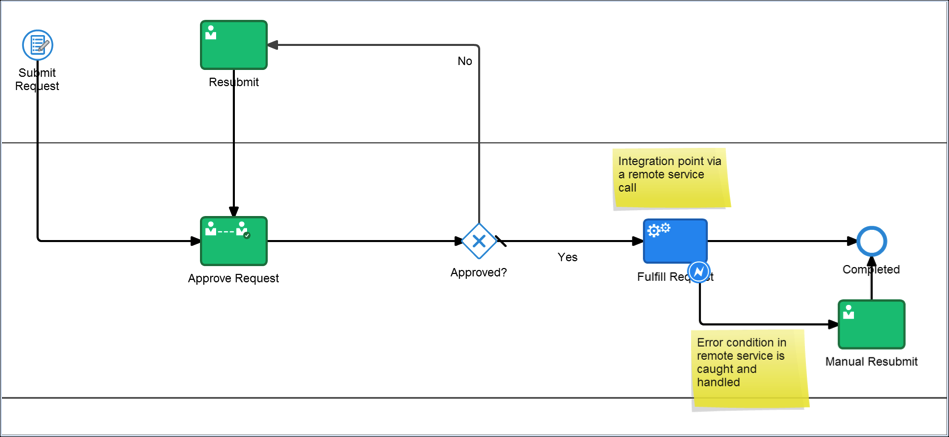
Oracle PCS erstellt einen einfachen Antragsprozess. Dieser sieht zu Beginn wie folgt aus:

Nun geht es darum, den einfachen Prozess an die eigenen Bedürfnisse anzupassen. In unserem Fall sind folgende Anpassungen erforderlich:

  • Das Formular aus Schritt 1 den einzelnen Prozessschritten (grüne Boxen) zuweisen
  • Dem Antragsprozess konkrete Benutzergruppen (Antragsteller, Sachbearbeiter, Manager) zuweisen.
  • Read the complete Article here.

SOA & BPM Partner Community

For regular information on Oracle SOA Suite become a member in the SOA & BPM Partner Community for registration please visit www.oracle.com/goto/emea/soa (OPN account required) If you need support with your account please contact the Oracle Partner Business Center.

Blog Twitter LinkedIn image[7][2][2][2] Facebook clip_image002[8][4][2][2][2] Wiki

Process Cloud Services 16.2.1 available


clip_image002ANNOUNCING…Oracle Process Cloud Service

16.2.1 Release

We are pleased to announce the availability of the 16.2.1 release of Process Cloud Service (PCS)

What’s New!

  • Document Workflow Process Apps
  • Business Indicators and Analytics Dashboard
  • REST Service Connectors
  • New Process Composer
  • New Data Association and Transformation Editor
  • Federated SSO
  • OAuth Authentication for REST API

Document Workflow Process Apps

Oracle Process Cloud Service introduces a new Document Start activity to create Document Workflow Process Applications specifically designed to process documents and document folders from Documents Cloud Service. Documents and folders used to initiate a Document Workflow Process Application are automatically associated to the process, providing participants easy access to the content within the context of their assigned tasks. The introduction of first class Document Workflow capabilities makes it easy to create processes to manage document review and approval, transactional document management and light weight case management use cases. 

Business Indicators and Analytics Dashboard

Business indicators enable you to capture and display business metrics specific to your applications. Use the Business Analytics Dashboard to plot and view charts, graphs and reports for business metrics captured as business indicators. Create charts that display business indicator values. In Composer, developers create business indicators for data objects whose metrics they want to capture and display as X axis, Y axis, and filter values. In Workspace, you select business or system indicators to plot them in charts, graphs and reports.

REST Service Connectors

Use the new REST Service Connector to invoke RESTful services directly from within a process flow. The Service Activity has been enhanced to support both SOAP and REST Service Connectors, providing a familiar approach to interacting with external data sources and systems. Using the REST Service Connector you can easily define the resources, operations and payloads needed to connect to a REST service, regardless of the description language used to define the service.

New Process Composer

The new Process Composer has a more flexible and intuitive user Interface that can now be accessed through mobile tablets. The BPMN palette is easier to navigate. The process Activities are easier to access. And improved process flow layout makes it easier to create professional and organized looking process maps. Select an Activity to choose from a contextual set of actions and properties to configure the Activity behavior. Changing process sequence is more intuitive and provides contextual instructions on sequence flow alternatives.

New Data Association and Transformation Editor

The new Data Association editor greatly simplifies the task of mapping data between process Data Objects and Activities. Separate Input and Output associations allow for a more natural experience that makes it easy to map and review associations. Simply drag-and-drop Data Objects and Activity Payloads or use the intelligent auto-complete data entry. Even create new Data Objects right in the editor. Define reusable Transformations to associate different data types or reduce complex mappings. Define them once and apply wherever they’re needed in the application.

Federated SSO

Oracle Process Cloud Service now supports federated single sign-on (SSO) and authentication. Users who enter their valid credentials are authenticated through the their identity provider such as Oracle Identity Federation (OIF) or Active Directory Federation Services (ADFS) using the Security Assertion Markup Language (SAML) protocol, and redirected to the Oracle Process Cloud Service Workspace or Composer home page.

OAuth Authentication for REST API

Oracle Process Cloud Service now accepts OAuth tokens as an alternative to basic authentication for our REST APIs

Want to try Process Cloud Service? Please visit our Community wiki PaaS Demo Accounts (Community membership required). For more information please visit the PCS tag here. (Community membership required)

SOA & BPM Partner Community

For regular information on Oracle SOA Suite become a member in the SOA & BPM Partner Community for registration please visit www.oracle.com/goto/emea/soa (OPN account required) If you need support with your account please contact the Oracle Partner Business Center.

Blog Twitter LinkedIn image[7][2][2][2] Facebook clip_image002[8][4][2][2][2] Wiki

PaaS free trial accounts ICS and PCS and PaaS for SaaS


clip_image002As part of our communities we do offer free PaaS accounts (only for partners in Europe, Middle East and Africa. In case you are not part of EMEA please contact your local partner manager):

· Integration Cloud Service & Process Cloud Service & SOA Cloud & PaaS for SaaS Service PaaS Demo Accounts  (Community membership required)

· Java Cloud Service & Application Cloud Container Service & Mobile Cloud Service PaaS Demo Accounts (Community membership required)

Watch the GSE Overview Video! Get an overview of what GSE is and how you can use GSE to help you sell. You can also get long running dedicated PaaS instances, therefore please send us details about your use cases. For instant access please request a sandbox demo

SOA & BPM Partner Community

For regular information on Oracle SOA Suite become a member in the SOA & BPM Partner Community for registration please visit www.oracle.com/goto/emea/soa (OPN account required) If you need support with your account please contact the Oracle Partner Business Center.

Blog Twitter LinkedIn image[7][2][2][2] Facebook clip_image002[8][4][2][2][2] Wiki

PaaS & Middleware Partner Update 15 May 2016

The May edition of the Middleware Partner Update contains three key topics:
• Fusion Middleware & PaaS Summer Camps
• Call for Papers Oracle OpenWorld & Java One
• SOA & BPM Partner Community Webcast May 31st

Watch the YouTube video here

For regular updates please subscribe to our YouTube channel here. For the latest SOA & BPM Partner Community information please visit our Community update wiki here (Community membership required)

SOA & BPM Partner Community

For regular information on Oracle SOA Suite become a member in the SOA & BPM Partner Community for registration please visit www.oracle.com/goto/emea/soa (OPN account required) If you need support with your account please contact the Oracle Partner Business Center.

Blog Twitter LinkedIn image[7][2][2][2] Facebook clip_image002[8][4][2][2][2] Wiki

Process Analytics with Oracle BPM Suite 12c and BAM – slides from OGh session for SIG SOA & BPM by Lucas Jellema


clip_image002Business Processes implemented in BPEL and BPM(N) and running on Oracle BPM Suite 12c or SOA Suite 12c have to fulfill a business purpose and as such must meet business requirements – both functionally and non-functionally. SLAs for throughput, response time, quality are usually associated with these processes and we typically also would like insight in the number of process executions (per group) and the paths taken through our processes.

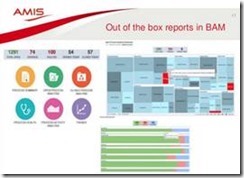
This presentation introduces process analytics in both BPEL and BPM processes in Oracle SOA Suite and BPM Suite 12c. It explains how to configure out of the box generic analytics and process specific business indicators. The presentation than introduces BAM 12c. It demonstrates the out of the box process analytics reports and dashboards. Then it explains how to create custom reports on the unified process analytics star schema or on custom tables. Finally the presentation goes into real-time monitoring in BAM using JMS and enterprise message resources in combination with the event processing templates in BAM. Read the complete article here.

SOA & BPM Partner Community

For regular information on Oracle SOA Suite become a member in the SOA & BPM Partner Community for registration please visit www.oracle.com/goto/emea/soa (OPN account required) If you need support with your account please contact the Oracle Partner Business Center.

Blog Twitter LinkedIn image[7][2][2][2] Facebook clip_image002[8][4][2][2][2] Wiki

Comparing a brand new Oracle Process Cloud Service (PCS) with traditional on-premise Oracle BPM Suite by Lukasz Romaszewski


clip_image002As you may have heard, Oracle is quickly extending its middleware stack to the public cloud platform, by implementing there, one by one, every possible piece of technology from its portfolio. One of the most successful and powerful component of the traditional Fusion Middleware stack is Oracle BPM, which has been widely adopted in many organizations and companies to drive down the costs and increase agility and business control over all of the business processes in place. No surprise that BPM is one of the first technology to become available in the cloud, in the form of Process Cloud Services. In this blog post I would like to take you in the quick tour over PCS, how it looks like, and most important thing – what are the differences between the traditional on-premise version and the new cloudify BPM.

Just to make things clear – I have based all my comparisons on some early beta version of PCS, which may look and behave differently from the final GA version.

Similar to all other PaaS components, PCS is totally web based and there is no such thing as IDE/JDeveloper tool to install and run on the local environment. Which of course clearly puts this product into the business toolbox, rather than developer/IT one. The very first thing which you notice once you open your instance of PCS is the new Alta look&feel, consistent with every other cloud product made by Oracle:


Once you log in, you will end up at the cloud version of old, good BPM Composer’s starting page, with some more or less visible changes in the layout and names of particular modules: Read the complete part 1 here and part 2 here.

SOA & BPM Partner Community

For regular information on Oracle SOA Suite become a member in the SOA & BPM Partner Community for registration please visit www.oracle.com/goto/emea/soa (OPN account required) If you need support with your account please contact the Oracle Partner Business Center.

Blog Twitter LinkedIn image[7][2][2][2] Facebook clip_image002[8][4][2][2][2] Wiki

Process Cloud Service (PCS) whitepaper, data sheet, eBook, articles, demos


  • clip_image002Collateral
    • Solution Brief: A New Approach to Digital Transformation – PDF
    • Datasheet: Productive Work Management in the Cloud – PDF
    • Infographic: Empowering the Business to Deliver at Market Speed – PDF
    • eBook: Rapidly Design, Automate and Manage Processes on the Cloud – PDF
  • Articles
    • Ovum: Oracle Brings Process to the Cloud – PDF
    • Forbes: What IT Pros Must Do To Survive, Thrive Amid Rapid Change – Article
    • Integration Cloud Service & Process Cloud Service – first impressions by Link Consulting – Blog
  • Videos
    • Oracle Process Cloud – Adapt at the Rate of Change – YouTube
    • Technical dive into Process Cloud Service – YouTube
  • Demos – 3 new PCS demos are available on https://demo.oracle.com.
    • GSE Demo Notice: PaaS – Process Cloud Service demo now Available – Details
    • End-to-End Application Flow
    • Sales Quote Demo
    • Travel Request Application
  • Customer Success
    • Land O Lakes Extends SaaS with Oracle Process Cloud Service – YouTube
    • Flextronics Speeds up BPM with Oracle Process Cloud Service – YouTube
    • Avio Empowers Business with Oracle Process Cloud Service – YouTube
    • eProseed Digitizes with Oracle Process Cloud Service – YouTube
    • Sofbang Extends SOA with with Oracle Process Cloud Service – YouTube
    • Hitachi Manages Contracts with Oracle Process Cloud Service – YouTube

SOA & BPM Partner Community

For regular information on Oracle SOA Suite become a member in the SOA & BPM Partner Community for registration please visit www.oracle.com/goto/emea/soa (OPN account required) If you need support with your account please contact the Oracle Partner Business Center.

Blog Twitter LinkedIn image[7][2][2][2] Facebook clip_image002[8][4][2][2][2] Wiki

Process Cloud Service – Application Roles & Admin role – who can do what during process execution by Niall Commiskey

.clip_image002and what they allow us to do…
I have covered the basic PCS roles, their rights and their responsibilities in an earlier post.
You can check it out here
Now to go into some more depth…
Here is my sample process –

You see the 2 app roles CSR and MGR.

We also have the default roles –
Process Owner and Process Reviewer

Read the complete article here.

SOA & BPM Partner Community

For regular information on Oracle SOA Suite become a member in the SOA & BPM Partner Community for registration please visit www.oracle.com/goto/emea/soa (OPN account required) If you need support with your account please contact the Oracle Partner Business Center.

Blog Twitter LinkedIn image[7][2][2][2] Facebook clip_image002[8][4][2][2][2] Wiki