Integration Cloud Service – Promote Integrations from Test to Production (T2P) by Shreenidhi Raghuram

clip_image002


The purpose of this blog is to provide simple steps to move Oracle Integration Cloud Service (ICS) integrations between different ICS environments. Oracle ICS provides export and import utilities to achieve integration promotion.

A typical use-case is to promote tested integrations from Test ICS Environment to Production ICS Environment, in preparation for a project go-live. Usually the Connection endpoints used by the integrations will be different on Test and Production Environments.

The main steps involved in code promotion for this typical use-case are as follows

  • Export an integration from Test ICS
  • Import the integration archive on Prod ICS
  • Update Connection details and activate the integration on Prod ICS Environment
Export an integration from Test ICS

Login to Test ICS
Search and locate the integration on Test ICS
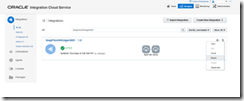
Select ‘Export’ and save the integration archive to the file system. Read the complete article here.

SOA & BPM Partner Community

For regular information on Oracle SOA Suite become a member in the SOA & BPM Partner Community for registration please visit www.oracle.com/goto/emea/soa (OPN account required) If you need support with your account please contact the Oracle Partner Business Center.

Blog Twitter LinkedIn image[7][2][2][2] Facebook clip_image002[8][4][2][2][2] Wiki

Leveraging the Twitter Adapter in ICS – Tweeting through Oracle Integration Cloud Service by Lucas Jellema

clip_image002


The Oracle Integration Cloud Service – ICS – comes loaded with a rich collection of Cloud Adapters. These adapters facilitate the integration with SaaS applications and internet services of various natures. These include Oracle SaaS applications (such as RightNow, Eloqua, ECommerce Cloud, ERP Cloud, HCM Cloud), on premises ERP applications (SAP, EBusiness Suite, Siebel) and assorted third party applications such as SalesForce, Facebook, Google Mail and Task, LinkedIn and Evernote. Through these adapters, interacting with said applications and services becomes a simple, declarative operation instead of a custom programming effort.

In this article, I will use the Twitter Adapter to create a connection to a Twitter Account (leveraging the Twitter API under the covers). The Twitter Adapters exposes over a dozen operations. I will use just the operation to publish a message (aka Tweet) in this example. From ICS, I will expose an integration through a simple REST connection. This allows trusted consumers to publish Tweets in a very easy way – leaving the authorization details and the API intricacies to ICS.

The steps I went through:

  • Grant access to [ICS Connection] app in the Twitter developer page and generate API Key and Consumer Key
  • Create a new ICS Connection based on Twitter Adapter; set up the API Key and Consumer Key
  • Create an ICS REST Connection (to expose)
  • Create an integration – between REST Connection as inbound (source) to Twitter Connection (as outbound destination); configure the endpoint (inbound) and operation (inbound and outbound)
  • Create the mappings for request and response
  • Define the tracking – business identifiers
  • Activate the integration
  • Test the exposed REST connection from any REST client, for example SoapUI, to Tweet a message through a simple REST POST call

Most of these steps are explained by the screenshots you will find below. Read the complete article here.

SOA & BPM Partner Community

For regular information on Oracle SOA Suite become a member in the SOA & BPM Partner Community for registration please visit www.oracle.com/goto/emea/soa (OPN account required) If you need support with your account please contact the Oracle Partner Business Center.

Blog Twitter LinkedIn image[7][2][2][2] Facebook clip_image002[8][4][2][2][2] Wiki

Create an Integration on ICS to expose a REST API for a SOAP Connection for an external web service by Lucas Jellema

clip_image002

In this article, I will show a little bit more of ICS – the Integration Cloud Service. In a previous article, I have introduced some concepts – such as Connection, Integration, Business Identifier. I have shown how to create an integration connecting two connections – an inbound and an outbound one (both of type SOAP).

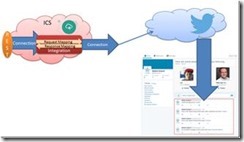
In picture, that looks like this:

In this article, I will create a new connection (REST API style) and create an integration to expose this connection, leveraging the same outbound connection:

After creating the integration, I will activate it and invoke the new REST API from a web browser and from SOAP UI.

The steps are:

  • Create REST Connection
  • Create and activate the Integration (with the mappings for request and response and the business identifiers for tracking)
  • Invoke the REST API
Configure REST Connection

Go to the ICS Home Page and navigate to the Connections page.

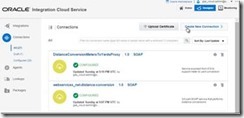
Create a New Connection. Read the complete article here.

SOA & BPM Partner Community

For regular information on Oracle SOA Suite become a member in the SOA & BPM Partner Community for registration please visit www.oracle.com/goto/emea/soa (OPN account required) If you need support with your account please contact the Oracle Partner Business Center.

Blog Twitter LinkedIn image[7][2][2][2] Facebook clip_image002[8][4][2][2][2] Wiki

The quick introduction to the Integration Cloud Service (Oracle PaaS– ICS) by Lucas Jellema

clip_image001

Integration is the term we employ for ‘what ties systems together into end-to-end interaction flows’. Integration describes what we have to do to make applications in one domain talk to those in another, or systems in one enterprise talk to those in another. And to systems running in one cloud interact with those running in another cloud or those running on premises. Integration is ideally approached based on standard based service interfaces and encapsulated implementations. With generic integration facilities handling most of the protocol, format, and technology specific details, and translating interactions as much as possible to standard SOAP and REST exchanges. And with that generic platform handling monitoring, security, system errors and state when asynchronous exchanges are required.

The Oracle Integration Cloud Service (ICS from now on) provides the cloud based integration platform that can run and manage these integration flows. ICS exposes a browser based user interface through which the integration is first designed, then activated and managed. ICS provides adapters to easily interact with a number of popular SaaS applications (Salesforce, Oracle HCM Cloud, Oracle ERP Cloud, Oracle SalesCloud, Service Cloud | Right Now, Eloqua, CPQ, Gmail & Google Task, Evernote, …) and Platform Services and technologies (Oracle Database, Oracle Messaging Cloud Service, FTP, SOAP and REST services) as well as a collection of Social Networks (Twitter, Linked In, Facebook). With ICS it is straightforward to connect to any of these as a target and expose an tailor made, easy to use interface to ICS consumers. Some of these can also be a source for interactions: events in SaaS applications  – such as creation or update of a business object – can trigger ICS to perform an integration flow – pushing data derived from the event to some target.

In this article I will introduce some of the core terminology for ICS and demonstrate my first steps. I will create a SOAP service that exposes a simple operation to convert distances in meters to their equivalent in yards. This service is the based on an existing conversion service offered by a third party. ICS is used to virtualize this service and map to and from between the business friendly interface that I have devised and the pre-existing service interface.

Overview

You will see how I have to first create two connections. Connection is the ICS term for an external link – either outbound from ICS to target systems  (comparable to business services in Service Bus or a Reference in SCA composites) or inbound into ICS (from external consumers), similar to Proxy Service in Service Bus and Service in SCA composites. One connection is outbound, to the third party service that does distance conversions. The other connection is inbound – it describes the SOAP interface that I want to expose from ICS to my consumers. Read the complete article here.

SOA & BPM Partner Community

For regular information on Oracle SOA Suite become a member in the SOA & BPM Partner Community for registration please visit www.oracle.com/goto/emea/soa (OPN account required) If you need support with your account please contact the Oracle Partner Business Center.

Blog Twitter LinkedIn image[7][2][2][2] Facebook clip_image002[8][4][2][2][2] Wiki

Integration Cloud Service use-cases & get started


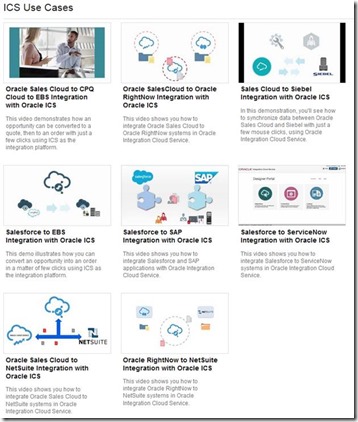
Maximize the value of your investments in SaaS and on-premise applications through a simple and powerful integration platform in the cloud. The use-case examples are great tips to get you started and spot opportunities are your customers! Get the use-cases here.

clip_image002

SOA & BPM Partner Community

For regular information on Oracle SOA Suite become a member in the SOA & BPM Partner Community for registration please visit www.oracle.com/goto/emea/soa (OPN account required) If you need support with your account please contact the Oracle Partner Business Center.

Blog Twitter LinkedIn image[7][2][2][2] Facebook clip_image002[8][4][2][2][2] Wiki

ICS Update – On premise Agent now Available by Arturo Viveros

clip_image001


Hello appreciated readers, here’s hoping to a fun and successful 2016 for you all!!

And for us Oracle FMW practitioners, there are some very exciting news to begin the year:
Yours truly has been following for a while the development and growth of Oracle’s iPaaS platform: "Integration Cloud Service". And it’s been a long wait, but at long last the ultra hyped On-Premise Agent has been released and is now available for all ICS subscriptions.
There are some other cool and useful new features in this release (e.g. content based routing, new adapters, etc.), which we will surely discuss during the next few weeks in a different post. However, in our humble opinion the Agent is a transcendent piece of the puzzle, which will open up a whole new set of use cases and possibilities for the implementation of cloud-driven integrations with ICS. So, what does this mean?, let’s look at it graphically:

Oracle ICS was an already powerful yet simple to implement tool, suited perfectly for Cloud to Cloud Integrations but somehow limited in its potential to participate in hybrid solutions (those which also include on-prem interaction). The obvious problem here is that we know Hybrid Architectures are still predominant among organizations in the midst of a cloud adoption strategy. And that’s why the Agent is a real game-changer: Read the complete article here.

SOA & BPM Partner Community

For regular information on Oracle SOA Suite become a member in the SOA & BPM Partner Community for registration please visit www.oracle.com/goto/emea/soa (OPN account required) If you need support with your account please contact the Oracle Partner Business Center.

Blog Twitter LinkedIn image[7][2][2][2] Facebook clip_image002[8][4][2][2][2] Wiki

New Agent Simplifies Cloud to On-premises Integration by Bruce Tierney


clip_image002Oracle Integration Cloud Service has generated a lot of enthusiasm since the June 2015 Oracle PaaS launch by Larry Ellison.  A major reason for this enthusiasm was the introduction of simplicity to cloud integration…historically a complex process only possible by integration specialists.  We are very pleased to introduce to Integration Cloud Service this same level of simplicity to the integration of on-premises applications allowing for faster and easier integration of existing on-premises applications with cloud SaaS applications.  

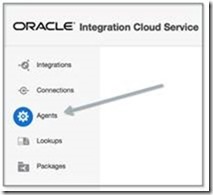
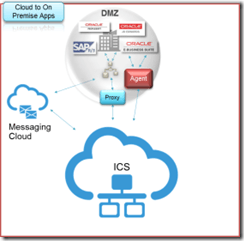
As shown in the image to the right, the new Agent feature within Oracle Integration Cloud Service eliminates common security and complexity issues previously associated with integrating on-premises applications from outside the firewall.   For example, there is no need to open an inbound port to communicate with on-premise systems and no need to expose any private SOA-based Web services.  Access the new Agent from the menu shown in the image below and let the agent simply and securely handle the communication. 

Furthermore, new adapters have been added to Integration Cloud Service to simplify the integration to on-premises applications.  These adapters are for Oracle E-Business Suite, Oracle Siebel Customer Relationship Management, SAP, Oracle Database, and the SOAP technology adapter.  The SOAP adapter can be used to connect to any Web service enabled application, including services exposed on Oracle SOA Suite or other on-premises integration platforms.clip_image006

Prior to creating the Agent or Agents, create your "Connections" to your applications.   Simply select and configure from a wide range of Oracle Applications such as Oracle CPQ Cloud, Sales Cloud, Service Cloud, HCM Cloud to name a few, 3rd party applications such as Salesforce.com, NetSuite and now with this release to on-premises applications.  See the image below to see some of the adapter choices: Read the complete article here.

SOA & BPM Partner Community

For regular information on Oracle SOA Suite become a member in the SOA & BPM Partner Community for registration please visit www.oracle.com/goto/emea/soa (OPN account required) If you need support with your account please contact the Oracle Partner Business Center.

Blog Twitter LinkedIn image[7][2][2][2] Facebook clip_image002[8][4][2][2][2] Wiki

Using Oracle Integration Cloud Service tutorial

clip_image001


When you subscribe to Oracle Integration Cloud Service, you also have the option to install an on-premises version of Oracle Integration Cloud Service in your local environment. This enables you to use on-premises Oracle Integration Cloud Service as a proxy server that sits between your internal company server hidden behind a fire wall and the cloud version of Oracle Integration Cloud Service. After installation, you can create users and assign roles to these users on the Users page of on-premises Oracle Integration Cloud Service. Read the tutorial here. & REST API for Oracle SOA Cloud Service tutorial here.

SOA & BPM Partner Community

For regular information on Oracle SOA Suite become a member in the SOA & BPM Partner Community for registration please visit www.oracle.com/goto/emea/soa (OPN account required) If you need support with your account please contact the Oracle Partner Business Center.

Blog Twitter LinkedIn image[7][2][2][2] Facebook clip_image002[8][4][2][2][2] Wiki

Agent for simplifying Integration between Cloud and On-Premises apps by Robert van Molken


clip_image001In the last few months I mentioned that Oracle is developing an Agent. The Agent easily integrates your on-premises application(s) with the Oracle Cloud Services. The Agent is rolling out on all production instances next week. It was publicly announced by Bruce Tierney on the 3rd of January. He is the Director of Product Marketing for Cloud Integration and SOA. You can read his announcement on the Oracle Integration blog.

In this first article about the Agent I will go into the architectural basics,  which components are included and how it will connect Cloud to On-premises applications. The article is based on information I presented about during OpenWorld 2015.

Current / classic integration approach

The current approach for connecting Cloud / Internet hosted applications with On-premises applications is usually through one or more firewalls, and the use of a reverse proxy, Oracle API Gateway or OHS. For this a variety of expertise is needed for example to open up inbound ports in the firewall, expose a private SOAP/REST service and configure the network routing. The SOAP/REST service can for example be implemented with SOA Suite to for example communicate with the CRM to retrieve customer data.

Let look at the current / classic approach in the diagram below:

This is going to change a lot when using the Agent. It will simplify above diagram.

Common Cloud to On-Premises Integration Patterns

Currently there are three common patterns for Cloud to On-Premises integrations. They are 1. using messaging, 2. through a proxy and 3. using an agent. Read the complete article here.

SOA & BPM Partner Community

For regular information on Oracle SOA Suite become a member in the SOA & BPM Partner Community for registration please visit www.oracle.com/goto/emea/soa (OPN account required) If you need support with your account please contact the Oracle Partner Business Center.

Blog Twitter LinkedIn image[7][2][2][2] Facebook clip_image002[8][4][2][2][2] Wiki

Integration Cloud Service free online training & free presales certification

clip_image002


Integration Cloud Service Guided Learning path was created to provide the presales consultant with a detailed understanding of key product features to prepare him/her to do product demos and be involved in proof-of-concept projects.

It starts with the ICS product overview and moves into technical details with short modules on:

· Integrating Applications with Oracle Integration Cloud Service (4 mins)

· Connecting to Applications with Oracle Integration Cloud Service (3 mins)

· Creating Connections in Oracle Integration Cloud Service (2 mins)

· Creating Integrations in Oracle Integration Cloud Service (3 mins)

· Mapping Data in Oracle Integration Cloud Service (2 mins)

· Mapping Data Between Applications with Oracle Integration Cloud Service (3 mins)

· Monitoring Integrations in Oracle Integration Cloud Service (2 mins)

· Monitoring Integrations (2 mins)

· Packaging Integrations with Oracle Integration Cloud Service (2 mins)

· Using Packages in Integration Cloud Service (4 mins)

· Using Lookups in Oracle Integration Cloud Service (2 mins)

· Integrating Oracle RightNow and Oracle Sales Cloud Using Oracle Integration Cloud Service (6 mins)

After going through these on-line modules, you can test what you learnt by taking the assessment test at the end. Attend the online training here.

SOA & BPM Partner Community

For regular information on Oracle SOA Suite become a member in the SOA & BPM Partner Community for registration please visit www.oracle.com/goto/emea/soa (OPN account required) If you need support with your account please contact the Oracle Partner Business Center.

Blog Twitter LinkedIn image[7][2][2][2] Facebook clip_image002[8][4][2][2][2] Wiki