Process Cloud Composer Tour by Gregory Hughlett


clip_image002There are many good reasons for business to look very seriously at the Oracle Process Cloud Service as a way to provision a fully managed BPM environment that lets the business focus on process improvement.  Previous releases of Oracle BPM admitedly have focused on the technologist and not the business user.  However, the evolution to the Process Cloud has been underway since 11g via the Process Composer tool.  Process Cloud now makes it available to everyone.

For the business, there are many reasons to move to the Oracle Process Cloud: 

  • It wlll lower start-up and upfront costs for both IT infrastructure and software licenses. 
  • Cloud implementations reduce risks associated with large capital investment with smoother predictable operational expenditures. Large one-time software upgrade costs are also eliminated.
  • Cloud customers benefit from using the latest product version and can rapidly leverage new feature capabilities. 
  • Requires the business to pay only for what they need, rather than over or under engineering an on premise business application.  "Elastic scalability’ ensures the business only pays for the capacity that is needed when it is needed.
  • Provides high performance and continuous availability: automatic load balancing and failover provide continuous availability.

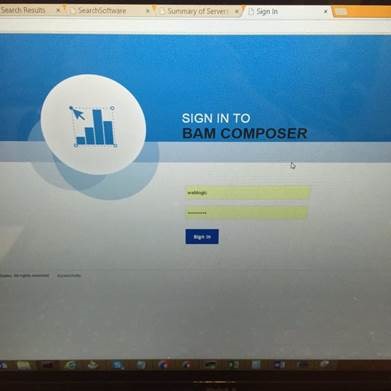
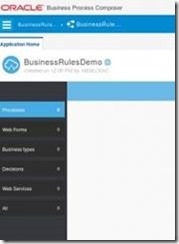
The first release of the Oracle Process Cloud provides a full lifecycle, soup to nuts process management tool.  The Process Cloud user interface is fast, modern, and designed for the business. It isn’t designed for the IT types (although us IT types will enjoy using them too.)  This topic is a tour through many of the Process Cloud screens at a high level so you can get a feel for how complete it is.  Many of the features you’ll see here can also be found in the on-premise Process Composer tool, a web-based tool, also oriented to business users.      

Process Composer Home

Depending on your role in the Process Cloud environment, you will have different options available on the Process Composer main page. Read the complete article here.

SOA & BPM Partner Community

For regular information on Oracle SOA Suite become a member in the SOA & BPM Partner Community for registration please visit www.oracle.com/goto/emea/soa (OPN account required) If you need support with your account please contact the Oracle Partner Business Center.

Blog Twitter LinkedIn image[7][2][2][2] Facebook clip_image002[8][4][2][2][2] Wiki

A quick look at Process Cloud Service by Laurens van der Starre


clip_image002Oracle Process Cloud Service is Oracle’s rapid process automation in the Cloud. It is more or less BPM in the cloud. This service allows you to quickly and easily create business processes like you are used to with Oracle BPM, only now in the cloud. In this post I’ll give a quick tour of this service.

So let’s start with the Process Cloud Service. The landing page already gives you loads of features.

The landing page of the Process Cloud

Here you have your spaces in which your processes will be saved, and where you start building new applications. So let’s create a new one. Read the complete article here.

SOA & BPM Partner Community

For regular information on Oracle SOA Suite become a member in the SOA & BPM Partner Community for registration please visit www.oracle.com/goto/emea/soa (OPN account required) If you need support with your account please contact the Oracle Partner Business Center.

Blog Twitter LinkedIn image[7][2][2][2] Facebook clip_image002[8][4][2][2][2] Wiki

Process Cloud – first impressions by Luc Gorissen


clip_image002As of this week, Oracle has released the Oracle Process Cloud Service (PCS): https://cloud.oracle.com/process. This PaaS cloud service offers a development platform for implementing business processes. Underpinning technology for this cloud service is the Oracle Fusion Middleware BPM stack. As a result, using the Process Cloud Service should be easy for people that are already familiar with Oracle Fusion Middleware BPM. For example, familiar platform components like BPM Composer and BPM WorkSpace are also present in PCS. With that in mind, we decided to give it a go!

This article outlines the steps for implementing a simple process in the Oracle Process Cloud Service. We were inspired during a discussion with a customer on SOA Governance, more specifically: how to handle/grant access to specific services. The customer mentioned that ‘he had people were complaining that it was unpredictable how long it took before access to a specific service in a specific environment was granted’. These types of processes can be handled very well within the Oracle Process Cloud. So, the ‘ServiceAccessApproval’ process will be shown in this example.

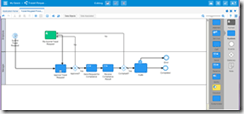
Sample process ServiceAccessApproval

The process ServiceAccessApproval in short consists of the following steps: Read the complete article here.

SOA & BPM Partner Community

For regular information on Oracle SOA Suite become a member in the SOA & BPM Partner Community for registration please visit www.oracle.com/goto/emea/soa (OPN account required) If you need support with your account please contact the Oracle Partner Business Center.

Blog Twitter LinkedIn image[7][2][2][2] Facebook clip_image002[8][4][2][2][2] Wiki

IoT Cloud Service – Driving value in the connected world–Webcast Wednesday, November 18th

imageWednesday, November 18th @ 9:00 AM – 10:00 AM PT

Speakers:

Harish Gaur, Senior Director Product Management for Internet of Things Product Group

Simon Nicholson, Senior Director, Product Management for the Internet of Things Product Group

IoT presents a huge opportunity to transform and differentiate your business—whether you are in manufacturing, logistics, infrastructure, or other verticals. Companies are looking to deliver business benefits from the Internet of Things (IoT) around reduced operational costs and enhanced customer experience, and by improving products. If this is done right, returns can be significant and rapid. By leveraging large volumes of sensor data, analyzing this data, and connecting this data with back-end applications, customers and partners are realizing the full potential of IoT for digital transformation.

Join this session to understand Oracle IoT Strategy and a phased approach to ROI with the Oracle Internet of Things Cloud Service, making IoT implementation straightforward, simple and effective. In this session, you will learn how the feature set will help you to quickly build IoT applications, connect and manage devices, configure and monitor security policies, manage and analyze massive amounts of data and integrate with your business processes and applications. You will also see examples of out-of-the-box integration with other Oracle Cloud services and applications, showing the unique value through end-to-end integration that Oracle provides.

This is the link to the registration page that displays all webcast details!

SOA & BPM Partner Community

For regular information on Oracle SOA Suite become a member in the SOA & BPM Partner Community for registration please visit www.oracle.com/goto/emea/soa (OPN account required) If you need support with your account please contact the Oracle Partner Business Center.

Blog Twitter LinkedIn image[7][2][2][2] Facebook clip_image002[8][4][2][2][2] Wiki

Fusion Middleware 12c – Selective tracing by Michel Schildmeijer


clip_image002For doing a good diagnosis in case of a problem in your Oracle Fusion Middleware Product, the platform offers you many methods and techniques to do your investigation. The disadvantage from some of these methods is that they have some impact on your system, such as if you would raise the log or debuglevel or use diagnostic snapshots.

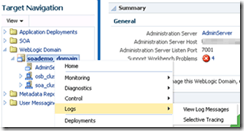
Selective Tracing is a facility available through Enterprise Manager to limit the scope of trace logging.This allows for debugging of a production system without overloading the system with logging activity. To use Selective Tracing, perform the following method:

1. On the left expand ‘WebLogic Domain’
2. Open Enterprise Manager: http://<your host>:7001/em

3. Right click your domain name -> Logs -> Selective Tracing. This will bring you to the following screen where you can configure your Selective Tracing session. Click on add fields and select as below: Read the complete article here.

SOA & BPM Partner Community

For regular information on Oracle SOA Suite become a member in the SOA & BPM Partner Community for registration please visit www.oracle.com/goto/emea/soa (OPN account required) If you need support with your account please contact the Oracle Partner Business Center.

Blog Twitter LinkedIn image[7][2][2][2] Facebook clip_image002[8][4][2][2][2] Wiki

OSB – Comparing Transformation Performance by Over de Auteur


clip_image001Introduction

In this post, I am looking into the relative performance of the transformation technologies in Service Bus 12c. Having searched the internet, I could not find a lot of specific information regarding the performance in Oracle Service Bus, but only qualitative opinions like “XSLT performs better for large documents”, or “Service Bus is optimized for XQuery”, without any supporting data [ORAFORUM].

Background

In an attempt to offload some of the production load from the SOA clusters, a migration project has been initiated to migrate services implemented in SOA Suite 11g (as BPEL processes) to the Oracle Service Bus cluster.

Although these services are not directly exposed to consumers, the intention is to reuse – without modification- as much artefacts as possible, including WSDL, JCA adapter definitons and the transformation logic – currently implemented in XSLT. Fortunately, the XSLT is version 1.0 since our Service Bus 11.1.1.6 does not yet support version 2.0.

Environment Setup

Although the environment where the question originates currently runs SOA/OSB 11g, migration to 12c is being planned. Liking life on the bleeding edge of technology, I decided to setup a test for 12c.

To quickly create a (reproducible) SOA 12c installation, I have used the scripts [BIEMOND] provided by Edwin Biemond to leverage Vagrant for the creation of two virtual machines (one for the DB and one for the middleware) (). Since my laptop has enough memory available, I have assigned 8 GB to the middleware virtual machine. Furthermore, the memory settings for the OSB-server have been increased to 1536 MB (initial = maximum memory).

On my laptop, I have also installed SoapUI [SOAPUI] (for functional testing – verifying that the testcase using different technologies yields the same result) and Apache Jmeter 2.13[JMeter] (for the actual performance testing).

Scenario Setup

For the time being I want to primarily focus on the relative performance of XQuery when compared to XSLT, over multiple transformations with varying payloads. So, the only metric I am interested in is the response time of the service, assuming that -with all other things being equal- equal actions will add equal overhead: the total response time of the service will be taken as the main indicator.

To support different transformations for testing, there should both be XQuery and XSLT versions of the transformation. Ideally, we should have different proxies per scenario and transformation technology, but actually I am too lazy to set up this scenario. Initially, I was thinking about setting up different testcases in the same proxy and switching between these testcases based on a value in the payload or operation, this has the suspicion that it works like a case statement (or nested if-then-else): evaluating the conditions for the fourth case might take more time than for the first case.

Fortunately, Service Bus also supports “Dynamic Transformations”[OSBDYNTRANS] for both XQuery and XSLT: this lets you dynamically assign the name of a transformation resource to apply, and also dynamically assign the payload to this transformation (see the Dynamic XQuery example below):

OSB Dynamic Assign Operation

The project I have come up with consists of a single proxy exposing a single operation and five pipelines: Read the whole article here.

SOA & BPM Partner Community

For regular information on Oracle SOA Suite become a member in the SOA & BPM Partner Community for registration please visit www.oracle.com/goto/emea/soa (OPN account required) If you need support with your account please contact the Oracle Partner Business Center.

Blog Twitter LinkedIn image[7][2][2][2] Facebook clip_image002[8][4][2][2][2] Wiki

SOA 12c–Creating ESS Job metadata by Siva


clip_image002In this post, We will use the EM Console to create ESS Job metadata  to call the Service Bus proxy services however the steps remain same for calling BPEL service too.

Configuration

During domain creation, we should select the following options to create ESS Managed Server and EM Plugin for ESS. EM Plugin for ESS enable us to monitor and manage submitted ESS jobs.

You should see the EM Console as shown below on successful domain creation and starting the Admin and ESS servers. Observe that Scheduling Services is shown having ESSAPP. Read the complete article here.

SOA & BPM Partner Community

For regular information on Oracle SOA Suite become a member in the SOA & BPM Partner Community for registration please visit www.oracle.com/goto/emea/soa (OPN account required) If you need support with your account please contact the Oracle Partner Business Center.

Blog Twitter LinkedIn image[7][2][2][2] Facebook clip_image002[8][4][2][2][2] Wiki

Fusion Middleware 12C: Deploy the MDS using Maven by Hugo Hendriks


clip_image002In two previous posts here and here, I demonstrated how you can setup CI for OFM 12C projects. One of the things I hadn’t figured out yet was how I could deploy the MDS using Maven. After a vague hint on the internet, Oracle’s response that this feature wasn’t officially supported yet and some trial and error I came across the solution. It is actually quite simple.

Basically it comes down to this:

  • Create a zip file of the files you want to stick into the MDS
  • Use the com.oracle.soa.plugin:oracle-soa-plugin:deploy maven goal to deploy it

That wasn’t that hard as you can see clip_image003Let’s go into a bit more detail. You can use a command line to create the zip or use the maven-assembly-plugin to give you a bit more flexibility. I used the last option because I wanted to filter certain files. Within my Jenkins job, I checked out my MDS files and zipped them using the package goal into a file called sca-MDS_rev1.0.jar. Look in the plugin section in the pom file down below to see about the configuration of the assembly plugin. The pom file is just a copy of a normal soa composite project. Read the whole article here.

SOA & BPM Partner Community

For regular information on Oracle SOA Suite become a member in the SOA & BPM Partner Community for registration please visit www.oracle.com/goto/emea/soa (OPN account required) If you need support with your account please contact the Oracle Partner Business Center.

Blog Twitter LinkedIn image[7][2][2][2] Facebook clip_image002[8][4][2][2][2] Wiki

Accessing Oracle B2B metadata from your application by Tiago Teixeira


For some time now, Oracle B2B has exposed several methods of accessing it’s partner and message metadata from a custom application. This has been improved even further with B2B 12c.
In this post I’ll guide you through the 2 most common ways of accessing B2B’s metadata programmatically and some news of the 12c version.
The 2 main ways of accessing the metadata stored in B2B are:

  • Web Services exposed by B2B
  • Java API

Web Services exposed by B2B

You can access the WSDL’s for the available web services at the following URL:

http://host_name:port_number/b2b/services/

The most common services are:

  • Outbound Web Service – Works as an internal Listening Channel. Based on the details and headers in the soap:body, the agreement identification is done and the message is routed to the partner.
  • Translation Web Service – Allows to translate documents such as EDI and HL7 from Native to XML format (NativeToXMLService) and from XML to Native format (XMLToNativeService)
  • Query API (GetTPAConfigService) – Allows for retrieval of different metadata such as active agreements for a Trading Partner or checking if a Trading Partner has an agreement for a specific Document.

Read the complete article here.

SOA & BPM Partner Community

For regular information on Oracle SOA Suite become a member in the SOA & BPM Partner Community for registration please visit www.oracle.com/goto/emea/soa (OPN account required) If you need support with your account please contact the Oracle Partner Business Center.

Blog Twitter LinkedIn image[7][2][2][2] Facebook clip_image002[8][4][2][2][2] Wiki