Create a fixed-length file in Oracle Integration by Ankur Jain

image

Are you struggling to create a fixed-length file in Oracle Integration and not able to find the step-by-step process on this, so this is the article that helps you to achieve your requirement.

Let’s first understand what is fixed-length file.

What is a fixed-length file?

Fixed length files have a constant length for each field and record.

For example, if you have data in a text file where the first column always has exactly 8 characters, and the second column has exactly 5, the third has exactly 12 (and so on), this would be categorized as a fixed-width text file.

To create a fixed file, you must create the XML Schema Definition (XSD) file that allows creating a fixed-length file. In this example, I’m using the below XSD schema to create the fixed-length file: Read the complete article here.

PaaS Partner Community

For regular information on Oracle PaaS become a member in the PaaS (Integration & Process) Partner Community please register here.

clip_image003 Blog clip_image005 Twitter clip_image004 LinkedIn image[7][2][2][2] Facebook clip_image002[8][4][2][2][2] Wiki

Technorati Tags: SOA Community,Oracle SOA,Oracle BPM,OPN,Jürgen Kress
Leveraging Grafana for OIC Metrics by Niall Commiskey

image

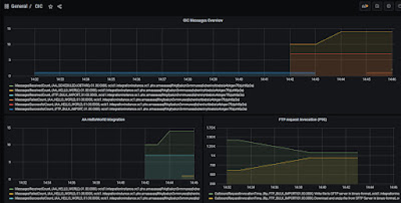
OCI Logging and OCI Logging Analytics are compelling offerings, but some folks may have standardised on other monitoring tools, such as Grafana.

So no time like the present to look at how one can leverage Grafana to monitor OIC Service Metrics. My colleague Valeria C. has already done great work in this area and has provided me with the impetus to get started. But first, I need Grafana! 

Step1 install Grafana on an OCI Compute instance.

Step 2 install the Grafana OCI Metrics plugin.

Step 3 monitor!

Install Grafana on OCI Compute instance

1. Spin up a compute instance

2. ssh into the instance

3. install Grafana – currently we need a version under v8. Read the complete article here.

PaaS Partner Community

For regular information on Oracle PaaS become a member in the PaaS (Integration & Process) Partner Community please register here.

clip_image003 Blog clip_image005 Twitter clip_image004 LinkedIn image[7][2][2][2] Facebook clip_image002[8][4][2][2][2] Wiki

Technorati Tags: SOA Community,Oracle SOA,Oracle BPM,OPN,Jürgen Kress

FlexDeploy Loves OIC: Series Overview by Dan Reynebeau

image

In this FlexDeploy Loves OIC blog series, we will show how FlexDeploy is used to configure, manage, deploy and test OIC artifacts as they are promoted through the different environments. Here is a summary of the FlexDeploy Loves OIC blog series.

At the conclusion of the series, you will see the ease and benefits of managing OIC integrations through FlexDeploy.

PaaS Partner Community

For regular information on Oracle PaaS become a member in the PaaS (Integration & Process) Partner Community please register here.

clip_image003 Blog clip_image005 Twitter clip_image004 LinkedIn image[7][2][2][2] Facebook clip_image002[8][4][2][2][2] Wiki

Technorati Tags: SOA Community,Oracle SOA,Oracle BPM,OPN,Jürgen Kress

Oracle Integration Cloud – Twilio Adapter for SMS and WhatsApp by Daniel Teixeira

image

The Oracle Integration Cloud (OIC) has an Adapter for Twilio which allows to communicated easily via SMS or with WhatsApp.

The Twilio Adapter provides the following benefits:

  • Sends an SMS or MMS message.
  • Returns all inbound and outbound SMS messages.

Create a Connection

Choose the Twilio Adapter from the Connections List.

A Twilio security identifier (SID) and authorization token are required.

These are provided when you create your Twilio user account.

Use them to properly configure the connection. Save and Test.

Create an Integration

Here I will create an AppDriven Integration with a REST trigger.

The REST trigger will have a parameter called input. Read the complete article here.

PaaS Partner Community

For regular information on Oracle PaaS become a member in the PaaS (Integration & Process) Partner Community please register here.

clip_image003 Blog clip_image005 Twitter clip_image004 LinkedIn image[7][2][2][2] Facebook clip_image002[8][4][2][2][2] Wiki

Technorati Tags: SOA Community,Oracle SOA,Oracle BPM,OPN,Jürgen Kress

Send emails with the OCI Email Service and Node.js by Daniel Teixeira

image

The Oracle Cloud Infrastructure (OCI) has an Email Service and like any other OCI service it can be accessed via the OCI CLI , REST API’s or one of the available SDK’s.

Oracle Cloud Infrastructure Email Delivery is an email sending service that provides a fast and reliable managed solution for sending high-volume emails that need to reach your recipients’ inbox. Email Delivery provides the tools necessary to send application-generated email for mission-critical communications such as receipts, fraud detection alerts, multi-factor identity verification, and password resets.

In the next steps I will configure this service and use Node.js to invoke it programmatically.

Create an Approved Sender

An approved sender must be set up for all “From:” addresses sending mail through Oracle Cloud Infrastructure, or mail is rejected.

Go To: Developer Services > Integration > Email Delivery > Approved Senders

You can define your own email and email domain, but that would take a bit longer and it’s not really necessary outside a Production environment. Read the complete article here

PaaS Partner Community

For regular information on Oracle PaaS become a member in the PaaS (Integration & Process) Partner Community please register here.

clip_image003 Blog clip_image005 Twitter clip_image004 LinkedIn image[7][2][2][2] Facebook clip_image002[8][4][2][2][2] Wiki

Technorati Tags: SOA Community,Oracle SOA,Oracle BPM,OPN,Jürgen Kress

Integration & Process Partner Community Newsletter December 2021

It is time for the November quarterly update to Oracle Integration. With autumn in the Northern Hemisphere, we are excited to share all our exciting new features and improvements. For the latest Oracle Integration update please read the Integration Newsletter #3 and please register for the Integration Update Webcast on December 16th 2021.

In the last 6 months 1043 persons attended the 3 days hands-on integration bootcamps. In case you missed it we offer a free on-demand version. Boost your career with the Oracle Application Integration 2021 Specialist certification ($245 value) free until December 31st 2021!

Thanks to the community for sharing all the integration articles: OIC November 21 Release New Features & OHIP and Oracle Integration Cloud: Simplifying hospitality integrations even more & Oracle Integration (Application Integration) free hands-on lab on-demand & Oracle Integration Cloud – Gmail Adapter & Leveraging OCI AI Language Service from Oracle Integration & OIC and OCI AI Language Service Part II & How to call the OCI AI Language Service from the Oracle Integration Cloud & Improving the performance of Oracle Integration flows that use REST calls & OIC -> DB adapter – overcoming 10 MB limit & Guidelines when moving Integration Workloads from SOA to Oracle Integration.

In the process & innovation section Jan Kettenis published an article on Synchronous versus Fire-and-Forget Process. Get started with Oracle process attend the free hands-on lab on-demand.

For a short summery of our monthly key information watch the PaaS Partner Updates on YouTube. The December edition highlights the Oracle Integration November Release and the new Developer Community website. In this month’s community webcast Carmen Dumitrascu will updated the community on the available Oracle Cloud Platform trainings, certifications. The Oracle OPN team will provide instant support check and fix your account during the webcast! Please join the Partner Community Webcast December 14th 2021. On-demand webcast recordings are available at the Oracle Video Hub.

Want to publish your best practice article & news in the next community newsletter? Please feel free to send it via Twitter @soaCommunity #PaaSCommunity. Visit the Community Website (membership required) for the latest Oracle Integration product information including sales kit, training and marketing material & slack channel!

To read the newsletter please visit https://bit.ly/PAASnewsdecember2021

Please like and share the newsletter at Twitter and LinkedIn.

Integration newsletter logo

PaaS Partner Community

For regular information on Oracle PaaS become a member in the PaaS (Integration & Process) Partner Community please register here.

clip_image003 Blog clip_image005 Twitter clip_image004 LinkedIn image[7][2][2][2] Facebook clip_image002[8][4][2][2][2] Wiki

Technorati Tags: newsletter,SOA Community newsletter,SOA Community,Oracle,OPN,Jürgen Kress

Field Level Encryption with Oracle Integration and OCI Vault by Stan Tanev

image

Integration platforms are often required to handle confidential information such as personal details, payment information or other data protected by compliance and regulatory standards such as HIPAA, GDPR, PII and PCI.

Various methods exist to protect data from unauthorized access while data is in transit and at rest. These approaches typically encrypt the entire payload. As a complementary approach Field Level Encryption has an important role to play by ensuring that only appropriately configured clients can read sensitive data fields. This approach also allows clients without the encryption keys to work with the non-sensitive data which would be impossible to do with a fully encrypted payload.

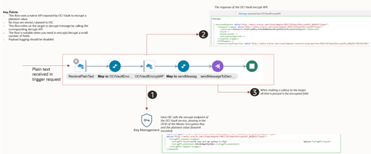
Although Field Level Encryption (FLE) is not natively supported in Oracle Integration (OIC) today, this blog will explore several options that will allow you to implement FLE with OIC. In this blog, I will present these options, discuss some guiding principles and showcase some sample implementations.

In the context of Oracle Integration, an implementation of Field Level Encryption should allow a developer to easily encrypt/decrypt individual field(s) as part of an integration flow. Let’s explore several use cases where this may be applicable:  

  • Oracle Integration may be required to receive or send encrypted information to other systems as part of a bigger data payload. For instance: OIC developers may be required to encrypt some but not all fields for a new hire sourced from Oracle HCM prior to sending them to an external system. Read the complete article here.

PaaS Partner Community

For regular information on Oracle PaaS become a member in the PaaS (Integration & Process) Partner Community please register here.

clip_image003 Blog clip_image005 Twitter clip_image004 LinkedIn image[7][2][2][2] Facebook clip_image002[8][4][2][2][2] Wiki

Technorati Tags: SOA Community,Oracle SOA,Oracle BPM,OPN,Jürgen Kress
Are you getting most out of your Oracle Cloud subscription? By Prateek Parasar

image

Whether you are a SaaS or OCI (Oracle Cloud Infrastructure) customer, you may be finding it hard to stay up-to-date on all the features being added by Oracle on quarterly basis. Oracle is at the moment innovating much faster than any other cloud provider.

Whether it’s the standard SaaS (HCM, Recruit, Payroll, ERP, Procurement and Supply Chain etc), PaaS (see table below) or IaaS offerings such as network, compute or storage, Oracle is constantly adding advanced features such as Autonomous upgrade to AI capabilities. Read the complete article here.

PaaS Partner Community

For regular information on Oracle PaaS become a member in the PaaS (Integration & Process) Partner Community please register here.

clip_image003 Blog clip_image005 Twitter clip_image004 LinkedIn image[7][2][2][2] Facebook clip_image002[8][4][2][2][2] Wiki

Technorati Tags: SOA Community,Oracle SOA,Oracle BPM,OPN,Jürgen Kress

Leveraging OCI AI Language Service from Oracle Integration by Niall Commiskey

image

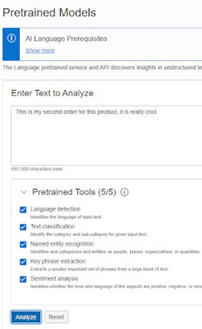
First, a simple example of what’s possible here – I enter a text for analysis – This is my second order for this product, it is really cool.

As you can see – a positive sentiment and rightly so our iBike is the best in the virtual world!

Now how can I invoke this from OIC? Imagine I have an order processing integration – the payload includes a comments field – where customer can open their hearts to us. Let’s implement this in OIC.

Step 1 – create a connection to OCI AI Service

Invoking AI is just like invoking other OCI services from OIC. The connection setup is similar to that for Object Storage etc. So I begin by cloning my existing Object Storage connection. Read the complete article here.

PaaS Partner Community

For regular information on Oracle PaaS become a member in the PaaS (Integration & Process) Partner Community please register here.

clip_image003 Blog clip_image005 Twitter clip_image004 LinkedIn image[7][2][2][2] Facebook clip_image002[8][4][2][2][2] Wiki

Technorati Tags: SOA Community,Oracle SOA,Oracle BPM,OPN,Jürgen Kress
How to call the OCI AI Language Service from the Oracle Integration Cloud by Daniel Teixeira

image

The OCI AI Language service is one of the new set of AI Services and it can provide valuable capabilities in the context of the OIC. I wrote about the language AI service in this post.

There are plenty of use cases where OIC could potentially benefit from AI Services, anomaly detection being an obvious one, but also language with the ability to detect sentiment, detect language and extract key words from text.

This post will focus for now on the technical side of setting this up in OIC. Later on I will bring more posts focusing on specific use cases.

Step 1: Create a Connection

This is similar to other Connections, like Object Storage and Functions.

The connection URL can be found – Read the complete article here.

PaaS Partner Community

For regular information on Oracle PaaS become a member in the PaaS (Integration & Process) Partner Community please register here.

clip_image003 Blog clip_image005 Twitter clip_image004 LinkedIn image[7][2][2][2] Facebook clip_image002[8][4][2][2][2] Wiki

Technorati Tags: SOA Community,Oracle SOA,Oracle BPM,OPN,Jürgen Kress