Additional new content Cloud Platform Partner Community

image· August 21 – New OIC articles by Phil Wilkins

· Premier League debut The Premier League began the 2021–22 football season with a new player on the pitch: Match Insights—Powered by Oracle Cloud, which provides AI-driven statistical insights on how teams organize, their changing win probability through the game, and the likelihood of a goal in the coming moments.

· 5 smart city success factors Cities, such as San José, California, are harnessing smart cities technology to help reduce poverty, protect natural resources, and otherwise make themselves better places to live and work. Learn about five factors that drive success.

PaaS Partner Community

For regular information on Oracle PaaS become a member in the PaaS (Integration & Process) Partner Community please register here.

clip_image003 Blog clip_image005 Twitter clip_image004 LinkedIn image[7][2][2][2] Facebook clip_image002[8][4][2][2][2] Wiki

Technorati Tags: SOA Community,Oracle SOA,Oracle BPM,OPN,Jürgen Kress

Embedding the Oracle OICS Process Workspace Application in an iFrame by Siming Mu

image

Introduction

Oracle Process Cloud Workspace is a web application that a user uses to interact with human activities in BPMN processes. It is a stand-alone web application in Oracle Integration Cloud Service (OICS). In some use cases, customers want to embed the Workspace application in an iframe of their own web page. Out of box, this is not possible because all HTTP responses from the Workspace have an X-Frame-Options header set to "sameorigin". It does not allow browsers to embed response data into an iframe from a different domain.

This post demonstrates a work-around solution to this problem by using a proxy server. The idea is to use a proxy server (OHS or Apache) to  remove or modify the X-Frame-Options header from all responses from the Workspace.

Demo Environment

My demo environment, shown in the image below, includes an OHS server installed on localhost:7777. I have my OICS instance running on a VM. I have a simple test web page with an iframe installed on the OHS.

Check the Problem First

Let’s verify the problem exists first. The following two screen shots show the Workspace accessed directly without the proxy.

Now we create a simple web page "myworkspace.html" on our OHS instance. The page contains  an iframe that points directly to the Workspace. Read the complete article here.

PaaS Partner Community

For regular information on Oracle PaaS become a member in the PaaS (Integration & Process) Partner Community please register here.

clip_image003 Blog clip_image005 Twitter clip_image004 LinkedIn image[7][2][2][2] Facebook clip_image002[8][4][2][2][2] Wiki

Technorati Tags: SOA Community,Oracle SOA,Oracle BPM,OPN,Jürgen Kress

Cloud Platform Partner YouTube Update November 2021


The November video includes three topics:

• Free Oracle Digital Assistant training & certification

• New Integration Partner Community Website

• Connect Opera Cloud Webcast

For regular updates please subscribe to our YouTube channel here. Thanks for your likes and sharing the video on YouTube and LinkedIn. For the latest integration & process information please join the PaaS community.

clip_image003 Blog clip_image005 Twitter clip_image004 LinkedIn image[7][2][2][2] Facebook image Meetups

Technorati Tags: YouTube,PaaS,Cloud,Middleware Update,WebLogic,WebLogic Community,Oracle,OPN,Jürgen Kress

Delivering Real Customer Value with Agile Innovation: Heathrow rapidly moves to Oracle Cloud and connects with hybrid Integration – Webcast November 16th 2021

IS09AU3K2

Heathrow rapidly moves to Oracle Cloud and connects with hybrid Integration

The continuous delivery of constant small innovations can bring benefits faster without risks. Join us to hear how Capgemini’s Agile Innovation Platform (AIP) combined with Flexagon’s FlexDeploy DevOps platform can enable innovations and have delivered tangible benefits to customers using the latest cloud capabilities and traditional on-premises ERP.
Phil Wilkins, Technical Evangelist, from Capgemini and Dan Goerdt, President, from Flexagon will describe how the combination are highly effective at delivering micro-innovation demonstrated through real-world customer results.
From this session, you will learn:

  • How the Agile Innovation Platform’s building blocks, templates, allows us to focus on customer value & innovation.
  • How FlexDeploy brings unique benefits to both Open Source and Oracle-specific technologies.
  • What were the challenges solved and benefits gained by actual customers using AIP and FlexDeploy.
  • How Integration is the foundation of continuous delivery and innovation.

Schedule: November 16th 2021 4:30 p.m. CET (Paris) 7:30 a.m. PST (San Francisco)

For details please visit the registration page here.

PaaS Partner Community

For regular information on Oracle PaaS become a member in the PaaS (Integration & Process) Partner Community please register here.

clip_image003 Blog clip_image005 Twitter clip_image004 LinkedIn image[7][2][2][2] Facebook clip_image002[8][4][2][2][2] Wiki

Technorati Tags: SOA Community,Oracle SOA,Oracle BPM,OPN,Jürgen Kress

Extend HCM Cloud with workflow process in Oracle Integration Cloud by Mani Krishnan

imageIntroduction

Oracle Integration Cloud provides rich work flow capabilities that can be integrated with Oracle SaaS applications. Oracle HCM cloud provides approval and work list capabilities for most needs. However, there are use cases where a complex workflow with multiple approvals and ability to enrich approval data from  multiple applications will be necessary. In this post, let’s look at seamlessly integrating integration cloud process user interfaces with HCM cloud.

Overview

Instructions in this post are applicable to Oracle Integration cloud on Oracle Cloud Infrastructure (OCI). Each OCI tenancy is associated with an IDCS instance, which supports identity federation with Oracle SaaS applications. Enabling identity federation with IDCS also allows seamless integration with many other Oracle PaaS products. The high-level steps are:

· Enable federation between IDCS and HCM Cloud

· Add Oracle Integration Cloud (OIC) to a Identity provider policy

· Embed process UI in HCM cloud

Here is a depiction of the SAML federation solution:

User logs into HCM Cloud and opens a page with an embedded OIC process page. The OIC  process page should display content specific to the currently signed-in user without requiring user to log into IDCS or HCM Cloud. Steps 3,4 and 5 are transparent to the end user.

Enable identity federation between IDCS and HCM Cloud

Before identity federation can be validated, users and role assignments also must be synchronized between HCM Cloud and IDCS. There are several ways to achieve it. Follow instructions at this link to use the ESS Job in SaaS to synchronize users and role assignments. This task can be entirely performed by customers as self service. Read the complete article here.

PaaS Partner Community

For regular information on Oracle PaaS become a member in the PaaS (Integration & Process) Partner Community please register here.

clip_image003 Blog clip_image005 Twitter clip_image004 LinkedIn image[7][2][2][2] Facebook clip_image002[8][4][2][2][2] Wiki

Technorati Tags: SOA Community,Oracle SOA,Oracle BPM,OPN,Jürgen Kress

Updating SOA Polling Frequency through WLST by Ahmed Aboulnaga

Havimagee you ever wondered how you can update the PollingFrequency of an inbound adapter such as the FileAdapter or FtpAdapter using WLST?

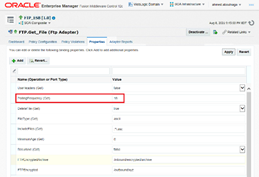
Taking a look at an Oracle SOA 12c composite in the EM console, when you click on your service, you can navigate to the Properties tab to view and update the polling frequency of the inbound adapter at any time during runtime.

We experienced a strange issue. For example, the inbound FileAdapter would be configured to poll the folder every 10 seconds. However, we noticed that in some cases (which we can’t explain), the file never gets picked up. It may sit there for hours. A restart of the SOA managed servers took care of this. We also found out that updating the polling frequency re-triggers or re-initializes the inbound file polling for some odd reason. Read the complete article here.

PaaS Partner Community

For regular information on Oracle PaaS become a member in the PaaS (Integration & Process) Partner Community please register here.

clip_image003 Blog clip_image005 Twitter clip_image004 LinkedIn image[7][2][2][2] Facebook clip_image002[8][4][2][2][2] Wiki

Technorati Tags: SOA Community,Oracle SOA,Oracle BPM,OPN,Jürgen Kress
CI/CD for Oracle Integrations with Visual Builder Studio by Shay Shmeltzer

image

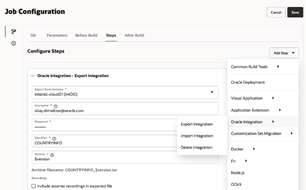
The new version of Oracle Visual Builder Studio adds support for automating continuous deployment of Integrations created in Oracle Integration from one instance to another. This can help teams easily promote changes to integrations from their development instance to their test and production instances. In this blog we’ll show you how to achieve this.

Oracle Integration is a cloud service that allows you to integrate data from multiple sources and create data APIs for other apps to consume. For example, many of the customers who are developing user interfaces with Oracle Visual Builder rely on Oracle Integration to get the data shown in the UI. Oracle Integration has adapters that can help you easily connect and extract data from multiple systems.
Oracle Integration provides a web-based interface where developers visually create integrations and manage versions of those integrations. For customers who are looking to automate the process of migrating integrations between instances (such as from dev to prod) – Oracle Visual Builder provides an easy-to-use solution that simplify export and import of integrations.

Automating Integration CI/CD

We added specific Oracle integration functionality into Visual Builder Studio in both the Environments and Build areas. In the environments section you can define multiple environments and map them to integration cloud instances. We can scan your tenancy for instances, and you can also provide a pointer to other instances in other cloud tenancies. Read the complete article here.

PaaS Partner Community

For regular information on Oracle PaaS become a member in the PaaS (Integration & Process) Partner Community please register here.

clip_image003 Blog clip_image005 Twitter clip_image004 LinkedIn image[7][2][2][2] Facebook clip_image002[8][4][2][2][2] Wiki

Technorati Tags: SOA Community,Oracle SOA,Oracle BPM,OPN,Jürgen Kress
Use Oracle Integration to Connect E-Business Suite with Financials Cloud

image

Moving Oracle E-Business Suite to the cloud brings many opportunities to modernize and integrate with other cloud services. Many times, these projects relate to the adoption of new SaaS applications which add more functionality and business processes.

One example is modernizing the infrastructure of EBS running the manufacturing operations by bringing to Oracle Cloud and connecting with a new implementation of Oracle Financials SaaS.

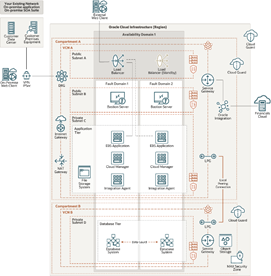
Oracle Integration is an Oracle Cloud regional service with a powerful set of adapters, providing connectivity and integration for Oracle E-Business Suite, cloud services and technologies, and SaaS applications as Oracle Financials Cloud. This architecture presents a topology for connecting an EBS instance on Oracle Cloud Infrastructure (OCI) with Oracle Financials SaaS using Oracle Integration.

Architecture

This architecture shows the deployment of Oracle E-Business Suite in a single availability domain inside an OCI region, along with integrations built using Oracle Integration. Oracle Integration is connected to Oracle E-Business Suite using Oracle E-Business Suite Adapter deployed with the Oracle Integration Connectivity Agent.

The architecture includes two compartments, both of which have Cloud Guard enabled to provide maximum security based on Oracle’s security best practices. In addition, the compartment where the database system and the autonomous database private endpoint are deployed is a security zone compartment. Read the complete article here.

PaaS Partner Community

For regular information on Oracle PaaS become a member in the PaaS (Integration & Process) Partner Community please register here.

clip_image003 Blog clip_image005 Twitter clip_image004 LinkedIn image[7][2][2][2] Facebook clip_image002[8][4][2][2][2] Wiki

Technorati Tags: SOA Community,Oracle SOA,Oracle BPM,OPN,Jürgen Kress
Free Webinar: CI and CD for Oracle SOA and OIC by Dan Goerdt & Dan Reynebeau

image

Take a deep dive of FlexDeploy’s support for the SOA Suite, WebLogic resources, and the Oracle Integration Cloud.

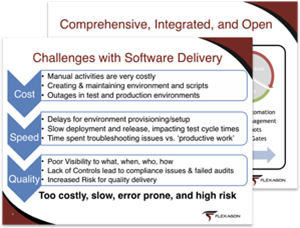
The Oracle SOA Suite and Oracle Integration Cloud provide a wealth of features for integration, but most customers struggle to create fast and repeatable deployment processes to manage changes across their on prem and cloud environments.

In this webinar you will learn how FlexDeploy can:

  • Automate the entire Build, Deploy, and Release process.
  • Remove the need for scripting and manual activities.
  • Integrate seamlessly with tools such as Jira, Soap UI, and ServiceNow. Read the complete article here.

PaaS Partner Community

For regular information on Oracle PaaS become a member in the PaaS (Integration & Process) Partner Community please register here.

clip_image003 Blog clip_image005 Twitter clip_image004 LinkedIn image[7][2][2][2] Facebook clip_image002[8][4][2][2][2] Wiki

Technorati Tags: SOA Community,Oracle SOA,Oracle BPM,OPN,Jürgen Kress
Tips and Tricks for handling numbers in BPEL or OIC by Pranav Davar

image

While integrating with multiple systems and moving data from one system to the other, we generally come across scenarios, wherein we need to change the format of the number or perform operations like floor, ceil, round, divide, multiply, add, etc. on numbers. We will be going through various mathematical functions available in XSLT 1.0, which would be helpful in such scenarios, and also some generic errors which we encounter usually.

Mathematical Operations

1. Divide

2. Multiply

3. Add

4. Subtract

5. Square-root

6. Round

7. Floor

8. Ceil

9. Advanced Number formatting

Common Errors

Mathematical Operations

1. Divide

To divide 2 numbers, we can use the div operator to divide two numbers.

Syntax:

    $num1 div $num2

Example:

    Let us assume we want to divide 120 by 7. Read the complete article here.

PaaS Partner Community

For regular information on Oracle PaaS become a member in the PaaS (Integration & Process) Partner Community please register here.

clip_image003 Blog clip_image005 Twitter clip_image004 LinkedIn image[7][2][2][2] Facebook clip_image002[8][4][2][2][2] Wiki

Technorati Tags: SOA Community,Oracle SOA,Oracle BPM,OPN,Jürgen Kress