Convert JSON to String Oracle Integration by Ankur Jain

image

I have seen multiple target applications which accept the JSON data as a String in a single element. So, it is necessary to convert the JSON to String before you call the target endpoint.

Convert JSON to String Oracle Integration

For example:

Below is the JSON which you may get from the source system:

{

"firstname": "ankur",

"lastname": "jain"

}

and you need to map the above JSON as a string in the following single element:

{

"data" : "{\n \"firstname\" : \"ankur\",\n \"lastname\" : \"jain\"\n}"

}

So, in order to achieve this, first, you have to write the JSON to the temporary location using the Stage File action and read it using the opaque schema as a String.

Here is the opaque.xsd code which you need to use to read the JSON from the stage: Read the complete article here.

PaaS Partner Community

For regular information on Oracle PaaS become a member in the PaaS (Integration & Process) Partner Community please register here.

clip_image003 Blog clip_image005 Twitter clip_image004 LinkedIn image[7][2][2][2] Facebook clip_image002[8][4][2][2][2] Wiki

Technorati Tags: SOA Community,Oracle SOA,Oracle BPM,OPN,Jürgen Kress

Leverage Oracle MySQL Database Service (MDS) with Oracle Integration Cloud by Arpit Narula

image

The primary objective of this blog is to detail out how Oracle’s MySQL DB can be provisioned on OCI Gen -2 and integrate it with Oracle Integration Cloud. MySQL Database Service on Oracle Cloud might prove out to be a very cost effective and performance enhancing solution for many use cases. A few such use cases are

· Custom Logging and Error Handling Frameworks

· Implementing Parking Lot Patterns for Integrations

· Building Data Stage for VBCS applications

So let’s jump into the fun sections where we will cover the following topics in detail.

a) Create an MDS Cloud Instance

b) Setup compute instance (that will connect to MDS)

c) Create an OIC Instance and Agent Setup

d) Build a sample integration read the complete article here.

PaaS Partner Community

For regular information on Oracle PaaS become a member in the PaaS (Integration & Process) Partner Community please register here.

clip_image003 Blog clip_image005 Twitter clip_image004 LinkedIn image[7][2][2][2] Facebook clip_image002[8][4][2][2][2] Wiki

Technorati Tags: SOA Community,Oracle SOA,Oracle BPM,OPN,Jürgen Kress
Ways to download connectivity agent Oracle Integration by Ankur Jain

image

The connectivity agent is used to establish the communication between SaaS and on-premises applications. Before you create the connection with on-premises applications in Oracle Integration, you must have to download the connectivity agent and install it on the host machine.

There are various ways to download the connectivity agent. So, in this short article, we’ll describe various options to download the connectivity agent of Oracle Integration.

  1. Using Oracle Integration Console

The easiest way to download the connectivity agent is using the Oracle Integration console. To download it using the Oracle Integration console follow the below steps:

  1. Login into the Oracle Integration Console.
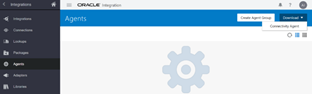
  2. Navigate to the Integrations -> Agents page
  3. Click on the Download -> Connectivity Agent option from the upper right corner of the page. Read the complete article here.

PaaS Partner Community

For regular information on Oracle PaaS become a member in the PaaS (Integration & Process) Partner Community please register here.

clip_image003 Blog clip_image005 Twitter clip_image004 LinkedIn image[7][2][2][2] Facebook clip_image002[8][4][2][2][2] Wiki

Technorati Tags: SOA Community,Oracle SOA,Oracle BPM,OPN,Jürgen Kress

OIC Activity Stream to OCI Log analytics by Shreenidhi Raghuram

OIC Activity Stream to OCI Log analytics image

Introduction

We know that Oracle Integration Activity stream logs can be downloaded from OIC using the Monitoring console. Here is the reference link – Monitoring OIC
A commonly implemented solution by customers is to automate the download of activity stream logs periodically using monitoring REST API and store them in repositories like FTP servers or Object storage for offline analysis and diagnosis.

However the Activity stream download  is governed by size of the activity stream log file. Refer – activity stream logs retention.
Due to this size limitation, customers could have an issue with the ability to reliably download activity stream logs for a definite period of time, say last 1 hour. For instance, during periods of heavy activity on the OIC instance the log file may only cover a portion of the period due to the size limitation.

Solution

Good news ! This requirement has now been addressed as part of the August 2021 release of Oracle Integration.
OIC now allows activity streams to be sent to OCI Logging service. OCI Logging service provides persistence as well as real time analysis on the OIC activity stream messages. Read the complete article here.

PaaS Partner Community

For regular information on Oracle PaaS become a member in the PaaS (Integration & Process) Partner Community please register here.

clip_image003 Blog clip_image005 Twitter clip_image004 LinkedIn image[7][2][2][2] Facebook clip_image002[8][4][2][2][2] Wiki

Technorati Tags: SOA Community,Oracle SOA,Oracle BPM,OPN,Jürgen Kress
Oracle Implementation Certifications

image

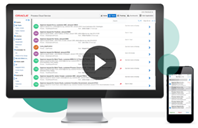
Enablement and certification are key to cloud success. At the Oracle Learning Center partners can attend free on-line classes and certifications. Additional we offer the latest implementation exams ($245 or free vouchers) for:

· Oracle Integration Cloud 2022 Sales Specialist

· Oracle Integration Cloud 2022 Solution Engineer Specialist

· Oracle Cloud Platform Application Integration 2021 Specialist | 1Z0-1042-21

· SOA Modernization Overview

PaaS Partner Community

For regular information on Oracle PaaS become a member in the PaaS (Integration & Process) Partner Community please register here.

clip_image003 Blog clip_image005 Twitter clip_image004 LinkedIn image[7][2][2][2] Facebook clip_image002[8][4][2][2][2] Wiki

Technorati Tags: SOA Community,Oracle SOA,Oracle BPM,OPN,Jürgen Kress

Business Identifiers in Oracle Integration by Ankur Jain

image

A Business identifier in Oracle Integration helps you to track the messages from the monitoring dashboard quickly and easily.

Without enabling the Business identifiers, you can not activate the integrations.

Max 3 business identifiers can be assigned during the design time. One is primary and the other two are secondary.

To understand how to enable Business Identifiers and how to use them to track the runtime integration, read the complete article here

PaaS Partner Community

For regular information on Oracle PaaS become a member in the PaaS (Integration & Process) Partner Community please register here.

clip_image003 Blog clip_image005 Twitter clip_image004 LinkedIn image[7][2][2][2] Facebook clip_image002[8][4][2][2][2] Wiki

Technorati Tags: SOA Community,Oracle SOA,Oracle BPM,OPN,Jürgen Kress
Oracle Integration Update Webcast September 2021 on-demand

image

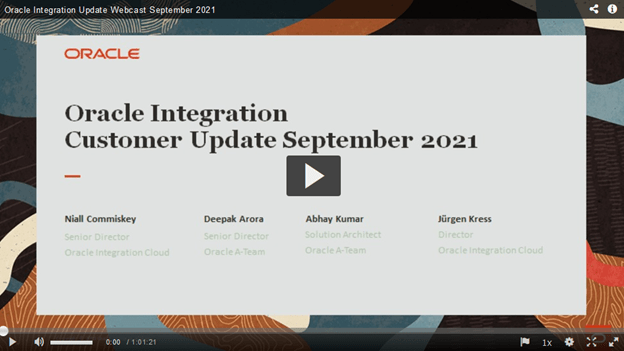
Watch to get the latest updates and innovations on Oracle Integration release. Our Oracle Integration Product Manager Team will present new features, product roadmaps, discuss upcoming innovations and provide guidelines to help you adopt these quickly within your organization. Topics include:

  • Welcome & announcements
  • August release update Oracle Integration
  • ERP / SCM Integration Best Practices from the A-Team
  • Questions & Answers

Watch the on-demand webcast here and subscribe to the newsletter here.

PaaS Partner Community

For regular information on Oracle PaaS become a member in the PaaS (Integration & Process) Partner Community please register here.

clip_image003 Blog clip_image005 Twitter clip_image004 LinkedIn image[7][2][2][2] Facebook clip_image002[8][4][2][2][2] Wiki

Technorati Tags: SOA Community,Oracle SOA,Oracle BPM,OPN,Jürgen Kress

OIC & Blue Prism part 2 by Niall Commiskey

    image

    This post goes into a bit more detail, especially on the Blue Prism side. The use case today is that of updating an excel sheet – Here’s mine – today we are doing employee assessments and we will leverage Blue Prism to automatically assign performance values, based on the employee rating. Apologies to any Liam Mellows fans out there.

    The employees have been rated – the performance fields just need to be updated. Our digital worker will take care of this.

    The OIC process will invoke Blue Prism, passing the name of the excel sheet to be processed.

    The Blue Prism process is as follows –

    Thanks to the following page for the instructions on how to create the above.

    The logic is simple enough –

    • Open workbook – Open the excel sheet

    • Get Collection – here we copy the workbook contents to the Employees collection

      • Loop over each employee entry

        • Update each employee performance field based on their rating

      • Write Data – update the Excel sheet

      • Save Data – Save Excel Sheet

      • Close Workbook – Close Excel Sheet

        The process leverages the Blue Prism VBO(Visual Business Object) for Excel. This VBO is pre-seeded in the product. Think of this as an Excel adapter, providing us with functionality such as open close, write, save etc.

        You see on the left a Data Item – Workbook Name. This is the variable which holds the name of the excel sheet to be processed. Read the complete article here.

        PaaS Partner Community

        For regular information on Oracle PaaS become a member in the PaaS (Integration & Process) Partner Community please register here.

        clip_image003 Blog clip_image005 Twitter clip_image004 LinkedIn image[7][2][2][2] Facebook clip_image002[8][4][2][2][2] Wiki

        Technorati Tags: SOA Community,Oracle SOA,Oracle BPM,OPN,Jürgen Kress
        OIC and Blue Prism RPA by Niall Commiskey

        image

        I downloaded the BluePrism trial this morning, along with a set of 10 beginner labs they make available online.

        Blue Prism Design Time

        The focus of this post is not on how to design automations with Blue Prism; the 10 labs do a great job of that. The focus here is on how to invoke such from OIC.

        I will use the following process as an example – this is actually Lab4  Blue Prism offers a rich set of process design actions –

        Some of these have been used to add robustness to the process model, very important for mission critical automations.

        The process shown above is very simple – it opens the Blue Prism website in InternetExplorer and searches for a specific topic – e.g. Coca Cola

        So it is doing the following, from an automation perspective –

        1. open the page in IE

        2. enter data – the search string – in the search box

        3. press the search button.

        I test this within the Blue Prism Design Studio and it works fine. The search value – Coca Cola – is hard coded, as you can see in the Data Items block above.

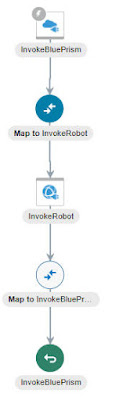
        Now say I want to expose this functionality as a service – I will then need to define an input variable for the search string. This can be easily defined in the Start action. Read the complete article here.

        PaaS Partner Community

        For regular information on Oracle PaaS become a member in the PaaS (Integration & Process) Partner Community please register here.

        clip_image003 Blog clip_image005 Twitter clip_image004 LinkedIn image[7][2][2][2] Facebook clip_image002[8][4][2][2][2] Wiki

        Technorati Tags: SOA Community,Oracle SOA,Oracle BPM,OPN,Jürgen Kress

        Integration & Process Partner Community Newsletter October 2021

        Dear Partner Community

        Get started with your free Oracle Application Integration Learning Subscription and schedule your free certification exam! Oracle is the only vendor who offers certified adapters to connect Oracle SaaS. Oracle Integration Empowers your SaaS implementation. Until December 31st 2021 we offer free training & certification Oracle Application Integration 2021 Specialist Learning Subscription and exam ($245 value)!

        Accelerate growth & customer success:

        · Join the Integration Partner Community to receive monthly updates.

        · Watch the on-demand webcast "connect, innovate & extend SaaS".

        · Access the sales kits including customer presentation in ppt format.

        · Take the Oracle Integration Cloud 2022 Sales Specialist online training & assessment.

        · Become an Oracle Integration Solution Solution Engineer Specialist.

        For details please visit the new community website (membership required). The page includes the latest newsletter, upcoming trainings & webcasts, monthly YouTube Update and the Slack channel. Content is organized in sales, marketing and enablement categories. Visit the community website here!

        Thanks to the community for sharing all the integration articles: OIC Pub/Sub with OCI Streaming & OIC Pub/Sub with OCI Streaming Part 2 & OIC Pub/Sub with OCI Streaming Part 3 & Ways to download connectivity agent Oracle Integration & Restricting access to OIC instances & Installing OIC Connectivity Agent on OCI Compute & Free Webinar: CI and CD for Oracle SOA and OIC.

        In the process & innovation section we highlight the Jarvis Pizzeria article series from Richard & team.

        For a short summery of our monthly key information watch the PaaS Partner Updates on YouTube. The October edition highlights the free certification & learning subscription and the Hands-on conversational AI training. In this month’s community webcast Grant Ronald will present how to build an awesome digital assistant experience. Please join the Partner Community Webcast October 26th 2021. On-demand webcast recordings are available at the Oracle Video Hub.

        Want to publish your best practice article & news in the next community newsletter? Please feel free to send it via Twitter @soaCommunity #PaaSCommunity.

        To read the newsletter please visit https://bit.ly/paasnewsoctober2021

        Please like and share the newsletter at Twitter and LinkedIn.

        Integration newsletter logo

        PaaS Partner Community

        For regular information on Oracle PaaS become a member in the PaaS (Integration & Process) Partner Community please register here.

        clip_image003 Blog clip_image005 Twitter clip_image004 LinkedIn image[7][2][2][2] Facebook clip_image002[8][4][2][2][2] Wiki

        Technorati Tags: newsletter,SOA Community newsletter,SOA Community,Oracle,OPN,Jürgen Kress