FlexDeploy for Oracle Integration Cloud

image

Whether it’s the ability to easily and effectively build and deploy OIC artifacts, the need to easily and efficiently access logs and reports, or the desire to incorporate automated testing into the development process, FlexDeploy provides a simple way to build, deploy, and test OIC artifacts. Have a question for us here at Flexagon? Leave it in the comments! Oh, and leave us a like! We really appreciate it. Flexagon is an innovative software company focused on enabling enterprise agility and operational excellence. Our DevOps platform, FlexDeploy, brings automation, controls, and visibility to software provisioning, build, deploy, test, and release processes, and includes pre-built plugins for Oracle Database, Fusion Middleware, E-Business Suite, Cloud, and many open source and commercial technologies. Watch the video here.

PaaS Partner Community

For regular information on Oracle PaaS become a member in the PaaS (Integration & Process) Partner Community please register here.

clip_image003 Blog clip_image005 Twitter clip_image004 LinkedIn image[7][2][2][2] Facebook clip_image002[8][4][2][2][2] Wiki

Technorati Tags: SOA Community,Oracle SOA,Oracle BPM,OPN,Jürgen Kress

Oracle Integration – Connecting to NetSuite using Token Based Authentication by Subhani Sahib Italapuram

image

In this blog, We shall talk about Token Based Authentication(TBA) which is one of the security policies supported by NetSuite adapter in Oracle Integration.

If you want to use token-based authentication with the Oracle NetSuite Adapter, You should have the following information that is required for creating a connection.

  • Consumer key
  • Consumer secret
  • Token
  • Token secret
  • Account ID

And to use Token Based Authentication (TBA), you need to complete the tasks given below in the NetSuite application.

  1. Enable Token-Based Authentication
  2. Create Integration record
  3. Create a Role and assign to a User
  4. Create an Access Token for the Integration record, User, and Role
  5. NetSuite Account ID.

Let us go through the below steps and get the values required for us to create a connection using NetSuite adapter in Oracle Integration.

1. Enable Token-Based Authentication

Go to Setup in NetSuite application > Company > Enable Features > Click the SuiteCloud subtab –> Under Manage Authentication section, check the TOKEN-BASED AUTHENTICATION (Please note that the features Client SuiteScript and Server SuiteScript must also be enabled to use token-based authentication with RESTlets, If it is not enabled, please enable). Read the complete article here.

PaaS Partner Community

For regular information on Oracle PaaS become a member in the PaaS (Integration & Process) Partner Community please register here.

clip_image003 Blog clip_image005 Twitter clip_image004 LinkedIn image[7][2][2][2] Facebook clip_image002[8][4][2][2][2] Wiki

Technorati Tags: SOA Community,Oracle SOA,Oracle BPM,OPN,Jürgen Kress

Connecting Hubspot and NetSuite using Oracle Integration (OIC) by Niall Commiskey

image
Simple scenario here – I need to sync contacts between Hubspot and NetSuite. Introduction.

Now I am new to HubSpot – by new I mean really a neophyte – I am trying this out for the first time tonight. I create a HubSpot developer account and get the api key. Read the complete article here.

PaaS Partner Community

For regular information on Oracle PaaS become a member in the PaaS (Integration & Process) Partner Community please register here.

clip_image003 Blog clip_image005 Twitter clip_image004 LinkedIn image[7][2][2][2] Facebook clip_image002[8][4][2][2][2] Wiki

Technorati Tags: SOA Community,Oracle SOA,Oracle BPM,OPN,Jürgen Kress
Integration Customer Newsletter Spring 2021

IOIC customer webcast HQ June 2021t is time for the May quarterly update to Oracle Integration. With Spring in the air, we are excited to share all our exciting new features and improvements. Thanks to Simone, Antony, Michael, Amit, and Niall for the blog post series:

If you want to let us know how much you are enjoying this newsletter or If you have anything you would like us to feature in a future edition, message us via LinkedIn or twitter using hashtags #OracleIntegration.

Please feel free to forward this newsletter to anybody who may be interested and invite them to subscribe too. Read the Spring 2021 here and subscribe to the newsletter here.

clip_image003 Blog clip_image005 Twitter clip_image004 LinkedIn image[7][2][2][2] Facebook clip_image002[8][4][2][2][2] Wiki

Technorati Tags: SOA Community,Oracle SOA,Oracle BPM,OPN,Jürgen Kress, Integration newsletter

Accessing Object Storage from Oracle Integration by Ankur Jain

image

The Oracle Cloud Infrastructure (OCI) offers a rich set of services and Object Storage is one of the important services that can be used to store a wide variety of objects of any content type such as videos, images, documents, and so on. Depending on the bucket you created in Object Storage, you can access it from OCI or the public internet.

In the previous few other posts, you may have seen the usage of an FTP adapter to read/write files which is a traditional approach to store files. So as the digitization of data is on-demand, Object Storage is in high demand to store the data and access it from anywhere.

You can automate your different document repositories to store data in the Object Storage using the Oracle Integration Cloud to make it a centralized repository.

You would be requiring few things before you access the Object Storage from the Oracle Integration and store your objects. Following are the few things you would be requiring: Read the complete article here.

PaaS Partner Community

For regular information on Oracle PaaS become a member in the PaaS (Integration & Process) Partner Community please register here.

clip_image003 Blog clip_image005 Twitter clip_image004 LinkedIn image[7][2][2][2] Facebook clip_image002[8][4][2][2][2] Wiki

Technorati Tags: SOA Community,Oracle SOA,Oracle BPM,OPN,Jürgen Kress

OIC and Oracle Hospitality (OHIP) – Getting the most out of Opera APIs by Niall Commiskey

image

This is my second post on integrating with Oracle Hospitality Cloud using OIC. The introductory post is here. So let’s continue our journey…I preface this post with the usual caveat – I am not an expert on Oracle Hospitality, however, I have been playing around with the apis provided by OHIP.

So here is the basic scenario – I want to implement the following basic use cases –

1. room reservation

2. checkin

The introductory post covered room reservation, but here is a recap. Think of OHIP (Oracle Hospitality Integration Platform) as THE catalog of APIs for Opera integration and THE Gateway for processing API requests. Starting point is getting the required OAuth Token -  Read the complete article here.

PaaS Partner Community

For regular information on Oracle PaaS become a member in the PaaS (Integration & Process) Partner Community please register here.

clip_image003 Blog clip_image005 Twitter clip_image004 LinkedIn image[7][2][2][2] Facebook clip_image002[8][4][2][2][2] Wiki

Technorati Tags: SOA Community,Oracle SOA,Oracle BPM,OPN,Jürgen Kress

Integrating Oracle Hospitality Cloud and 3rd party CRM (SFDC) via OIC and OHIP by Niall Commiskey

image

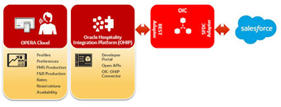
This is a typical Opera Integration use case – extract guest details from reservations/profiles and put them into a CRM for sales and marketing purposes. Simple scenario here – create contacts in SFDC for new Opera reservations. Here I query the Profile and Reservations objects in Opera via OHIP and then leverage the OIC SFDC adapter to create the relevant Contacts in SFDC. This will be a scheduled job that runs on a regular basis, ensuring my guest profiles etc are in sync with the relevant contact data in SFDC. Starting point, as usual, is Postman and the starter collection delivered by OHIP. Read the complete article here and watch the webcast Connect Opera with Oracle SaaS.

PaaS Partner Community

For regular information on Oracle PaaS become a member in the PaaS (Integration & Process) Partner Community please register here.

clip_image003 Blog clip_image005 Twitter clip_image004 LinkedIn image[7][2][2][2] Facebook clip_image002[8][4][2][2][2] Wiki

Technorati Tags: SOA Community,Oracle SOA,Oracle BPM,OPN,Jürgen Kress
Guidelines when moving Integration Workloads from SOA to Oracle Integration by Shreenidhi Raghuram

image

Introduction

The aim of this blog is to guide customers when they set out to migrate their integration solutions from SOA to Oracle Integration (OIC). 
The focus in this blog is to help customers during the creation, configuration of Oracle Integration service instances, and also provide best practices for choosing the right OIC features and integration patterns when developing SOA equivalent integrations on Oracle Integration Cloud.

The existing SOA workloads could be running in customer data-centers, on-premise or on Oracle cloud. The blog aims to provide high level guidelines when moving integration workloads from SOA to Oracle Integration Cloud.

To start with the SOA Suite installations could be any of the below –

  • SOA on-premise – Where SOA is installed and managed on-premise or within customer datacenter
  • SOACS on OCI – these are SOACS installation running on customer OCI tenancy in one of the OCI regions worldwide
  • SOACS Marketplace – This is the newer installations which run on OCI and are installed using the SOA images available in Oracle market place
  • SOACS on OCI Classic – These are legacy SOACS installations running on OCI Classic datacenters. Read the complete article here.

PaaS Partner Community

For regular information on Oracle PaaS become a member in the PaaS (Integration & Process) Partner Community please register here.

clip_image003 Blog clip_image005 Twitter clip_image004 LinkedIn image[7][2][2][2] Facebook clip_image002[8][4][2][2][2] Wiki

Technorati Tags: SOA Community,Oracle SOA,Oracle BPM,OPN,Jürgen Kress
Subscribing to Fusion Custom Business Events in OIC by Kishore Katta

image

Integration with all Oracle Fusion based Cloud services – like Oracle Financials Cloud , Oracle SCM Cloud, Oracle Engagement Cloud each service publishes Business Events wherein Oracle Integration can subscribe. Events is a great way to broadcast information to downstream systems for Real Time Synchronization

ERP cloud publishes 2 types of events. In this blog we will see how Custom Business Events can be published in ERP cloud and subscribe in OIC

Whenever we create a new custom object in Oracle ERP Cloud using Oracle Application Composer,  custom business events can be published explicitly. Once published, these business events can be subscribed from Oracle Integration (OIC). Business Events  are visible for selection when configuring the Oracle ERP Cloud Adapter in OIC as a trigger connection in the Adapter Endpoint Configuration Wizard.

For each Custom parent Object, OIC supports 3 Standard Events (Create, update, and delete ). Any operations on child custom objects generate update events for the parent custom objects. When  a record is created, OIC is notified with record detail information through event handler framework on subscription to any related events. Read the complete article here.

PaaS Partner Community

For regular information on Oracle PaaS become a member in the PaaS (Integration & Process) Partner Community please register here.

clip_image003 Blog clip_image005 Twitter clip_image004 LinkedIn image[7][2][2][2] Facebook clip_image002[8][4][2][2][2] Wiki

Technorati Tags: SOA Community,Oracle SOA,Oracle BPM,OPN,Jürgen Kress

Beating OIC’s FTP File Limits by Phil Wilkins

image

OIC has for some time now provided an FTP adaptor and more recently included a full FTP server capability. But both have limits on the file size and capacity. The file constraints (1GB for a file and 500GB for the FTP server) shouldn’t be an issue for day to day activities. But OIC is often used to support SaaS Financials and other cloud solutions which do have monthly process cycles which can generate significant data volumes, for example, payroll data. The question is how to handle such data with such constraints?

Data Integration?

There is a school of thought that points to the possibility when handling such large data volumes we should consider using Data Integration rather than a more event-centric integration tool. Personally, I think there is a lot of validity in the argument, and anyone dealing with such bulky data activities should review and question if it is a better answer.

That said, there are cases where it does stand-up. For example:

  • If an organization is transitioning to a more event-driven or at least micro-batch model, you have to start the transition somewhere, but trying to line up changes everywhere can be problematic, so we have to start somewhere. Building an integration process so you have an event model developed, but in the interim, you need to take that bulk mechanism and convert it to a small stream of events.
  • You may be working with a bulk data extract and only need a small subset of the data provided, it won’t help if the data is also represented using a verbose notation such as XML.

Other Approaches

How to overcome the constraint? Oracle databases aren’t so constrained, and SQLLoader can provide an easy means to ingest the data into a staging table. The benefit of this is:

  • if you’re only needing a subset of the data you can pull just those columns from the table.
  • the bulk of the use of XML to be self-describing can be shed through using the DB schema as being more prescriptive. Read the complete article here.

PaaS Partner Community

For regular information on Oracle PaaS become a member in the PaaS (Integration & Process) Partner Community please register here.

clip_image003 Blog clip_image005 Twitter clip_image004 LinkedIn image[7][2][2][2] Facebook clip_image002[8][4][2][2][2] Wiki

Technorati Tags: SOA Community,Oracle SOA,Oracle BPM,OPN,Jürgen Kress