Oracle Integration Cloud New Home Page by Ankur Jain

image

The new Home page gives you an ability to get jump-started on building your integrations that are called as Accelerators and Recipes.

Accelerators are run-ready business integrations or technical patterns you can configure and activate

Whereas Recipes are starter templates that give you a head start.

See the below video to check the all-new features of the Oracle Integration Cloud home page and how it works. Read the complete article here

PaaS Partner Community

For regular information on Oracle PaaS become a member in the PaaS (Integration & Process) Partner Community please register here.

clip_image003 Blog clip_image005 Twitter clip_image004 LinkedIn image[7][2][2][2] Facebook clip_image002[8][4][2][2][2] Wiki

Technorati Tags: SOA Community,Oracle SOA,Oracle BPM,OPN,Jürgen Kress

Oracle Integration (OIC) Recipes – HCM Directory Synchronisation by Niall Commiskey

image

The 2 previous posts dealt with Technical Accelerators, now to the recipes. Recipes are best practice implementations of common use cases. They provide a very quickstart to implementing these.

Let’s look at the above recipe; as you can see, I have already installed it. Read the complete article here.

PaaS Partner Community

For regular information on Oracle PaaS become a member in the PaaS (Integration & Process) Partner Community please register here.

clip_image003 Blog clip_image005 Twitter clip_image004 LinkedIn image[7][2][2][2] Facebook clip_image002[8][4][2][2][2] Wiki

Technorati Tags: SOA Community,Oracle SOA,Oracle BPM,OPN,Jürgen Kress
Inbound EDI message to Oracle Integration for B2B World by Subhani Sahib Italapuram

image

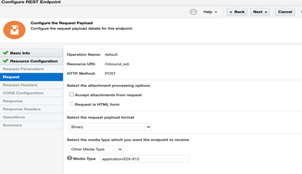
In this blog, let’s create a basic inbound integration flow that receives an EDI document through a REST request, parses and validates the EDI, converts it to XML, and returns the XML in the response.

We shall use REST adapter to keep our blog simple but, you can replace it as per your business requirement, could be FTP adapter, SOAP or any other technology adapters/application specific adapter.

Prerequisites for implementing this use case: Prior implementation experience with Oracle Integration or Basic knowledge of using Oracle Integration and refer my previous blogs on B2B

Let us look at the with the implementation:

  1. In the navigation pane of Oracle Integration, click Integrations.
  2. On the Integrations page, click Create.
  3. Select App Driven Orchestration as the style to use. The Create New Integration dialog is displayed.
  4. In the What do you want to call your integration? field, enter Inbound EDI via REST, then click Create

Configure the REST Adapter Trigger Connection

On the integration canvas, click the start node and select Sample REST Endpoint Interface as the trigger connection.

The Adapter Endpoint Configuration Wizard opens. Read the complete article here.

PaaS Partner Community

For regular information on Oracle PaaS become a member in the PaaS (Integration & Process) Partner Community please register here.

clip_image003 Blog clip_image005 Twitter clip_image004 LinkedIn image[7][2][2][2] Facebook clip_image002[8][4][2][2][2] Wiki

Technorati Tags: SOA Community,Oracle SOA,Oracle BPM,OPN,Jürgen Kress

How to Keep Exactly One OIC Integration Instance running 24/7 by John Graves

image

Introduction

Oracle Integration has a great feature to periodically run a flow instance according to a schedule.  This schedule can be something simple, like "run every 10 minutes" or something more complex using a calendar ICS definition.  This works great for scenarios that run periodically, then exit.

However, I’ve recently been tasked to have an OIC flow monitor and process messages from an Oracle Stream using the new Oracle Stream Adapter.  This would ideally require a flow to be running 24/7 to look for messages and process them.

But OIC is not designed to run a single flow instance for more than a few minutes and if we setup a schedule, there will be gaps in time where there are no instances running.

Use-case

My use-case is for the Streams Adapter, but this will work regardless of what is being done inside a given flow. So what’s the secret?  Use the OIC REST APIs for the scheduling service. Read the complete article here.

PaaS Partner Community

For regular information on Oracle PaaS become a member in the PaaS (Integration & Process) Partner Community please register here.

clip_image003 Blog clip_image005 Twitter clip_image004 LinkedIn image[7][2][2][2] Facebook clip_image002[8][4][2][2][2] Wiki

Technorati Tags: SOA Community,Oracle SOA,Oracle BPM,OPN,Jürgen Kress
Creating Journal Entries in Netsuite via OIC by Niall Commiskey

imageMy first real foray into the magical world of bookkeeping. What is a journal entry?

Apparently journal entries are used to record business transactions. And remember the books must always balance – so here’s an example for a sales entry – I sell my Hare of the Dog T-Shirt on credit, so I need to debit accounts receivable and credit sales. Ask your accountant, if you need to know more.

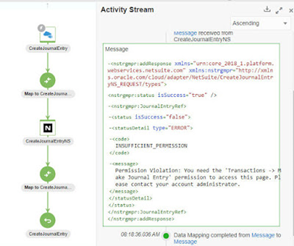
Net, net, I can create a Journal Entry in Netsuite, via the OIC Netsuite adapter. Again, I am not a Netsuite or bookkeeping expert, so my first step is to create a Journal Entry in Netsuite itself and then look at the xml version. Read the complete article here.

PaaS Partner Community

For regular information on Oracle PaaS become a member in the PaaS (Integration & Process) Partner Community please register here.

clip_image003 Blog clip_image005 Twitter clip_image004 LinkedIn image[7][2][2][2] Facebook clip_image002[8][4][2][2][2] Wiki

Technorati Tags: SOA Community,Oracle SOA,Oracle BPM,OPN,Jürgen Kress
How to Configure the New Oracle Integration Cloud (OIC) Streams Adapter by John Graves

image

Introduction

I’m writing this blog because some of the existing documentation is a bit confusing and I initially struggled to get the new OIC Streams Adapter configured.

Connector Parameters

There are not many things to setup for the connector, but let me explain each one in detail:

Bootstrap Servers

If you search around, you’ll find lots of different examples of how this should look.  Some use "cell-1" prefix, some show "console" prefix and others. For The OIC Streams Adapter, this should be in the form:

streaming.us-ashburn-1.oci.oraclecloud.com:9092

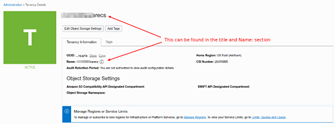
where the "us-ashburn-1" is replaced with your region (e.g. us-ashburn-1,us-phoenix-1, etc).  This can be found in the URL when you login to the OCI console. The rest should be the same and the port should be 9092.

SASL Username

This part can be confusing.  The docs often speak of an ID, but not meaning OCID.  Let me try to make it clear here.  It is made up of three parts: Read the complete article here.

PaaS Partner Community

For regular information on Oracle PaaS become a member in the PaaS (Integration & Process) Partner Community please register here.

clip_image003 Blog clip_image005 Twitter clip_image004 LinkedIn image[7][2][2][2] Facebook clip_image002[8][4][2][2][2] Wiki

Technorati Tags: SOA Community,Oracle SOA,Oracle BPM,OPN,Jürgen Kress

My private Corner – monthly updates

image

Every month’s you have the opportunity to join our live community webcast to learn something new and to ask your questions. These one hour product updates include a live demo. Special thanks to the excellent speaker team! Since June 2020 more than 1863 persons have attended the live webcasts and many more the on-demand versions. Missed one of them? Watch them on-demand www.tinyurl.com/CommunityUpdate (membership required). Like the webcast, want to suggest a topic? Send us your feedback #PaaSCommunity!

PaaS Partner Community

For regular information on Oracle PaaS become a member in the PaaS (Integration & Process) Partner Community please register here.

clip_image003 Blog clip_image005 Twitter clip_image004 LinkedIn image[7][2][2][2] Facebook clip_image002[8][4][2][2][2] Wiki

Technorati Tags: SOA Community,Oracle SOA,Oracle BPM,OPN,Jürgen Kress
Zero loss of service, smoothly migration from Salesforce to Oracle Apps CX with Oracle Integration Cloud Salesforce Adapter plus helper technology tools such as an Autonomous Database, Data Integration and Object Storage by Javier Mugueta

image

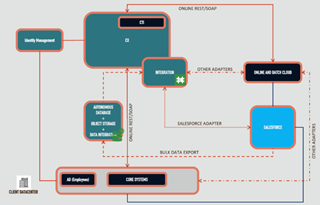
One of the big challenges regarding migrations is operational risk when moving from the old solution to the new one. Oracle Cloud provides technologies and tools that help reduce the risk to almost zero by leveraging patterns that allow the coexistence of both solutions during the migration phase, giving the alternative to deploy Oracle CX in tracks that can go live sequentially avoiding a big bang approach which typically sounds scaring.

Salesforce Adapter

Oracle Integration Cloud (OIC) provides Salesforce Adapter, an bidirectional integration component that can be used for synchronisation between Salesforce and Oracle CX during the migration project, helping in the roll out of the different modules in CX by maintaining objects created in one side replicted in the other or vice versa.

With the adapter, we can catch CRUD operations events in both sides, creating/updating/deleting the corresponding entities as long as data is created in SalesForce or Oracle. Read the complete article here.

PaaS Partner Community

For regular information on Oracle PaaS become a member in the PaaS (Integration & Process) Partner Community please register here.

clip_image003 Blog clip_image005 Twitter clip_image004 LinkedIn image[7][2][2][2] Facebook clip_image002[8][4][2][2][2] Wiki

Technorati Tags: SOA Community,Oracle SOA,Oracle BPM,OPN,Jürgen Kress

Update Lookups in Oracle Integration Cloud by Ankur Jain

image

Update lookups in Oracle Integration Cloud are one of the most common requirements and this has been asked in multiple forums on how to update lookup hence the article is written.

Integration doesn’t have inbuilt functions to update lookup values at runtime. To solve this, OIC offers a REST API to update lookup as per need. The REST API details:

PUT: /ic/api/integration/v1/lookups/{lookupname}

Request Payload: Read the complete article here.

PaaS Partner Community

For regular information on Oracle PaaS become a member in the PaaS (Integration & Process) Partner Community please register here.

clip_image003 Blog clip_image005 Twitter clip_image004 LinkedIn image[7][2][2][2] Facebook clip_image002[8][4][2][2][2] Wiki

Technorati Tags: SOA Community,Oracle SOA,Oracle BPM,OPN,Jürgen Kress

Extending OOTB OIC Recipe – Extract New Hire Info by Kishore Katta

imageBackground

In the previous blog we have seen how to Install and Run a Recipe – Extract New Hire Info from Oracle HCM Cloud. Extract definition is created and executed in HCM Cloud as a pre-requisite for the OOTB Recipe to work. In this blog we will create an Integration Flow in OIC to extend and automate the whole process of executing the Extract instead of having it done manually from HCM Cloud. Also, there has been incredible uptake of cloud storage buckets which provides a simple, low cost mechanism to store both structured and unstructured data. Data Archiving is one of the key use cases for extracts. We will store the extracts in an OCI Storage bucket as part of the Integration Flow. Read the complete article here.

PaaS Partner Community

For regular information on Oracle PaaS become a member in the PaaS (Integration & Process) Partner Community please register here.

clip_image003 Blog clip_image005 Twitter clip_image004 LinkedIn image[7][2][2][2] Facebook clip_image002[8][4][2][2][2] Wiki

Technorati Tags: SOA Community,Oracle SOA,Oracle BPM,OPN,Jürgen Kress