Silently Install SOA QuickStart Revised by Martien van den Akker

image

Earlier I wrote a script to silently install the SOA QuickStart installer and wrote about it here.

Several customer projects further and iterations on the script further, I revised this script lately again. Because I’m leaving this customer in a week or three, and to help my successors to build up their development pc’s in a comfortable and standard way.

You may have noticed that over the years I’ve grown fond of scripting stuff, especially building up environments. At my current customer every developer installed the several IDE’s, test tooling and TortoiseSVN by hand. So every one has the tooling in another folder structure. Checked out the subversion repo’s by hand and therefor in another structure.

So, scripting things help in having the tooling in the same folder structure for every one. And that reduces the chances on problems and misconfigurations. Especially preventing the infamous phrase: ‘It works with me…’ when having problems. One of the revisions is to have nested if-else structures in the script, which makes it more readable then the conditional goto’s we were used to use in Windows .bat files.

Another important improvement was to have the install binaries in a separate fileserver-repository. This makes it possible to have the scripting and depending files in a Subversion repository. The script improved installSoaQS.bat is as follows: Read the complete article here.

PaaS Partner Community

For regular information on Oracle PaaS become a member in the PaaS (Integration & Process) Partner Community please register here.

clip_image003 Blog clip_image005 Twitter clip_image004 LinkedIn image[7][2][2][2] Facebook clip_image002[8][4][2][2][2] Wiki

Technorati Tags: SOA Community,Oracle SOA,Oracle BPM,OPN,Jürgen Kress
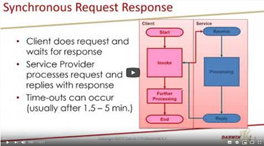
The magic of CorrelationSets by Martien van den Akker

image

CorrelationSets in BPEL are as old as the road to Rome. I wrote about it before:

Although it was in the BPEL project from the very beginning, when Oracle acquired it in 2004, you might not have dealt with it before. But maybe not even realized that you can use it in Oracle Integration Cloud, with structured processes.

In the first week of June I got to do a presentation about this subject, in a series of Virtual Meetups.

If you weren’t able to attend, but would like to watch it then you’re in luck, it got recorded by Phil Wilkins: Read the complete article here.

In my presentation I start with a simple demo based on a BPEL process. I have put the resulting code on GitHub: https://github.com/makker-nl/blog/tree/master/CorrelationDemo.

Then I move on to a more complicated situation in OIC. I created an export for that project and placed it on GitHub too: https://github.com/makker-nl/blog/tree/master/CorrelationDemoOIC

This allows you to inspect it and try to recreate it yourself. Read the complete article here.

PaaS Partner Community

For regular information on Oracle PaaS become a member in the PaaS (Integration & Process) Partner Community please register here.

clip_image003 Blog clip_image005 Twitter clip_image004 LinkedIn image[7][2][2][2] Facebook clip_image002[8][4][2][2][2] Wiki

Technorati Tags: SOA Community,Oracle SOA,Oracle BPM,OPN,Jürgen Kress

PaaS Partner YouTube Update December 2020


The December video includes three topics:

• Oracle Digital Assistant newsletter

• Partner Community Webcasts on-demand

• Extend SaaS services with serverless solutions

For regular updates please subscribe to our YouTube channel here. Thanks for your likes and sharing the video on YouTube and LinkedIn. For the latest PaaS Community information please visit our Community update wiki here (Community membership required).

clip_image003 Blog clip_image005 Twitter clip_image004 LinkedIn image[7][2][2][2] Facebook image Meetups

Technorati Tags: YouTube,PaaS,Cloud,Middleware Update,WebLogic,WebLogic Community,Oracle,OPN,Jürgen Kress

Embedded File Server (SFTP) in Oracle Integration by Subhani Sahib Italapuram

image

We will be talking about how to leverage embedded File Server in Oracle Integration in this blog.

Prerequisites: Basic knowledge of Oracle Integration.

Targeted audience: Oracle Integration Developers OR Oracle Integration Users.

File Server Overview

File Server provides an embedded SFTP server within Oracle Integration, enabling organizations to focus on building integrations without needing to host and maintain a separate SFTP server.

Enable File Server in OIC

Before use, File Server must be enabled for the Oracle Integration instance. Enabling File Server is a one-time action completed in Oracle Cloud Infrastructure by an administrator with manage access to the instance. See Enable File Server

File Server Users

The primary users of File Server include:

· Oracle Integration administrators, who use File Server to manage server settings and configure users, groups, and folders, including permissions. To administer File Server as described in this guide, you must be assigned the ServiceAdministrator role in Oracle Integration. See Oracle Integration Service Roles in Provisioning and Administering Oracle Integration and Oracle Integration for SaaS, Generation 2.

· Oracle Integration developers, who use File Server along with the FTP adapter in integrations to read and write files.

· Oracle Integration users, who access File Server using an SFTP client. These users must be configured and enabled as users in File Server. Their access is controlled by their assigned folders and folder permissions. Read the complete article here.

PaaS Partner Community

For regular information on Oracle PaaS become a member in the PaaS (Integration & Process) Partner Community please register here.

clip_image003 Blog clip_image005 Twitter clip_image004 LinkedIn image[7][2][2][2] Facebook clip_image002[8][4][2][2][2] Wiki

Technorati Tags: SOA Community,Oracle SOA,Oracle BPM,OPN,Jürgen Kress

OIC – SurveyMonkey 2 Netsuite Synchronisation by Niall Commiskey

imageSimple Use Case

As the sages say, its a gift to be simple and I’m fully d’accord with that. I have been asked to detail how to sync contact details from SurveyMonkey to Netsuite. Ok, said I to myself, let’s do it! It was only afterwards that I started considering what would be a valid use case from a business perspective. I came up with the following use case – A B2B scenario – I keep a list of customer contacts in SurveyMonkey.

AS you can see, I have 2 customers Commiskey Inc. and MacCumascaigh c.t.
Commiskey Inc has 2 contacts
Mac Cumascaigh c.t. has 1 contact. Read the complete article here.

PaaS Partner Community

For regular information on Oracle PaaS become a member in the PaaS (Integration & Process) Partner Community please register here.

clip_image003 Blog clip_image005 Twitter clip_image004 LinkedIn image[7][2][2][2] Facebook clip_image002[8][4][2][2][2] Wiki

Technorati Tags: SOA Community,Oracle SOA,Oracle BPM,OPN,Jürgen Kress

Cloud Platform Partner Advisory Council 2020

image

You are invited to the 12th edition of the annual global Partner Advisory Council by the Oracle Integration Product Management team.

Why should you attend? Get the latest product updates and roadmap details from the Oracle Integration Product Management team. Provide feedback based on your customer project experience and discuss with the Oracle team product improvements & future directions.

Who should attend? Senior consultants architects, technical leaders & CTOs, who implemented successful Oracle Integration.

Schedule: December 8th-10th 2020

Agenda
December 8th 8:00-9:00 PST
Keynotes presented by Clay Magouyrk, Executive Vice President, Oracle Cloud Strategy and Andrew Mendelsohn, Executive Vice President, Oracle Data Management Strategy.
December 9th 2020 8:30-11:00 PST
Welcome & introduction & partner feedback
OIC Vision and Roadmap and Release Management
Extreme Scalability and Enhanced Resilience in Oracle Integration, Antony Reynolds
Summery & wrap up day 1
December 10th 2020 8:30-11:00 PST
Adapters & Accelerators & Recepis, Michael Meiner
Extend SaaS with Visual Builder and Process
API Management, Robert Wunderlich
SOA modernization, Ravi Pinto and Sandhya
Summery & wrap up

For details please visit the registration page here.

PaaS Partner Community

For regular information on Oracle PaaS become a member in the PaaS (Integration & Process) Partner Community please register here.

clip_image003 Blog clip_image005 Twitter clip_image004 LinkedIn image[7][2][2][2] Facebook clip_image002[8][4][2][2][2] Wiki

Technorati Tags: SOA Community,Oracle SOA,Oracle BPM,OPN,Jürgen Kress

Invoking One Integration From Another Call Integration Action Step by Step by Harshit Yadav

image

In this blog, we are going to discuss, How to use Oracle Integration Cloud Service’s Call Integration Action feature to invoke an integration from another integration.

It is particularly useful when you need to have multiple small nested integrations rather than having one large integration. It is easier to diagnose errors when you have multiple small nested integrations. If you want to know more about How to Managing & Monitoring Integration Errors in Oracle Integration Cloud (OIC) check our blog.

If you are new to OIC and want to get familiarise then check our blog Oracle Integration Cloud (OIC) For Beginners Overview

Activate and Test Sample Hello World Integration

We will be using the sample  Hello World integration as the integration to be invoked (Child Integration) and Hello World Invoke integration will be used as the parent integration that will invoke the child integration. Both the integrations are provided as a sample but we will simplify the Invoke integration part for easy understanding. Read the complete article here.

PaaS Partner Community

For regular information on Oracle PaaS become a member in the PaaS (Integration & Process) Partner Community please register here.

clip_image003 Blog clip_image005 Twitter clip_image004 LinkedIn image[7][2][2][2] Facebook clip_image002[8][4][2][2][2] Wiki

Technorati Tags: SOA Community,Oracle SOA,Oracle BPM,OPN,Jürgen Kress
OIC – Design Time variables – August Release New Feature by Niall Commiskey

image

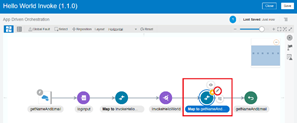
Integration Properties are user defined properties available for usage by activities(e.g Notification ,Log) as read-only data within the flow. Integration properties provides a degree of integration configurability outside of the flow itself. For example, an email address used by a Notification activity within the flow can be externalized as integration property ‘sendTo’ allowing it to be configured without having to edit the integration itself or having to pass the value at runtime.

Ok, makes sense – so how to leverage this in OIC – Read the complete article here.

PaaS Partner Community

For regular information on Oracle PaaS become a member in the PaaS (Integration & Process) Partner Community please register here.

clip_image003 Blog clip_image005 Twitter clip_image004 LinkedIn image[7][2][2][2] Facebook clip_image002[8][4][2][2][2] Wiki

Technorati Tags: SOA Community,Oracle SOA,Oracle BPM,OPN,Jürgen Kress
Manage User & Roles Oracle Integration Cloud by Ankur Jain

image

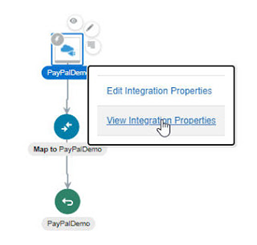
It’s really important to manage users and roles for Oracle Integration Cloud. This article focuses on how to create users and assign different users to OIC application roles.

A user needs to be created under Oracle Identity Cloud Service (IDCS).

Once a user is created, he/she can be assigned to any Oracle Cloud service and OIC is one of them. Read the complete article here.

PaaS Partner Community

For regular information on Oracle PaaS become a member in the PaaS (Integration & Process) Partner Community please register here.

clip_image003 Blog clip_image005 Twitter clip_image004 LinkedIn image[7][2][2][2] Facebook clip_image002[8][4][2][2][2] Wiki

Technorati Tags: SOA Community,Oracle SOA,Oracle BPM,OPN,Jürgen Kress

Automating End to End Bulk Export from Oracle ERP Cloud using Oracle Integration (Part 1- ERP Cloud Callback) by Kishore Katta

image
Background

What are the main methods available for Outbound Integrations within Oracle ERP Cloud?

Oracle ERP Cloud has provided a very useful functionality which empowers business enterprises to extract financials data from Oracle Cloud ERP and integrate it with on-premise systems, legacy systems and other Cloud Applications.

One very common business scenario in an enterprise is to generate extracts of financials data like Journals, Payables Invoices, Payments, Receivable Invoices etc for legacy or third-party partner systems. Let’s see the Outbound mechanisms and the purpose of each of them based on the volume of data that needs to be sent to downstream applications

BIP Extract

Designed to extract incremental data for scenarios ex:

–Get the list of invoices that has been approved since last execution

–Extract payment data since last execution to update downstream or upstream applications to reflect payments Read the complete article here.

PaaS Partner Community

For regular information on Oracle PaaS become a member in the PaaS (Integration & Process) Partner Community please register here.

clip_image003 Blog clip_image005 Twitter clip_image004 LinkedIn image[7][2][2][2] Facebook clip_image002[8][4][2][2][2] Wiki

Technorati Tags: SOA Community,Oracle SOA,Oracle BPM,OPN,Jürgen Kress