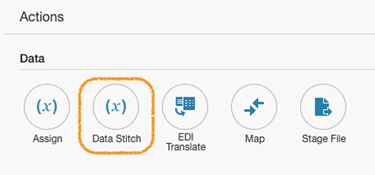
Data Stitch: Append and Assign for repeating elements by Jorge Herreria

imageSummary

Data Stitch has ASSIGN, APPEND and REMOVE operations. Some use-cases are easy to grasp; some others require a little thinking… On this blog I‘ll explain behaviors I deem they are not straightforward to derive the outcome for using Data Stitch in a OIC Orchestration:

· Assigning into unbounded elements (aka – Repeating Elements)

· Appending instances into an unbounded element and how to complete the data.

I assume you are familiar with XPath Expressions and XSD Schemas, because there is a lot a lingo in this post…

You will not see many screen shots. My goal is to give you the concepts so you become a good data “tailor?”

Expect some twisted humor here and there; more often that none.

I love this quote:  Perfection is boring; therefor laugh at your mistakes.

Syntax

For Data Stitch Sentences

(TO XPath expression).OPERATION(FROM XPath expression)

Example:

($v1/ns0:customer/ns0:name).ASSIGN(“Jorge Herreria”)

On explanations you will see step/step/step/… in location paths. I’m going to omit the namespace prefixes, and just put the local-name on each step; looking to make it easy to read… However on actual XPathExpressions you’ll see prefixes. Read the complete article here.

PaaS Partner Community

For regular information on Oracle PaaS become a member in the PaaS (Integration & Process) Partner Community please register here.

clip_image003 Blog clip_image005 Twitter clip_image004 LinkedIn image[7][2][2][2] Facebook clip_image002[8][4][2][2][2] Wiki

Technorati Tags: SOA Community,Oracle SOA,Oracle BPM,OPN,Jürgen Kress

Recursive calls in Oracle Integration Flows (Scenario: Paginated API calls for large Data Sets) by Jang-Vijay Singh

image

A number of use-cases can be implemented cleanly using a recursive approach. This post is not to debate the pros and cons of recursion versus looping but provides a simple approach to achieve this.

For scenarios such as the ones listed below, and possibly more, this approach is quite efficient, concise, maintainable, and most importantly, it is highly scalable. It also leaves a smaller runtime footprint with a smaller execution time per instance than a looping flow instance. This also makes error handling easier as I will describe later.

  • Polling (continuously monitoring an FTP location, a database, or an API output)
  • Paginated API’s (when the target system exposes an API with a paginated* interface such as the eBay findProducts operation)
  • Retryable flows
Paginated Calls

Many software systems store large sets of data. For instance, a vendor might have hundreds of thousands of products and product-prices listed on EBay or an eCommerce store. They might have millions of transactions in their PayPal account.

There might occasionally be legitimate scenarios to fetch all of this data. The software system can provide various interfaces to export such data in bulk. Such a bulk data export interface could be raw data files, access to a database, but also a standard API like a Rest Service.

For reasons of performance and good practice, such Rest API’s (typically a GET operation) would limit the amount of data returned in any one call by using a pagination strategy. An eCommerce store could list hundreds of thousands of products for instance, and it wouldn’t be appropriate to return such a large data set in a single call. A pagination strategy would involve setting parameters like pageNumber and pageSize. Read the complete article here.

PaaS Partner Community

For regular information on Oracle PaaS become a member in the PaaS (Integration & Process) Partner Community please register here.

clip_image003 Blog clip_image005 Twitter clip_image004 LinkedIn image[7][2][2][2] Facebook clip_image002[8][4][2][2][2] Wiki

Technorati Tags: SOA Community,Oracle SOA,Oracle BPM,OPN,Jürgen Kress

Global Variables and Data Stitch in Oracle Integration by Ankur Jain

image

This article covers the two most important features which Oracle announced recently. One of the features allows us to create Global Variables that are available throughout the integration. The feature is part of feature flag “oic.ics.console.integration.complex-variables“. The variable can be one any types as below:

  • String
  • Boolean
  • Date
  • Date Time
  • Object
  • Number

Global Variables

  • Another feature is Data Stitch which allows us to create assignments of complex type (Object) variables. This feature is part of feature flag “oic.ics.console.integration.stitch-action“.

The minimum Oracle Integration version required for the feature is 200113.1400.33493.

Enable two feature flag on your OIC instance to enjoy these features:

PaaS Partner Community

For regular information on Oracle PaaS become a member in the PaaS (Integration & Process) Partner Community please register here.

clip_image003 Blog clip_image005 Twitter clip_image004 LinkedIn image[7][2][2][2] Facebook clip_image002[8][4][2][2][2] Wiki

Technorati Tags: SOA Community,Oracle SOA,Oracle BPM,OPN,Jürgen Kress

Integrate SaaS hands-on Bootcamps Webtraining for Asia, South America, India and US

imageDo you want to find out why Gartner named Oracle as a Leader in Magic Quadrant for three years in row? Are you able to innovate quickly in the new digital world? Are you looking for ways to integrate systems and data faster using a modern cloud integration platform? Attend the Oracle Integration Bootcamp, a three days hands-on training for Oracle partners!

Oracle Product Management is pleased to invite Oracle Partners to attend a 3-days hands-on workshop on how to integrate with ERP & HCM applications using Oracle Integration Cloud. This Invite-Only hands-on workshop will be delivered at No-Fee to Partners. It will consist of presentations, demos, and hands-on labs.

Oracle Integration Cloud (OIC) offers Integration, Process Automation and Visual design capabilities that help business analysts and IT specialists to automate end to end business processes across departments. Oracle Integration Cloud offers a simple recipe to be successful in this application integration and process automation journey: Build, Integrate and Engage.

Schedule:

Get the latest OIC training material here (community membership required).

For additional location please visit our website here.

Can’t attand a hands-on bootcamp? Watch on-demand webcast:

PaaS Partner Community

For regular information on Oracle PaaS become a member in the PaaS (Integration & Process) Partner Community please register here.

clip_image003 Blog clip_image005 Twitter clip_image004 LinkedIn image[7][2][2][2] Facebook clip_image002[8][4][2][2][2] Wiki

Technorati Tags: SOA Community,Oracle SOA,Oracle BPM,OPN,Jürgen Kress

Testing REST trigger-based Integrations in OIC Console by Sumit Tomar

image

Test Integration feature allows users to test an App-driven integration with REST trigger by invoking it directly from OIC without relying on a third party software.

How it works

Activate the Integration.

Click on "Run" link.

A popup will be displayed as below.

Click on Test link to go to Test Integration page.

Test Integration page will have 3 sections: Operation, Request, and Response.

Operation and Request section will have the endpoint’s metadata populated.

Operation

Operation section contains Operation option(if Integration trigger is configured with multiple operations) along with HTTP method and relative URI (for the selected operation in case of multiple operations). Read the complete article here.

PaaS Partner Community

For regular information on Oracle PaaS become a member in the PaaS (Integration & Process) Partner Community please register here.

clip_image003 Blog clip_image005 Twitter clip_image004 LinkedIn image[7][2][2][2] Facebook clip_image002[8][4][2][2][2] Wiki

Technorati Tags: SOA Community,Oracle SOA,Oracle BPM,OPN,Jürgen Kress
OIC –> Netsuite Asynchronous Request Processing by Niall Commiskey

image

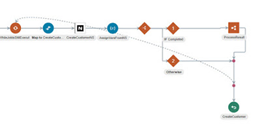
Another feature supported by the OIC Netsuite adapter – With asynchronous requests, your client application sends a request to SOAP web services, where it is placed in a processing queue and handled asynchronously with other requests. Your client application does not wait for a response but goes on to other work. After a job is submitted, a job Id is returned in the SOAP web services response. Your client application can then check on the status and result of the request by referencing the job Id.
Asynchronous processing may be advantageous in the following situations:
– If you expect your connection to NetSuite to be slow or unstable.
– If your job is large, and its processing can be postponed until off-peak hours.
Be aware that asynchronous responses may not be returned immediately. Before committing to using
asynchronous operations, you should consider this factor and decide whether it fits in with your business logic.
Above description taken from the Netsuite Web Services doc here

Here is a very simple example of leveraging this feature, when creating a new customer.
This is the synchronous version of such an integration, now to change this to asynchronous –

Step 1 – Add an Assign Activity to create the following 2 variables.
They will be used later on. Read the complete article here.

PaaS Partner Community

For regular information on Oracle PaaS become a member in the PaaS (Integration & Process) Partner Community please register here.

clip_image003 Blog clip_image005 Twitter clip_image004 LinkedIn image[7][2][2][2] Facebook clip_image002[8][4][2][2][2] Wiki

Technorati Tags: SOA Community,Oracle SOA,Oracle BPM,OPN,Jürgen Kress
HCM Data loader in Oracle Integration by Ankur Jain

image

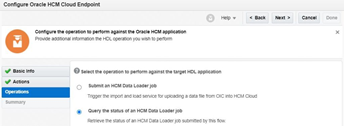
Oracle Integration Cloud leverages HCM adapter to load data into HCM via the Data loader option. HCM Data Loader is a powerful tool for bulk-loading and maintaining data. The data can be from any source. You can use HCM Data Loader for data migration, ongoing maintenance of HCM data, and coexistence scenarios, where core HR data is uploaded regularly.

The article focuses on how to use an HCM adapter to load data into HCM.

Useful link

ERP Adapter in Oracle Integration Cloud

Oracle Autonomous Transaction Processing Adapter in OIC

HCM Adapter in Oracle Integration

YouTube channel to learn via videos

Below is the use case which I’m going to cover here:

  • Create a scheduled integration
  • Pick up a Worker zip file from FTP location
  • Use HCM adapter to load the data file
  • Use the HCM adapter to extract the status of the data loader job.

Follow the below steps in order to achieve integration.

  • Create a scheduled based integration and name it as “HCM_Data_Loader_Integration”

Configure FTP to read Worker file

PaaS Partner Community

For regular information on Oracle PaaS become a member in the PaaS (Integration & Process) Partner Community please register here.

clip_image003 Blog clip_image005 Twitter clip_image004 LinkedIn image[7][2][2][2] Facebook clip_image002[8][4][2][2][2] Wiki

Technorati Tags: SOA Community,Oracle SOA,Oracle BPM,OPN,Jürgen Kress
OIC and Netsuite –> Custom fields revisited by Niall Commiskey

image

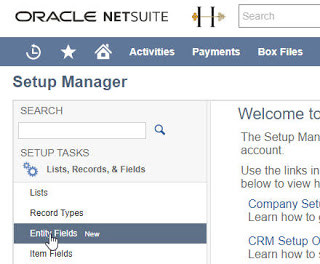
This post again is mainly note for myself – however, others may also find it useful! Here I detail how to create a new custom field in Netsuite. This field will hold the ecological rating of the customer – one of the following values –
A, B, or C. I create what is known in Netsuite as an Entity Field. I also created a new List Record to hold the valid values of A, B and C. I apply this field to the Customer object. Now to the Display settings – read the complete article here.

PaaS Partner Community

For regular information on Oracle PaaS become a member in the PaaS (Integration & Process) Partner Community please register here.

clip_image003 Blog clip_image005 Twitter clip_image004 LinkedIn image[7][2][2][2] Facebook clip_image002[8][4][2][2][2] Wiki

Technorati Tags: SOA Community,Oracle SOA,Oracle BPM,OPN,Jürgen Kress
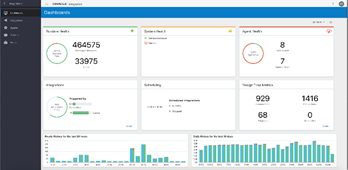
Integration Monitoring and Scheduling pages – Progressive Web App UI Experience by Arya Sanyal

image

Pre-requisites

These pages were made public on June 8th, 2020.

What’s New

New Oracle Integration (OIC) monitoring and scheduling UI is built using Oracle JavaScript Extension Toolkit (Oracle JET) utilizing full benefits of JavaScript, CSS3 and HTML5 design and development principles. This UI is compliant with latest UX standards and offers consistent user experience across all Integration pages.

Following are the highlights of the new features and enhancements included in the new UI:

· Monitoring UI:

· Progressive load of data on all pages

· System health information displayed on Dashboard

· Search feature in Activity Stream page

· New page for Design time Audit with full search capabilities

· Aborted instances count included in Integrations page

· Summary of all instances displayed in Integrations page

· Integrated Activity Stream in Tracking page

· Scheduled Run information now displayed in Tracking page

· Inline display of error messages in Errors page

  • Scheduling UI
    • Reorganized Future Runs and Schedule page
    • Ability to search for older completed requests
    • Ability to select timezone while defining schedules

Toolbar, table-view layout and search and filtering consistency maintained across Designer and Monitoring pages. Please check Integration pages – Progressive Web App UI Experience blog for in-depth details about these items and also about the new Navigation scheme.

Dashboard

  • Runtime Health card shows total number of received and failed messages. The chart shows the success rate
  • ‘System Health’ card shows status of Service Instance and Agents
  • A new ‘Agent Health’ card has been added which shows total number of agents and how many agents are down. The chart shows the the percentage of available(up) agents. Read the complete article here.

PaaS Partner Community

For regular information on Oracle PaaS become a member in the PaaS (Integration & Process) Partner Community please register here.

clip_image003 Blog clip_image005 Twitter clip_image004 LinkedIn image[7][2][2][2] Facebook clip_image002[8][4][2][2][2] Wiki

Technorati Tags: SOA Community,Oracle SOA,Oracle BPM,OPN,Jürgen Kress

OIC –> Evernote Adapter by Niall Commiskey

image

Apparently an elephant never forgets – I do, hence my post – Again, all text in italics from the Oracle docs.

Starting point, as always, is the Oracle docs here

So what is a typical integration use case involving Evernote? The Evernote Adapter can be used in a variety of scenarios. For example, you can collect rich information about your customers, including notes, contact details, and other information into secure notes that only authorized team members can view in one place through Evernote. To collect contact information, use the Oracle Service Cloud (RightNow) Adapter. Evernote offers a REST api, so there are some pre-reqs to leveraging this via the OIC Evernote adapter.

Pre-requisites

1. Sign in to Evernote – yes, it is free.

2. Navigate to dev.evernote.com Read the complete article here.

PaaS Partner Community

For regular information on Oracle PaaS become a member in the PaaS (Integration & Process) Partner Community please register here.

clip_image003 Blog clip_image005 Twitter clip_image004 LinkedIn image[7][2][2][2] Facebook clip_image002[8][4][2][2][2] Wiki

Technorati Tags: SOA Community,Oracle SOA,Oracle BPM,OPN,Jürgen Kress