Invoice Automation in the Cloud into Oracle ERP Cloud, EBS, JDE or PeopleSoft connected with Oracle Integration

image

Arcivate are a dynamic cloud solutions provider offering SaaS Invoice Automation, tightly integrated with Oracle ERP platforms.

Invoice processing can be labour intensive, costing organisations time and money through less than efficient processes. Mi Invoices the Arcivate invoice processing solution, automates the paper-intensive AP invoice process by coupling scanning, capture and imaging technology with workflow to reduce errors, increase throughput and boost efficiency. This allows organisations to shift their focus to the management of information from the processing of data.

Mi Invoices is a SaaS solution providing Oracle Invoice Automation and is a true cloud environment that is multi-tenanted to give a rapid deployment for customers and so maximise benefit of the solution instantly. Mi Invoices forms a critical part of improving your procure to pay, P2P, processes, by automating the capture and processing of supplier invoices. Invoice processing is seamless integrated into ERP Cloud, EBS, JDE & PeopleSoft based on Oracle Integration. For details please visit the Oracle Cloud Marketplace here.

PaaS Partner Community

For regular information on Oracle PaaS become a member in the PaaS (Integration & Process) Partner Community please register here.

clip_image003 Blog clip_image005 Twitter clip_image004 LinkedIn image[7][2][2][2] Facebook clip_image002[8][4][2][2][2] Wiki

Technorati Tags: SOA Community,Oracle SOA,Oracle BPM,OPN,Jürgen Kress
Jarvis Pizzeria: Summary of a Decision Model Use Case by Marcel van de Glind

image

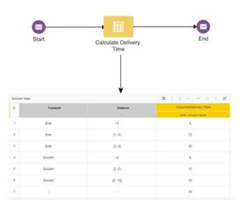
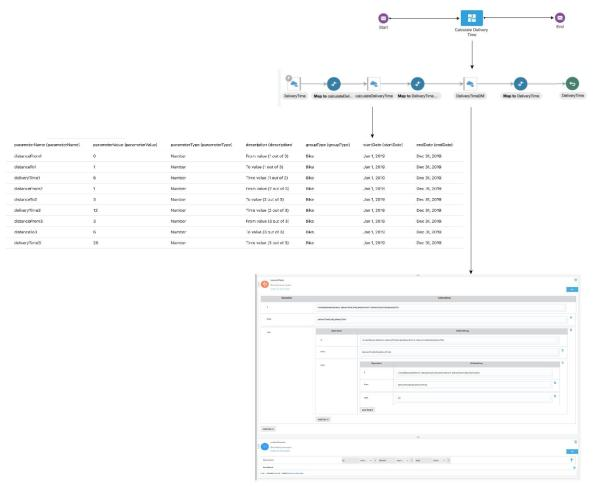
We have written a blog series of 6 posts describing a Decision Model Use Case. Because it concerns a series of multiple blogs and it may be difficult to oversee the whole. We will outline the full picture in this blog.

Summary

The Use Case is about accessing a Decision Model via ICS from PCS. The data used in the DM is retrieved from a Business Object in ICS and sent to the DM. The DM request data and the DM outcomes are stored in a BO in JSON format via an integration.

Using a DM in PCS (how to manage versions …) In the first blog we make the first version of the Decision Model. In this implementation we call the Decision Model directly from PCS. We also pay attention to the difference between versions and snapshots of Decision Models, and how to use them.

image

Using a DM in ICS In this blog we adjust the call from PCS so that the call from PCS goes through ICS. Hereby the creation of this ICS integration is explained step by step.

How to manage Masterdata of a DM (part 1)

In this blog we show a way to move the constant data in the Decision Model to the integration, with the purpose that the Decision Model therefore needs to be adjusted less often. It also emerges that this does have an impact on the internal structure of the Decision Model. The model has been changed from a decision table to nested if-then-else constructions.

How to manage Masterdata of a DM (part 2)

image

In part 1 we moved the constant data from the Decision Model to the integration. In the integration, use was made of variable with a constant value (as was the case in the DM). In this blog we show how we can get the values ​​from a database table (Business Object) instead of this constants.

Managing DM Masterdata Validity Period

In this blog we will expand the Use Case further with a validity period for the masterdata in the Business Object. Because this only contains changes to already existing components, the overview image does not change.

Input and Output Storage of Decision Model Invokes

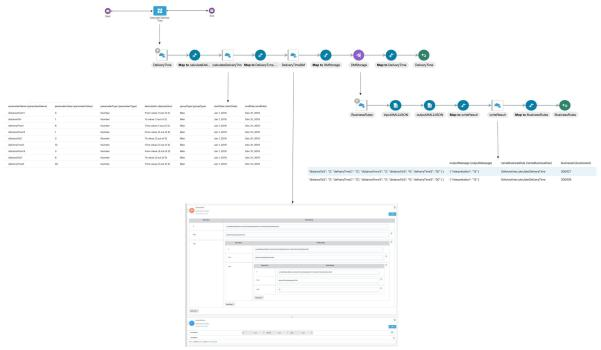
In the sixth and final blog we have further elaborated the Use Case. The whole has been expanded with the storage in a BO of the DM input and output messages. A piece of javaScript was also discussed with which XML messages can be converted to JSON.

The image below shows the final result.

image

note: click this link for a list of all Jarvis Pizzeria post.

PaaS Partner Community

For regular information on Oracle PaaS become a member in the PaaS (Integration & Process) Partner Community please register here.

clip_image003 Blog clip_image005 Twitter clip_image004 LinkedIn image[7][2][2][2] Facebook clip_image002[8][4][2][2][2] Wiki

Technorati Tags: SOA Community,Oracle SOA,Oracle BPM,OPN,Jürgen Kress

Additional new content PaaS Partner Community

image

· Oracle CEO Safra Catz: What Moving to Oracle Cloud Has Done for Us “Though we have thousands of customers and references, our own experience adopting Oracle Cloud applications and infrastructure allows us to serve as a unique and knowledgeable advisor to organizations that want to know how to go about their own digital transformation,” says Catz. Among the benefits? Closing the books in 12 days or fewer and cutting the time for talent reviews by more than 70%. And there’s more.

· Build, Test, and Deploy Applications on Oracle Cloud—for Free

· Online Jeweler Says ‘Yes’ to Better Process

· Podcast: Are Robots Coming for Manufacturing Jobs?

· Paving the Way for Connected Construction

· Oracle Modern Cloud Day January–March | various locations

· Oracle Cloud Test Drive January–April | various locations

PaaS Partner Community

For regular information on Oracle PaaS become a member in the PaaS (Integration & Process) Partner Community please register here.

clip_image003 Blog clip_image005 Twitter clip_image004 LinkedIn image[7][2][2][2] Facebook clip_image002[8][4][2][2][2] Wiki

Technorati Tags: SOA Community,Oracle SOA,Oracle BPM,OPN,Jürgen Kress
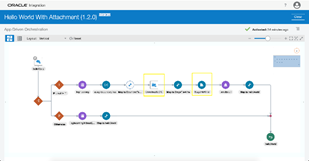
How to send email with attachments in OIC? By Niket Narang

image

Have you ever encountered a scenario where the requirement was to send attachments along with email notification in OIC and you could not? Well, now it is possible. The new feature makes it really easy to configure notification activity to add attachments along with the email.

Prerequisite

  • Enable feature flag: 
oic.ics.console.notification-attachment

Click here to learn on how to enable feature flag. The minimum Oracle Integration version required for the feature is 191020.0200.32001.

Step By Step Guide to Send Notification with Attachment

There are multiple ways in OIC to work with files. Some of the options are i) configure REST adapter to accept attachments as part of the request, ii) use Stage file activity to create a new file or iii) use FTP adapter to download the file to OIC from remote location for further processing. Any file reference(s) created by upstream operations can be used to configure attachments in the notification activity. Let us learn how we can configure notification action to send email with attachments in simple steps:

  • For this blog, we will clone the sample integration ‘Hello World’ that is available with OIC.
  • Navigate to the integration landing page, clone the ‘Hello World’ integration and name it ‘Hello World with Attachment’. Read the complete article here.

PaaS Partner Community

For regular information on Oracle PaaS become a member in the PaaS (Integration & Process) Partner Community please register here.

clip_image003 Blog clip_image005 Twitter clip_image004 LinkedIn image[7][2][2][2] Facebook clip_image002[8][4][2][2][2] Wiki

Technorati Tags: SOA Community,Oracle SOA,Oracle BPM,OPN,Jürgen Kress
Top tweets PaaS Partner Community May 2020

imageMay top tweets by PaaSCommunity

Send your tweets @soacommunity #PaaSCommunity and follow us at http://twitter.com/soacommunity. Make sure you share your content with the community!

PaaS Partner Community

For regular information on Oracle PaaS become a member in the PaaS (Integration & Process) Partner Community please register here.

clip_image003 Blog clip_image005 Twitter clip_image004 LinkedIn image[7][2][2][2] Facebook clip_image002[8][4][2][2][2] Wiki

Technorati Tags: SOA Community,Oracle SOA,Oracle BPM,OPN,Jürgen Kress, Twitter

Using Stage File Read/Write operation to encrypt/decrypt files by Namratha Narayan

image

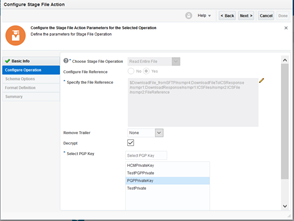
You may have a scenario where the requirement is to retrieve an encrypted file from sFTP server and send that to external REST endpoint in encrypted/unencrypted mode with additional capabilities such as processing in the middle.

The new feature makes it easy to configure PGP keys in Stage File Read/Write operation to decrypt/encrypt file up to 10 MB in size.

Prerequisite

Enable following features:

  • oic.suite.settings.certificate  (It will allow user to manage certificate life cycle in OIC)
  • oic.ics.stagefile.pgp.key.support (It will allow user to upload and delete PGP keys in stage file)

To enable feature flags – Refer to Blog on Enabling Feature Flags in Oracle Integration

The minimum Oracle Integration version required for the feature is 190904.0200.31130

Step By Step Guide

  • Public Key is used for Encryption and Private Key for decryption. In order to use encrypt/decrypt files we have to upload PGP keys in OIC. Read the complete article here.

PaaS Partner Community

For regular information on Oracle PaaS become a member in the PaaS (Integration & Process) Partner Community please register here.

clip_image003 Blog clip_image005 Twitter clip_image004 LinkedIn image[7][2][2][2] Facebook clip_image002[8][4][2][2][2] Wiki

Technorati Tags: SOA Community,Oracle SOA,Oracle BPM,OPN,Jürgen Kress

How To Configure an Integration flow with Binary Content Using Rest Adapter as Trigger in Oracle Integration by Sri Ranga Prashant Padala

image

Binary Content Type Support in Oracle Integration Rest Adapter Trigger

Introduction:

Oracle Integration Rest Adapter now supports application/octet-stream in the trigger request and response, with this new capability, it will be possible to invoke an integration using Binary content over REST. Similarly, it will be possible for an integration flow to return binary content in response to a request over REST. Before we do a deep dive on the feature let us start with understating what is application/octet-stream

About "application/octet-stream" MIME attachments:

A MIME attachment with the content type "application/octet-stream" is a binary file. Typically, it will be an application or a document that must be opened in an application, such as a spreadsheet or word processor. If the attachment has a filename extension associated with it, you may be able to tell what kind of file it is. A .exe extension, for example, indicates it is a Windows or DOS program (executable), while a file ending in .doc is probably meant to be opened in Microsoft Word. Read the complete article here.

PaaS Partner Community

For regular information on Oracle PaaS become a member in the PaaS (Integration & Process) Partner Community please register here.

clip_image003 Blog clip_image005 Twitter clip_image004 LinkedIn image[7][2][2][2] Facebook clip_image002[8][4][2][2][2] Wiki

Technorati Tags: SOA Community,Oracle SOA,Oracle BPM,OPN,Jürgen Kress
Integration Bootcamp Virtual Webtraing Europe, Middle East & Africa June 15th-17th 2020

Integrate SaaS Bootcamp Europe 06.2020Oracle Integration Bootcamp Europe, Middle East & Africa June 15th-17th 2020

SaaS solutions like HCM, CX and ERP Cloud need to be integrated and customized. Oracle Integration connects SaaS solutions with out of the box adapters.

Do you want to find out why Gartner named Oracle as a Leader in Magic Quadrant for three years in row? Are you able to innovate quickly in the new digital world? Are you looking for ways to integrate systems and data faster using a modern cloud integration platform? Attend the Oracle Integration Bootcamp, a three days hands-on training for Oracle partners!

Oracle Product Management is pleased to invite Oracle Partners to attend the 3-day hands-on workshop on how to integrate with ERP & HCM applications using Oracle Integration Cloud. This Invite-Only hands-on workshop will be delivered at No-Fee to Partners. It will consist of presentations, demos, and hands-on labs.

Schedule: June 15th-17th 2020

Workshop format:

  • Web based training with presentations, demos, and hands-on labs
  • Attendees will receive training environment login during the workshop

Audience:

  • Oracle SaaS partners who implement ERP, HCM and CX solutions
  • Consultants and Architect with technical background

For additional local training’s please visit the website here.

PaaS Partner Community

For regular information on Oracle PaaS become a member in the PaaS (Integration & Process) Partner Community please register here.

clip_image003 Blog clip_image005 Twitter clip_image004 LinkedIn image[7][2][2][2] Facebook clip_image002[8][4][2][2][2] Wiki

Technorati Tags: SOA Community,Oracle SOA,Oracle BPM,OPN,Jürgen Kress

Integration Designer Pages – Progressive Web App UI Experience by Harish Vinayachandran

image

Pre-requisites

Enable oic.ics.featureflag.spa.designer feature flag to see the new Integration designer pages.

What’s New

New UI is built using Oracle JavaScript Extension Toolkit (Oracle JET) utilizing full benefits of JavaScript, CSS3 and HTML5 design and development principles. This new UI is compliant with latest UX standards and offers consistent user experience across Integration designer pages.

Following are the highlights of the new features and enhancements included in the new UI:

  • Single configuration UI to view and configure dependent resources of an integration.
  • Inline edit of connection resource configuration.
  • Lookup editor enhancements for ease of editing large table sets using paging controls.
  • Single click callout library configuration.
  • Pre-filtered results on resource list page based on logged in username.
  • Enhancements on the resource list page to filter by created and last updated username.
  • Progressive loading of UI contents.
  • Continuous and smooth scrolling of resource list contents.
  • Ease of accessing primary actions on resources list page.

Changes in the top-level menu structure

The top level menu in Suite UI has been restructured to make way for the new UI. When the logged in user has access to designer pages, a click on the ‘Integrations’ menu now opens a sub-menu with links to designer landing pages instead of page re-direction. Click the sub-menu links displays the respective landing page. Read the complete article here.

PaaS Partner Community

For regular information on Oracle PaaS become a member in the PaaS (Integration & Process) Partner Community please register here.

clip_image003 Blog clip_image005 Twitter clip_image004 LinkedIn image[7][2][2][2] Facebook clip_image002[8][4][2][2][2] Wiki

Technorati Tags: SOA Community,Oracle SOA,Oracle BPM,OPN,Jürgen Kress

How to Encrypt/Decrypt Files in OIC by Bipin Kumar

image

Encrypt/Decrypt capabilities in Stage Files

You may have a scenario where the requirement is to retrieve an encrypted file from sFTP server and send that to external REST endpoint in encrypted/unencrypted mode with additional capabilities such as processing in the middle.

Stage File action in Integration canvas supports various file operations (list/read/write/zip/unzip). Existing OIC feature (oic.ics.stagefile.pgp.key.support) enables decrypt option while reading entire file and encrypt option while writing file. This feature is useful to process the file upto 10 MB size and doesn’t support decryption option while doing read file in segments. For more details, see blog: Using Stage File Read/Write operation to encrypt/decrypt files.

This blog explains the new feature(oic.ics.stagefile.firstclass.encrypt-decrypt ) which allows OIC user to encrypt or decrypt file of size up to 1GB.

Prerequisite

Enable following features:

  • oic.suite.settings.certificate  (It will allow user to manage certificate life cycle in OIC)
  • oic.ics.stagefile.firstclass.encrypt-decrypt (It will allow user to Encrypt or Decrypt a large file in stage file). Read the complete article here.

PaaS Partner Community

For regular information on Oracle PaaS become a member in the PaaS (Integration & Process) Partner Community please register here.

clip_image003 Blog clip_image005 Twitter clip_image004 LinkedIn image[7][2][2][2] Facebook clip_image002[8][4][2][2][2] Wiki

Technorati Tags: SOA Community,Oracle SOA,Oracle BPM,OPN,Jürgen Kress