Multiple resources with single REST: Oracle Integration by Ankur Jain

image

Struggling on how to expose a REST API with multiple resources in Oracle Integration Cloud. Here is the article which will help you to expose such REST APIs.

This feature is restricted with Feature Flag “oic.cloudadapter.adapter.rest.mvrp” which should be enabled on OIC pod before you start implementing the article.

See the article on feature flag.

Let’s gets started and see how to achieve this advance feature.

Use Case
  • Expose a single REST API to perform two operations
    • Insert employee details in DB
    • Get employee details from DB

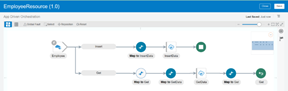
Once the integration is completed it will look like below

PICK action in OIC

Step by step procedure to achieve the use case
  • Create a App Driven Orchestration integration with name “EmployeeResource
  • Drop the REST connection as a trigger point, provide information as below and click checkbox

PaaS Partner Community

For regular information on Oracle PaaS become a member in the PaaS (Integration & Process) Partner Community please register here.

clip_image003 Blog clip_image005 Twitter clip_image004 LinkedIn image[7][2][2][2] Facebook clip_image002[8][4][2][2][2] Wiki

Technorati Tags: SOA Community,Oracle SOA,Oracle BPM,OPN,Jürgen Kress

Integration Bootcamp Virtual Webtraing India June 1st-3rd 2020

Integrate SaaS Bootcamp India 06.2020Oracle Integration Bootcamp June 1st – 3rd 2020
SaaS solutions like HCM, CX and ERP Cloud need to be integrated and customized. Oracle Integration connects SaaS solutions with out of the box adapters.

Do you want to find out why Gartner named Oracle as a Leader in Magic Quadrant for three years in row? Are you able to innovate quickly in the new digital world? Are you looking for ways to integrate systems and data faster using a modern cloud integration platform? Attend the Oracle Integration Bootcamp, a three days hands-on training for Oracle partners!

Oracle Product Management is pleased to invite Oracle Partners to attend the 3-day hands-on workshop on how to integrate with ERP & HCM applications using Oracle Integration Cloud. This Invite-Only hands-on workshop will be delivered at No-Fee to Partners. It will consist of presentations, demos, and hands-on labs.

Schedule: June 1st – 3rd 2020

Workshop format:

  • Web based training with presentations, demos, and hands-on labs
  • Attendees will receive training environment login during the workshop

Audience:

  • Oracle SaaS partners who implement ERP, HCM and CX solutions
  • Consultants and Architect with technical background

For additional local training’s please visit the website here.

PaaS Partner Community

For regular information on Oracle PaaS become a member in the PaaS (Integration & Process) Partner Community please register here.

clip_image003 Blog clip_image005 Twitter clip_image004 LinkedIn image[7][2][2][2] Facebook clip_image002[8][4][2][2][2] Wiki

Technorati Tags: SOA Community,Oracle SOA,Oracle BPM,OPN,Jürgen Kress

OIC Integration: defining and using constants by Jan Kettenis

image

Oracle Integration Cloud does not have native support for constants, but it is easy to set this up. This post discusses how. For integrations there are two ways to define constants in the Oracle Integration Cloud:

  • Lookups
  • Variables

Lookups are initially meant to support mapping of values from one domain to another. For example, one domain has country code using two letters ("NL") whereas another domain uses three letters ("NLD"). The lookup can then be used to "translate" the value from one to the other ("NL" <-> "NLD"). The same feature can also be used to support configurable constants by providing a list of name-value pairs. For example, in the following SMColor lookup two different name-value pairs have been stored, "YELLOW" with value "yellow", and "BLUE" with value "blue":
In an integration you can use this lookup to get the value by name using an XPath lookup function. As I will show hereafter, there are two different XPath expressions, each being used in a different context.
Variables are set in an Integration using the Assign activity. You can define a variable with a specific name and a value. You can also use a combination of the two. In the following example you see the variable "red" being defined with value "red" and the variable "blue" is initiated using an XPath expression that on its turn gets the value from the lookup name-value pair with name "BLUE": Read the complete article here.

PaaS Partner Community

For regular information on Oracle PaaS become a member in the PaaS (Integration & Process) Partner Community please register here.

clip_image003 Blog clip_image005 Twitter clip_image004 LinkedIn image[7][2][2][2] Facebook clip_image002[8][4][2][2][2] Wiki

Technorati Tags: SOA Community,Oracle SOA,Oracle BPM,OPN,Jürgen Kress

SaaS Business Event Integration using Oracle ERP Adapter and Engagement Cloud Adapter in OIC–Webcast May 20th 2020

Rimageegister for this Webcast on May 20th 2020
This one-hour advisor webcast is recommended for technical users wanting to learn how to integrate Oracle ERP Cloud and Oracle Engagement Cloud) with other external applications using Business Event subscriptions using Oracle Integration Cloud.
Topics:
* Introduction: What is Business Event Integration
* Workflow for Configuring Business Event Integration
* Other Configuration Considerations
* Troubleshooting References
* Q&A

For details please visit the registration page here.

PaaS Partner Community

For regular information on Oracle PaaS become a member in the PaaS (Integration & Process) Partner Community please register here.

clip_image003 Blog clip_image005 Twitter clip_image004 LinkedIn image[7][2][2][2] Facebook clip_image002[8][4][2][2][2] Wiki

Technorati Tags: SOA Community,Oracle SOA,Oracle BPM,OPN,Jürgen Kress

PaaS (Process & Integration) Partner Community Newsletter May 2020

Dear PaaS Partner Community

Oracle Insight, part of Oracle Integration, will launched in our community webcast May 26th. Join us to empower business owners with KPI’s and dashboards build on their integration data.

Many System Integrators us Oracle Integration to connect SaaS services with out of the box adapters. Oracle Integration can be also used by Independent Software Vendors to integrate their solutions with Oracle SaaS and Oracle on-premises applications. A great example is our partner ARCivate who connects their Mi Invoices payment solution with E-Business suite base on Oracle Integration.

Watch Filip Huysmans, Cimageontribute moving customers to the Oracle Cloud Platform. We want to promote also your customer success, submit your story via the customer reference program.

How to become a SaaS Integration Expert? We offer training material, free online training including free certification, documentation, trial services and support via our slack channel. Be prepared to connect your next SaaS solution with Oracle Integration. Thanks to the community for sharing all the integration articles: Advisor Webcast: SaaS Business Event Integration using Oracle ERP Adapter and Engagement Cloud Adapter in OIC – May 20, 2020 & Kafka Adapter for OIC & Netsuite Custom Field Discovery & Creating net new apps on top of Netsuite with OIC Visual Builder & Object Storage with Oracle Integration Cloud – Part 2 & B2B – EDI Translation support & Token required to provision an Oracle Integration Cloud instance & OIC – Monitoring API – Getting Activity Stream data & SOA Suite: SOAP Faults in BPEL and Mediator & Swagger API document from Any WADL & Schema in Oracle SOA.

In the process & innovation section we Chris released the latest hands-on training material. Thanks to Niall for the excellent use case to integrate and extend Netsuite with custom workflows. New process features include an updated expression builder. Which can be also used for task actions in e-mail notifications.

For a short summery of our monthly key information watch the PaaS Partner Updates on YouTube. The May edition highlights all resources to become a SaaS Integration expert. This month’s community webcast will the launch of Oracle Insight by Simone Geib. Join our PaaS Partner Community Webcast May 26th 2020.

Want to publish your best practice article & news in the next community newsletter? Please feel free to send it via Twitter @soaCommunity #PaaSCommunity!

To read the newsletter please visit www.tinyurl.com/PaaSNewsMay2020

Please like and share the newsletter at Twitter and LinkedIn

PaaS Newsletter May 2020

PaaS Partner Community

For regular information on Oracle PaaS become a member in the PaaS (Integration & Process) Partner Community please register here.

clip_image003 Blog clip_image005 Twitter clip_image004 LinkedIn image[7][2][2][2] Facebook clip_image002[8][4][2][2][2] Wiki

Technorati Tags: newsletter,SOA Community newsletter,SOA Community,Oracle,OPN,Jürgen Kress

Oracle Integration Cloud Service Lookups by Ankur Jain

image

Oracle Integration Cloud Service lookup associates values used by one application for a specific field to the values used by other applications for the same field. This provides the capability to map values across vocabularies or systems. For example, you can map country codes, city codes, currency codes, and so on.

In this short video, we are going to demonstrate as below:

  • Creating a Lookup
  • Adding Adapters or Domain Names to a Lookup
  • Cloning a Lookup
  • Deleting a Lookup
  • Export & Import Lookup
  • Updating Lookups in Active Integrations
  • Read the complete article here.

PaaS Partner Community

For regular information on Oracle PaaS become a member in the PaaS (Integration & Process) Partner Community please register here.

clip_image003 Blog clip_image005 Twitter clip_image004 LinkedIn image[7][2][2][2] Facebook clip_image002[8][4][2][2][2] Wiki

Technorati Tags: SOA Community,Oracle SOA,Oracle BPM,OPN,Jürgen Kress

Integration Patterns – Publish/Subscribe (Part2) by Daniel Martins Teixeira

image

In my previous blog post, I explained the integration pattern publish/subscribe, and how easy it is to make use of its power with Oracle Integration Cloud – all without the need to setup a messaging infrastructure.

The previous post covered the required steps to create the connection, the integration and the trigger (using Postman) to publish a message.

This second part will explain step-by-step how to consume those messages.

1. Create an Integration.

We will select the Type Subscribe To OIC.

Provide a name a description and optionally associate this integration with a package. Read the complete article here.

PaaS Partner Community

For regular information on Oracle PaaS become a member in the PaaS (Integration & Process) Partner Community please register here.

clip_image003 Blog clip_image005 Twitter clip_image004 LinkedIn image[7][2][2][2] Facebook clip_image002[8][4][2][2][2] Wiki

Technorati Tags: SOA Community,Oracle SOA,Oracle BPM,OPN,Jürgen Kress

Send Notification with attachment in Oracle Integration Cloud by Ankur Jain

image

In this article, we are going to showcase how to send Notification with attachment in Oracle Integration Cloud(OIC). This is new feature provided by Oracle and as of now it is controlled by feature flag. In order to use this feature, you have to raise a Service Request with Oracle to enable the feature flag “oic.ics.console.notification-attachment” into the OIC POD.
Once it is enabled, you can use notification activity to send notification along with attachments.

Let’s go ahead and see how to achieve this use case.

  • Create an App Driven Orchestration in OIC and give a name as “SendAttachment”
  • Drop the REST adapter as a trigger point and provide details as below:
    • What do you want to call your endpoint?: SendAttachment
    • What’s is the endpoint’s relative resource URI?: /attachment
    • What action do you want to perform on this endpoint: POST
    • Select Configure a request payload for this endpoint checkbox
    • Select Configure this endpoint to receive the response checkbox
    • Read the complete article here.

PaaS Partner Community

For regular information on Oracle PaaS become a member in the PaaS (Integration & Process) Partner Community please register here.

clip_image003 Blog clip_image005 Twitter clip_image004 LinkedIn image[7][2][2][2] Facebook clip_image002[8][4][2][2][2] Wiki

Technorati Tags: SOA Community,Oracle SOA,Oracle BPM,OPN,Jürgen Kress

Why and How to Integrate Oracle Policy Automation with Oracle Integration by Cristian Silipigni

Oracle Integration has recently introduced new functionalities to extend its connection capabilities.image

I’m especially talking about the enhanced Oracle Policy Automation adapter which is often used in integration projects when it’s required to extend SaaS applications.

The Oracle Policy Automation (OPA) adapter is available in Oracle Integration to address different scenarios allowing to OPA decisions to be invoked at any point of the integration flows. For example, when a Service Cloud Incident is created for a medical device manufacturer (for instance a hearing aid), an integration instance can be triggered by OPA used to find out what to do with this particular type of incident and routing properly the managed information. The integration layer (in this case OIC) performs all necessary actions saving the decision somewhere, invoking other processes / web services or pushing data to multiple applications Cloud and / or on-premise.

By using Oracle Integration we can easily integrate the OPA decisions logic into any enterprise application without the need to build a custom connector. There are some use cases where OPA is used in an integration scenario:

  • Auto-triage incidents to ensure service-level agreements are met
  • Calculate benefit payments using data stored in a legacy system
  • Recalculate leave entitlements when regulations changes
  • Calculate complex sales commissions

The Oracle Integration adapter today enables bidirectional communications allowing inbound and outbound communication patterns. Read the complete article here.

PaaS Partner Community

For regular information on Oracle PaaS become a member in the PaaS (Integration & Process) Partner Community please register here.

clip_image003 Blog clip_image005 Twitter clip_image004 LinkedIn image[7][2][2][2] Facebook clip_image002[8][4][2][2][2] Wiki

Technorati Tags: SOA Community,Oracle SOA,Oracle BPM,OPN,Jürgen Kress

SOA Suite 12.2.1.4 / OIC interoperability by Niall Commiskey

image

Hybrid integration architectures can be easily implemented, leveraging OIC and SOA Suite. This will be very interesting for existing SOA Suite customers who are moving to the cloud. For example, a customer could have existing integrations running on SOA Suite on-premise that implement orders 2 cash use cases. The customer may adopt a cloud based CRM e.g. Oracle Engagement Cloud or SFDC. She can now leverage OIC and SOA Suite to implement an Opportunity to Cash scenario. OIC responds to the event – new Opportunity created and calls the on-premise integration to do the rest.
Naturally, the interoperability between OIC and SOA Suite is bi-directional. Let’s begin with OIC invoking composites, running on SOA Suite.

OIC invoking SOA Suite Composites

My setup for this example is as follows –

1. OIC in the Oracle Cloud

2. SOA Suite installed on my laptop – JDeveloper 12.2.1.4 Quickstart. Read the complete article here.

PaaS Partner Community

For regular information on Oracle PaaS become a member in the PaaS (Integration & Process) Partner Community please register here.

clip_image003 Blog clip_image005 Twitter clip_image004 LinkedIn image[7][2][2][2] Facebook clip_image002[8][4][2][2][2] Wiki

Technorati Tags: SOA Community,Oracle SOA,Oracle BPM,OPN,Jürgen Kress