Jarvis Pizzeria: Managing DM Masterdata Validity Period by Marcel van de Glind

image

In a previous blog we described how to retrieving the masterdata from a VBCS Business Object. In this blog we will expand this further with a validity period for the masterdata

Now let’s expand our scenario (see previous blog)  a little further. Currently, one of the means of transport in the Decision model is a bike. Many bikes in the Netherlands are currently being replaced by an electrically powered version. Jarvis Pizzeria will also replace regular bikes with electric bikes from the new year. The change must also be implemented in the system (read Decision Model).

However, we do not want to implement this change at the turn of the year, but are already preparing it now. To achieve this, the variables must be provided with attributes that delimit the validity period of the variable.

Because we have already moved the variables of the Decision Model to a Business Object (see previous post), this is fairly easy to implement. Extending the BO definition with a start and end date and adjusting the selection query so that it takes these dates into account would be sufficient. So let’s see what that will look like.

Firstly, the adaptation of the BO definition (the last two fields are new). Read the complete article here.

PaaS Partner Community

For regular information on Oracle PaaS become a member in the PaaS (Integration & Process) Partner Community please register here.

clip_image003 Blog clip_image005 Twitter clip_image004 LinkedIn image[7][2][2][2] Facebook clip_image002[8][4][2][2][2] Wiki

Technorati Tags: SOA Community,Oracle SOA,Oracle BPM,OPN,Jürgen Kress
Jarvis Pizzeria: Input and Output Storage of Decision Model Invokes by Marcel van de Glind

image

In this blog we describe a way to store the Input and Output of Decision Model Invokes (in JSON format).

From an administrative point of view, we at Jarvis believe it is important that we can always see how we have achieved certain results. In this case this means that we want to know with which variables the Decision Model was invoked and what the outcomes were. How we do this is subject of this blog.

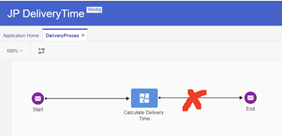
Saving the results is e.g. possible after performing the ‘Calculate Delivery Time’ integration in the Process. However, we have chosen to do this in the integration that we have already created (Managing DM Masterdata Validity Period) so that the process is not polluted with this technical step. As will appear later in this blog, we have to slightly update the payload of the call. The integration looks like this at the end of this previous blog. Read the complete article here.

PaaS Partner Community

For regular information on Oracle PaaS become a member in the PaaS (Integration & Process) Partner Community please register here.

clip_image003 Blog clip_image005 Twitter clip_image004 LinkedIn image[7][2][2][2] Facebook clip_image002[8][4][2][2][2] Wiki

Technorati Tags: SOA Community,Oracle SOA,Oracle BPM,OPN,Jürgen Kress
API Platform – Developer Portal Delegated Authentication by Phil Wilkins

image

The API Platform when you configure IDCS to provide the option to authenticate users against a corporate Identity Provider such as Active Directory will automatically update the Management Portal Login screen accordingly. However today it doesn’t automatically update the Developer Portal login page.  Whilst perhaps an oversight, it is very easy to fix manually when you know how. As result you can have a login that looks like:

The rest of this blog will show what’s needed to fix the problem.

The behaviour of the API Platform’s login pages for the Management and Developer Portals are controlled from the Oracle Cloud Management tier (rather than the API one specifically). Therefore you’ll need to login to your Identity Cloud instance and navigate to the management console and open the side bar.

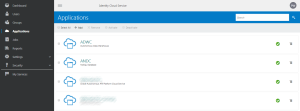
With that we need to open up the details about the applications. When you select the applications menu you’ll get something like this: Read the complete article here.

PaaS Partner Community

For regular information on Oracle PaaS become a member in the PaaS (Integration & Process) Partner Community please register here.

clip_image003 Blog clip_image005 Twitter clip_image004 LinkedIn image[7][2][2][2] Facebook clip_image002[8][4][2][2][2] Wiki

Technorati Tags: SOA Community,Oracle SOA,Oracle BPM,OPN,Jürgen Kress
Notifications from Oracle API Platform Cloud Service by Phil Wilkins

image

There are circumstances in which notifications from the Oracle API Platform CS could be seen as desirable.  For example, if you wish to ensure that the developers are defining good APIs and not accidentally implementing APIs that hit the OWASP Top 10 for APIs. Then you will probably configure things such that developer users can design the APIs, configure the policies, but only request an API to be deployed.

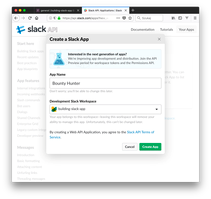
However, presently notifications through mechanisms such as email or via collaboration platforms such as Slack aren’t available.  But implementing a solution isn’t difficult.  For the rest of this blog we’ll explore how this might be implemented, complete with a Slack implementation.

The execution of any such activity effectively needs to follow the basic pattern of …

  1. detect the condition requiring a notification, such as a deployment request,
  2. gather the information so we can provide a meaningful request, for example, the API name being requested. Read the complete article here.

PaaS Partner Community

For regular information on Oracle PaaS become a member in the PaaS (Integration & Process) Partner Community please register here.

clip_image003 Blog clip_image005 Twitter clip_image004 LinkedIn image[7][2][2][2] Facebook clip_image002[8][4][2][2][2] Wiki

Technorati Tags: SOA Community,Oracle SOA,Oracle BPM,OPN,Jürgen Kress

Top tweets PaaS Partner Community April 2020

imageApril top tweets by PaaSCommunity

Send your tweets @soacommunity #PaaSCommunity and follow us at http://twitter.com/soacommunity. Make sure you share your content with the community!

PaaS Partner Community

For regular information on Oracle PaaS become a member in the PaaS (Integration & Process) Partner Community please register here.

clip_image003 Blog clip_image005 Twitter clip_image004 LinkedIn image[7][2][2][2] Facebook clip_image002[8][4][2][2][2] Wiki

Technorati Tags: SOA Community,Oracle SOA,Oracle BPM,OPN,Jürgen Kress, Twitter

API Management for Cloud Native Development by Robert Wunderlich

image

We’re pleased to announce the Limited Availability (LA) release of the Oracle Cloud Infrastructure API Gateway service.

This service is a highly available, fully managed gateway that enables developers to create governed HTTP/S interfaces for other Oracle Cloud Infrastructure services, including Oracle Functions, Container Engine for Kubernetes, and Compute.

The API Gateway service supports the delivery of APIs declaratively, as specified in the Cloud Native Computing Foundation’s definition of cloud native. In addition, this service provides support for the API Gateway pattern in a microservices context.

Cloud Native API Management Platform

The API Gateway service provides the following features:

  • HTTPS endpoint for Oracle Functions, which lets you write Oracle Functions and provide access to your users via RESTful API
  • RESTful APIs for any other HTTPS backends that you develop on Oracle Cloud Infrastructure
  • Resource server for AuthN/AuthZ that leverages functions to use any authorization server
  • Rate-limiting to protect your backends from spikes in volume
  • Interface filtering to protect your backends from unintended requests
  • Logging for monitoring your services by using Oracle Cloud Infrastructure common logging features

Common Use Cases

You can use the API Gateway service to address these common use cases:

  • Expose Oracle Functions as APIs: Applications built on Oracle Cloud Infrastructure and distributed applications on other clouds can access your Oracle Functions via RESTful APIs served by API Gateway. Using the gateway, you can provide an OAuth2 authenticated RESTful API for an Oracle Function. Read the complete article here.

PaaS Partner Community

For regular information on Oracle PaaS become a member in the PaaS (Integration & Process) Partner Community please register here.

clip_image003 Blog clip_image005 Twitter clip_image004 LinkedIn image[7][2][2][2] Facebook clip_image002[8][4][2][2][2] Wiki

Technorati Tags: SOA Community,Oracle SOA,Oracle BPM,OPN,Jürgen Kress

Simplified OAuth Config for Oracle Integration Cloud REST API using Postman! By Manish Kumar Gupta

image

This blog will be discussing very specific use case requirement which is more developer oriented and providing a quicker and efficient solution to invoke Oracle Integration REST API using OAuth access_token for testing purpose.

As an integration developer time to time you need to invoke Oracle Integration REST API to test API functionality. All the REST API in OIC needs a header parameter called “Authorization” which must needs to hold a valid access_token value in this format “Bearer access_token“.

In above format, “Bearer” is static world, However, access_token is the token value which we get after successfully OAuth Authentication from Oracle Identity Cloud Service.  Getting access_token from IDCS using code credentials flow is multi steps and cumbersome process.

However, developer can leverage Postman environment and variable features to simplify the process of getting access_token. That’s what, I will be covering in this blog.

Before I proceed further, I must redirect you to read my colleague blog which has greater in-depth explanation about what is IDCS, how IDCS govern security aspect of all Oracle PaaS products such as Oracle Integration Cloud, Analytics Cloud, Digital Assistant and so on and OAuth client and token generation process etc. I am recommending you to read his blog because I will be using few artefacts e.g. IDCS URL, Client ID, Client Secret etc which we need to get from IDCS OAuth Client Application as per the process given in his blog. Read the complete article here.

PaaS Partner Community

For regular information on Oracle PaaS become a member in the PaaS (Integration & Process) Partner Community please register here.

clip_image003 Blog clip_image005 Twitter clip_image004 LinkedIn image[7][2][2][2] Facebook clip_image002[8][4][2][2][2] Wiki

Technorati Tags: SOA Community,Oracle SOA,Oracle BPM,OPN,Jürgen Kress

Oracle Integration Cloud REST Adapter capabilities by Ankur Jain

image

Oracle Integration Cloud REST Adapter video will help you to understand about REST Adapter capabilities and limitations. This post might be interested for all who is just jumping into the Oracle Integration Cloud and want to understand how REST adapter works and how to create REST connection with the help of REST adapter in OIC. Here is the video for you which will help you to understand REST adapter in OIC. Read the complete article here.

PaaS Partner Community

For regular information on Oracle PaaS become a member in the PaaS (Integration & Process) Partner Community please register here.

clip_image003 Blog clip_image005 Twitter clip_image004 LinkedIn image[7][2][2][2] Facebook clip_image002[8][4][2][2][2] Wiki

Technorati Tags: SOA Community,Oracle SOA,Oracle BPM,OPN,Jürgen Kress

Using the next generation Activity Stream by Mamta Sangwan

image

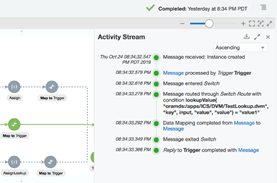
For debugging an instance or check payload in an instance, user had to use Audit Trail and Tracing on Tracking details screen. Since the information was scattered at two places, user had to keep switching between them to get the complete picture of the Instance. With this new Activity Stream, we are clubbing Audit Trail with Tracing information and showing more compact and easily readable Activity Stream.

Prerequisite for Activity Stream

  1. Enable feature flag: 

oic.ics.console.monitoring.tracking.improved-activity-stream

  1. The minimum Oracle Integration version required for the feature is 191030.0200.32180

Step By Step Guide to View Activity Stream

  1. Enable Tracing (with payload if required) for the integration. This is to view detailed payload information during development cycle. For production, it is recommended to keep Tracing turned off.
  2. Run the integration to create an instance.
  3. Navigate to Monitoring → Tracking page and check for the instance user wants to view Activity Stream. Read the complete article here.

PaaS Partner Community

For regular information on Oracle PaaS become a member in the PaaS (Integration & Process) Partner Community please register here.

clip_image003 Blog clip_image005 Twitter clip_image004 LinkedIn image[7][2][2][2] Facebook clip_image002[8][4][2][2][2] Wiki

Technorati Tags: SOA Community,Oracle SOA,Oracle BPM,OPN,Jürgen Kress

OIC – CPQ Integration part II by Niall Commiskey

image

Before looking more deeply at how one integrates with CPQ, let’s look at the product itself –

CPQ in 5 minutes…

CPQ has its own scripting tool – BML –

BML (BigMachines Extensible Language) is a scripting tool that is used to capture a company’s complex business logic within CPQ Cloud Configuration and Commerce. More in-depth info in the CPQ eBook here

In a nutshell – Oracle CPQ Cloud enables both enterprise and midsize companies to streamline the entire opportunity-to-quote-to-order process, including product selection, configuration, pricing, quoting, ordering, and approval workflows.

1. Configure -Create valid product configurations with user-friendly, dynamic interfaces – whether your customer needs simple bundles or more complex “engineered-to-order” scenarios. Read the complete article here.

PaaS Partner Community

For regular information on Oracle PaaS become a member in the PaaS (Integration & Process) Partner Community please register here.

clip_image003 Blog clip_image005 Twitter clip_image004 LinkedIn image[7][2][2][2] Facebook clip_image002[8][4][2][2][2] Wiki

Technorati Tags: SOA Community,Oracle SOA,Oracle BPM,OPN,Jürgen Kress