SOA Suite 12c: Collect & Deploy SCA composites & Service Bus artifacts using Maven by Maarten Smeets
April 6, 2016 Leave a comment
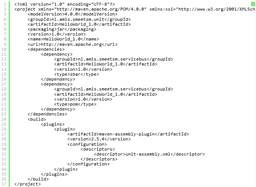 An artifact repository has many benefits for collaboration and governance of artifacts. In this blog post I will illustrate how you can fetch SCA composites and Service Bus artifacts from an artifact repository and deploy them. The purpose of this exercise is to show that you do not need loads of custom scripts to do these simple tasks. Why re-invent a wheel when Oracle already provides it?
This example has been created for SOA Suite 12.1.3. This will not work as-is for 11g and earlier since they lack OOTB Maven support for SOA Suite artifacts. In order to start using Maven to do command-line deployments, you need to have some Oracle artifacts in your repository. See http://biemond.blogspot.nl/2014/06/maven-support-for-1213-service-bus-soa.html on how to put them there. I have used two test projects which were already in the repository. A SCA composite called HelloWorld_1.0 and a Service Bus project also called HelloWorld_1.0. In my example, the SCA composite is in the GroupId nl.amis.smeetsm.composite and the Service Bus project is in the GroupId nl.amis.smeetsm.servicebus. You can find information on how to deploy to an artifact repository (e.g. Nexus) here.
SCA Composite
Quick & dirty with few dependencies
I have described getting your SCA composite out of Nexus and into an environment here. The process described there has very few dependencies. First you manually download your jar file using the repository API and then you deploy it using a Maven command like:
mvn com.oracle.soa.plugin:oracle-soa-plugin:deploy -DsarLocation=HelloWorld-1.0.jar -Duser=weblogic -Dpassword=Welcome01 -DserverURL=http://localhost:7101
In order for this to work, you need to have a (dummy) pom.xml file in the current directory. You cannot use the project pom file for this. The only requisites (next to a working Maven installation) are;
- the sar file
- serverUrl and credentials of the server you need to deploy to
Notice that you do not even need an Oracle home location for this. In order to build the project from sources however, you do need an Oracle home. Read the complete article here.
For regular information on Oracle SOA Suite become a member in the SOA & BPM Partner Community for registration please visit www.oracle.com/goto/emea/soa (OPN account required) If you need support with your account please contact the Oracle Partner Business Center.
 Blog
Blog  Twitter
  LinkedIn
 ![image[7][2][2][2]](https://paascommunity.com/wp-content/uploads/2013/04/image7222.png?w=20&h=20 "image[7][2][2][2]") Facebook
Facebook ![clip_image002[8][4][2][2][2]](https://paascommunity.com/wp-content/uploads/2013/04/clip_image00284222.jpg?w=26&h=23 "clip_image002[8][4][2][2][2]") Wiki
Wiki
Technorati Tags: SOA Community,Oracle SOA,Oracle BPM,OPN,Jürgen Kress




 PaaS Community Blog