Advanced HCM data loader (HDL) processing using OIC HCM adapter by Mani Krishnan

image 

Introduction

Oracle Integration Cloud (OIC) Integration provides adapter for most popular SaaS applications, including Oracle HCM Cloud.  This post focuses on integrating with HCM data loader (HDL) tool of HCM using OIC HCM adapter, multiple HDL file processing and fault handling. Information in this post is applicable to release 18.3.1 of OIC.

HCM Adapter basics

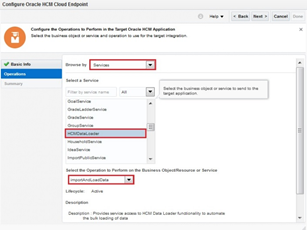
Refer to documentation here, for more information about HCM adapter. At a high level, HCM adapter makes it easier to integrate with HCM cloud using REST , HDL. HCM Extracts and ATOM feeds. As with all OIC adapters,a connection is first created using  Oracle HCM Cloud adapter with endpoints and credentials to the target HCM cloud environment. This connection is then used as invocation target in integration flows, at which time the specifics of the integration such as HDL or ATOM feeds is configured. Note that HCM adapter does not generate HDL-formatted file at this time, although this can be done using OIC. Refer to another A-team blog for guidance on generating HDL files within an integration flow. Below are the sample configuration screens for using HCM adapter for HDL imports.

Integration logic and Implementation

The integration flow elaborated here was demonstrated to a customer who had the following requirements:

  • Multiple HDL files from several source systems should be processed for each run, from FTP location
  • Files should be processed in alpha numeric order of file name. Read the complete article here.

PaaS Partner Community

For regular information on Oracle PaaS become a member in the SOA & BPM Partner Community for registration please visit www.oracle.com/goto/emea/soa (OPN account required) If you need support with your account please contact the Oracle Partner Business Center.

clip_image003 Blog clip_image005 Twitter clip_image004 LinkedIn image[7][2][2][2] Facebook clip_image002[8][4][2][2][2] Wiki

Technorati Tags: SOA Community,Oracle SOA,Oracle BPM,OPN,Jürgen Kress
PeopleSoft Integration using Oracle Integration Cloud – Part 2 by Jin Park

image

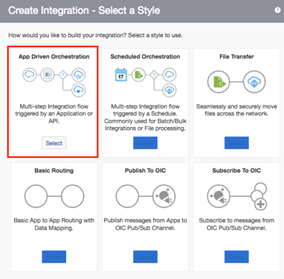
Now we’re ready to create connections and integration from OIC. If you missed part 1, please go for Part 1 now.  Also my colleague Carlos already wrote excellent blog, Teaching how to integrate Salesforce and Sale Cloud with Oracle Integration Cloud Service so you can look at how to configure outbound message from Salesforce.com and Salesforce Connection with Trigger from OIC.

We know OIC is capable of hybrid integration so you actually can use OIC for SaaS integration scenarios such as SaaS and SaaS or SaaS and on-premises. You may need to set up VPN between your data centre and OIC  using VPNaaS (VPN as a Service from Oracle) or just install OIC connectivity agent inside your organisation network. It’s really depending on the network / security policy of your organisation.

For PeopleSoft, it’s normally located behind corporate firewall so make sure you’ve got VPN is working or connectivity agent installed. So make sure that you’ve got successful web service call from public internet using the SOAP / REAT API test client such as Soap UI / Postman. That would save lots of your time to debug connectivity issue later. Don’t forget to enable web service request logging as well. PeopleSoft provides excellent internal tools to monitor web service request which I will explain next section.

Enable request message logging from PeopleSoft

Visit again to NavBar from top right-hand side from PeopleSoft, then go to Navigator, PeopleTools, Integration Broker, Integration Setup, Services. Now search by service name CI_CONTACT_INFO. After that, select operation CI_CONTACT_INFO_F.V1. Finally select Routings tab and set *Log detail to Header and Detail as below. This will enable web service request message logging which helps you to debug. Read the complete article here.

PaaS Partner Community

For regular information on Oracle PaaS become a member in the SOA & BPM Partner Community for registration please visit www.oracle.com/goto/emea/soa (OPN account required) If you need support with your account please contact the Oracle Partner Business Center.

clip_image003 Blog clip_image005 Twitter clip_image004 LinkedIn image[7][2][2][2] Facebook clip_image002[8][4][2][2][2] Wiki

Technorati Tags: SOA Community,Oracle SOA,Oracle BPM,OPN,Jürgen Kress
PeopleSoft Integration using Oracle Integration Cloud – Part 1 by Jin Park

image 

Luckily, I’ve got a chance to look at PeopleSoft integration with other SaaS app using OIC (Oracle Integration Cloud) and decided to share what I learned.

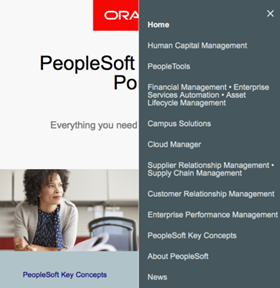
If you’re not familiar with PeopleSoft, please visit PeopleSoft Information Portal and just click hamburger menu on top right-hand side of web page. You will see it covers lots of things.

I’ll explain contact information synchronisation from Salesforce.com into PeopleSoft which is SOAP web service based integration. It is a typical integration use case for PeopleSoft. Will post REST API and file based integration in future as well.

PeopleSoft has excellent middleware layer called Integration Broker. And I’ve chosen SOAP web service for contact information component interface as it would be easiest and simplest way to expose simple business logic in PeopleSoft as SOAP web service. Of course, you have other options such as REST API,  JMS, file based integration, it really depends on organisation’s integration requirements. Read the complete article here.

PaaS Partner Community

For regular information on Oracle PaaS become a member in the SOA & BPM Partner Community for registration please visit www.oracle.com/goto/emea/soa (OPN account required) If you need support with your account please contact the Oracle Partner Business Center.

clip_image003 Blog clip_image005 Twitter clip_image004 LinkedIn image[7][2][2][2] Facebook clip_image002[8][4][2][2][2] Wiki

Technorati Tags: SOA Community,Oracle SOA,Oracle BPM,OPN,Jürgen Kress
Enabling the Future Today – Feature Flags in Oracle Integration Cloud by Antony Reynolds

image

Enabling the Future Today

Within Integration cloud we are moving to a model that allows us to trial new features without making them available to everyone.  Everone runs the same codebase but feature flags control what is available to a specific instance.  Why would we do this? For multiple reasons:

  • Gain feedback on new features before rolling them out to the whole user base.
  • Test new features in "the wild" in a controlled manner.
  • Be able to rollback new features that may have unforeseen problems.

How It Works

Each new feature is given a flag that is used to control its availability.  For instance the flag for the small footprint OIC agent was oic.adapters.connectivity-agent.light-weight-agent.  If this flag was enabled for a given OIC instance then they could download the lightweight connectivity agent.  Other OIC instances running the same code but with the flag turned off would not offer the new agent.

Flags are controlled from a central system and can be updated in real time by Oracle development and operations.  This means that feature flags can be turned on very quickly, and also if a problem occurs they can be disabled.

Feature Flag Lifecycle

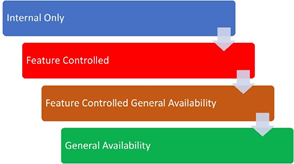
Feature flags have a lifecycle as illustrated below.

The different stages are:

Internal Only

You may see a product manager demo features on an instance that are not currently available, if using a production pod these may only be available to internal users.  This is where we try things out internally before turning them on for any customers.  Once we are happy with the feature internally we are ready to share it with selected customers and move the feature to Feature Controlled.  Note that this change in stage does not require any code changes, it just alters our internal approval process to enable the feature. Read the complete article here.


PaaS Partner Community

For regular information on Oracle PaaS become a member in the SOA & BPM Partner Community for registration please visit www.oracle.com/goto/emea/soa (OPN account required) If you need support with your account please contact the Oracle Partner Business Center.

clip_image003 Blog clip_image005 Twitter clip_image004 LinkedIn image[7][2][2][2] Facebook clip_image002[8][4][2][2][2] Wiki

Technorati Tags: SOA Community,Oracle SOA,Oracle BPM,OPN,Jürgen Kress

Top tweets PaaS Partner Community May 2019

image

May 2019 top tweets by PaaSCommunity

Send your tweets @soacommunity #PaaSCommunity and follow us at http://twitter.com/soacommunity. Make sure you share your content with the community!


PaaS Partner Community

For regular information on Oracle PaaS become a member in the SOA & BPM Partner Community for registration please visit www.oracle.com/goto/emea/soa (OPN account required) If you need support with your account please contact the Oracle Partner Business Center.

clip_image003 Blog clip_image005 Twitter clip_image004 LinkedIn image[7][2][2][2] Facebook clip_image002[8][4][2][2][2] Wiki

Technorati Tags: SOA Community,Oracle SOA,Oracle BPM,OPN,Jürgen Kress

API-Key Based Authentication: Quickly and Easily by Anuj Kaushal

image

API-Key based authentication is a simple way for providing secure access to APIs. This involves the following steps:

  1. Pre-requisite: User logs in to the service portal and finds or generates an API-Key.
  2. The API-Key is shared with the client application.
  3. The client application makes a request for a resource using the API key.

Steps required in API Key based authentication.

* An API-key is simply a token that a client provides when making API calls.

How to invoke a REST API protected with an API-Key using Oracle Integration Cloud?

Oracle REST Adapter provides a comprehensive way for consuming external RESTful APIs. It provides a re-usable connection that can be used to specify the security policy for accessing protected APIs. For consuming APIs protected using an API-Key, integration developers should proceed by selecting API Key Based Authentication security policy. Read the complete article here.

PaaS Partner Community

For regular information on Oracle PaaS become a member in the SOA & BPM Partner Community for registration please visit www.oracle.com/goto/emea/soa (OPN account required) If you need support with your account please contact the Oracle Partner Business Center.

clip_image003 Blog clip_image005 Twitter clip_image004 LinkedIn image[7][2][2][2] Facebook clip_image002[8][4][2][2][2] Wiki

Technorati Tags: SOA Community,Oracle SOA,Oracle BPM,OPN,Jürgen Kress

WEDO industry demos and showcases

image

The Oracle WEDO team in Spain developed industry demos and showcases:

· WEDO Industry (teaser): https://vimeo.com/287864117

· WEDO Industry (short): https://youtu.be/qJl_Emh-WvQ

· WEDO Industry (long): https://youtu.be/SAyoLMgw9ww

You want to use them for your customer meetings? Please feel free to get in contact with the team via twitter.

PaaS Partner Community

For regular information on Oracle PaaS become a member in the SOA & BPM Partner Community for registration please visit www.oracle.com/goto/emea/soa (OPN account required) If you need support with your account please contact the Oracle Partner Business Center.

clip_image003 Blog clip_image005 Twitter clip_image004 LinkedIn image[7][2][2][2] Facebook clip_image002[8][4][2][2][2] Wiki

Technorati Tags: SOA Community,Oracle SOA,Oracle BPM,OPN,Jürgen Kress
PaaS free trial accounts ICS, SOA CS, API CS, PCS, IoT and PaaS for SaaS

image

PaaS free trial accounts ICS, SOA CS, API CS, PCS, IoT and PaaS for SaaS

Demo.Oracle.com

As part of our communities we do offer free PaaS accounts (only for partners in Europe, Middle East and Africa. In case you are not part of EMEA please contact your local partner manager):

· Integration Cloud Service & Process Cloud Service & SOA Cloud & API CS & IoT & PaaS for SaaS Service PaaS Demo Accounts  (Community membership required)

· Java Cloud Service & Application Cloud Container Service & Mobile Cloud Service PaaS Demo Accounts (Community membership required)

Free trials

To request a free 30 days cloud trial, which can be extended or an additional month, please add yourself to our community wiki:

PaaS Demo Accounts (Community membership required)

PaaS Partner Community

For regular information on Oracle PaaS become a member in the SOA & BPM Partner Community for registration please visit www.oracle.com/goto/emea/soa (OPN account required) If you need support with your account please contact the Oracle Partner Business Center.

clip_image003 Blog clip_image005 Twitter clip_image004 LinkedIn image[7][2][2][2] Facebook clip_image002[8][4][2][2][2] Wiki

Technorati Tags: SOA Community,Oracle SOA,Oracle BPM,OPN,Jürgen Kress
ERP & HCM Application integration using Oracle Integration Workshop June 24 – June 26, 2019 Paris France

image

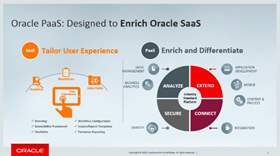
Are you working on Oracle SaaS implementations and want to integrate and extend them using PaaS? Oracle Product Management is pleased to invite Oracle Partners to attend the 3-day hands-on workshop on how to integrate with ERP & HCM applications using Oracle Integration Cloud. This Invite-Only hands-on workshop will be delivered at No-Fee to Partners. It will consist of presentations, demos, and hands-on labs. Oracle Integration Cloud (OIC) offers Integration, Process Automation and Visual design capabilities that help business analysts and IT specialists to automate end to end business processes across departments. Oracle Integration Cloud offers a simple recipe to be successful in this application integration and process automation journey: Build, Integrate and Engage.

For details please visit the registration page here.

For additional information please get the innovate, extend and integrate SaaS kit here.


PaaS Partner Community

For regular information on Oracle PaaS become a member in the SOA & BPM Partner Community for registration please visit www.oracle.com/goto/emea/soa (OPN account required) If you need support with your account please contact the Oracle Partner Business Center.

clip_image003 Blog clip_image005 Twitter clip_image004 LinkedIn image[7][2][2][2] Facebook clip_image002[8][4][2][2][2] Wiki

Technorati Tags: SOA Community,Oracle SOA,Oracle BPM,OPN,Jürgen Kress

My private Corner – PaaS the knowledge at a local Oracle Developer Meetup

imageEvery year the #PaaSCommunity meets at the PaaS Partner Community Forum, Oracle OpenWorld and the PaaS Summer Camp. To PaaS the knowledge within partners and customers we created the local Developer Meetups. Join them to share, network and collaborate across Europe:

· Brussels, Belgium

· Cairo Egypt

· Cologne, Germany

· Frankfurt Germany

· Istanbul, Turkey

· Lisbon, Portugal

· Lille, France

· London, UK

· Madrid, Spain

· Oslo, Norway

· Porto, Portugal

· Utrecht, Netherlands

Special thanks to all local hosts! Please let us know in case you want to run an event at one of this location or you want to start your local Meetup.


PaaS Partner Community

For regular information on Oracle PaaS become a member in the SOA & BPM Partner Community for registration please visit www.oracle.com/goto/emea/soa (OPN account required) If you need support with your account please contact the Oracle Partner Business Center.

clip_image003 Blog clip_image005 Twitter clip_image004 LinkedIn image[7][2][2][2] Facebook clip_image002[8][4][2][2][2] Wiki

Technorati Tags: SOA Community,Oracle SOA,Oracle BPM,OPN,Jürgen Kress