SOA Suite on containerized platform – Docker by Michel Schildmeijer

image

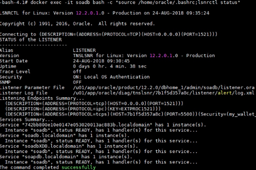
In this post I am exploring the sense of configuring and running an Oracle SOA Suite 12.2 domain on docker and managed by Kubernetes, to discover if SOA is a good candidate to run on Docker.

The server where I will install it is running Oracle Linux 6.8; unfortunately Kubernetes now is supported on Linux 7, so my next post will handle that subject.

First of all here are my install bits and experiences.

Setting up Docker

Before installing I had to add some YUM repo to get the right docker package:

  1. export DOCKERURL="https://yum.dockerproject.org/repo/main/oraclelinux/6" 
  2. rm /etc/yum.repos.d/docker*.repo 
  3. yum-config-manager –add-repo "$DOCKERURL/oraclelinux/docker-ce.repo" 
  4. yum-config-manager –enable docker-ce-stable-17.05 
  5. Read the complete article here.

PaaS Partner Community

For regular information on Oracle PaaS become a member in the SOA & BPM Partner Community for registration please visit www.oracle.com/goto/emea/soa (OPN account required) If you need support with your account please contact the Oracle Partner Business Center.

clip_image003 Blog clip_image005 Twitter clip_image004 LinkedIn image[7][2][2][2] Facebook clip_image002[8][4][2][2][2] Wiki

Technorati Tags: SOA Community,Oracle SOA,Oracle BPM,OPN,Jürgen Kress
Robotic Process Automation for ERP Modernization – Webcast May 16th 2019

imageOracle Integration and RPA working together May 16, 2019 10:00 am PST

Join Glenn Hoormann, Executive Vice President, eAlliance and Eduardo Chiocconi, Director Product Management for Oracle Integration to get the inside track on how RPA robots and employees can work together to automate end to end business processes such as Order to Cash and Quote to Order.
Learn how you can:

  • Take your RPA strategy from good to great with Robotic Service Orchestration to bring human decision making to your digital workforce
  • Visually design end to end processes with the ability to quickly and easily switch out manual steps for RPA robot execution 
  • Tame legacy complexity for repetitive and complex activities including bank statement reconciliation, customer on-boarding, and opportunity to order

For details please visit the registration page here.


PaaS Partner Community

For regular information on Oracle PaaS become a member in the SOA & BPM Partner Community for registration please visit www.oracle.com/goto/emea/soa (OPN account required) If you need support with your account please contact the Oracle Partner Business Center.

clip_image003 Blog clip_image005 Twitter clip_image004 LinkedIn image[7][2][2][2] Facebook clip_image002[8][4][2][2][2] Wiki

Technorati Tags: SOA Community,Oracle SOA,Oracle BPM,OPN,Jürgen Kress

UiPath leverages Oracle Cloud Platform for Robotic Process Automation by Arijit Chakraborty

image

UiPath is a leading provider of Robotic Process Automation (RPA) solutions to efficiently automate business processes. UiPath allows organizations to be more productive and achieve better business outcomes through workflow and business process automation leveraging RPA, artificial intelligence and machine learning.

UiPath was looking for a robust integration solution with end-to-end process design capability for automating business processes. UiPath chose Oracle Integration Cloud and Oracle Process Cloud for addressing their hybrid cloud integration and workflow automation requirements. This also allowed them to add artificial intelligence into their automations to drive additional workflow efficiencies.

Listen to Bobby Patrick, Chief Marketing Officer at UiPath, talk about how with Oracle Cloud Platform they have been able to dramatically improve job satisfaction of their employees while helping their clients achieve improved business outcomes. Read the complete article here.

PaaS Partner Community

For regular information on Oracle PaaS become a member in the SOA & BPM Partner Community for registration please visit www.oracle.com/goto/emea/soa (OPN account required) If you need support with your account please contact the Oracle Partner Business Center.

clip_image003 Blog clip_image005 Twitter clip_image004 LinkedIn image[7][2][2][2] Facebook clip_image002[8][4][2][2][2] Wiki

Technorati Tags: SOA Community,Oracle SOA,Oracle BPM,OPN,Jürgen Kress
Road to Oracle Cloud by Markus Lohn

image

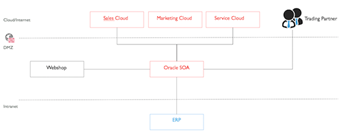
In this blogpost, I want to share my experience of migrating an Oracle SOA solution from on-premise to the cloud. But why was it necessary to think about this possibility? More than two years ago, our customer launched a comprehensive program to to make sales fit for the future. A huge area also covered IT support and automation of sales business processes. The solution introduced the use of different cloud system that have to be integrated. The integration part was achieved with the Oracle SOA platform. The SOA platform connects internal IT systems with external business partners and customers. The SOA platform is operated on-premise in the customer’s DMZ zone.

Now that several systems have already been operated in the cloud and due to limited resources available to operate the SOA platform, the customer considered to move the platform into the cloud. The primary goal of a cloud deployment was to relieve the operations team. This allows the operations team to focus on functional monitoring. Furthermore, the following objectives were important:

  • The manufacturer ensures the best support for the operation of the platform, e.g. load balancing and clustering.
  • Installation of patches or new versions performed by the software provider.
  • HA capabilities are already firmly integrated in the cloud service and the system is continuously protected by backups against failure.
  • Additional resources can be easily requested or returned on demand. Read the complete article here.

PaaS Partner Community

For regular information on Oracle PaaS become a member in the SOA & BPM Partner Community for registration please visit www.oracle.com/goto/emea/soa (OPN account required) If you need support with your account please contact the Oracle Partner Business Center.

clip_image003 Blog clip_image005 Twitter clip_image004 LinkedIn image[7][2][2][2] Facebook clip_image002[8][4][2][2][2] Wiki

Technorati Tags: SOA Community,Oracle SOA,Oracle BPM,OPN,Jürgen Kress

Lift and Shift SOA 11G to Oracle SOA Cloud Service by Matt Wright

image

Watch the video here.


PaaS Partner Community

For regular information on Oracle PaaS become a member in the SOA & BPM Partner Community for registration please visit www.oracle.com/goto/emea/soa (OPN account required) If you need support with your account please contact the Oracle Partner Business Center.

clip_image003 Blog clip_image005 Twitter clip_image004 LinkedIn image[7][2][2][2] Facebook clip_image002[8][4][2][2][2] Wiki

Technorati Tags: SOA Community,Oracle SOA,Oracle BPM,OPN,Jürgen Kress
Leverage Microsoft Email Adapter to send email using Oracle Integration Cloud (OIC) (Part-1) by Ankur Jain

image

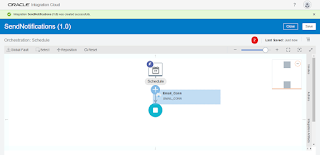
Though Oracle Integration Cloud provides Notification Activity which is used to send an Email notification to any number of recipients at a time. However, there is such a situation where the Notification activity doesn’t full fill the purpose. For example: If there is a requirement where the email notification is required along with attachment then in that case, Notification activity will not full fill the purpose. In such scenarios, the MS email adapter will help to send an email along with Attachments.

We are splitting the article into two parts:
In the first part, we’ll show how to send email notification using the MS email adapter
In second part, we’ll show how to send email notification along with attachment using MS email adapter. In the first part, we’ll create scheduler integration which will send a notification to the single recipient.
Below are the high-level activities which need to perform  to achieve the use case

  • Configure MS Email adapter in Oracle Integration Cloud
  • Create Scheduled Integration

Important Blogs to learn more about Oracle ICS / OIC. Read the complete article here.


PaaS Partner Community

For regular information on Oracle PaaS become a member in the SOA & BPM Partner Community for registration please visit www.oracle.com/goto/emea/soa (OPN account required) If you need support with your account please contact the Oracle Partner Business Center.

clip_image003 Blog clip_image005 Twitter clip_image004 LinkedIn image[7][2][2][2] Facebook clip_image002[8][4][2][2][2] Wiki

Technorati Tags: SOA Community,Oracle SOA,Oracle BPM,OPN,Jürgen Kress
OIC integration with Fusion HCM & the efficacy of BI reports & HCM REST APIs by Niall Commiskey

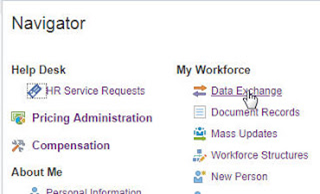
imageI am not a HCM expert, but playing around with the Oracle HCM adapter did force me to dig a bit deeper into how HCM works. It all began with a relatively simple file based integration that "imported" a worker into HCM. The integration had a REST trigger and leveraged the Oracle HCM adapter as well as the technical SOAP adapter.

I ran a test from Postman, with, what a colleague told me was, a valid REST payload, one of the attributes being BusinessUnitID.

{ "PersonNumber":"77012", "StartDate":"2014/01/01", "DateOfBirth":"1988/05/23", "LegislationCode":"US", "FirstName":"FirstName0112", "LastName":"LastName0112", "LegalEmployerName":"US1 Legal Entity", "BusinessUnitId":"458", "JobId":"300100003260508" }

I tested the integration and then went into Fusion HCM to validate what I had done. From an OIC perspective, the integration flow had executed successfully. So off I ventured into HCM. Read the complete article here.

PaaS Partner Community

For regular information on Oracle PaaS become a member in the SOA & BPM Partner Community for registration please visit www.oracle.com/goto/emea/soa (OPN account required) If you need support with your account please contact the Oracle Partner Business Center.

clip_image003 Blog clip_image005 Twitter clip_image004 LinkedIn image[7][2][2][2] Facebook clip_image002[8][4][2][2][2] Wiki

Technorati Tags: SOA Community,Oracle SOA,Oracle BPM,OPN,Jürgen Kress
Migrate Integration Cloud Service (ICS) Integrations to Integration Cloud (OIC) by Ankur Jain

image

This article is written to show how to migrate ICS artifacts including Integrations, Connections, Lookups, packages, libraries etc. to OIC. Since, ICS /OIC provides the export and import feature but this is limited to single integration at a time. What about, if there are 100’s of integration which are there in the ICS and wanted to migrate all integrations once.

To do so, there is Clone utility which is provided for bulk export all the integrations, connections, packages, libraries and other artifacts from ICS to OIC. This clone utility is the set of REST APIs in ICS / OIC. ICS provides REST APIs to bulk export ICS artifacts and OIC provides REST APIs to import these exported artifacts.

Prerequisites:

  • Oracle Cloud Storage Container with create / update permissions
  • Existing ICS service with Admin role access to the service
  • OIC service with Admin role access to the service
  • A feature flag has to be enabled on OIC to enable clone utility. To turn on the feature flag, open a Service Request with Oracle support

Artifacts, which can be exported using the Clone Utility:

  • Integrations
  • Connections including credentials
  • Lookups
  • Libararies
  • Certificates
  • Packages

Note: Agent groups can not be exported, this need to be created manually

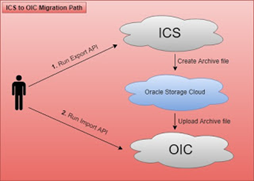
Below is the pictorial representation, which will give a high level, thought on how migration works

Let me explain the diagram in more detail

  • Execute the export API to export ICS artifacts
  • The first steps will create the archive file automatically and save into Oracle Storage Cloud container. Read the complete article here.

PaaS Partner Community

For regular information on Oracle PaaS become a member in the SOA & BPM Partner Community for registration please visit www.oracle.com/goto/emea/soa (OPN account required) If you need support with your account please contact the Oracle Partner Business Center.

clip_image003 Blog clip_image005 Twitter clip_image004 LinkedIn image[7][2][2][2] Facebook clip_image002[8][4][2][2][2] Wiki

Technorati Tags: SOA Community,Oracle SOA,Oracle BPM,OPN,Jürgen Kress

How to enable and use Tracing in less than 5 min by Muthu Palanisamy

image

In this short blog, I’d like to show you how easy it is to enable tracing in OIC Integration and start tracing your integration flows. When Tracing is enabled, OIC Integration prints detailed info before and after each action that is executed (optionally the payload if needed). Hence care should be taken to make sure that it is enabled only for debugging purposes and turned off before going production.

Global Tracing

Let’s assume that you have a requirement where you would like to enable or disable tracing for every integration you have created. You can use the global tracing for accomplishing the same. Enable the Global tracing with below steps:

· Login as an administrator.

· Click Settings on the left side.

· Click Trace on the left side.

· Select Global Tracing On and Click Save on the top right.

· Optionally you can select Include Payload which will additionally write the payload.

Integration Level Tracing

If your requirement is to enable the tracing for one or more integrations and disable tracing for the rest of the integrations, you can use Integration Level tracing. Enable the Integration tracing with below steps: Read the complete article here.


Developer Partner Community

For regular information become a member in the WebLogic Partner Community please visit: http://www.oracle.com/partners/goto/wls-emea ( OPN account required). If you need support with your account please contact the Oracle Partner Business Center.

clip_image003 Blog clip_image005 Twitter clip_image004 LinkedIn image[7][2][2][2] Facebook image Meetups

Technorati Tags: PaaS,Cloud,Middleware Update,WebLogic, WebLogic Community,Oracle,OPN,Jürgen Kress

OIC Integration 101 Part V – Social adapters – Facebook and Twitter by Niall Commiskey

image

Just a quick introduction to some of our Social adapters. Facebook – social media for over 50s

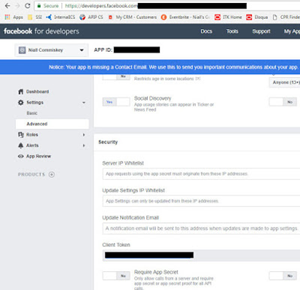
You will need a Facebook account to do this lab. Essentially, you will create a new page under your Facebook account. Then you will leverage the OIC Facebook adapter to retrieve Page details and then retrieve Page posts. So let’s begin –

developers.facebook.com setup

You will need an account at developers.facebook.com
Simply go in and create one.
Essentially what you do is create an App.
The work that we do via the FB adapter will be in the context of this app.

Note the App ID and App Secret they will be needed for creating the OIC connection to Facebook. You also need to set the callback url for OIC. Read the complete article here.


PaaS Partner Community

For regular information on Oracle PaaS become a member in the SOA & BPM Partner Community for registration please visit www.oracle.com/goto/emea/soa (OPN account required) If you need support with your account please contact the Oracle Partner Business Center.

clip_image003 Blog clip_image005 Twitter clip_image004 LinkedIn image[7][2][2][2] Facebook clip_image002[8][4][2][2][2] Wiki

Technorati Tags: SOA Community,Oracle SOA,Oracle BPM,OPN,Jürgen Kress