Cloud Integration Workshop for Partners France and UK


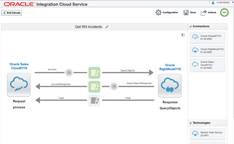
clip_image002The Oracle team is pleased to invite your integration developers and consultants to a 3-days hands-on workshop on how to integrate applications with Oracle Cloud platform. Oracle will organize several 3-days Workshops between October 2015 – June 2016. We invite you to join the workshop InClass or Remotely (avoid travel time and travel costs by joining remotely). These Invite-Only hands-on workshops will be delivered by Oracle Development at No-Fee to Partners. A workshop consists of live presentations, live demos, and hands-on laboratory exercises.

IMPORTANT: These workshops are available to selected Oracle Partners with a current OPN Gold Level or higher membership. A fully executed Oracle Cloud Services Training Addendum is required for this workshop

Agenda

Oracle Integration Cloud Service

– Integration Basics
– Integration Patterns – cloud-to-cloud and cloud-to-on-premise

– Application Adapters
– Pre-built integration Flows
– Cloud SDK and APIs
– Administration.

Schedules

Workshop dates:

12th – 14th October, 2015 (Mon-Wed). Location: France, Colombes. Remote participation is possible.

9th – 11th November, 2015 (Mon-Wed). Location: UK, TVP. Remote participation is possible.

Target Audience

Integration Developers, Solution Architects, Technology Consultants.

Registration

Provide your submission to your local Alliances & Channels Manager. Alternatively, provide your submission to your local Alliances & Channels Enablement Manager. Provide the following information: Workshop, Workshop region, Workshop date, InClass or Remote, Partner Company, Participant’s name, Participant’s Corporate Email Address, Resident Country, Participant’s Manager’s Corporate Email Address.

France: jean-jacques.panissie@oracle.com and UK, Israel: kate.lynskey@oracle.com

SOA & BPM Partner Community

For regular information on Oracle SOA Suite become a member in the SOA & BPM Partner Community for registration please visit www.oracle.com/goto/emea/soa (OPN account required) If you need support with your account please contact the Oracle Partner Business Center.

Blog Twitter LinkedIn image[7][2][2][2] Facebook clip_image002[8][4][2][2][2] Wiki

Video on Using Force Commit for Non-Idempotent Activities in BPM 12c by Jaideep


clip_image002In BPM 11g it was not possible to explicitly ask the engine to dehydrate the bpm process instance state. The only way to do this was to model a timer catch event set to one second or longer. Oracle BPM 12c has introduced a new property for activities called ‘Force Commit after execution’ to enable us to do this. This video is an excerpt from one of our Oracle BPM Training courses which explains why this property is important especially when you have Non-Idempotent activities in your process.

If you like our videos and blogs, be sure to click on the buttons below to follow us on LinkedIn and Twitter so that you can get notified when we post new content. Read the complete article here.

SOA & BPM Partner Community

For regular information on Oracle SOA Suite become a member in the SOA & BPM Partner Community for registration please visit www.oracle.com/goto/emea/soa (OPN account required) If you need support with your account please contact the Oracle Partner Business Center.

Blog Twitter LinkedIn image[7][2][2][2] Facebook clip_image002[8][4][2][2][2] Wiki

BPM 12c Events (Part 2 of 3): End Events by Antonis Antoniou


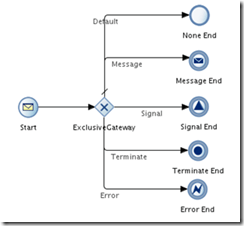
clip_image002End events define how a process should finish and just like with start events, processes can have more than one end event.

As you can see from the sample process below, we are provided with a plethora of end events that include a “None End” event, a “Message Send” event, a “Signal” event and a “Terminate End” and “Error End” event.

The “None End” event is the default end event in a manual and reusable process and as it’s name implies, it is used when your process doesn’t need to perform any action upon completion. When all process instance tokens reach the “None End” event, the instance is completed.

The "Message End" event, as the name implies, will send a message before an instance completion and is especially useful when you want to trigger another process or instance. The "Message End" event has one unique particularity, it can only be used with either a message start event or a message catch event.

The "Signal Event" will publish a signal before completion.

The "Terminate End" is used to terminate, immediately, without any error handling, a process.

The "Error End" will throw an error before completion. This type of end event is used most commonly in subprocesses to trigger an exception to a main process.

Let’s see how you can use these end events in practice.
Create the basic BPM application and BPM project (named both application and project "EndEventsDemo") and select "Composite with BPMN Process" in step 3. Read the complete article here.

SOA & BPM Partner Community

For regular information on Oracle SOA Suite become a member in the SOA & BPM Partner Community for registration please visit www.oracle.com/goto/emea/soa (OPN account required) If you need support with your account please contact the Oracle Partner Business Center.

Blog Twitter LinkedIn image[7][2][2][2] Facebook clip_image002[8][4][2][2][2] Wiki

Oracle Integration workshop: Service Bus & SOA 12c new features and products Friday October 23rd 2015 Belgium

The workshop will give an introduction to the new features and products of Oracle SOA 12c:

· First focus will be on Oracle Service Bus. How to expose services on the bus will be practiced, some new OSB 12c features will receive special attention.

· Second part of the workshop explores some new 12c products and their use in combination with the Oracle Service Bus.


· Oracle Service Bus 12c: Hands-on introduction to OSB12c with focus on 12c features: pipeline templates, dynamic validation, RESTfull services, Maven,…

· Oracle Stream Explorer: the different features of the new Oracle Stream Explorer will be explored and how it’s targeted to a service bus project.

· Oracle Managed File Transfer: Using MFT, a file transfer will be set up. Its combined use of the Oracle Service Bus will be looked into.

· Oracle API Manager: Oracle API Manager gives more flexibility and control in securing and exposing the services, which were built in our OSB exercises earlier on.


Schedule: Friday October 23rd 2015

For more information please visit the registration page here.

SOA & BPM Partner Community

For regular information on Oracle SOA Suite become a member in the SOA & BPM Partner Community for registration please visit www.oracle.com/goto/emea/soa (OPN account required) If you need support with your account please contact the Oracle Partner Business Center.

Blog Twitter LinkedIn image[7][2][2][2] Facebook clip_image002[8][4][2][2][2] Wiki

Business Rules in BPM Suite 12c by Waslley Souza

clip_image001If you use the Business Rules feature in Oracle BPM Suite 12c, the business rules you created can be modified at runtime using the BPM Composer. This way you do not need to spend time changing and re-deploying your application. This feature works the same way in BPM Suite and SOA Suite.

As a starting point, I will use the BPM application created here: Creating a simple BPM Manual Process. Download the sample application: BpmBusinessRulesApp.zip.

In the WebLogic Console, create the president user.

In the JDeveloper, open the AddEmployee process.
Right-click HrOfficer swimlane, choose Add Role and add the President role.

Change the Canonical Model, adding JobName and Salary elements. Read the complete article here.

SOA & BPM Partner Community

For regular information on Oracle SOA Suite become a member in the SOA & BPM Partner Community for registration please visit www.oracle.com/goto/emea/soa (OPN account required) If you need support with your account please contact the Oracle Partner Business Center.

Blog Twitter LinkedIn image[7][2][2][2] Facebook clip_image002[8][4][2][2][2] Wiki

Cloud Resell Program Oracle Partner Network


clip_image002For partners interested in building recurring revenue selling Oracle Cloud services, the Oracle Cloud Resell program enables partners to participate in the lifetime value of the subscription including add-on, upgrade and renewal opportunities.

The Oracle Cloud Resell program offers recurring revenue from the ongoing Cloud Service that your resell. In the resell program, you – the partner, own the relationship and you participate in the entire lifetime value of the contract. You also benefit from delivering implementation and consulting services with the knowledge obtained through the Oracle specialization program. This is revenue direct to your bottom line and can be seamlessly bundled in the Cloud Service subscription price to the end customer.

Requirements to Resell Cloud Services
  1. Be an Oracle PartnerNetwork member in good standing (Gold or higher) with a valid OPN Agreement
  2. Meet the resale competency criteria set forth within each of the Knowledge Zones (listed below)
  3. Execute a Full Use Program Distribution Agreement (FUDA) from the Oracle Partner Store
  4. Execute a Cloud Services Distribution Addendum (CSDA) to the FUDA by contacting a Partner Business Center representative

Read more about the OPN Cloud program here.

SOA & BPM Partner Community

For regular information on Oracle SOA Suite become a member in the SOA & BPM Partner Community for registration please visit www.oracle.com/goto/emea/soa (OPN account required) If you need support with your account please contact the Oracle Partner Business Center.

Blog Twitter LinkedIn image[7][2][2][2] Facebook clip_image002[8][4][2][2][2] Wiki

Additional new content SOA & BPM Partner Community


SOA & BPM Partner Community

For regular information on Oracle SOA Suite become a member in the SOA & BPM Partner Community for registration please visit www.oracle.com/goto/emea/soa (OPN account required) If you need support with your account please contact the Oracle Partner Business Center.

Blog Twitter LinkedIn image[7][2][2][2] Facebook clip_image002[8][4][2][2][2] Wiki

Technorati Tags: SOA Community,Oracle SOA,Oracle BPM,OPN,Jürgen Kress

PaaS and SaaS: Perfect Together by Debra Lilley

clip_image001Platform as a service, or PaaS, is exciting a lot of our customers—not just those who want to move to the cloud, but also those who see PaaS as a way to build applications faster and more efficiently. As Oracle releases more development tools in the cloud, I believe that PaaS will become the de facto way to extend software as a service (SaaS).

First, let’s explore some of the major benefits of PaaS. With PaaS, you no longer have to worry about the cost and time associated with maintaining hardware or a data center. By bypassing the setup required for a development environment, your organization will achieve faster time to value on projects. Most PaaS offerings are on a consumption model: Much like buying gas, you fill up only when you need to, and you pay for only what you use. Finally, the quick-start, user-friendly, cloud-based development tools enable and foster continuous innovation.

In my work for Certus Solutions, a leader in Oracle Cloud implementations in Europe, the Middle East, and Asia, I have been particularly interested in “PaaS4SaaS,” which is the ability to extend Oracle’s cloud platform and applications with our own mini applications and have them seamlessly co-exist. Here are a few points I’ve observed for Oracle customers looking to do the same. Read the complete article here.

SOA & BPM Partner Community

For regular information on Oracle SOA Suite become a member in the SOA & BPM Partner Community for registration please visit www.oracle.com/goto/emea/soa (OPN account required) If you need support with your account please contact the Oracle Partner Business Center.

Blog Twitter LinkedIn image[7][2][2][2] Facebook clip_image002[8][4][2][2][2] Wiki

Manufacturing, Banking and Retail Industry Solutions build with Middleware on Oracle PaaS – Webcast October 7th 2015

image Digital transcends many industries – manufacturing, banking, telecommunications and retail to name a few.

The Oracle Cloud Platform helps organizations transform these industries with engaging customer experience and agile operational processes and business models.

Join this session and learn how to create solutions for your customers so they can demonstrate the value of Oracle PaaS.

For details please visit the registration page here.

SOA & BPM Partner Community

For regular information on Oracle SOA Suite become a member in the SOA & BPM Partner Community for registration please visit www.oracle.com/goto/emea/soa (OPN account required) If you need support with your account please contact the Oracle Partner Business Center.

Blog Twitter LinkedIn image[7][2][2][2] Facebook clip_image002[8][4][2][2][2] Wiki

Fusion HCM Cloud Bulk Integration Automation by Jack Desai


Introduction

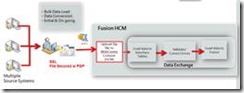
clip_image002Fusion HCM Cloud provides a comprehensive set of tools, templates, and pre-packaged integration to cover various scenarios using modern and efficient technologies. One of the patterns is the bulk integration to load and extract data to/from cloud. The inbound tool is the File Based data loader (FBL) evolving into HCM Data Loaders (HDL). HDL supports data migration for full HR, incremental load to support co-existence with Oracle Applications such as E-Business Suite (EBS) and PeopleSoft (PSFT). It also provides the ability to bulk load into configured flexfields. HCM Extracts is an outbound integration tool that let’s you choose data, gathers and archives it. This archived raw data is converted into a desired format and delivered to supported channels recipients.

HCM cloud implements Oracle WebCenter Content, a component of Fusion Middleware, to store and secure data files for both inbound and outbound bulk integration patterns. This post focuses on how to automate data file transfer with WebCenter Content to initiate the loader. The same APIs will be used to download data file from the WebCenter Content delivered through the extract process.

WebCenter Content replaces SSH File Transfer Protocol (SFTP) server in the cloud as a content repository in Fusion HCM starting with Release 7+. There are several ways of importing and exporting content to and from Fusion Applications such as:

  • Upload using “File Import and Export” UI from home page navigation: Navigator > Tools
  • Upload using WebCenter Content Document Transfer Utility
  • Upload programmatically via Java Code or Web Service API

This post provides an introduction, with working sample code, on how to programmatically export content from Fusion Applications to automate the outbound integration process to other applications in the cloud or on-premise. A Service Oriented Architecture (SOA) composite is implemented to demonstrate the concept.

Main Article

Fusion Applications Security in WebCenter Content

The content in WebCenter Content is secured through users, roles, privileges and accounts. The user could be any valid user with a role such as “Integration Specialist.” The role may have privileges such as read, write and delete. The accounts are predefined by each application. For example, HCM uses /hcm/dataloader/import and /hcm/dataloader/export respectively.

Let’s review the inbound and outbound batch integration flows.

Inbound Flow

This is a typical Inbound FBL process flow: Read the complete article here.

SOA & BPM Partner Community

For regular information on Oracle SOA Suite become a member in the SOA & BPM Partner Community for registration please visit www.oracle.com/goto/emea/soa (OPN account required) If you need support with your account please contact the Oracle Partner Business Center.

Blog Twitter LinkedIn image[7][2][2][2] Facebook clip_image002[8][4][2][2][2] Wiki