Additional new content PaaS Partner Community

image

· Oracle’s Formula for Cloud Success On Oracle’s second-quarter earnings call, Oracle Executive Chairman and CTO Larry Ellison emphasized that two strategic initiatives would determine Oracle’s success: the cloud-based Oracle Autonomous Database, which provides “the largest technology lead we have ever enjoyed over our database competitors since we entered the database market almost four decades ago,” and its two cloud-based enterprise resource planning suites. What else did Ellison say?

· Enterprise IT Will Be 80% Cloud by 2025 The reasoning behind Oracle’s prediction is that newer, enterprise-grade cloud architectures, plus the extreme automation of platforms such as Oracle Autonomous Database, will multiply the cost savings of the cloud while letting enterprise IT meet its other commitments to the business. Performance and security that real businesses demand.

· Secrets to Building Blockchain, IoT, and Other Developer Demos “The idea was to build a demo to show all of the Oracle Supply Chain applications that will be used for working with a manufacturing plant or in the manufacturing process,” explains Jasper Potts, speaking at Oracle OpenWorld Europe in London. The secrets.

· The Next 30 Years: How to Survive Disruption “The bad is that everything is broken and we all know it. The good is that it’s fixable,” said futurist Mark Stevenson at Oracle OpenWorld London. “The ugly is that it’s going to get messy as the old world dies and a new one has to be built.” One secret to survival? Getting help from people who understand technology. More of his top advice.


PaaS Partner Community

For regular information on Oracle PaaS become a member in the SOA & BPM Partner Community for registration please visit www.oracle.com/goto/emea/soa (OPN account required) If you need support with your account please contact the Oracle Partner Business Center.

clip_image003 Blog clip_image005 Twitter clip_image004 LinkedIn image[7][2][2][2] Facebook clip_image002[8][4][2][2][2] Wiki

Technorati Tags: SOA Community,Oracle SOA,Oracle BPM,OPN,Jürgen Kress

Sending Data from Oracle IoT to a Mobile Device Using Node.js

image

In this learning path, you will create a Node.js application to integrate Oracle IoT Cloud Service and Oracle Mobile Cloud Service. Take the course here.

Five Ways Blockchain Is Changing Higher Ed
For one, blockchain’s ability to manage, share, and protect digital content makes it ideal for helping researchers and educators create intellectual property, share it, and still control the way it’s used. Professors, for instance, could be rewarded based on the actual use, and reuse, of their teaching materials, much as how they’re rewarded based on citations in research papers and journals. Four more advantages.


PaaS Partner Community

For regular information on Oracle PaaS become a member in the SOA & BPM Partner Community for registration please visit www.oracle.com/goto/emea/soa (OPN account required) If you need support with your account please contact the Oracle Partner Business Center.

clip_image003 Blog clip_image005 Twitter clip_image004 LinkedIn image[7][2][2][2] Facebook clip_image002[8][4][2][2][2] Wiki

Technorati Tags: SOA Community,Oracle SOA,Oracle BPM,OPN,Jürgen Kress

Another blockchain: installing Ethereum on Oracle Cloud by Lonneke Dikmans

image

After installing MultiChain on Oracle Compute Cloud, and playing around with HyperLedger on the Oracle Blockchain Cloud service, I now ran into a case where Ethereum was used.
This blog post describes how I installed a Ethereum node on Oracle Cloud Infrastructure.

Prerequisites
  • An account on Oracle Cloud with Administrator rights
  • You have generated an ssh key-pair
  • You are logged in to your cloud account
Create Compartment

Create a compartment with the name Ethereum to separate this from your other infrastructure. You can find this under "Identity".

Create a Virtual Cloud Network
  1. Navigate to Virtual Cloud Network, by selecting Network from the Menu
  2. Select the compartment you just created
  3. Click "Create Virtual Cloud Network"
  • The compartment will default to the compartment you just selected
  • Name: ethereum-network
  • select "Create Virtual Cloud Network plus related resources" to quickly get up and running
  • Click "Create"

A dialog is displayed that shows you what has been created, after a few seconds.

Create compute nodes

For this example I will create 3 nodes on 3 separate VMs. Read the complete article here.


PaaS Partner Community

For regular information on Oracle PaaS become a member in the SOA & BPM Partner Community for registration please visit www.oracle.com/goto/emea/soa (OPN account required) If you need support with your account please contact the Oracle Partner Business Center.

clip_image003 Blog clip_image005 Twitter clip_image004 LinkedIn image[7][2][2][2] Facebook clip_image002[8][4][2][2][2] Wiki

Technorati Tags: SOA Community,Oracle SOA,Oracle BPM,OPN,Jürgen Kress
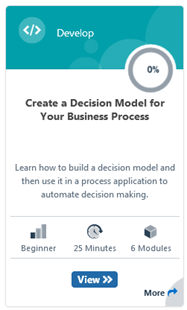
Create a Decision Model for Your Business Process free online training

image

In business, decisions are everywhere. Should this loan application or document change be approved? Should emergency vehicles be dispatched to this incident? How many bonus shopping points is this shopping cart worth?

· Have you ever left your house and wished you were better prepared for the weather?

In this learning path, you’ll build a decision model that makes the decision for you. You’ll create a simple process application that asks you to input the current temperature and the chance of rain. Based on the forecast, the application decides whether you should bring:

· An umbrella, for warm and rainy weather

· A raincoat, for cold and rainy weather

· An overcoat, for cold and dry weather

· Nothing, for warm and dry weather

· Attend the training here.

PaaS Partner Community

For regular information on Oracle PaaS become a member in the SOA & BPM Partner Community for registration please visit www.oracle.com/goto/emea/soa (OPN account required) If you need support with your account please contact the Oracle Partner Business Center.

clip_image003 Blog clip_image005 Twitter clip_image004 LinkedIn image[7][2][2][2] Facebook clip_image002[8][4][2][2][2] Wiki

Technorati Tags: SOA Community,Oracle SOA,Oracle BPM,OPN,Jürgen Kress
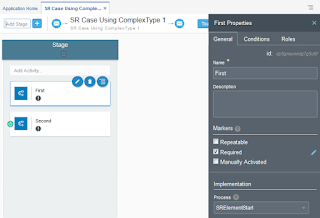
Oracle Dynamic Process Calling Structured Process Caveat by Jan Kettenis

image

When implementing a Dynamic Process, there currently are three options to implement a case activity: Human Task, Service (or Integration), and Process. At least up to version 18.4.5.0.0 there is limitation when defining the interface in case of a Process Activity making that you cannot use a Business Type which is based on an XSD element, which on its turn in based on a complexType. The below describes the problem you will run into, and a suggestion of how to work-around this.

When developing XSD’s for web services you may have developed the practice of defining a complexType with an element based on that complexType, for example as in the below XSD. Reason could be that you developed with the (on-premise) SOA or BPM Suite and found this to give the best flexibility, especially when integrating with Oracle Business Rules. Read the complete article here.


PaaS Partner Community

For regular information on Oracle PaaS become a member in the SOA & BPM Partner Community for registration please visit www.oracle.com/goto/emea/soa (OPN account required) If you need support with your account please contact the Oracle Partner Business Center.

clip_image003 Blog clip_image005 Twitter clip_image004 LinkedIn image[7][2][2][2] Facebook clip_image002[8][4][2][2][2] Wiki

Technorati Tags: SOA Community,Oracle SOA,Oracle BPM,OPN,Jürgen Kress

Oracle Fusion Middleware 12c (12.2.1.4.0) Released

image

We are proud to announce the release of Oracle Fusion Middleware 12c (12.2.1.4.0). Software is now available on the Oracle Software Delivery Cloud (OSDC) and My Oracle Support (MOS), and will be available on the Oracle Technology Network (OTN).
This release includes the following products:

  •     Oracle SOA Suite and Business Process Management 12c (12.2.1.4.0)
  •     Oracle B2B and Healthcare 12c (12.2.1.4.0)
  •     Oracle Business Intelligence 12c (12.2.1.4.0)
  •     Oracle Coherence 12c (12.2.1.4.0)
  •     Oracle Data Integrator 12c (12.2.1.4.0)
  •     Oracle Enterprise Data Quality 12c (12.2.1.4.0)
  •     Oracle Forms and Reports 12c (12.2.1.4.0)
  •     Oracle Fusion Middleware Infrastructure 12c (12.2.1.4.0)
  •     Oracle Fusion Middleware WebLogic Server Plug-In 12c    (12.2.1.4.0)
  •     Oracle GoldenGate Studio 12c (12.2.1.4.0)
  •     Oracle GoldenGate Veridata 12c (12.2.1.4.0)
  •     Oracle HTTP Server 12c (12.2.1.4.0)
  •     Oracle Identity and Access Management 12c (12.2.1.4.0)
  •     Oracle Internet Directory 12c (12.2.1.4.0)
  •     Oracle JDeveloper Studio 12c (12.2.1.4.0)
  •     Oracle Managed File Transfer 12c (12.2.1.4.0)
  •     Oracle MapViewer 12c (12.2.1.4.0)
  •     Oracle Real-Time Integration Business Insight 12c (12.2.1.4.0)
  •     Oracle Service Bus 12c (12.2.1.4.0)
  •     Oracle TopLink 12c (12.2.1.4.0)
  •     Oracle Traffic Director 12c (12.2.1.4.0)
  •     Oracle Unified Directory 12c (12.2.1.4.0)
  •     Oracle WebCenter Content 12c (12.2.1.4.0)
  •     Oracle WebCenter Portal 12c (12.2.1.4.0)
  •     Oracle WebCenter Sites 12c (12.2.1.4.0)
  •     Oracle WebLogic Server 12c (12.2.1.4.0)

This release also includes the following VM Templates for Private Cloud Appliance:

  • Oracle VM Virtual Appliance for WebLogic Server and Coherence
    (12.2.1.4.0)
  • Oracle VM Virtual Appliance for Infrastructure (12.2.1.4.0)
  • Oracle VM Virtual Appliance for SOA Suite (12.2.1.4.0)
  • Oracle VM Virtual Appliance for Internet Directory (12.2.1.4.0)
  • Oracle VM Virtual Appliance for Identity and Access Management (12.2.1.4.0)
  • Oracle VM Virtual Appliance for HTTP Server (12.2.1.4.0)
  • Oracle VM Virtual Appliance for Traffic Director (12.2.1.4.0)
  • Oracle VM Virtual Appliance for Traffic Director Collocated (12.2.1.4.0)
    (12.2.1.4.0)

Here is the related information for these releases:


PaaS Partner Community

For regular information on Oracle PaaS become a member in the SOA & BPM Partner Community for registration please visit www.oracle.com/goto/emea/soa (OPN account required) If you need support with your account please contact the Oracle Partner Business Center.

clip_image003 Blog clip_image005 Twitter clip_image004 LinkedIn image[7][2][2][2] Facebook clip_image002[8][4][2][2][2] Wiki

Technorati Tags: SOA Community,Oracle SOA,Oracle BPM,OPN,Jürgen Kress
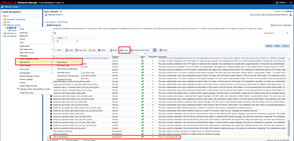
Custom rate-limiting policy for OSB services by Hugo Hendriks

image

A rate limiting policy is a policy which you can configure so that certain clients can only make a certain amount of calls on your service. For example you can make it SLA based. Another benefit is that you can prevent clients to flood your service which requests which can overload a backend system. This could be accidental or it might be on purpose (DDOS attack). Most API platforms like Mulesoft, Dell Boomi and Oracle API Platform Cloud Service have these out-of-the-box but the On-Prem version of SOA Suite doesn’t come out of the box with such a policy. Time to make one of our own.

Implementation

In a previous post, I created a policy which could send data to an Elastic stack. See here. Again we are going to create a custom policy to check if a certain type of IP isn’t doing too much calls within 1 minute.

I am going to re-use the BaseAssertionExecutor of last time and make a new implementation. I am going to make the amount of calls configurable. So every unique IP can a certain amount of calls per minute. For easy testing purposes, my default is 10. See here the code for my RateLimitingAssertionExecutor: Read the complete article here.


PaaS Partner Community

For regular information on Oracle PaaS become a member in the SOA & BPM Partner Community for registration please visit www.oracle.com/goto/emea/soa (OPN account required) If you need support with your account please contact the Oracle Partner Business Center.

clip_image003 Blog clip_image005 Twitter clip_image004 LinkedIn image[7][2][2][2] Facebook clip_image002[8][4][2][2][2] Wiki

Technorati Tags: SOA Community,Oracle SOA,Oracle BPM,OPN,Jürgen Kress

Oracle SOA Cloud Service: using Rest API to start and stop instances by Eduardo Barra Cordeiro

image

In this article, Qualogy’s Eduardo Cordeiro shares some tips about how to use Oracle Cloud Rest API to start and stop your SOA CS stack. This article is based on the official Oracle cloud documentation.

Use case

Even though you can always use the cloud dashboard console to control your cloud instances, it is useful to have some scripts scheduled to start and stop when you want to save your credits, mainly for non-production environment. If you want to keep your instances up only 5 days a week, 8h per day (not 24×7), you are probably searching for a way to automate this process.

Using Rest API to manage SOA Cloud Service instances

In the Oracle documentation you will find all the available commands that can be executed to manage your instances. In this post I will use start and stop commands only. Additional to that, I will share how to start/stop your databases in the cloud. The standard URL that you will use to execute your commands on SOA CS instances is: Read the complete article here.

PaaS Partner Community

For regular information on Oracle PaaS become a member in the SOA & BPM Partner Community for registration please visit www.oracle.com/goto/emea/soa (OPN account required) If you need support with your account please contact the Oracle Partner Business Center.

clip_image003 Blog clip_image005 Twitter clip_image004 LinkedIn image[7][2][2][2] Facebook clip_image002[8][4][2][2][2] Wiki

Technorati Tags: SOA Community,Oracle SOA,Oracle BPM,OPN,Jürgen Kress
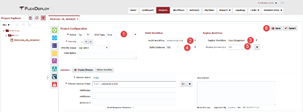
FlexDeploy Loves OIC: Manage Integrations with Connections by Dan Reynebeau

image 

Oracle Integration Cloud (OIC) provides the ability to develop an integration in the cloud.  The integration can connect cloud and/or on-premise applications, however, these integrations are maintained directly in the cloud and not in any Source Code Management (SCM) system.  Deploying an integration from one OIC instance to another OIC instance is a manual process. It requires exporting an integration from one instance and importing that integration into the next instance.  In addition, the associated connections must be sync’d between instances.  Due to the manual nature of managing the integrations, there is very limited delivery lifecycle management.

FlexDeploy provides build, deploy, release automation and delivery lifecycle management to eliminate the manual deployment process and easily show what integration version is in which environment.  In this blog, we will show how to configure FlexDeploy to

  • communicate with an OIC instance
  • export/import an integration
  • manage the associated connections in a single operation to simplify the integration deployment
FlexDeploy Configuration

The configuration starts with the creation of several topology components such as environments, instances and endpoints.  I won’t cover the creation of these components however each of the links will provide the user guide pages for each component.  Once the topology components are created and associated with each other, the environment/instances will be created on the topology overview and allow configuration of each environment/instance combination.  This will be the main configuration to be able to communicate with the OIC instance.  Select Topology->Topology Overview.  The page will show a colored circle per environment with red meaning not configured to green meaning fully configured. Read the complete article here.

PaaS Partner Community

For regular information on Oracle PaaS become a member in the SOA & BPM Partner Community for registration please visit www.oracle.com/goto/emea/soa (OPN account required) If you need support with your account please contact the Oracle Partner Business Center.

clip_image003 Blog clip_image005 Twitter clip_image004 LinkedIn image[7][2][2][2] Facebook clip_image002[8][4][2][2][2] Wiki

Technorati Tags: SOA Community,Oracle SOA,Oracle BPM,OPN,Jürgen Kress

Redaction policy in Oracle API Cloud Service by Ankur Jain

image

Oracle API CS offers an inbuilt feature to limit or remove the certain fields and headers which is the part of request and response payload. This policy is called Redaction policy. The policy can be used in both request and response pipeline.

In the request pipeline, headers, queries and payload content can be controlled before the backend service is invoked. Similarly, in the response pipeline, headers, queries and payload content can be controlled before the response sent to the consumer.

Let’s see how to apply the redaction policy in request and response pipeline separately.To complete this article, we’ll assume one service is already configured in the Oracle API CS. If not, kindly follow the blog Let suppose, one API configured is in the API CS with the below request and response. Read the complete article here.

PaaS Partner Community

For regular information on Oracle PaaS become a member in the SOA & BPM Partner Community for registration please visit www.oracle.com/goto/emea/soa (OPN account required) If you need support with your account please contact the Oracle Partner Business Center.

clip_image003 Blog clip_image005 Twitter clip_image004 LinkedIn image[7][2][2][2] Facebook clip_image002[8][4][2][2][2] Wiki

Technorati Tags: SOA Community,Oracle SOA,Oracle BPM,OPN,Jürgen Kress