Additional new content Cloud Platform Partner Community

image

PaaS Partner Community

For regular information on Oracle PaaS become a member in the PaaS (Integration & Process) Partner Community please register here.

clip_image003 Blog clip_image005 Twitter clip_image004 LinkedIn image[7][2][2][2] Facebook clip_image002[8][4][2][2][2] Wiki

Technorati Tags: SOA Community,Oracle SOA,Oracle BPM,OPN,Jürgen Kress
Automate Processes with Oracle Integration

image

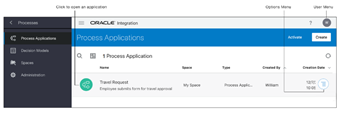
Automate your business using process applications: develop, test, publish, and activate. Repeat whenever changes are needed.

Use the Processes feature to rapidly design, automate, and manage business processes in the cloud.

There are two working environments: the design-time environment, where you develop and test applications, and the runtime environment, where you use and monitor process applications.

The design-time environment:

· Provides business-friendly graphical tools for designing processes, forms, data, decision models, and metrics from scratch

· Includes QuickStart Apps for fast and easy rollout of custom business applications

· Provides test environments for refining processes before activating them for use in production

· Lets you move process applications (metadata and data) from cloud to on-premises

The runtime environment:

· Makes it easy for you to view, complete, reassign, and delegate tasks

· Lets you stay organized with filters

· Lets you share documents and collaborate with others on your team

· Provides tools to track process flows, view detailed audit trails, troubleshoot, and fix processes

The design-time environment is also called Composer, and the runtime environment is also called Workspace. The terms design time and Composer, and runtime and Workspace are used interchangeably throughout this guide. Start here with process automation.

PaaS Partner Community

For regular information on Oracle PaaS become a member in the PaaS (Integration & Process) Partner Community please register here.

clip_image003 Blog clip_image005 Twitter clip_image004 LinkedIn image[7][2][2][2] Facebook clip_image002[8][4][2][2][2] Wiki

Technorati Tags: SOA Community,Oracle SOA,Oracle BPM,OPN,Jürgen Kress
OIC: Bulk integration between HCM Oracle SaaS and Snowflake by Gabriele Cannas

image

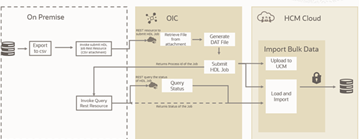
With this OIC integration solution, we will go through the configuration steps needed to leverage the OIC native HCM adapter, to retrieve data generated by HCM extractions and load them into Snowflake datawarehouse.

In this case I will use employee data as in the extraction named "EPBCS Employee Metadata_1902".

This solution is performing the data load by storing them into a Snowflake internal stage and then copying to the target table. The integration is so directly from Oracle HCM to Snowflake. Read the complete article here.

PaaS Partner Community

For regular information on Oracle PaaS become a member in the PaaS (Integration & Process) Partner Community please register here.

clip_image003 Blog clip_image005 Twitter clip_image004 LinkedIn image[7][2][2][2] Facebook clip_image002[8][4][2][2][2] Wiki

Technorati Tags: SOA Community,Oracle SOA,Oracle BPM,OPN,Jürgen Kress

New Third Party Application Adapters by Madhav Poosarla

image

It is time for the Oracle Integration November 2021 update. With holidays approaching, Bluebell the cat is pleased to take us through the cool new features and functionality in the update. In this blog, Bluebell will be specifically focusing on the new third-party adapters that are part of the update. Oracle Integration in the continuum of improving connectivity with third-party application providers continues to add new adapters with each release. Oracle Integration is pleased to announce the addition of the SugarCRM Adapter and eBay Marketplace Adapter to its growing list of connectivity adapters.

Let’s now dive into the details of the new adapters.

SugarCRM Adapter

Introduction

Oracle always tries to improve the OIC capability by introducing the new adapters, which will enable users to perform plug and play integration. We are introducing Sugar CRM adapter as a new addition in OIC adapters portfolio with Nov’21 release.

Sugar CRM is one of the applications in the CRM space, it enables enterprises to automate their marketing tasks from marketing campaigns, to lead generation, to closing deals and finally to improving customer experience.

SugarCRM Adapter will enable you to connect and offer connectivity with the SugarCRM application seamlessly and helps businesses to manage customer relations more easily and effectively. Read the complete article here.

PaaS Partner Community

For regular information on Oracle PaaS become a member in the PaaS (Integration & Process) Partner Community please register here.

clip_image003 Blog clip_image005 Twitter clip_image004 LinkedIn image[7][2][2][2] Facebook clip_image002[8][4][2][2][2] Wiki

Technorati Tags: SOA Community,Oracle SOA,Oracle BPM,OPN,Jürgen Kress

Decouple complex flows into simplified multiple resource REST flow by Madhav Poosarla

image

Oracle has simplified decoupling of complex REST flows using “Multi Verb/ Resource Rest Support”.

We shall illustrate this feature using HCM Data loader (HDL) job use case. Let’s discuss about the use case briefly, and how multi verb/resource rest support feature can be implemented here.

As part of the use case, it loads the new hire information in HCM using HDL job and monitors the job processing. Here it requires couple of resource invocations to HCM from user as below

· Submit the Oracle HDL job.

· Query the job status until completion.

Each of the invocations using Oracle Integration can happen using 2 integration flows, but using the multi verb / resource support, invoking both resources has been achieved using a single integration.

You can expose multiple entry points to a single orchestrated integration that uses the REST Adapter as the trigger connection. Each entry point can be configured with a different resource URI and HTTP action/verb, as necessary. This feature eliminates the need to create multiple integrations (each with a separate resource URI and verb) to perform different operations.

Adding to above, submit resource takes the input data as a Rest attachment. Read the complete article here

PaaS Partner Community

For regular information on Oracle PaaS become a member in the PaaS (Integration & Process) Partner Community please register here.

clip_image003 Blog clip_image005 Twitter clip_image004 LinkedIn image[7][2][2][2] Facebook clip_image002[8][4][2][2][2] Wiki

Technorati Tags: SOA Community,Oracle SOA,Oracle BPM,OPN,Jürgen Kress
Call VB Business Objects from Oracle Integration by Ankur Jain

image

We often get a requirement to synchronize the data from source to Visual Builder application in a real-time or scheduled fashion. There may be various scenarios to synchronize the data from the source applications to VB Business Objects as mentioned below:

  • Synchroize master data from SaaS to VB application
  • As an when some update happens to an application we need to bring it to the VB application

These are just a few examples but there may be more.

As you may know, when you create a custom business object, a REST API is automatically created for you, with GET, POST, PATCH, and DELETE endpoints

These REST APIs can be called from outside Visual Builder very easily using the provided endpoint details. So, we can leverage the same Busines Object REST APIs to synchronize the data from source to Visual Builder application. To meet this requirement, I have captured a short video that will help to understand how to call Visual Builder Business Object REST APIs to insert the data into Business Object. Read the complete article here.

PaaS Partner Community

For regular information on Oracle PaaS become a member in the PaaS (Integration & Process) Partner Community please register here.

clip_image003 Blog clip_image005 Twitter clip_image004 LinkedIn image[7][2][2][2] Facebook clip_image002[8][4][2][2][2] Wiki

Technorati Tags: SOA Community,Oracle SOA,Oracle BPM,OPN,Jürgen Kress

Oracle Integration Update, Salesforce and Jira Adapters Enhancements by Milad Shiraz

image

Salesforce, and Jira, two of our most favorite adapters are equipped with more exciting features to increase your productivity.

Salesforce Adapter Change Data Capture Events Support

Not long ago, we introduced consumption of Custom Notifications with Platform Event to the Salesforce adapter. To build on that, this November release enables support for the Change Data Capture (CDC) events. This allows you to receive change event notifications using Change Data Capture (CDC) events for the entities selected in Salesforce.com. It’s important to note, only the list of entities (business objects) you select in Salesforce.com are shown to pick from in the Adapter Trigger Endpoint Configuration Wizard. For more details, see Select Objects for Change Notifications in the User Interface.

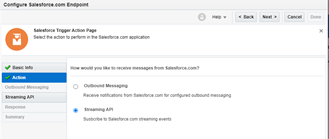
Here is a quick walkthrough of the new wizard interface.

Action page

Not much has changed here, select Streaming API, and continue.

Streaming API page

Here, select subscribe to change date capture (CDC) Events and select the event and change types along with the proper business object for this connection. Read the complete article here.

PaaS Partner Community

For regular information on Oracle PaaS become a member in the PaaS (Integration & Process) Partner Community please register here.

clip_image003 Blog clip_image005 Twitter clip_image004 LinkedIn image[7][2][2][2] Facebook clip_image002[8][4][2][2][2] Wiki

Technorati Tags: SOA Community,Oracle SOA,Oracle BPM,OPN,Jürgen Kress
Build retry logic in Oracle Integration by Ankur Jain

image

Generally, we have a requirement where we need to execute a task n number of times, especially in the exceptions scenarios. For example: If you are calling an external service and that service is not reachable due to some reasons (Network issue, Service issue, etc.) then you may need to re-try to call the services n number of times to get the transaction successful. But even after retrying n number of times, the service is not reachable, so you can either continue the flow or terminate depending on business requirements.

The same, requirement you can have while you are building an Oracle Integration. So to meet this requirement, you need to build the re-try logic as Oracle Integration doesn’t give this feature out of the box.

You can leverage the while action to build the re-try logic as shown in the following screenshot.

To meet this requirement, I have captured a short video, that will help you to achieve the same. Look at the complete video, to understand how to build a retry logic in Oracle Integration. Read the complete article here.

PaaS Partner Community

For regular information on Oracle PaaS become a member in the PaaS (Integration & Process) Partner Community please register here.

clip_image003 Blog clip_image005 Twitter clip_image004 LinkedIn image[7][2][2][2] Facebook clip_image002[8][4][2][2][2] Wiki

Technorati Tags: SOA Community,Oracle SOA,Oracle BPM,OPN,Jürgen Kress

Speed up your Accounting Closing Cycle with automated loading of Payable Invoices into Oracle ERP Cloud, using Oracle Integration Cloud – by Juan Carlos

image

My colleague Juan Carlos has a great series of videos that cover end to end use cases with OIC and Oracle Apps (CX/ERP/ServiceCloud).

In this one he shows how to automate the loading of files into Oracle ERP Cloud by leveraging OIC and FTP. Check it out! Watch the video here

PaaS Partner Community

For regular information on Oracle PaaS become a member in the PaaS (Integration & Process) Partner Community please register here.

clip_image003 Blog clip_image005 Twitter clip_image004 LinkedIn image[7][2][2][2] Facebook clip_image002[8][4][2][2][2] Wiki

Technorati Tags: SOA Community,Oracle SOA,Oracle BPM,OPN,Jürgen Kress
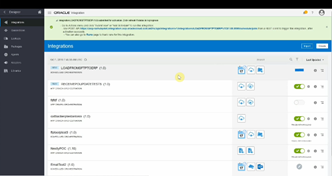
Quarterly Updates by Phil Wilkins

image

The update regime for Integration Cloud is well established in its quarterly pattern, but within that pattern are two update cycles, separated by two weeks. It is possible to choose which cycle your OIC instance update will be executed in. If you don’t specify which cycle then by default you will be put into the second cycle.

For production deployments of OIC that makes a lot of sense. But we would recommend that your non-production instance be part of the 1st update cycle. This allows you two weeks to validate and fix any issues in the event that the upgrade breaks any of your integrations. While that shouldn’t happen if you are exploiting an undocumented behaviour or something reported as a bug there is always a risk.

So the obvious question is how to define which update cycle should be used. For OCI Gen 2 (the majority of users should have migrated to now), the control is achieved by setting a freeform tag on the OIC instance. The tag needs to be called OIC_UPDATE_WINDOW1 (note – if you don’t read the Oracle documentation carefully you could end up omitting the numeral) and the value can be left blank. The tags are set on the OCI view for your OIC instance, which has a tabbed view as you can see below. Once the value is set then the OCI view will show an Updating status – this is not to be confused with the OIC instance being updated with the latest quarterly changes.

All of this shows up in blog (here and script fragment here) and a documentation (here). What is less apparent is the lead time needed for the tag to be in place. This is in the order of 7 or more weeks. This means you need to have your OIC dev instance in place almost a full quarter before the opportunity is available, and spinning up a new OIC instance and expecting it to immediately adopt the latest version during the maintenance window isn’t going to solve any problems.

How to confirm the instance version

The related question is where to look for the version of OIC is running. The information is only provided in the instance console rather then the OCI View of OIC. The version information is available as part of the drop down visible on the question mark icon at the top right of the UI, as the following screenshots show: Read the complete article here.

PaaS Partner Community

For regular information on Oracle PaaS become a member in the PaaS (Integration & Process) Partner Community please register here.

clip_image003 Blog clip_image005 Twitter clip_image004 LinkedIn image[7][2][2][2] Facebook clip_image002[8][4][2][2][2] Wiki

Technorati Tags: SOA Community,Oracle SOA,Oracle BPM,OPN,Jürgen Kress