Installing OIC Connectivity Agent on OCI Compute by Niall Commiskey

imageThis is a follow up from the previous OCI Streaming post – the OCI Streaming connection requires a connectivity agent to be specified, when one uses the connection as a trigger. I tried this out with the connectivity agent installed on my laptop. Naturally, this is not feasible for any organization, so installation of the agent on an OCI Compute is a compelling alternative.

Step 1 – Spin up an OCI Compute Instance -  You can accept the defaults – Read the complete article here.

PaaS Partner Community

For regular information on Oracle PaaS become a member in the PaaS (Integration & Process) Partner Community please register here.

clip_image003 Blog clip_image005 Twitter clip_image004 LinkedIn image[7][2][2][2] Facebook clip_image002[8][4][2][2][2] Wiki

Technorati Tags: SOA Community,Oracle SOA,Oracle BPM,OPN,Jürgen Kress

Oracle Integration Update Webcast December 16th 2021

Product Management Webinar: Attend to get the latest updates and innovations on Oracle Integration November 2021 release. Our Oracle Integration Product Manager Team will present new features, product roadmaps, discuss upcoming innovations and provide guidelines to help you adopt these quickly within your organization. Topics include:

  • Welcome & announcements
  • November release update Oracle Integration
  • HCM Integration Best Practices from the A-Team
  • Questions & Answers

Schedule: December 16th 2021 17:00 CET (Paris time) or 8:00 am PST (San Francisco time)

Speakers:

Mani Krishnan Niall Commiskey Jürgen Kress
Mani Krishnan

Consulting Solution Architect, Oracle HQ

Niall Commiskey

Senior Director Product Management, Oracle HQ
Jürgen Kress

Director Product Management, Oracle HQ

For details please visit the registration page here.

For regular updates please subscribe to the newsletter here.

PaaS Partner Community

For regular information on Oracle PaaS become a member in the PaaS (Integration & Process) Partner Community please register here.

clip_image003 Blog clip_image005 Twitter clip_image004 LinkedIn image[7][2][2][2] Facebook clip_image002[8][4][2][2][2] Wiki

Technorati Tags: SOA Community,Oracle SOA,Oracle BPM,OPN,Jürgen Kress

Restricting access to OIC instances

image

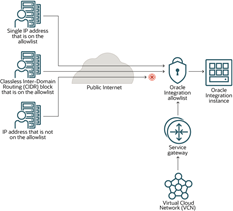
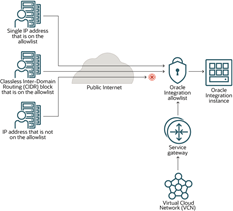
Restrict the networks that have access to your Oracle Integration instance by configuring an allowlist (formerly a whitelist). Only users from the specific IP addresses, Classless Inter-Domain Routing (CIDR) blocks, and virtual cloud networks that you specify can access the Oracle Integration instance.

For the Oracle Integration instance, configure the allowlist when you create the instance or after creating the instance.

Option 1 for Configuring Allowlists: Restrict Access to Oracle Integration Using the Self-service Allowlist Capabilities

In this scenario, you restrict access to Oracle Integration using an allowlist. The allowlist restricts access based on the following parameters:

  • Single IP address
  • Classless Inter-Domain Routing (CIDR) block (that is, an IP address range)
  • Virtual Cloud Network Oracle Cloud ID (VCN OCID)

Additionally, your organization might have a service gateway. The service gateway lets your virtual cloud network (VCN) privately access Oracle Integration without exposing the data to the public internet.

Only the specified IP addresses and VCN OCIDs can access Oracle Integration. Users and systems accessing Oracle Integration from listed VCNs have full access.

Advantages

  • Easy setup! You can configure your allowlist in just a few minutes, without having to create a custom endpoint.
  • All traffic is supported, including REST, SOAP, and other internet traffic.

Read the complete article here.

PaaS Partner Community

For regular information on Oracle PaaS become a member in the PaaS (Integration & Process) Partner Community please register here.

clip_image003 Blog clip_image005 Twitter clip_image004 LinkedIn image[7][2][2][2] Facebook clip_image002[8][4][2][2][2] Wiki

Technorati Tags: SOA Community,Oracle SOA,Oracle BPM,OPN,Jürgen Kress

Heathrow rapidly moves to Oracle Cloud and connects with hybrid Integration watch on-demand webcast

Heathrow rapidly moves to Oracle Cloud and connects with hybrid Integration

The continuous delivery of constant small innovations can bring benefits faster without risks. Join us to hear how Capgemini’s Agile Innovation Platform (AIP) combined with Flexagon’s FlexDeploy DevOps platform can enable innovations and have delivered tangible benefits to customers using the latest cloud capabilities and traditional on-premises ERP.
Phil Wilkins, Technical Evangelist, from Capgemini and Dan Goerdt, President, from Flexagon will describe how the combination are highly effective at delivering micro-innovation demonstrated through real-world customer results.
From this session, you will learn:

  • How the Agile Innovation Platform’s building blocks, templates, allows us to focus on customer value & innovation.
  • How FlexDeploy brings unique benefits to both Open Source and Oracle-specific technologies.
  • What were the challenges solved and benefits gained by actual customers using AIP and FlexDeploy.
  • How Integration is the foundation of continuous delivery and innovation.

Watch on-demand the webcast here.

LHRairport

PaaS Partner Community

For regular information on Oracle PaaS become a member in the PaaS (Integration & Process) Partner Community please register here.

clip_image003 Blog clip_image005 Twitter clip_image004 LinkedIn image[7][2][2][2] Facebook clip_image002[8][4][2][2][2] Wiki

Technorati Tags: SOA Community,Oracle SOA,Oracle BPM,OPN,Jürgen Kress

Cloud Platform free trial accounts

imageFree Oracle Cloud platforms 30 days cloud trial are available here. Your Oracle partner manager can extend this trails. For SaaS trials please visit https://demo.oracle.com . For support please contact the OPN Team.

PaaS Partner Community

For regular information on Oracle PaaS become a member in the PaaS (Integration & Process) Partner Community please register here.

clip_image003 Blog clip_image005 Twitter clip_image004 LinkedIn image[7][2][2][2] Facebook clip_image002[8][4][2][2][2] Wiki

Technorati Tags: SOA Community,Oracle SOA,Oracle BPM,OPN,Jürgen Kress

Oracle Developer Meetups in Utrecht, Brussels, Cairo, Istanbul, Lille, London, Lisbon, Madrid, Porto, Sao Paulo and Oslo

imageWant to learn more about developing Enterprise-grade Cloud Native applications on the Oracle Cloud Platform, covering topics like Microservices Architecture, developing in Node, Python and PHP, using Low Code development tools to build Mobile apps, and much more? Join the Oracle Developer Meetup groups if you want to follow Oracle’s solutions in this area, or participate in the events and hands-on labs we organize.

PaaS Partner Community

For regular information on Oracle PaaS become a member in the PaaS (Integration & Process) Partner Community please register here.

clip_image003 Blog clip_image005 Twitter clip_image004 LinkedIn image[7][2][2][2] Facebook clip_image002[8][4][2][2][2] Wiki

Technorati Tags: SOA Community,Oracle SOA,Oracle BPM,OPN,Jürgen Kress

Ways to download connectivity agent Oracle Integration by Ankur Jain

imageThe connectivity agent is used to establish the communication between SaaS and on-premises applications. Before you create the connection with on-premises applications in Oracle Integration, you must have to download the connectivity agent and install it on the host machine.

There are various ways to download the connectivity agent. So, in this short article, we’ll describe various options to download the connectivity agent of Oracle Integration.

  1. Using Oracle Integration Console

The easiest way to download the connectivity agent is using the Oracle Integration console. To download it using the Oracle Integration console follow the below steps:

  1. Login into the Oracle Integration Console.
  2. Navigate to the Integrations -> Agents page
  3. Click on the Download -> Connectivity Agent option from the upper right corner of the page.

This will start downloading the connectivity agent and a file with the name oic_connectivity_agent.zip will be downloaded on your default download location. You can then transfer it to the host machine where you want to install a connectivity agent. Read the complete article here.

PaaS Partner Community

For regular information on Oracle PaaS become a member in the PaaS (Integration & Process) Partner Community please register here.

clip_image003 Blog clip_image005 Twitter clip_image004 LinkedIn image[7][2][2][2] Facebook clip_image002[8][4][2][2][2] Wiki

Technorati Tags: SOA Community,Oracle SOA,Oracle BPM,OPN,Jürgen Kress

OIC Pub/Sub with OCI Streaming Part 3 by Niall Commiskey

imageThis final post in the series covers using the OCI Streaming adapter as a Trigger.

This requires us to specify a connectivity agent in the connection definition. My Streaming api endpoint is public, so the connectivity agent can run anywhere e.g. on my laptop.

Here I leverage my agent group – NIALLC_AGENTGROUP. Now to the integration with OCI Streaming as trigger -  Read the complete article here.

PaaS Partner Community

For regular information on Oracle PaaS become a member in the PaaS (Integration & Process) Partner Community please register here.

clip_image003 Blog clip_image005 Twitter clip_image004 LinkedIn image[7][2][2][2] Facebook clip_image002[8][4][2][2][2] Wiki

Technorati Tags: SOA Community,Oracle SOA,Oracle BPM,OPN,Jürgen Kress

OIC Pub/Sub with OCI Streaming Part 2 by Niall Commiskey

imageHere we have multiple subscribers, let’s call them cg01 and cg02 – cg standing for consumer group. The previous post had 1 subscriber, now we are looking at 2. This is very easy to implement. One just needs separate integrations per subscriber, it’s what you would require anyway. So let’s check out my OIC artefacts –

AA-StreamingProducts-Subscribe is configured to subscribe as consumer cg01. AA-StreamingProducts-Subscribe-CG02 is configured to subscribe as consumer cg02. Read the complete article here.

PaaS Partner Community

For regular information on Oracle PaaS become a member in the PaaS (Integration & Process) Partner Community please register here.

clip_image003 Blog clip_image005 Twitter clip_image004 LinkedIn image[7][2][2][2] Facebook clip_image002[8][4][2][2][2] Wiki

Technorati Tags: SOA Community,Oracle SOA,Oracle BPM,OPN,Jürgen Kress

OIC Pub/Sub with OCI Streaming by Niall Commiskey

image

Simple use case here – publish and subscribes to events from Shopify.

Normally I would be doing this with orders, however, my trial Shopify account doesn’t allow me to create orders, so I’m leveraging Products here. But, I know you are all experts at extrapolating.

Now someone may think of using Pub/Sub pattern available when creating a new integration in OIC. However, as you can see – it has been deprecated.

The publish to OIC integration style has been deprecated. Oracle recommends that you use app driven orchestration and use an invoke to publish a message into the OIC streaming service. Read the complete article here.

PaaS Partner Community

For regular information on Oracle PaaS become a member in the PaaS (Integration & Process) Partner Community please register here.

clip_image003 Blog clip_image005 Twitter clip_image004 LinkedIn image[7][2][2][2] Facebook clip_image002[8][4][2][2][2] Wiki

Technorati Tags: SOA Community,Oracle SOA,Oracle BPM,OPN,Jürgen Kress