Extend HCM Cloud with workflow process in Oracle Integration Cloud by Mani Krishnan

imageIntroduction

Oracle Integration Cloud provides rich work flow capabilities that can be integrated with Oracle SaaS applications. Oracle HCM cloud provides approval and work list capabilities for most needs. However, there are use cases where a complex workflow with multiple approvals and ability to enrich approval data from  multiple applications will be necessary. In this post, let’s look at seamlessly integrating integration cloud process user interfaces with HCM cloud.

Overview

Instructions in this post are applicable to Oracle Integration cloud on Oracle Cloud Infrastructure (OCI). Each OCI tenancy is associated with an IDCS instance, which supports identity federation with Oracle SaaS applications. Enabling identity federation with IDCS also allows seamless integration with many other Oracle PaaS products. The high-level steps are:

· Enable federation between IDCS and HCM Cloud

· Add Oracle Integration Cloud (OIC) to a Identity provider policy

· Embed process UI in HCM cloud

Here is a depiction of the SAML federation solution:

User logs into HCM Cloud and opens a page with an embedded OIC process page. The OIC  process page should display content specific to the currently signed-in user without requiring user to log into IDCS or HCM Cloud. Steps 3,4 and 5 are transparent to the end user.

Enable identity federation between IDCS and HCM Cloud

Before identity federation can be validated, users and role assignments also must be synchronized between HCM Cloud and IDCS. There are several ways to achieve it. Follow instructions at this link to use the ESS Job in SaaS to synchronize users and role assignments. This task can be entirely performed by customers as self service. Read the complete article here.

PaaS Partner Community

For regular information on Oracle PaaS become a member in the PaaS (Integration & Process) Partner Community please register here.

clip_image003 Blog clip_image005 Twitter clip_image004 LinkedIn image[7][2][2][2] Facebook clip_image002[8][4][2][2][2] Wiki

Technorati Tags: SOA Community,Oracle SOA,Oracle BPM,OPN,Jürgen Kress
Updating SOA Polling Frequency through WLST by Ahmed Aboulnaga

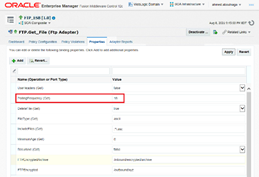
Havimagee you ever wondered how you can update the PollingFrequency of an inbound adapter such as the FileAdapter or FtpAdapter using WLST?

Taking a look at an Oracle SOA 12c composite in the EM console, when you click on your service, you can navigate to the Properties tab to view and update the polling frequency of the inbound adapter at any time during runtime.

We experienced a strange issue. For example, the inbound FileAdapter would be configured to poll the folder every 10 seconds. However, we noticed that in some cases (which we can’t explain), the file never gets picked up. It may sit there for hours. A restart of the SOA managed servers took care of this. We also found out that updating the polling frequency re-triggers or re-initializes the inbound file polling for some odd reason. Read the complete article here.

PaaS Partner Community

For regular information on Oracle PaaS become a member in the PaaS (Integration & Process) Partner Community please register here.

clip_image003 Blog clip_image005 Twitter clip_image004 LinkedIn image[7][2][2][2] Facebook clip_image002[8][4][2][2][2] Wiki

Technorati Tags: SOA Community,Oracle SOA,Oracle BPM,OPN,Jürgen Kress
CI/CD for Oracle Integrations with Visual Builder Studio by Shay Shmeltzer

image

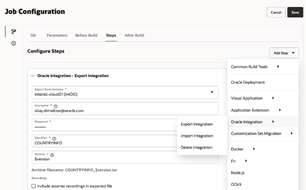
The new version of Oracle Visual Builder Studio adds support for automating continuous deployment of Integrations created in Oracle Integration from one instance to another. This can help teams easily promote changes to integrations from their development instance to their test and production instances. In this blog we’ll show you how to achieve this.

Oracle Integration is a cloud service that allows you to integrate data from multiple sources and create data APIs for other apps to consume. For example, many of the customers who are developing user interfaces with Oracle Visual Builder rely on Oracle Integration to get the data shown in the UI. Oracle Integration has adapters that can help you easily connect and extract data from multiple systems.
Oracle Integration provides a web-based interface where developers visually create integrations and manage versions of those integrations. For customers who are looking to automate the process of migrating integrations between instances (such as from dev to prod) – Oracle Visual Builder provides an easy-to-use solution that simplify export and import of integrations.

Automating Integration CI/CD

We added specific Oracle integration functionality into Visual Builder Studio in both the Environments and Build areas. In the environments section you can define multiple environments and map them to integration cloud instances. We can scan your tenancy for instances, and you can also provide a pointer to other instances in other cloud tenancies. Read the complete article here.

PaaS Partner Community

For regular information on Oracle PaaS become a member in the PaaS (Integration & Process) Partner Community please register here.

clip_image003 Blog clip_image005 Twitter clip_image004 LinkedIn image[7][2][2][2] Facebook clip_image002[8][4][2][2][2] Wiki

Technorati Tags: SOA Community,Oracle SOA,Oracle BPM,OPN,Jürgen Kress
Use Oracle Integration to Connect E-Business Suite with Financials Cloud

image

Moving Oracle E-Business Suite to the cloud brings many opportunities to modernize and integrate with other cloud services. Many times, these projects relate to the adoption of new SaaS applications which add more functionality and business processes.

One example is modernizing the infrastructure of EBS running the manufacturing operations by bringing to Oracle Cloud and connecting with a new implementation of Oracle Financials SaaS.

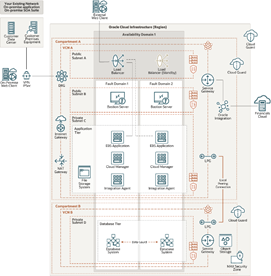
Oracle Integration is an Oracle Cloud regional service with a powerful set of adapters, providing connectivity and integration for Oracle E-Business Suite, cloud services and technologies, and SaaS applications as Oracle Financials Cloud. This architecture presents a topology for connecting an EBS instance on Oracle Cloud Infrastructure (OCI) with Oracle Financials SaaS using Oracle Integration.

Architecture

This architecture shows the deployment of Oracle E-Business Suite in a single availability domain inside an OCI region, along with integrations built using Oracle Integration. Oracle Integration is connected to Oracle E-Business Suite using Oracle E-Business Suite Adapter deployed with the Oracle Integration Connectivity Agent.

The architecture includes two compartments, both of which have Cloud Guard enabled to provide maximum security based on Oracle’s security best practices. In addition, the compartment where the database system and the autonomous database private endpoint are deployed is a security zone compartment. Read the complete article here.

PaaS Partner Community

For regular information on Oracle PaaS become a member in the PaaS (Integration & Process) Partner Community please register here.

clip_image003 Blog clip_image005 Twitter clip_image004 LinkedIn image[7][2][2][2] Facebook clip_image002[8][4][2][2][2] Wiki

Technorati Tags: SOA Community,Oracle SOA,Oracle BPM,OPN,Jürgen Kress
Free Webinar: CI and CD for Oracle SOA and OIC by Dan Goerdt & Dan Reynebeau

image

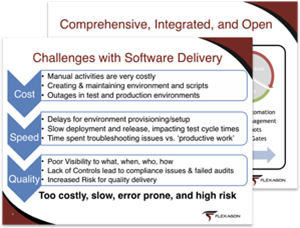
Take a deep dive of FlexDeploy’s support for the SOA Suite, WebLogic resources, and the Oracle Integration Cloud.

The Oracle SOA Suite and Oracle Integration Cloud provide a wealth of features for integration, but most customers struggle to create fast and repeatable deployment processes to manage changes across their on prem and cloud environments.

In this webinar you will learn how FlexDeploy can:

  • Automate the entire Build, Deploy, and Release process.
  • Remove the need for scripting and manual activities.
  • Integrate seamlessly with tools such as Jira, Soap UI, and ServiceNow. Read the complete article here.

PaaS Partner Community

For regular information on Oracle PaaS become a member in the PaaS (Integration & Process) Partner Community please register here.

clip_image003 Blog clip_image005 Twitter clip_image004 LinkedIn image[7][2][2][2] Facebook clip_image002[8][4][2][2][2] Wiki

Technorati Tags: SOA Community,Oracle SOA,Oracle BPM,OPN,Jürgen Kress

Tips and Tricks for handling numbers in BPEL or OIC by Pranav Davar

image

While integrating with multiple systems and moving data from one system to the other, we generally come across scenarios, wherein we need to change the format of the number or perform operations like floor, ceil, round, divide, multiply, add, etc. on numbers. We will be going through various mathematical functions available in XSLT 1.0, which would be helpful in such scenarios, and also some generic errors which we encounter usually.

Mathematical Operations

1. Divide

2. Multiply

3. Add

4. Subtract

5. Square-root

6. Round

7. Floor

8. Ceil

9. Advanced Number formatting

Common Errors

Mathematical Operations

1. Divide

To divide 2 numbers, we can use the div operator to divide two numbers.

Syntax:

    $num1 div $num2

Example:

    Let us assume we want to divide 120 by 7. Read the complete article here.

PaaS Partner Community

For regular information on Oracle PaaS become a member in the PaaS (Integration & Process) Partner Community please register here.

clip_image003 Blog clip_image005 Twitter clip_image004 LinkedIn image[7][2][2][2] Facebook clip_image002[8][4][2][2][2] Wiki

Technorati Tags: SOA Community,Oracle SOA,Oracle BPM,OPN,Jürgen Kress

Convert JSON to String Oracle Integration by Ankur Jain

image

I have seen multiple target applications which accept the JSON data as a String in a single element. So, it is necessary to convert the JSON to String before you call the target endpoint.

Convert JSON to String Oracle Integration

For example:

Below is the JSON which you may get from the source system:

{

"firstname": "ankur",

"lastname": "jain"

}

and you need to map the above JSON as a string in the following single element:

{

"data" : "{\n \"firstname\" : \"ankur\",\n \"lastname\" : \"jain\"\n}"

}

So, in order to achieve this, first, you have to write the JSON to the temporary location using the Stage File action and read it using the opaque schema as a String.

Here is the opaque.xsd code which you need to use to read the JSON from the stage: Read the complete article here.

PaaS Partner Community

For regular information on Oracle PaaS become a member in the PaaS (Integration & Process) Partner Community please register here.

clip_image003 Blog clip_image005 Twitter clip_image004 LinkedIn image[7][2][2][2] Facebook clip_image002[8][4][2][2][2] Wiki

Technorati Tags: SOA Community,Oracle SOA,Oracle BPM,OPN,Jürgen Kress

Leverage Oracle MySQL Database Service (MDS) with Oracle Integration Cloud by Arpit Narula

image

The primary objective of this blog is to detail out how Oracle’s MySQL DB can be provisioned on OCI Gen -2 and integrate it with Oracle Integration Cloud. MySQL Database Service on Oracle Cloud might prove out to be a very cost effective and performance enhancing solution for many use cases. A few such use cases are

· Custom Logging and Error Handling Frameworks

· Implementing Parking Lot Patterns for Integrations

· Building Data Stage for VBCS applications

So let’s jump into the fun sections where we will cover the following topics in detail.

a) Create an MDS Cloud Instance

b) Setup compute instance (that will connect to MDS)

c) Create an OIC Instance and Agent Setup

d) Build a sample integration read the complete article here.

PaaS Partner Community

For regular information on Oracle PaaS become a member in the PaaS (Integration & Process) Partner Community please register here.

clip_image003 Blog clip_image005 Twitter clip_image004 LinkedIn image[7][2][2][2] Facebook clip_image002[8][4][2][2][2] Wiki

Technorati Tags: SOA Community,Oracle SOA,Oracle BPM,OPN,Jürgen Kress
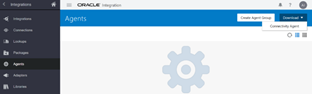
Ways to download connectivity agent Oracle Integration by Ankur Jain

image

The connectivity agent is used to establish the communication between SaaS and on-premises applications. Before you create the connection with on-premises applications in Oracle Integration, you must have to download the connectivity agent and install it on the host machine.

There are various ways to download the connectivity agent. So, in this short article, we’ll describe various options to download the connectivity agent of Oracle Integration.

  1. Using Oracle Integration Console

The easiest way to download the connectivity agent is using the Oracle Integration console. To download it using the Oracle Integration console follow the below steps:

  1. Login into the Oracle Integration Console.
  2. Navigate to the Integrations -> Agents page
  3. Click on the Download -> Connectivity Agent option from the upper right corner of the page. Read the complete article here.

PaaS Partner Community

For regular information on Oracle PaaS become a member in the PaaS (Integration & Process) Partner Community please register here.

clip_image003 Blog clip_image005 Twitter clip_image004 LinkedIn image[7][2][2][2] Facebook clip_image002[8][4][2][2][2] Wiki

Technorati Tags: SOA Community,Oracle SOA,Oracle BPM,OPN,Jürgen Kress

OIC Activity Stream to OCI Log analytics by Shreenidhi Raghuram

OIC Activity Stream to OCI Log analytics image

Introduction

We know that Oracle Integration Activity stream logs can be downloaded from OIC using the Monitoring console. Here is the reference link – Monitoring OIC
A commonly implemented solution by customers is to automate the download of activity stream logs periodically using monitoring REST API and store them in repositories like FTP servers or Object storage for offline analysis and diagnosis.

However the Activity stream download  is governed by size of the activity stream log file. Refer – activity stream logs retention.
Due to this size limitation, customers could have an issue with the ability to reliably download activity stream logs for a definite period of time, say last 1 hour. For instance, during periods of heavy activity on the OIC instance the log file may only cover a portion of the period due to the size limitation.

Solution

Good news ! This requirement has now been addressed as part of the August 2021 release of Oracle Integration.
OIC now allows activity streams to be sent to OCI Logging service. OCI Logging service provides persistence as well as real time analysis on the OIC activity stream messages. Read the complete article here.

PaaS Partner Community

For regular information on Oracle PaaS become a member in the PaaS (Integration & Process) Partner Community please register here.

clip_image003 Blog clip_image005 Twitter clip_image004 LinkedIn image[7][2][2][2] Facebook clip_image002[8][4][2][2][2] Wiki

Technorati Tags: SOA Community,Oracle SOA,Oracle BPM,OPN,Jürgen Kress