Process Automation with Process Cloud Service (PCS) – Part 2 (Forms) by Daniel Teixeira

image

In the previous post I created a simple business process, but with no real implementation details. It was just a framework.

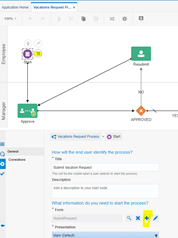
Now, I will show how to create a Form to start the Process. Remember that there are many ways of stating a process, but for this case the Form is the way to go.

How to Create a Form

You can create a Form from two different places.

  1. The Form Menu on the left side. (left pic)
  2. From within the Form properties in the Model. (right pic)

With this first option you can choose to create a new Form from within PCS, or to bring an ExternalUI – from VBCS for example.

The second has the advantage of assigning the form directly to the process activity. Read the complete article here.

PaaS Partner Community

For regular information on Oracle PaaS become a member in the PaaS (Integration & Process) Partner Community please register here.

clip_image003 Blog clip_image005 Twitter clip_image004 LinkedIn image[7][2][2][2] Facebook clip_image002[8][4][2][2][2] Wiki

Technorati Tags: SOA Community,Oracle SOA,Oracle BPM,OPN,Jürgen Kress
Oracle Implementation Certifications

image

Enablement and certification are key to cloud success. At the Oracle Competence Center and Online Learning Library partners can attend free on-line classes and certifications. Additional we offer the latest implementation exams ($245 or free vouchers) for:

· Oracle Cloud Platform Application Integration 2021 Specialist | 1Z0-1042-21

· Oracle Cloud Platform Digital Assistant 2020 Specialist | 1Z0-1071-20

PaaS Partner Community

For regular information on Oracle PaaS become a member in the PaaS (Integration & Process) Partner Community please register here.

clip_image003 Blog clip_image005 Twitter clip_image004 LinkedIn image[7][2][2][2] Facebook clip_image002[8][4][2][2][2] Wiki

Technorati Tags: SOA Community,Oracle SOA,Oracle BPM,OPN,Jürgen Kress
Process Automation with Process Cloud Service (PCS) – Part 1 by Daniel Teixeira

image

Earlier in my career I worked extensively with a Business Process Management (BPM) software called Cordys (meanwhile acquired by OpenText). Had a couple of trainings on BEA Aqualogic BPM Suite (now Oracle). Later on, while working for TIBCO I had several trainings and a bit of project experience with their BPM solution.

Most of the BPM concepts are familiar to me, but over the years they became quite rusty So this is a good time to dive a bit more into a component of the Oracle Integration Cloud (OIC). I am talking about the Process Cloud Service (PCS), and this will be a series of posts dedicated to exploring PCS capabilities!

Somehow BPM seems to be out of use nowadays and Process Automation became the trendy designation!

The Concepts

Processes are based on BPM Notation (BPMN) – https://www.bpmn.org/

“A standard Business Process Model and Notation (BPMN) will provide businesses with the capability of understanding their internal business procedures in a graphical notation and will give organizations the ability to communicate these procedures in a standard manner. “

The Use Case

In the upcoming posts I will work out a very simple, yet relatable, use case.

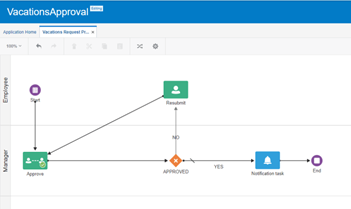
A process to manage an employee vacation request .

Granted, if you are self employed this makes no sense, but if you work for a company with a couple hundred or thousands of employees, then the need to manage this process becomes obvious.

Departments/Teams internal planning may require a process to manage this, and on top of that, they may have some business rules that need to be implemented ( example: an entire team cannot take vacations at the same time). Read the complete article here.

PaaS Partner Community

For regular information on Oracle PaaS become a member in the PaaS (Integration & Process) Partner Community please register here.

clip_image003 Blog clip_image005 Twitter clip_image004 LinkedIn image[7][2][2][2] Facebook clip_image002[8][4][2][2][2] Wiki

Technorati Tags: SOA Community,Oracle SOA,Oracle BPM,OPN,Jürgen Kress

Helpful Suggestions in setting up SOA suite on Containers by Arun Ganesan

image

Oracle SOA Suite On Containers was released by Oracle recently. Here is the quick start guide on how to setup a SOA Suite environment in Kubernetes.

Below are some of the helpful suggestions that might be useful while performing the setup as in the quick start guide above.

Unable to pull Weblogic Kubernetes Operator :

Weblogic Kubernetes Operator image is available at ghcr.io.  Below is a sample command:

docker pull ghcr.io/oracle/weblogic-kubernetes-operator:3.0.1

SOA Suite Image Location:

The SOA Suite image can be installed from two different locations.

First option is to use Oracle Support repository. This is the only version supported for production deployments and also has the latest patch set. More info can be found here. The other options is to use Oracle Container Registry – use this only for development, test environments and not for prod. Read the complete article here.

PaaS Partner Community

For regular information on Oracle PaaS become a member in the PaaS (Integration & Process) Partner Community please register here.

clip_image003 Blog clip_image005 Twitter clip_image004 LinkedIn image[7][2][2][2] Facebook clip_image002[8][4][2][2][2] Wiki

Technorati Tags: SOA Community,Oracle SOA,Oracle BPM,OPN,Jürgen Kress

SOA Suite Docker Image Release – 21.1.2 by Ravi Pinto

imageWe are delighted to announce the release of the next iteration of Oracle SOA Suite Docker Image. This release is tagged as 21.1.2.

Here is a look at the features that the first release in the new year brings in

  • New config parameters introduced to help customize cluster name for both Oracle SOA and Oracle Service Bus
  • New way to perform the life cycle operations on Domain, Cluster & Servers
  • Supports Oracle SOA Suite 12.2.1.4 domains deployment using January 2021 PSU and known bug fixes
  • Various bug fixes for Oracle SOA Suite and Oracle Service Bus. Read the complete article here.

PaaS Partner Community

For regular information on Oracle PaaS become a member in the PaaS (Integration & Process) Partner Community please register here.

clip_image003 Blog clip_image005 Twitter clip_image004 LinkedIn image[7][2][2][2] Facebook clip_image002[8][4][2][2][2] Wiki

Technorati Tags: SOA Community,Oracle SOA,Oracle BPM,OPN,Jürgen Kress

Piloting Your Digital Transformation Journey through Modernization by Ravi Pinto

image

As organizations evaluate Digital Transformation and consequently, SOA Modernization as part of that exercise, my colleague, Perren Walker, has put together some thoughts that I wanted to share with you. He has penned them in context the aerospace industry. I am sure you will glean some pearls of wisdom here.

What does aerospace have to teach us about cost-effective IT modernization?

In my mind, there are many similarities between aerospace platforms and IT systems, not the least both are capital intensive and can experience rapid technological obsolescence. Yet, Boeing has flown an airplane from 1955, some 66 years, and it is expected to fly beyond 2050. How has Boeing been able to continuously modernize an aircraft with such longevity, while remaining a state-of-the-art platform and the best economic choice? 

We’ve selected Boeing’s avionics platform because Oracle SOA Suite customers are looking to achieve similar business returns with their Integration investments. When we look closely, there are 4 parallels between Boeing’s aircraft and Oracle SOA Suite customers, who are driving platform modernization:

  1. An extensible, re-configurable architecture

With SOA Suite containerization[1], customers can easily configure SOA Suite’s architecture to easily run in the cloud, on-premise or in a hybrid configuration.  This protects your investment in existing integrations, while SOA modernization can take place with Oracle Integration. Read the complete article here.

PaaS Partner Community

For regular information on Oracle PaaS become a member in the PaaS (Integration & Process) Partner Community please register here.

clip_image003 Blog clip_image005 Twitter clip_image004 LinkedIn image[7][2][2][2] Facebook clip_image002[8][4][2][2][2] Wiki

Technorati Tags: SOA Community,Oracle SOA,Oracle BPM,OPN,Jürgen Kress
FlexDeploy for Oracle Integration Cloud

image

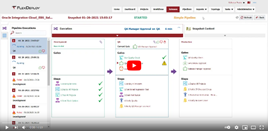
Whether it’s the ability to easily and effectively build and deploy OIC artifacts, the need to easily and efficiently access logs and reports, or the desire to incorporate automated testing into the development process, FlexDeploy provides a simple way to build, deploy, and test OIC artifacts. Have a question for us here at Flexagon? Leave it in the comments! Oh, and leave us a like! We really appreciate it. Flexagon is an innovative software company focused on enabling enterprise agility and operational excellence. Our DevOps platform, FlexDeploy, brings automation, controls, and visibility to software provisioning, build, deploy, test, and release processes, and includes pre-built plugins for Oracle Database, Fusion Middleware, E-Business Suite, Cloud, and many open source and commercial technologies. Watch the video here.

PaaS Partner Community

For regular information on Oracle PaaS become a member in the PaaS (Integration & Process) Partner Community please register here.

clip_image003 Blog clip_image005 Twitter clip_image004 LinkedIn image[7][2][2][2] Facebook clip_image002[8][4][2][2][2] Wiki

Technorati Tags: SOA Community,Oracle SOA,Oracle BPM,OPN,Jürgen Kress

Oracle Integration – Connecting to NetSuite using Token Based Authentication by Subhani Sahib Italapuram

image

In this blog, We shall talk about Token Based Authentication(TBA) which is one of the security policies supported by NetSuite adapter in Oracle Integration.

If you want to use token-based authentication with the Oracle NetSuite Adapter, You should have the following information that is required for creating a connection.

  • Consumer key
  • Consumer secret
  • Token
  • Token secret
  • Account ID

And to use Token Based Authentication (TBA), you need to complete the tasks given below in the NetSuite application.

  1. Enable Token-Based Authentication
  2. Create Integration record
  3. Create a Role and assign to a User
  4. Create an Access Token for the Integration record, User, and Role
  5. NetSuite Account ID.

Let us go through the below steps and get the values required for us to create a connection using NetSuite adapter in Oracle Integration.

1. Enable Token-Based Authentication

Go to Setup in NetSuite application > Company > Enable Features > Click the SuiteCloud subtab –> Under Manage Authentication section, check the TOKEN-BASED AUTHENTICATION (Please note that the features Client SuiteScript and Server SuiteScript must also be enabled to use token-based authentication with RESTlets, If it is not enabled, please enable). Read the complete article here.

PaaS Partner Community

For regular information on Oracle PaaS become a member in the PaaS (Integration & Process) Partner Community please register here.

clip_image003 Blog clip_image005 Twitter clip_image004 LinkedIn image[7][2][2][2] Facebook clip_image002[8][4][2][2][2] Wiki

Technorati Tags: SOA Community,Oracle SOA,Oracle BPM,OPN,Jürgen Kress

Connecting Hubspot and NetSuite using Oracle Integration (OIC) by Niall Commiskey

image
Simple scenario here – I need to sync contacts between Hubspot and NetSuite. Introduction.

Now I am new to HubSpot – by new I mean really a neophyte – I am trying this out for the first time tonight. I create a HubSpot developer account and get the api key. Read the complete article here.

PaaS Partner Community

For regular information on Oracle PaaS become a member in the PaaS (Integration & Process) Partner Community please register here.

clip_image003 Blog clip_image005 Twitter clip_image004 LinkedIn image[7][2][2][2] Facebook clip_image002[8][4][2][2][2] Wiki

Technorati Tags: SOA Community,Oracle SOA,Oracle BPM,OPN,Jürgen Kress
Integration Customer Newsletter Spring 2021

IOIC customer webcast HQ June 2021t is time for the May quarterly update to Oracle Integration. With Spring in the air, we are excited to share all our exciting new features and improvements. Thanks to Simone, Antony, Michael, Amit, and Niall for the blog post series:

If you want to let us know how much you are enjoying this newsletter or If you have anything you would like us to feature in a future edition, message us via LinkedIn or twitter using hashtags #OracleIntegration.

Please feel free to forward this newsletter to anybody who may be interested and invite them to subscribe too. Read the Spring 2021 here and subscribe to the newsletter here.

clip_image003 Blog clip_image005 Twitter clip_image004 LinkedIn image[7][2][2][2] Facebook clip_image002[8][4][2][2][2] Wiki

Technorati Tags: SOA Community,Oracle SOA,Oracle BPM,OPN,Jürgen Kress, Integration newsletter