Identity Propagation call from Integration Cloud to Oracle SaaS Applications – free on-demand webinar

image

One of the big challenges that Oracle Integration Cloud developers face is any outbound REST call from Integration Cloud (IC) to Fusion Applications (FA) APIs require a user’s identity. Although this may seem trivial on the surface, the mechanism to have the identity of a user flow from a client application to IC to FA in a secure fashion is not trivial. However, there is a proven pattern that can be leveraged with Oracle Cloud technologies to solve this problem and the following presentation will illustrate this pattern.

Speaker: Greg Mally & Deepak Arora

Watch the webcast on-demand

Take the opportunity to watch our community webcasts on-demand:

· Identity Propagation call from Integration Cloud to Oracle SaaS Applications

· Connect Opera with Oracle SaaS

· Extreme Scalability and Enhanced Resilience for OIC

· SOA Modernization

· Cloud Native and Serverless SaaS Extensions

· How Process Workflow can extend the role of Integration

· Innovate Service Cloud with Chatbots

· Integration Update & New Features

· Chatbot Design best practices for Conversational UX

· Connect, Innovate, Extend SaaS KickOff Webcast 2020

· Cloud Platform KickOff Webcast 2020

· Netsuite Integration

· Integration Insight

· Innovate HCM with Chatbots

· ERP Integration with Application Adapters

· HCM Integration with Application Adapters

· Extend SaaS with Visual Builder Cloud Service

· Integration Adapters

· Integrate SaaS

· Digital Assistant Update

· SOA Cloud Service

· PaaS Overview Webcast

· Process Cloud Service Update

· Integrate ERP Cloud

· Integrate HCM Cloud

· Functions and Cloud Native

· Blockchain

· API Platform Cloud Service part 2

· 3rd Generation API Gateways part1

· Oracle JET

· Oracle Visual Builder Cloud Service

· Container Native Application Development Platform

PaaS Partner Community

For regular information on Oracle PaaS become a member in the PaaS (Integration & Process) Partner Community please register here.

clip_image003 Blog clip_image005 Twitter clip_image004 LinkedIn image[7][2][2][2] Facebook clip_image002[8][4][2][2][2] Wiki

Technorati Tags: SOA Community,Oracle SOA,Oracle BPM,OPN,Jürgen Kress

Additional new content Cloud Platform Partner Community

image

Oracle Developer Live

Expose services through an API gateway

Cloud Native Patterns: a free ebook for developers

Oracle’s Clay Magouyrk redefines hybrid cloud strategy

How to build applications with the WebSocket API for Java EE and Jakarta EE

Oracle’s Java Webcast Series: Upcoming Events, On-demand Events

WebLogic Modernization with Kubernetes, Containers and Microservices
Automate CI/CD for Oracle Cloud Functions with Oracle Visual Builder Studio

Build a Blog in Oracle JET with Headless Oracle Content and Experience

Helidon + Micronaut & Helidon + GraphQL

PaaS Partner Community

For regular information on Oracle PaaS become a member in the PaaS (Integration & Process) Partner Community please register here.

clip_image003 Blog clip_image005 Twitter clip_image004 LinkedIn image[7][2][2][2] Facebook clip_image002[8][4][2][2][2] Wiki

Technorati Tags: SOA Community,Oracle SOA,Oracle BPM,OPN,Jürgen Kress
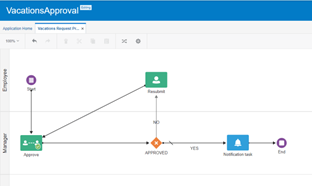
Process Automation with Process Cloud Service (PCS) – Part 1 by Daniel Teixeira

imageEarlier in my career I worked extensively with a Business Process Management (BPM) software called Cordys (meanwhile acquired by OpenText). Had a couple of trainings on BEA Aqualogic BPM Suite (now Oracle). Later on, while working for TIBCO I had several trainings and a bit of project experience with their BPM solution.

Most of the BPM concepts are familiar to me, but over the years they became quite rusty So this is a good time to dive a bit more into a component of the Oracle Integration Cloud (OIC). I am talking about the Process Cloud Service (PCS), and this will be a series of posts dedicated to exploring PCS capabilities! Somehow BPM seems to be out of use nowadays and Process Automation became the trendy designation!

The Concepts

Processes are based on BPM Notation (BPMN) – https://www.bpmn.org/ “A standard Business Process Model and Notation (BPMN) will provide businesses with the capability of understanding their internal business procedures in a graphical notation and will give organizations the ability to communicate these procedures in a standard manner. “

The Use Case

In the upcoming posts I will work out a very simple, yet relatable, use case. A process to manage an employee vacation request. Granted, if you are self employed this makes no sense, but if you work for a company with a couple hundred or thousands of employees, then the need to manage this process becomes obvious.

Departments/Teams internal planning may require a process to manage this, and on top of that, they may have some business rules that need to be implemented ( example: an entire team cannot take vacations at the same time).

Create the Process

I choose to Create an Application. That will give us a blank canvas to create everything from scratch. There are several QuickStarts, which are ready to run sample Processes. In this post I will build the entire process step by step. Read the complete article here.

PaaS Partner Community

For regular information on Oracle PaaS become a member in the PaaS (Integration & Process) Partner Community please register here.

clip_image003 Blog clip_image005 Twitter clip_image004 LinkedIn image[7][2][2][2] Facebook clip_image002[8][4][2][2][2] Wiki

Technorati Tags: SOA Community,Oracle SOA,Oracle BPM,OPN,Jürgen Kress

Accelerate your chatbot projects with Oracle Digital Assistant Templates – Partner Community Webcast May 18th 2021

image

Digital Assistant Templates provide you with a solid foundation on which to deliver awesome conversational experiences.

· Fast track your first release

· Solid foundation to extend more

· Learn from best practice examples

· Simple to tailor to your needs

Templates are available for: Oracle HCM, Oracle ERP – Project Management, Oracle Transport Management / ERP, Oracle TALEO, Oracle PeopleSoft, Oracle OBDX (Financial Services GBU), Oracle Field Service, Oracle EPM, CX Service, Frequently Asked Questions and IT Helpdesk.

Join this webcast to learn more about the templates available and see live demos of them in action.

Speakers: Martin Jarvis and Martijn de Gruntimage

Schedule: May 18th 16:30 – 17:30 CET (Berlin time)

For details please visit the registration page here.

Take the opportunity to watch our community webcasts on-demand:

· Identity Propagation call from Integration Cloud to Oracle SaaS Applications

· Connect Opera with Oracle SaaS

· Extreme Scalability and Enhanced Resilience for OIC

· SOA Modernization

· Cloud Native and Serverless SaaS Extensions

· How Process Workflow can extend the role of Integration

· Innovate Service Cloud with Chatbots

· Integration Update & New Features

· Chatbot Design best practices for Conversational UX

· Connect, Innovate, Extend SaaS KickOff Webcast 2020

· Cloud Platform KickOff Webcast 2020

· NetSuite Integration

· Integration Insight

· Innovate HCM with Chatbots

· ERP Integration with Application Adapters

· HCM Integration with Application Adapters

· Extend SaaS with Visual Builder Cloud Service

· Integration Adapters

· Integrate SaaS

· Digital Assistant Update

· SOA Cloud Service

· PaaS Overview Webcast

· Process Cloud Service Update

· Integrate ERP Cloud

· Integrate HCM Cloud

· Functions and Cloud Native

· Blockchain

· API Platform Cloud Service part 2

· 3rd Generation API Gateways part1

· Oracle JET

· Oracle Visual Builder Cloud Service

· Container Native Application Development Platform

For the latest information please visit Community Updates Wiki page (Community membership required).

PaaS Partner Community

For regular information on Oracle PaaS become a member in the PaaS (Integration & Process) Partner Community please register here.

clip_image003 Blog clip_image005 Twitter clip_image004 LinkedIn image[7][2][2][2] Facebook clip_image002[8][4][2][2][2] Wiki

Technorati Tags: SOA Community,Oracle SOA,Oracle BPM,OPN,Jürgen Kress

Convert from Schedule to REST based integration by Vijay Kendai

image

This blog is for a new feature coming out in Oracle Integration (OIC) February 2021 release.

Currently in Orchestration, after a trigger has been added, the user does not have the ability to replace it with another trigger. The user essentially has to re-create the integration to achieve this. With this feature, users will be provided with the ability to replace a trigger with minimal impact and without having the need to re-construct various actions in the canvas. After conversion, users will be provided with appropriate warnings and errors to take any corrective action needed, to bring the integration to a configured state.

What is covered ?

In the first phase, only scheduled orchestrations will be addressed.

  • Schedule trigger will be allowed for replacement only with a REST trigger.

What is not covered ?

  • Replacing schedule in Scheduled orchestrations with REST trigger having multiple verbs
  • Replacing trigger in App driven orchestrations

Details

The following section describes in detail how a schedule can be converted to a REST trigger.

On clicking the schedule node, user will be provided with a menu option under more actions to convert to a REST based trigger as shown below. Read the complete article here.

PaaS Partner Community

For regular information on Oracle PaaS become a member in the PaaS (Integration & Process) Partner Community please register here.

clip_image003 Blog clip_image005 Twitter clip_image004 LinkedIn image[7][2][2][2] Facebook clip_image002[8][4][2][2][2] Wiki

Technorati Tags: SOA Community,Oracle SOA,Oracle BPM,OPN,Jürgen Kress

Reactivate All Integrations Together that Use the Same Connection by Shubham Agrawal

image

This blog is for a new feature coming out in Oracle Integration Cloud (OIC) February 2021 release. This blog covers the issue of applying the changed connection properties to the active integrations.

A connection can be used by multiple integration. If connection is updated then Active integrations don’t reflect until they are re-activated. After updating the connection, user currently has to manually go to each integration and re-activate to reflect the updated connection. As an Oracle Integration Cloud user after connection update, user should be able to reactivate all the active integration which are using the same connection.

What does it cover

Users can reactivate the associated integrations for the connection they are trying to update.

User only need to reactivate the integrations if they change connection properties, it does not apply if only primary info is changed, as that would not impact the running integrations.

Now, we can simply reactivate all the associated integrations with a single click, and it will restore the active integrations to its original state (like retain if tracing need to be enabled). Read the complete article here.

PaaS Partner Community

For regular information on Oracle PaaS become a member in the PaaS (Integration & Process) Partner Community please register here.

clip_image003 Blog clip_image005 Twitter clip_image004 LinkedIn image[7][2][2][2] Facebook clip_image002[8][4][2][2][2] Wiki

Technorati Tags: SOA Community,Oracle SOA,Oracle BPM,OPN,Jürgen Kress
API Gateway Deployment by Niall Commiskey

imageThe February 21 of OIC release brings OCI API Gateway Connectivity to OIC. So, as you can see, I have my Gateway. Now I create an API Gateway connection in OIC – Read the complete article here

PaaS Partner Community

For regular information on Oracle PaaS become a member in the PaaS (Integration & Process) Partner Community please register here.

clip_image003 Blog clip_image005 Twitter clip_image004 LinkedIn image[7][2][2][2] Facebook clip_image002[8][4][2][2][2] Wiki

Technorati Tags: SOA Community,Oracle SOA,Oracle BPM,OPN,Jürgen Kress

DevOps and Release Automation for Oracle Integration Cloud – Webcast May 13th 2021

image

As you may know, the FlexDeploy DevOps platform can improve your enterprise software development, operations, and release processes. You can achieve high quality software faster with less cost and risk, increase visibility into your pipeline, and eliminate manual activities and scripting.

In this technical webinar, take a deep-dive into FlexDeploy’s out-of-the-box support for Oracle Integration Cloud (OIC) with a FlexDeploy expert.

You will learn:

  • Continuous delivery release pipelines, dashboards, and reports
  • Automated deployment of integrations and configuration
  • Manage connection property replacement
  • Incorporate continuous integration (CI) and automated testing
Details:

When: May 13th at 11am-12pm EDT / 8am-9am PDT

Where: Virtually, via WebEx

Who: Those interested in exploring DevOps, CI/CD, and Release Orchestration for Oracle Integration Cloud

Register for the webinar today!

PaaS Partner Community

For regular information on Oracle PaaS become a member in the PaaS (Integration & Process) Partner Community please register here.

clip_image003 Blog clip_image005 Twitter clip_image004 LinkedIn image[7][2][2][2] Facebook clip_image002[8][4][2][2][2] Wiki

Technorati Tags: SOA Community,Oracle SOA,Oracle BPM,OPN,Jürgen Kress

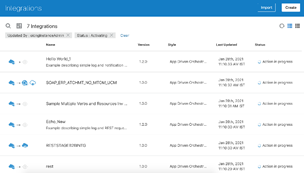
OIC & OCI API Gateway Integration: Quick and Easy by Varinder Kaur

image

This blog is for a new feature coming out in Oracle Integration Cloud (OIC) February 2021 release.

If you are interested in OCI API Gateway Integration, then read this blog as it covers the steps needed to seamlessly integrate with API Gateway.

The API Gateway service enables you to publish APIs with private endpoints that are accessible from within your network, and which you can expose with public IP addresses if you want them to accept internet traffic. Now you can create an Oracle OCI API Gateway Deployment from a OIC Rest based Integration. The API deployment will be created with routing rules pointing to the activated integration.

AssumptionOIC user has already created API Gateway or access to API Gateway.
Creating a Deployment from OIC :

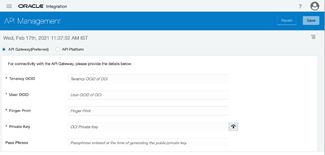
· Configure in API Management settings with OCI Signature V1 Policy : Configure the properties – tenancy OCID, user OCID, fingerprint, private key and passphrase(if present). These properties can be found under your profile menu, tenancy and user settings. Click on Save button after configuring the values, it will validate the credentials and save API gateway settings.

· Activate an Integration: Taking the example of a sample integration here- "Echo" integration ( You can build your own integration). Activate the integration by clicking on Activate icon. The below activate dialog will appear.In the activate dialog, there is an additional action of "Activate and Deploy" which will perform two actions- first activate the integration and then deploy it. Read the complete article here.

PaaS Partner Community

For regular information on Oracle PaaS become a member in the PaaS (Integration & Process) Partner Community please register here.

clip_image003 Blog clip_image005 Twitter clip_image004 LinkedIn image[7][2][2][2] Facebook clip_image002[8][4][2][2][2] Wiki

Technorati Tags: SOA Community,Oracle SOA,Oracle BPM,OPN,Jürgen Kress
Embedding Oracle Integration Insight dashboards : Quickly and Easily by Sandhya Lakshmi Gopalan

image

Integration Insight in Oracle Integration empowers business users by providing a real-time view into their business processes. In addition to viewing Insight dashboards within the Oracle Integration console, Insight offers the capability to embed business dashboards in other applications.

For example:

  • If your business involves order management and you already have your business users using Oracle Cloud ERP to manage your orders, you can embed Insight dashboards for the order process in Cloud ERP. This provides business users with a single consolidated view within Cloud ERP, without needing to sign into Oracle Integration to view the Insight dashboards.
  • If you have a financial business process, with a front-end application that is used by business users, Insight dashboards can be embedded in the front-end application to show real-time business process metrics that can assist in making business decisions.

Integration Insight provides two ways to embed dashboards in other applications:

  • A URL builder for embedding dashboards in an iFrame.
  • Oracle JET Composite Component Architecture (CCA) components for embedding dashboards as HTML elements. Read the complete article here.

PaaS Partner Community

For regular information on Oracle PaaS become a member in the PaaS (Integration & Process) Partner Community please register here.

clip_image003 Blog clip_image005 Twitter clip_image004 LinkedIn image[7][2][2][2] Facebook clip_image002[8][4][2][2][2] Wiki

Technorati Tags: SOA Community,Oracle SOA,Oracle BPM,OPN,Jürgen Kress