Identity Propagation – VBCS > IC > Fusion Apps by Greg Mally

image

This blog was a collaborative effort between Greg Mally and Mike Muller of the A-Team.  There is an effort under way to provide example assets for this blog and when those assets are available, this blog will be updated with details on how to get to them.

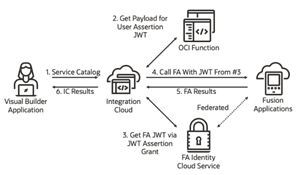
One of the big challenges that Oracle Integration Cloud developers face is any outbound REST calls from Integration Cloud (IC) to Fusion Applications (FA) APIs require a user’s identity.  On the surface this seems pretty trivial because the IC REST connections allow for configuring the connection with basic authentication or OAuth 2 JSON Web Token (JWT). However, this configuration is tied to a single user and many use cases/flows require the identity of the person making the FA REST call due to access restrictions, security, auditing, etc. This blog will present a pattern that has been implemented to accomplish identity propagation from a client application, through IC, and to FA.

Problem Statement

How can an Oracle Integration Cloud developer ensure that the invoking user’s identity gets passed along to a Fusion Application call? Read the complete article here.

For more information attend the Identity Propagation call from Integration Cloud to Oracle SaaS Applications – Partner Community Webcast April 27th 2021

PaaS Partner Community

For regular information on Oracle PaaS become a member in the PaaS (Integration & Process) Partner Community please register here.

clip_image003 Blog clip_image005 Twitter clip_image004 LinkedIn image[7][2][2][2] Facebook clip_image002[8][4][2][2][2] Wiki

Technorati Tags: SOA Community,Oracle SOA,Oracle BPM,OPN,Jürgen Kress
Simple Fusion ERP – OIC Demo by Niall Commiskey

image

Here is a very simple demo to show the value add of OIC in respect of creating suppliers in Fusion ERP. Should take you about an hour to create this.

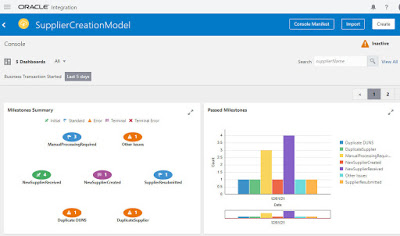
It covers the OIC components – Integration, Process and Insight. It also includes embedding the Insight Dashboard in Fusion ERP.

Creating a Supplier in Fusion ERP

The above details the minimum number of fields required to create a supplier. JSON format –

{   "supplierName" : "NiallCSupplier",

  "taxOrgType" : "Corporation",

  "supplierType" : "Supplier",

  "bizRelationship" : "PROSPECTIVE",

  "DUNS" : "389765334",

  "taxCountry" : "US",

  "taxpayerID" : "410417775" }

My processing logic is as follows – Integration with a REST Trigger invokes the ERP adapter to create a new supplier. A Business Process is called if this creation is NOT successful. I also have an Insight Dashboard that keeps business users updated on what’s happening. Read the complete article here.

PaaS Partner Community

For regular information on Oracle PaaS become a member in the PaaS (Integration & Process) Partner Community please register here.

clip_image003 Blog clip_image005 Twitter clip_image004 LinkedIn image[7][2][2][2] Facebook clip_image002[8][4][2][2][2] Wiki

Technorati Tags: SOA Community,Oracle SOA,Oracle BPM,OPN,Jürgen Kress

Unlock new patterns of integration by controlling the HTTP Response status in OIC REST based integrations by Anuj Kaushal

image

Integration flows with a REST based trigger can be called using any HTTP client. In this blog post we illustrate how an integration developer can control the HTTP response code from within the integration flow and how doing so can unlock interesting patterns of integration.

By default, REST based integration flows return the following HTTP response status:

-       HTTP 200 (OK) in case of success

-       HTTP 202 (Accepted) in case of Asynchronous flows.

-       HTTP 4xx in case of client side errors like calling the integration flow with the wrong method or URL etc.

-       HHTP 5xx or user-defined in case of failures during the integration flow but with a fixed error format.

The integration developer needs to assign the HTTP response status code from the mapper as follows: This option provides a number of possibilities to integration developers, few applications of which are:

1.     Return a redirect (3xx) code.

-       There exist several re-direct codes that have specific meaning. For instance method forwarding is usually performed by some clients only when the status code is 307. While in some cases a POST is always redirected as a GET (PRG) to avoid double posts. When a web form is submitted to a server through an HTTP POST request, attempts to refresh the server response can cause the contents of the original POST to be resubmitted, possibly causing undesired results, such as a duplicate insert. Read the complete article here.

PaaS Partner Community

For regular information on Oracle PaaS become a member in the PaaS (Integration & Process) Partner Community please register here.

clip_image003 Blog clip_image005 Twitter clip_image004 LinkedIn image[7][2][2][2] Facebook clip_image002[8][4][2][2][2] Wiki

Technorati Tags: SOA Community,Oracle SOA,Oracle BPM,OPN,Jürgen Kress

Replace Trigger in Orchestration by Vijay Kendai

imageThis blog is for a new feature coming out in Oracle Integration Cloud (OIC) February 2021 release.

Currently in Orchestration, after a trigger has been added, the user does not have the ability to replace it with another trigger. The user essentially has to re-create the integration to achieve this. With this feature, users will be provided with the ability to replace a trigger with minimal impact and without having the need to re-construct various actions in the canvas. After conversion, users will be provided with appropriate warnings and errors to take any corrective action needed, to bring the integration to a configured state.

What is covered ?

In the first phase, only scheduled orchestrations will be addressed.

  • Schedule trigger will be allowed for replacement only with a REST trigger.

What is not covered ?

  • Replacing schedule in Scheduled orchestrations with REST trigger having multiple verbs
  • Replacing trigger in App driven orchestrations

Details

The following section describes in detail how a schedule can be converted to a REST trigger. On clicking the schedule node, user will be provided with a menu option under more actions to convert to a REST based trigger as shown below. Read the complete article here.

PaaS Partner Community

For regular information on Oracle PaaS become a member in the PaaS (Integration & Process) Partner Community please register here.

clip_image003 Blog clip_image005 Twitter clip_image004 LinkedIn image[7][2][2][2] Facebook clip_image002[8][4][2][2][2] Wiki

Technorati Tags: SOA Community,Oracle SOA,Oracle BPM,OPN,Jürgen Kress

Embedding Oracle Integration Insight dashboards : Quickly and Easily by Sandhya Lakshmi Gopalan

image

Integration Insight in Oracle Integration empowers business users by providing a real-time view into their business processes. In addition to viewing Insight dashboards within the Oracle Integration console, Insight offers the capability to embed business dashboards in other applications.

For example:

  • If your business involves order management and you already have your business users using Oracle Cloud ERP to manage your orders, you can embed Insight dashboards for the order process in Cloud ERP. This provides business users with a single consolidated view within Cloud ERP, without needing to sign into Oracle Integration to view the Insight dashboards.
  • If you have a financial business process, with a front-end application that is used by business users, Insight dashboards can be embedded in the front-end application to show real-time business process metrics that can assist in making business decisions.

Integration Insight provides two ways to embed dashboards in other applications:

  • A URL builder for embedding dashboards in an iFrame.
  • Oracle JET Composite Component Architecture (CCA) components for embedding dashboards as HTML elements. Read the complete article here.

PaaS Partner Community

For regular information on Oracle PaaS become a member in the PaaS (Integration & Process) Partner Community please register here.

clip_image003 Blog clip_image005 Twitter clip_image004 LinkedIn image[7][2][2][2] Facebook clip_image002[8][4][2][2][2] Wiki

Technorati Tags: SOA Community,Oracle SOA,Oracle BPM,OPN,Jürgen Kress

Read BI Report base64 encoded response by Kabir Yadav

image

In the previous post we have seen the PART 1 of BI Report Invocation. If you don’t have seen that requesting you to first check that out by clicking here.

In this article we will develop the left part (PART 2) i.e. convert the base64 encoded run report operation response  and then read it in proper XML format using stage activity.

PART 2 : Steps to read the base64 encoded report output.

    • Add Assign activity to decode the run report base64 encoded output

PaaS Partner Community

For regular information on Oracle PaaS become a member in the PaaS (Integration & Process) Partner Community please register here.

clip_image003 Blog clip_image005 Twitter clip_image004 LinkedIn image[7][2][2][2] Facebook clip_image002[8][4][2][2][2] Wiki

Technorati Tags: SOA Community,Oracle SOA,Oracle BPM,OPN,Jürgen Kress
Invoke BI Report in OIC by Kabir Yadav

image

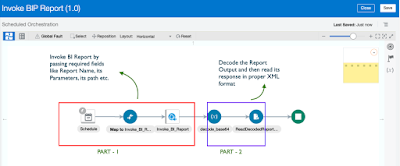
In this article we will see the steps to invoke a BI Report in an Integration and then the steps to read its base64 encoded output. We will do the development by breaking it into 2 parts :

PART 1 : Steps to invoke a BI Report

PART 2 : Steps to read the base64 encoded report output.

Lets start the development : ~ PART 1 :  Steps to invoke a BI Report : Lets develop one schedule integration where we will configure a soap adapter connection to call the BI Report using runReport Operation and then do the mappings. First we will create the connection and then create the integration. Create Connection :

Here we will configure  " ExternalReprtWSSService WSDL URL " which can be used to run a report. The same connection we will use in below steps while developing integration. Navigate to connection window and select SOAP adapter, give any meaningful name for connection. Read the complete article here.

PaaS Partner Community

For regular information on Oracle PaaS become a member in the PaaS (Integration & Process) Partner Community please register here.

clip_image003 Blog clip_image005 Twitter clip_image004 LinkedIn image[7][2][2][2] Facebook clip_image002[8][4][2][2][2] Wiki

Technorati Tags: SOA Community,Oracle SOA,Oracle BPM,OPN,Jürgen Kress
B2B Trading Partner Management by Niall Commiskey

image

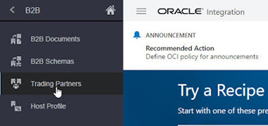
Here we are talking about the concept of a host and her remote trading partners. This brings organization to B2B document exchange, essentially defining who can exchange what documents with me and whether the trading partner’s role is that of sender or receiver. This is all covered by a B2B agreement.

B2B documents contain specific fields for sender and receiver ids. The first line of the EDI X12 850 PO doc includes this information – ISA stands for Interchange Control Header. OIC B2B now supports enforcement of Trading Partners/Agreements; let’s look at how this is implemented. Let’s begin with ourselves, identified as the Host –  Here I click on Host Profile and enter an identifier – this will be used in B2B document exchanges; such documents will contain fields that identify the sender and receiver of the B2B document. Read the complete article here.

PaaS Partner Community

For regular information on Oracle PaaS become a member in the PaaS (Integration & Process) Partner Community please register here.

clip_image003 Blog clip_image005 Twitter clip_image004 LinkedIn image[7][2][2][2] Facebook clip_image002[8][4][2][2][2] Wiki

Technorati Tags: SOA Community,Oracle SOA,Oracle BPM,OPN,Jürgen Kress

Protecting your OIC apis with OCI API Gateway by Niall Commiskey

image
Introduction

OCI Services add a lot of value add to OIC. I have discussed OCI Functions Service and the OCI Streaming Service in previous posts. Today – my first working day of 2021 – it’s the turn of OCI API Gateway.

I’m sure you are all conversant with what API Gateway gives you. If not, check out the overview here

The Gateway setup was very simple and quick – I just followed the instructions here

This blog post covers the following –

1. Virtualizing a publicly available REST api using API Gateway

2. Virtualizing an OIC API

3.  Adding a Throttling Policy at Deployment level

4. Adding a Request Policy – Query Parameter Transformation

Virtualizing a public REST API via OCI API Gateway

Now to a simple sanity test – I found the following public REST API -  Read the complete article here.

PaaS Partner Community

For regular information on Oracle PaaS become a member in the PaaS (Integration & Process) Partner Community please register here.

clip_image003 Blog clip_image005 Twitter clip_image004 LinkedIn image[7][2][2][2] Facebook clip_image002[8][4][2][2][2] Wiki

Technorati Tags: SOA Community,Oracle SOA,Oracle BPM,OPN,Jürgen Kress
API Gateway Integration: Quick and Easy by Varinder Kaur

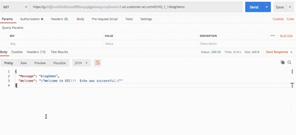
imageThis blog is for a new feature coming out in Oracle Integration Cloud (OIC) February 2021 release.

If you struggle with API Gateway Integration, then read this blog as it covers the steps needed to seamlessly integrate with API Gateway.

The API Gateway service enables you to publish APIs with private endpoints that are accessible from within your network, and which you can expose with public IP addresses if you want them to accept internet traffic. Now you can create an Oracle OCI API Gateway Deployment from a OIC Rest based Integration. The API deployment will be created with routing rules pointing to the activated integration.

AssumptionOIC user has already created API Gateway or access to API Gateway.
Creating a Deployment from OIC :

· Configure in API Management settings with OCI Signature V1 Policy : Configure the properties – tenancy OCID, user OCID, fingerprint, private key and passphrase(if present). These properties can be found under your profile menu, tenancy and user settings. Click on Save button after configuring the values, it will validate the credentials and save API gateway settings.

· Activate an Integration: Taking the example of a sample integration here- "Echo" integration ( You can build your own integration). Activate the integration by clicking on Activate icon. The below activate dialog will appear.In the activate dialog, there is an additional action of "Activate and Deploy" which will perform two actions- first activate the integration and then deploy it. Read the complete article here.

PaaS Partner Community

For regular information on Oracle PaaS become a member in the PaaS (Integration & Process) Partner Community please register here.

clip_image003 Blog clip_image005 Twitter clip_image004 LinkedIn image[7][2][2][2] Facebook clip_image002[8][4][2][2][2] Wiki

Technorati Tags: SOA Community,Oracle SOA,Oracle BPM,OPN,Jürgen Kress