How to configure endpoints of ORDS Connections in OIC? By Jan Kettenis

image

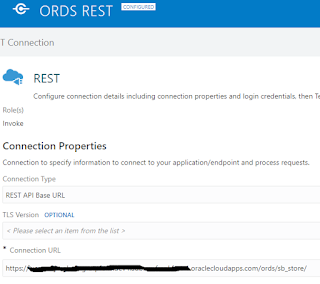
This article discussed how to configure the endpoint of a Connection to an ORDS REST service (AutoREST or REST Module) in such a way that you have the right part of the URI in the right place and can easily refactor it or promote your application to another environment.

To call Oracle Rest Data Services (ORDS) from an Oracle Database (DBCS or ATP) you create a REST Invoke Connection (not also Trigger, as the DB will not call you back).

To make the database supporting ORDS you must enable REST Services on the schema whereby you configure an alias, for example "my_schema_alias" which becomes part of the URL of the endpoint of the REST service. The question is where to put that alias: in the configuration of the Connection or in the relative resource URI’s in the Integrations? Read the complete article here.

PaaS Partner Community

For regular information on Oracle PaaS become a member in the PaaS (Integration & Process) Partner Community please register here.

clip_image003 Blog clip_image005 Twitter clip_image004 LinkedIn image[7][2][2][2] Facebook clip_image002[8][4][2][2][2] Wiki

Technorati Tags: SOA Community,Oracle SOA,Oracle BPM,OPN,Jürgen Kress

Top tweets PaaS Partner Community December 2020

imageDecember top tweets by PaaSCommunity

Send your tweets @soacommunity #PaaSCommunity and follow us at http://twitter.com/soacommunity. Make sure you share your content with the community!

PaaS Partner Community

For regular information on Oracle PaaS become a member in the PaaS (Integration & Process) Partner Community please register here.

clip_image003 Blog clip_image005 Twitter clip_image004 LinkedIn image[7][2][2][2] Facebook clip_image002[8][4][2][2][2] Wiki

Technorati Tags: SOA Community,Oracle SOA,Oracle BPM,OPN,Jürgen Kress, Twitter

How to create a XSLT map that reads many correlated payloads by Jorge Herreria

image

Summary

On this post will see a way for creating XSLT maps that need to loop thought different sources (aka input payloads) which their instances are correlated by key fields.

Example for 1:0..n and 1:1 relationships between sources

I will use the Business units and Employees classic example: Each Business Unit can have  0..n Employees (1:0..n relationship). Also the G/L Accounts source with a 1:1 correlation with Business Units. I want to create a XSLT Map that puts them together. Here are the sources (aka input payloads). Read the complete article here.

PaaS Partner Community

For regular information on Oracle PaaS become a member in the PaaS (Integration & Process) Partner Community please register here.

clip_image003 Blog clip_image005 Twitter clip_image004 LinkedIn image[7][2][2][2] Facebook clip_image002[8][4][2][2][2] Wiki

Technorati Tags: SOA Community,Oracle SOA,Oracle BPM,OPN,Jürgen Kress

OIC Technical Accelerators – Re-sequencer by Niall Commiskey

image

Let’s try out the Re-sequencer – useful for my simple use case of requencing orders by orderNr, before processing them. The job of the re-sequencer is to process the input messages, in my case – orders, based on a sequence id – e.g. orderNr, as opposed to processing them based on time of arrival. In this scenario, each message will be "parked" in an ATP DB for a certain time period. This allows out of sequence orders to arrive and be processed in the correct order.
e.g.
orderNr 3 for Lucia Inc.
orderNr 2 for Phillip Inc.
orderNr 1 for Lucia Inc.

need to be re-sequenced as –
orderNr 1 for Lucia Inc.
orderNr 2 for Lucia Inc.

orderNr 3 for Lucia Inc.

The Re-sequencer has the concept of groups – e.g. the Orders group, the HCM employee update group etc, i.e. the type of messages to be resequenced. There are other key parameters, which are discussed in the documentation, a link to which is provided below. There are also discussed in this post. Before I actually start using the Accelerator, let’s take a detailed look at it in the OIC Home Page – Read the complete article here.

PaaS Partner Community

For regular information on Oracle PaaS become a member in the PaaS (Integration & Process) Partner Community please register here.

clip_image003 Blog clip_image005 Twitter clip_image004 LinkedIn image[7][2][2][2] Facebook clip_image002[8][4][2][2][2] Wiki

Technorati Tags: SOA Community,Oracle SOA,Oracle BPM,OPN,Jürgen Kress

Introducing B2B in Oracle Integration(OIC) by Subhani Sahib Italapuram

image

Oracle Integration provides support for B2B e-commerce with B2B for Oracle Integration.

B2B for Oracle Integration represents a collective set of features inside Oracle Integration to support EDI document processing. This includes the EDI Translate action and a B2B schema editor to customize the EDI data formats. B2B for Oracle Integration provides for the secure and reliable exchange of business documents between Oracle Integration and a trading partner.

B2B for Oracle Integration works in an orchestrated integration through use of the EDI Translate action. When you add this action to an integration, the EDI Translate Action Wizard is invoked to guide you through configuration with the EDI X12 document standard

Business Protocols Supported in B2B for Oracle Integration

B2B for Oracle Integration supports the EDI X12 business protocol for the exchange of business documents between Oracle Integration and a trading partner. EDI X12 versions 4010 to 8010, which include all document types within each version, are provided with B2B for Oracle Integration

Access B2B for Oracle Integration

B2B for Oracle Integration is automatically included when provisioning the following Oracle Integration versions. Read the complete article here.

PaaS Partner Community

For regular information on Oracle PaaS become a member in the PaaS (Integration & Process) Partner Community please register here.

clip_image003 Blog clip_image005 Twitter clip_image004 LinkedIn image[7][2][2][2] Facebook clip_image002[8][4][2][2][2] Wiki

Technorati Tags: SOA Community,Oracle SOA,Oracle BPM,OPN,Jürgen Kress

Oracle Integration Cloud New Home Page by Ankur Jain

image

The new Home page gives you an ability to get jump-started on building your integrations that are called as Accelerators and Recipes.

Accelerators are run-ready business integrations or technical patterns you can configure and activate

Whereas Recipes are starter templates that give you a head start.

See the below video to check the all-new features of the Oracle Integration Cloud home page and how it works. Read the complete article here

PaaS Partner Community

For regular information on Oracle PaaS become a member in the PaaS (Integration & Process) Partner Community please register here.

clip_image003 Blog clip_image005 Twitter clip_image004 LinkedIn image[7][2][2][2] Facebook clip_image002[8][4][2][2][2] Wiki

Technorati Tags: SOA Community,Oracle SOA,Oracle BPM,OPN,Jürgen Kress

Oracle Integration (OIC) Recipes – HCM Directory Synchronisation by Niall Commiskey

image

The 2 previous posts dealt with Technical Accelerators, now to the recipes. Recipes are best practice implementations of common use cases. They provide a very quickstart to implementing these.

Let’s look at the above recipe; as you can see, I have already installed it. Read the complete article here.

PaaS Partner Community

For regular information on Oracle PaaS become a member in the PaaS (Integration & Process) Partner Community please register here.

clip_image003 Blog clip_image005 Twitter clip_image004 LinkedIn image[7][2][2][2] Facebook clip_image002[8][4][2][2][2] Wiki

Technorati Tags: SOA Community,Oracle SOA,Oracle BPM,OPN,Jürgen Kress

Inbound EDI message to Oracle Integration for B2B World by Subhani Sahib Italapuram

image

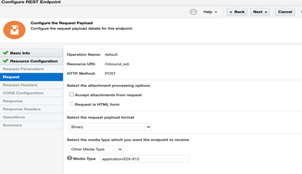
In this blog, let’s create a basic inbound integration flow that receives an EDI document through a REST request, parses and validates the EDI, converts it to XML, and returns the XML in the response.

We shall use REST adapter to keep our blog simple but, you can replace it as per your business requirement, could be FTP adapter, SOAP or any other technology adapters/application specific adapter.

Prerequisites for implementing this use case: Prior implementation experience with Oracle Integration or Basic knowledge of using Oracle Integration and refer my previous blogs on B2B

Let us look at the with the implementation:

  1. In the navigation pane of Oracle Integration, click Integrations.
  2. On the Integrations page, click Create.
  3. Select App Driven Orchestration as the style to use. The Create New Integration dialog is displayed.
  4. In the What do you want to call your integration? field, enter Inbound EDI via REST, then click Create

Configure the REST Adapter Trigger Connection

On the integration canvas, click the start node and select Sample REST Endpoint Interface as the trigger connection.

The Adapter Endpoint Configuration Wizard opens. Read the complete article here.

PaaS Partner Community

For regular information on Oracle PaaS become a member in the PaaS (Integration & Process) Partner Community please register here.

clip_image003 Blog clip_image005 Twitter clip_image004 LinkedIn image[7][2][2][2] Facebook clip_image002[8][4][2][2][2] Wiki

Technorati Tags: SOA Community,Oracle SOA,Oracle BPM,OPN,Jürgen Kress

How to Keep Exactly One OIC Integration Instance running 24/7 by John Graves

image

Introduction

Oracle Integration has a great feature to periodically run a flow instance according to a schedule.  This schedule can be something simple, like "run every 10 minutes" or something more complex using a calendar ICS definition.  This works great for scenarios that run periodically, then exit.

However, I’ve recently been tasked to have an OIC flow monitor and process messages from an Oracle Stream using the new Oracle Stream Adapter.  This would ideally require a flow to be running 24/7 to look for messages and process them.

But OIC is not designed to run a single flow instance for more than a few minutes and if we setup a schedule, there will be gaps in time where there are no instances running.

Use-case

My use-case is for the Streams Adapter, but this will work regardless of what is being done inside a given flow. So what’s the secret?  Use the OIC REST APIs for the scheduling service. Read the complete article here.

PaaS Partner Community

For regular information on Oracle PaaS become a member in the PaaS (Integration & Process) Partner Community please register here.

clip_image003 Blog clip_image005 Twitter clip_image004 LinkedIn image[7][2][2][2] Facebook clip_image002[8][4][2][2][2] Wiki

Technorati Tags: SOA Community,Oracle SOA,Oracle BPM,OPN,Jürgen Kress

Creating Journal Entries in Netsuite via OIC by Niall Commiskey

imageMy first real foray into the magical world of bookkeeping. What is a journal entry?

Apparently journal entries are used to record business transactions. And remember the books must always balance – so here’s an example for a sales entry – I sell my Hare of the Dog T-Shirt on credit, so I need to debit accounts receivable and credit sales. Ask your accountant, if you need to know more.

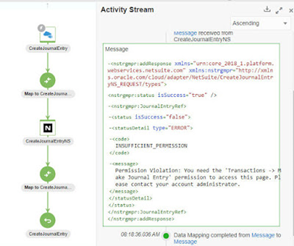
Net, net, I can create a Journal Entry in Netsuite, via the OIC Netsuite adapter. Again, I am not a Netsuite or bookkeeping expert, so my first step is to create a Journal Entry in Netsuite itself and then look at the xml version. Read the complete article here.

PaaS Partner Community

For regular information on Oracle PaaS become a member in the PaaS (Integration & Process) Partner Community please register here.

clip_image003 Blog clip_image005 Twitter clip_image004 LinkedIn image[7][2][2][2] Facebook clip_image002[8][4][2][2][2] Wiki

Technorati Tags: SOA Community,Oracle SOA,Oracle BPM,OPN,Jürgen Kress