Additional new content PaaS Partner Community

image

Oracle OpenWorld Reimagined Prioritizing the health and safety of our attendees, the in-person Oracle OpenWorld will be replaced with a series of free Oracle Cloud Virtual Summits. We are excited to stay connected with you online and look forward to reuniting at physical events in 2021.

The virtual summits are a series of free virtual events that feature keynotes, thought leaders, best practices, and customer stories that will put you on the path to success for your business:

PaaS Partner Community

For regular information on Oracle PaaS become a member in the PaaS (Integration & Process) Partner Community please register here.

clip_image003 Blog clip_image005 Twitter clip_image004 LinkedIn image[7][2][2][2] Facebook clip_image002[8][4][2][2][2] Wiki

Technorati Tags: SOA Community,Oracle SOA,Oracle BPM,OPN,Jürgen Kress

    Fault handling in OIC by Jan Kettenis

    image

    This article discusses how fault handling in Integrations works for the Oracle Integration Cloud, and some best practices on how to use it, including consuming Integrations in Structured Processes.

    Updated on August 6 2020 after discovering that in the explanation of Fault Return parts of the text were duplicated while others were missing.

    Special thanks to Greg Mally of the Oracle A-Team for his valuable input.

    As this is a lengthy article I will start with the conclusion including what I consider to be the best practices, so if you trust me you can stop right there

    Best practice is to always put an Invoke activity in a Scope. In case you need to handle a fault in a specific way, it is sufficient to add a Default (Fault) Handler only, unless you need to handle different back-end faults differently.

    In the Fault Handler use the Fault Return option to throw a fault coming from the back-end service to the consumer of the Integration for three reasons:

    1. It gives you maximum control over the way the fault is returned to the consumer. For example, only with Fault Return will you be able to return the HTTP 4xx or 5xx status code from the back-end service as-is to the consumer of a REST Integration.
    2. With that it allows you to wrap the fault from the back-end services in one single type of fault thrown to the consumer, making fault handling by the consumer as simple as possible. For example, in case of a modeled SOAP Fault returned to a Structured Process, it now suffices to add one single Boundary Error Event for the modeled fault to handle all business faults in the process.
    3. On the Monitoring tab the integration instance that handled the fault from the back-end service is itself flagged as “Succeeded” (instead of “Errored”), which strictly speaking is correct as the integration did what it had to do (don’t blame the messenger). After all, the actual fault happened in the back-end service. So instead of unnecessarily alarming the operator of OIC (which caused no issue), Operations should look at either the consumer or the back-end service to find out what went wrong.

    In other words, Fault Return is the easiest way to return faults thrown by the back-end service(s) in a consistent way. This is can be very convenient for your consumer. Read the complete article here.

    PaaS Partner Community

    For regular information on Oracle PaaS become a member in the PaaS (Integration & Process) Partner Community please register here.

    clip_image003 Blog clip_image005 Twitter clip_image004 LinkedIn image[7][2][2][2] Facebook clip_image002[8][4][2][2][2] Wiki

    Technorati Tags: SOA Community,Oracle SOA,Oracle BPM,OPN,Jürgen Kress

    Extend Oracle SaaS with Cloud Native & Serverless Solutions – Partner Community Webcast December 16th, 2020

    imageA number of customers have already built extensions/ integrations with Oracle SaaS using a variety of Oracle PaaS services. Going forward some of these will want to upgrade, migrate or build new, extensions/integrations and unsurprisingly want to ensure that their new extensions use modern technologies and modern frameworks. A specific desire these customers will have is the management of the PaaS servers, SaaS customers are used to the SaaS model, they pay by user/invoice and not by CPU and expect Oracle to manage everything.

    This presentation aims to help us understand what needs, when extending/integrating, a SaaS customer will have and various patterns they can adopt. The technologies we will explore are the various cloud native technologies, like Kubernetes, streams etc. and serverless technologies like Oracle Functions as a Service.

    Speaker: Angelo Santagata Architect, Oracle SaaS A-Team

    Schedule: December 16th 2020 16:30-17:30 CET (Berlin time)

    For details please visit the registration page here.

    Take the opportunity to watch our community webcasts on-demand:

    · How Process Workflow can extend the role of Integration

    · Innovate Service Cloud with Chatbots

    · Integration Update & New Features

    · Chatbot Design best practices for Conversational UX

    · Connect, Innovate, Extend SaaS KickOff Webcast 2020

    · Cloud Platform KickOff Webcast 2020

    · Netsuite Integration

    · Integration Insight

    · Innovate HCM with Chatbots

    · ERP Integration with Application Adapters

    · HCM Integration with Application Adapters

    · Extend SaaS with Visual Builder Cloud Service

    · Integration Adapters

    · Integrate SaaS

    · Digital Assistant Update

    · SOA Cloud Service

    · PaaS Overview Webcast

    · Process Cloud Service Update

    · Integrate ERP Cloud

    · Integrate HCM Cloud

    · Functions and Cloud Native

    · Blockchain

    · API Platform Cloud Service part 2

    · 3rd Generation API Gateways part1

    · Oracle JET

    · Oracle Visual Builder Cloud Service

    · Container Native Application Development Platform

    For the latest information please visit Community Updates Wiki page (Community membership required).

    PaaS Partner Community

    For regular information on Oracle PaaS become a member in the PaaS (Integration & Process) Partner Community please register here.

    clip_image003 Blog clip_image005 Twitter clip_image004 LinkedIn image[7][2][2][2] Facebook clip_image002[8][4][2][2][2] Wiki

    Technorati Tags: SOA Community,Oracle SOA,Oracle BPM,OPN,Jürgen Kress

    OIC: Integration Pick action full-circle now with Process using it! By Jan Kettenis

    image

    This article describes how the Pick feature aka Multi-Operation Support for REST integrations now also is fully supported by Process applications.
    More than a year ago the Pick action was introduced in OIC also known as Multi-Operation Support. Since then you can create REST integrations supporting multiple actions for one resource using one single URL. For example, you can have one single endpoint like …/ic/api/integration/v1/flows/rest/INT_GN_CASE_GROUPS/2.0/case-metadata/casegroups supporting a POST, GET, PUT and DELETE.

    Apart from the fact that it is the de-facto standard for developing REST services to handle one single resource, it also is more convenient to have one single Integration that you can activate or deactivate instead of creating as many integrations as there are actions. Until the August 2020 release it was not yet supported by Process, but finally it is!! Now why would you want this? In short: because is easier and it performs better. Read the complete article here.

    PaaS Partner Community

    For regular information on Oracle PaaS become a member in the PaaS (Integration & Process) Partner Community please register here.

    clip_image003 Blog clip_image005 Twitter clip_image004 LinkedIn image[7][2][2][2] Facebook clip_image002[8][4][2][2][2] Wiki

    Technorati Tags: SOA Community,Oracle SOA,Oracle BPM,OPN,Jürgen Kress
    Silently Install SOA QuickStart Revised by Martien van den Akker

    image

    Earlier I wrote a script to silently install the SOA QuickStart installer and wrote about it here.

    Several customer projects further and iterations on the script further, I revised this script lately again. Because I’m leaving this customer in a week or three, and to help my successors to build up their development pc’s in a comfortable and standard way.

    You may have noticed that over the years I’ve grown fond of scripting stuff, especially building up environments. At my current customer every developer installed the several IDE’s, test tooling and TortoiseSVN by hand. So every one has the tooling in another folder structure. Checked out the subversion repo’s by hand and therefor in another structure.

    So, scripting things help in having the tooling in the same folder structure for every one. And that reduces the chances on problems and misconfigurations. Especially preventing the infamous phrase: ‘It works with me…’ when having problems. One of the revisions is to have nested if-else structures in the script, which makes it more readable then the conditional goto’s we were used to use in Windows .bat files.

    Another important improvement was to have the install binaries in a separate fileserver-repository. This makes it possible to have the scripting and depending files in a Subversion repository. The script improved installSoaQS.bat is as follows: Read the complete article here.

    PaaS Partner Community

    For regular information on Oracle PaaS become a member in the PaaS (Integration & Process) Partner Community please register here.

    clip_image003 Blog clip_image005 Twitter clip_image004 LinkedIn image[7][2][2][2] Facebook clip_image002[8][4][2][2][2] Wiki

    Technorati Tags: SOA Community,Oracle SOA,Oracle BPM,OPN,Jürgen Kress
    The magic of CorrelationSets by Martien van den Akker

    image

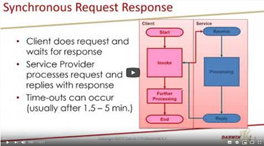
    CorrelationSets in BPEL are as old as the road to Rome. I wrote about it before:

    Although it was in the BPEL project from the very beginning, when Oracle acquired it in 2004, you might not have dealt with it before. But maybe not even realized that you can use it in Oracle Integration Cloud, with structured processes.

    In the first week of June I got to do a presentation about this subject, in a series of Virtual Meetups.

    If you weren’t able to attend, but would like to watch it then you’re in luck, it got recorded by Phil Wilkins: Read the complete article here.

    In my presentation I start with a simple demo based on a BPEL process. I have put the resulting code on GitHub: https://github.com/makker-nl/blog/tree/master/CorrelationDemo.

    Then I move on to a more complicated situation in OIC. I created an export for that project and placed it on GitHub too: https://github.com/makker-nl/blog/tree/master/CorrelationDemoOIC

    This allows you to inspect it and try to recreate it yourself. Read the complete article here.

    PaaS Partner Community

    For regular information on Oracle PaaS become a member in the PaaS (Integration & Process) Partner Community please register here.

    clip_image003 Blog clip_image005 Twitter clip_image004 LinkedIn image[7][2][2][2] Facebook clip_image002[8][4][2][2][2] Wiki

    Technorati Tags: SOA Community,Oracle SOA,Oracle BPM,OPN,Jürgen Kress

    Embedded File Server (SFTP) in Oracle Integration by Subhani Sahib Italapuram

    image

    We will be talking about how to leverage embedded File Server in Oracle Integration in this blog.

    Prerequisites: Basic knowledge of Oracle Integration.

    Targeted audience: Oracle Integration Developers OR Oracle Integration Users.

    File Server Overview

    File Server provides an embedded SFTP server within Oracle Integration, enabling organizations to focus on building integrations without needing to host and maintain a separate SFTP server.

    Enable File Server in OIC

    Before use, File Server must be enabled for the Oracle Integration instance. Enabling File Server is a one-time action completed in Oracle Cloud Infrastructure by an administrator with manage access to the instance. See Enable File Server

    File Server Users

    The primary users of File Server include:

    · Oracle Integration administrators, who use File Server to manage server settings and configure users, groups, and folders, including permissions. To administer File Server as described in this guide, you must be assigned the ServiceAdministrator role in Oracle Integration. See Oracle Integration Service Roles in Provisioning and Administering Oracle Integration and Oracle Integration for SaaS, Generation 2.

    · Oracle Integration developers, who use File Server along with the FTP adapter in integrations to read and write files.

    · Oracle Integration users, who access File Server using an SFTP client. These users must be configured and enabled as users in File Server. Their access is controlled by their assigned folders and folder permissions. Read the complete article here.

    PaaS Partner Community

    For regular information on Oracle PaaS become a member in the PaaS (Integration & Process) Partner Community please register here.

    clip_image003 Blog clip_image005 Twitter clip_image004 LinkedIn image[7][2][2][2] Facebook clip_image002[8][4][2][2][2] Wiki

    Technorati Tags: SOA Community,Oracle SOA,Oracle BPM,OPN,Jürgen Kress

    OIC – SurveyMonkey 2 Netsuite Synchronisation by Niall Commiskey

    imageSimple Use Case

    As the sages say, its a gift to be simple and I’m fully d’accord with that. I have been asked to detail how to sync contact details from SurveyMonkey to Netsuite. Ok, said I to myself, let’s do it! It was only afterwards that I started considering what would be a valid use case from a business perspective. I came up with the following use case – A B2B scenario – I keep a list of customer contacts in SurveyMonkey.

    AS you can see, I have 2 customers Commiskey Inc. and MacCumascaigh c.t.
    Commiskey Inc has 2 contacts
    Mac Cumascaigh c.t. has 1 contact. Read the complete article here.

    PaaS Partner Community

    For regular information on Oracle PaaS become a member in the PaaS (Integration & Process) Partner Community please register here.

    clip_image003 Blog clip_image005 Twitter clip_image004 LinkedIn image[7][2][2][2] Facebook clip_image002[8][4][2][2][2] Wiki

    Technorati Tags: SOA Community,Oracle SOA,Oracle BPM,OPN,Jürgen Kress

    Cloud Platform Partner Advisory Council 2020

    image

    You are invited to the 12th edition of the annual global Partner Advisory Council by the Oracle Integration Product Management team.

    Why should you attend? Get the latest product updates and roadmap details from the Oracle Integration Product Management team. Provide feedback based on your customer project experience and discuss with the Oracle team product improvements & future directions.

    Who should attend? Senior consultants architects, technical leaders & CTOs, who implemented successful Oracle Integration.

    Schedule: December 8th-10th 2020

    Agenda
    December 8th 8:00-9:00 PST
    Keynotes presented by Clay Magouyrk, Executive Vice President, Oracle Cloud Strategy and Andrew Mendelsohn, Executive Vice President, Oracle Data Management Strategy.
    December 9th 2020 8:30-11:00 PST
    Welcome & introduction & partner feedback
    OIC Vision and Roadmap and Release Management
    Extreme Scalability and Enhanced Resilience in Oracle Integration, Antony Reynolds
    Summery & wrap up day 1
    December 10th 2020 8:30-11:00 PST
    Adapters & Accelerators & Recepis, Michael Meiner
    Extend SaaS with Visual Builder and Process
    API Management, Robert Wunderlich
    SOA modernization, Ravi Pinto and Sandhya
    Summery & wrap up

    For details please visit the registration page here.

    PaaS Partner Community

    For regular information on Oracle PaaS become a member in the PaaS (Integration & Process) Partner Community please register here.

    clip_image003 Blog clip_image005 Twitter clip_image004 LinkedIn image[7][2][2][2] Facebook clip_image002[8][4][2][2][2] Wiki

    Technorati Tags: SOA Community,Oracle SOA,Oracle BPM,OPN,Jürgen Kress
    Invoking One Integration From Another Call Integration Action Step by Step by Harshit Yadav

    image

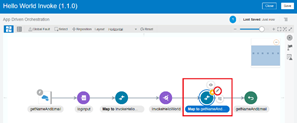
    In this blog, we are going to discuss, How to use Oracle Integration Cloud Service’s Call Integration Action feature to invoke an integration from another integration.

    It is particularly useful when you need to have multiple small nested integrations rather than having one large integration. It is easier to diagnose errors when you have multiple small nested integrations. If you want to know more about How to Managing & Monitoring Integration Errors in Oracle Integration Cloud (OIC) check our blog.

    If you are new to OIC and want to get familiarise then check our blog Oracle Integration Cloud (OIC) For Beginners Overview

    Activate and Test Sample Hello World Integration

    We will be using the sample  Hello World integration as the integration to be invoked (Child Integration) and Hello World Invoke integration will be used as the parent integration that will invoke the child integration. Both the integrations are provided as a sample but we will simplify the Invoke integration part for easy understanding. Read the complete article here.

    PaaS Partner Community

    For regular information on Oracle PaaS become a member in the PaaS (Integration & Process) Partner Community please register here.

    clip_image003 Blog clip_image005 Twitter clip_image004 LinkedIn image[7][2][2][2] Facebook clip_image002[8][4][2][2][2] Wiki

    Technorati Tags: SOA Community,Oracle SOA,Oracle BPM,OPN,Jürgen Kress