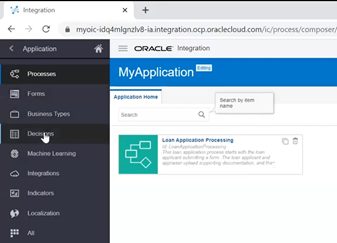
Overview of Oracle Process Cloud Service (PCS)

image

The article is written to give you an overview of Oracle Process Cloud Service(PCS)

  • Oracle Process Cloud Service is a cloud-based software development Platform as a Service (PaaS) that provides a hosted environment for your process applications.
  • Allows you to develop workflows in minutes.
  • Out Of the box template which help to develop workflows very quickly
Some useful article related to Process Cloud Service

A Simple application from Scratch: Oracle Process Cloud

Setting to enable the notification in Oracle Process Cloud Services

Key Benefits of PCS
  1. Accelerate
    • Business-led, Rapid Process Automation
    • Responsive, Multi-channel Forms
    • Integrate with Oracle and non-Oracle Applications
    • Play, Test & Validate
  2. Engage
    • Productive and Intuitive Task Management
    • Work on the Go Across Devices
    • Task Collaboration
    • Right work to Right Person
  3. Simply
    • Real Time insights and Actionable Dashboards
    • Operational Intelligence
    • End to End Visibility & Self-service
  4. Complete

PaaS Partner Community

For regular information on Oracle PaaS become a member in the PaaS (Integration & Process) Partner Community please register here.

clip_image003 Blog clip_image005 Twitter clip_image004 LinkedIn image[7][2][2][2] Facebook clip_image002[8][4][2][2][2] Wiki

Technorati Tags: SOA Community,Oracle SOA,Oracle BPM,OPN,Jürgen Kress

Oracle Cloud Platform Partner Kickoff Webcast June 30th, 2020

imageWant to increase your Oracle Cloud Platform business? Want to create new service offerings and solutions for the Cloud? Attend this webcast with Martijn Vlek, Vice President Oracle EMEA!

Content:

· Cloud Platform update

· Sales Plays & Cheat Sheets

· Customer presentations & demos & free trialsimage

· Partner resources & support

Speaker: Martijn Vlek, Vice President Oracle EMEA

Schedule: June 30th, 2020 11:00-12:00 a.m. CET Berlin time

For details please visit the registration page here.

PaaS Partner Community

For regular information on Oracle PaaS become a member in the PaaS (Integration & Process) Partner Community please register here.

clip_image003 Blog clip_image005 Twitter clip_image004 LinkedIn image[7][2][2][2] Facebook clip_image002[8][4][2][2][2] Wiki

Technorati Tags: SOA Community,Oracle SOA,Oracle BPM,OPN,Jürgen Kress

My private Corner – Bill Gate’s book tips

imageEvery year Bill Gates recommends interesting books to read during the summer break. Thoughtful list of interesting content, make sure you grape one or more books! Here is his original tweet” Every summer I try to do a little extra reading. Here are a few books you might enjoy.

PaaS Partner Community

For regular information on Oracle PaaS become a member in the PaaS (Integration & Process) Partner Community please register here.

clip_image003 Blog clip_image005 Twitter clip_image004 LinkedIn image[7][2][2][2] Facebook clip_image002[8][4][2][2][2] Wiki

Technorati Tags: SOA Community,Oracle SOA,Oracle BPM,OPN,Jürgen Kress

Javascript in ANT by Martien van den Akker

image

Earlier I wrote about an ANT script to scan JCA adapters files in your projects home, subversion working copy or github local repo.
g
In my current project we use sensors to kick-of message-archiving processes, without cluttering the BPEL process. I’m not sure if I would do that like that if I would do on a new project, but technically the idea is interesting. Unfortunately, we did not build a registry what BPEL processes make use of it and how. So I tought of how I could easily find out a way to scan that, and found that based on the script to scan JCA files, I could easily scan all the BPEL sensor files. If you have found the project folders, like I did in the JCA scan script, you can search for the *_sensor.xml files.
So in a few hours I had a basic sript. Now, in a second iteration, I would like to know what sensorActions the sensors trigger. For that I need to interpret the accompanying *_sensorAction.xml file. There for, based on the found sensor filename I need to determine the name of the sensor action file. Read the complete article here.

PaaS Partner Community

For regular information on Oracle PaaS become a member in the PaaS (Integration & Process) Partner Community please register here.

clip_image003 Blog clip_image005 Twitter clip_image004 LinkedIn image[7][2][2][2] Facebook clip_image002[8][4][2][2][2] Wiki

Technorati Tags: SOA Community,Oracle SOA,Oracle BPM,OPN,Jürgen Kress

Accelerate API Integration With the Power of OpenAPI by Anuj Kaushal

image

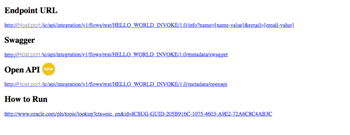
The OpenAPI Specification defines a standard, programming language-agnostic interface description for REST APIs. We are pleased to announce OpenAPI support in Oracle integration cloud REST adapter. What this means is that all OIC integration flows with a REST trigger will publish an openAPI to describe its metadata. This machine readable description of the API will allow interactive API explorers as well as the developers to consume OIC integration flows with ease.

On activation of an integration flow, the metadata link will show the new option to display the openAPI in addition to the swagger URL. We are also introducing an interactive openAPI explorer in the Oracle integration cloud REST adapter wizard that will help integration developers to explore and consume APIs described in openAPI format with a few clicks. The REST adapter already has similar support for swagger2.0. Read the complete article here.

PaaS Partner Community

For regular information on Oracle PaaS become a member in the PaaS (Integration & Process) Partner Community please register here.

clip_image003 Blog clip_image005 Twitter clip_image004 LinkedIn image[7][2][2][2] Facebook clip_image002[8][4][2][2][2] Wiki

Technorati Tags: SOA Community,Oracle SOA,Oracle BPM,OPN,Jürgen Kress
Configurators – One stop solution for all your dependency configuration needs by Sindhu Suresh

image

For those of you already familiar with the blog for Integration dependency configuration, we have something better to offer. The previous blog talks about replacing a connection dependency in the integration, with the another connection resource of the same role using Rest apis. We know how tedious handling rest apis can get, hence we have now come up with a snazzy UI do the same operation. This feature is available at the integration level and it has also been extended to work at Package level.  
Lets take a look at both, Integration Configurator and Package Configurator, in detail in the upcoming sections.

Integration Configurator

Prerequisite

Enable following feature:

  • oic.ics.featureflag.spa.designer (Integration designer pages)

To enable feature flags – Refer to Blog on Enabling Feature Flags in Oracle Integration

The minimum Oracle Integration version required for the feature is 191110.1400.32380.

Key Functionalities

As mentioned earlier, the integration configurator is a friendly UI built on top of the existing REST APIs(mentioned in the previous blog), that help users replace the dependencies in an integration, with some more added functionalities that elevate user experience. The functionalities are : Read the complete article here.

PaaS Partner Community

For regular information on Oracle PaaS become a member in the PaaS (Integration & Process) Partner Community please register here.

clip_image003 Blog clip_image005 Twitter clip_image004 LinkedIn image[7][2][2][2] Facebook clip_image002[8][4][2][2][2] Wiki

Technorati Tags: SOA Community,Oracle SOA,Oracle BPM,OPN,Jürgen Kress

One Stop Solution for OIC Certificate Management by Shubham Agrawal

image

Oracle Integration Certificate Management empowers admins to manage all their certificates and keys at one place.

Prerequisite

Enable following feature:

  • oic.suite.settings.certificate  (Suite level certificate landing page)

To enable feature flags – Refer to Blog on Enabling Feature Flags in Oracle Integration

The minimum Oracle Integration version required for the feature is 190924.1600.31522

Simplified and Progressive User Experience :
  • OIC provides the user with an easy tool for managing life cycle of certificate, through the Certificates page under Settings menu.
  •   Sorting and Filters capabilities:
    • Sort by: It allows sorting by Expiry date in ascending or descending order:
      • Expiring Soon
      • Expiring Later
    • It also allows filter by: Status, Type, Category, and Installed by.
    • By default table is loaded with Installed by User filter. Read the complete article here.

PaaS Partner Community

For regular information on Oracle PaaS become a member in the PaaS (Integration & Process) Partner Community please register here.

clip_image003 Blog clip_image005 Twitter clip_image004 LinkedIn image[7][2][2][2] Facebook clip_image002[8][4][2][2][2] Wiki

Technorati Tags: SOA Community,Oracle SOA,Oracle BPM,OPN,Jürgen Kress

Testing REST trigger-based Integrations in OIC Console by Sumit Tomar

image

Test Integration feature allows users to test a non-scheduled integration with REST endpoint by invoking it directly from OIC console without relying on any third party software.

Prerequisite for Test Integration Feature

  1. Enable feature flag:
    1. oic.ics.featureflag.spa.designer
    2. oic.ics.console.integration.invoke-integration-support
  2. The minimum Oracle Integration version required for the feature is 191110.1400.32380

How it works

Activate the Integration.

Click on "How to Run" link.

A popup will be displayed as below.

Click on Test link to go to Test Integration page.

Test Integration page will have 3 sections: Operation, Request, and Response.

Operation and Request section will have the endpoint’s metadata populated.

Operation

Operation section contains Operation option(if Integration is configured to have multiple operations) along with HTTP method and relative URI (for the selected operation in case of multiple operations). Read the complete article here.

PaaS Partner Community

For regular information on Oracle PaaS become a member in the PaaS (Integration & Process) Partner Community please register here.

clip_image003 Blog clip_image005 Twitter clip_image004 LinkedIn image[7][2][2][2] Facebook clip_image002[8][4][2][2][2] Wiki

Technorati Tags: SOA Community,Oracle SOA,Oracle BPM,OPN,Jürgen Kress

PaaS Partner YouTube Update June 2020

The June video includes three topics:

• Kickoff Webcasts for PaaS & SaaS partners.

• Hands-on trainings to become an integration or chatbot expert.

• Netsuite Integration community webcast

For regular updates please subscribe to our YouTube channel here. Thanks for your likes and sharing the video on YouTube and LinkedIn. For the latest PaaS Community information please visit our Community update wiki here (Community membership required).

PaaS Partner Community

For regular information on Oracle PaaS become a member in the PaaS (Integration & Process) Partner Community please register here.

clip_image003 Blog clip_image005 Twitter clip_image004 LinkedIn image[7][2][2][2] Facebook clip_image002[8][4][2][2][2] Wiki

Technorati Tags: SOA Community,Oracle SOA,Oracle BPM,OPN,Jürgen Kress

ERP to ATP Integration documentation by Meron Kebede

image

OBJECTIVE

This document outlines a step-by-step guide on how to integrate ERP and ATP in Oracle Integration Cloud (OIC). The purpose of the integration is to create a purchase order in ERP, hash the purchase order details, and send the actual purchase order details along with the hashed values to ATP.

COMPONENTS COVERED

  • How to create and configure ERP and ATP connections in OIC
  • How to generate a CSF key in SOA Composer
  • How to create an integration
  • Assign variables
  • Map attributes between ERP and ATP
  • How to register a custom script in OIC Libraries
  • How to call a custom script as a function in OIC integration orchestration
  • How to activate and monitor integration
  • How to test integration using SQLDeveloper

TOOLS & APPLICATIONS USED

PaaS Partner Community

For regular information on Oracle PaaS become a member in the PaaS (Integration & Process) Partner Community please register here.

clip_image003 Blog clip_image005 Twitter clip_image004 LinkedIn image[7][2][2][2] Facebook clip_image002[8][4][2][2][2] Wiki

Technorati Tags: SOA Community,Oracle SOA,Oracle BPM,OPN,Jürgen Kress