API Platform – Plans & Subscriptions by Phil Wilkins

image

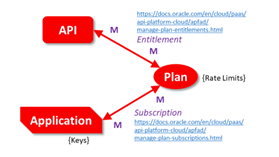
When it comes to Plans and Subscriptions on the Oracle API Platform we have a very flexible set of relationships. When it comes to checking the relationships to ensure a configuration is correct and that the impact of changing a plan or subscription is clear.  I end up having to draw a little diagram, which always leaves me second guessing myself about which way the linkages are. So I created a quick aide memoir, particularly given the unfortunate fact that Oracle’s online documentation isn’t great for diagrams. Read the complete article here.

PaaS Partner Community

For regular information on Oracle PaaS become a member in the PaaS (Integration & Process) Partner Community please register here.

clip_image003 Blog clip_image005 Twitter clip_image004 LinkedIn image[7][2][2][2] Facebook clip_image002[8][4][2][2][2] Wiki

Technorati Tags: SOA Community,Oracle SOA,Oracle BPM,OPN,Jürgen Kress
Top tweets PaaS Partner Community December 2019

imageDecember 2019 top tweets by PaaSCommunity

Send your tweets @soacommunity #PaaSCommunity and follow us at http://twitter.com/soacommunity. Make sure you share your content with the community!

PaaS Partner Community

For regular information on Oracle PaaS become a member in the PaaS (Integration & Process) Partner Community please register here.

clip_image003 Blog clip_image005 Twitter clip_image004 LinkedIn image[7][2][2][2] Facebook clip_image002[8][4][2][2][2] Wiki

Technorati Tags: SOA Community,Oracle SOA,Oracle BPM,OPN,Jürgen Kress, Twitter

Oracle API Platform Cloud Service – Enabling the Digital Transformation by Eduardo Barra Cordeiro

image

We live in a digital world. With the digital transformation, customers demand connectivity and innovative services. And in this rapidly changing marketplace, they have more options than ever. Companies need to respond quickly. It can be tough to keep up. On the bright side, this is a really exciting time because we can, in fact, deliver faster. And more. So how can you meet consumers expectations?

One of the most popular ways of communicating digital information is via APIs, or Application Programming Interfaces. A lot of widely known apps use APIs: the most common social platforms, your favorite traffic apps, like Waze, your bank app or even apps like weather. They all use APIs.

In this post, we will present the Oracle API Platform Cloud Service, and walk you through some of its concepts, including why you should consider using it.

Why an API platform?

To better understand why you should use this platform in your company, we should talk about hybrid clouds. Gartner defines a hybrid cloud service “as a cloud computing service that is composed of some combination of private, public and community cloud services, from different service providers. A hybrid cloud service crosses isolation and provider boundaries so that it can’t be simply put in one category of private, public, or community cloud service. It allows one to extend either the capacity or the capability of a cloud service, by aggregation, integration or customization with another cloud service.” Read the complete article here.

PaaS Partner Community

For regular information on Oracle PaaS become a member in the PaaS (Integration & Process) Partner Community please register here.

clip_image003 Blog clip_image005 Twitter clip_image004 LinkedIn image[7][2][2][2] Facebook clip_image002[8][4][2][2][2] Wiki

Technorati Tags: SOA Community,Oracle SOA,Oracle BPM,OPN,Jürgen Kress

Moving SOA to Oracle Cloud Infrastructure by Robert Wunderlich

image

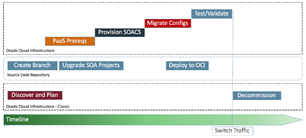
Many customers are running their workloads on Oracle Cloud Infrastructure Classic (OCI-C), but the new Oracle Cloud Infrastructure (OCI) offers compelling benefits that customers should consider moving their workloads to the "gen 2 cloud".  Additionally if the customer is not yet running SOA 12.2.1.3 or above, now is an ideal time to make the move.

A SOA implementation is typically large and serves mission critical requirements.  This means that a "side-by-side" migration is the best approach.  At a high-level the process is as follows:

  • Discover/map the existing OCI-C deployment.  Oracle provides a set of tools to help in migrating workloads to OCI.  You can learn more about this at Upgrade to Oracle Cloud Infrastructure.
  • Branch your SOA projects: SOA projects can be deployed into a new environment and they will be upgraded on the deployment.  However, a better approach is to branch your version control and upgrade the projects in JDeveloper.  You can then validate the project to catch any potential issues. Read the complete article here

PaaS Partner Community

For regular information on Oracle PaaS become a member in the PaaS (Integration & Process) Partner Community please register here.

clip_image003 Blog clip_image005 Twitter clip_image004 LinkedIn image[7][2][2][2] Facebook clip_image002[8][4][2][2][2] Wiki

Technorati Tags: SOA Community,Oracle SOA,Oracle BPM,OPN,Jürgen Kress

Microsoft SQL adapter in Oracle Integration Cloud by Ankur Jain

image

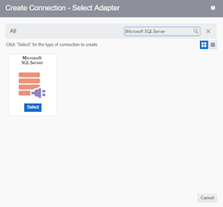
In this article, we are going to explain MS adapter, its capabilities and how to create a connection with MS SQL server that resides in the on-premises network.

Micrsoft SQL server Adapter capabilities

The Microsoft SQL Server Adapter enables to integrate the Microsoft SQL Server database residing behind the firewall of your on-premises environment with Oracle Integration Cloud Service through use of the on-premises connectivity agent.

The Microsoft SQL Server Adapter provides the following capabilities:

  • Execution of stored procedures in the Microsoft SQL Server database
  • Execution of DML statement such as Select, Insert, Update, and Delete using the Run a SQL Statement option
  • Support for generating XSD from PureSQL. This feature generates an XSD from a PureSQL statement provided by dynamically querying on the table.
  • Support for polling new and updated records for processing in the Microsoft SQL Server database

Let’ see how to create MS SQL connection:

  • Login into the Oracle Integration Cloud console and click on the Connections
  • Click on the Create button from Top right corner
  • Search for the Microsoft SQL server and select the adapter. Read the complete article here.

PaaS Partner Community

For regular information on Oracle PaaS become a member in the PaaS (Integration & Process) Partner Community please register here.

clip_image003 Blog clip_image005 Twitter clip_image004 LinkedIn image[7][2][2][2] Facebook clip_image002[8][4][2][2][2] Wiki

Technorati Tags: SOA Community,Oracle SOA,Oracle BPM,OPN,Jürgen Kress

Oracle Integration Cloud Taleo EE (OTAC) – Create Requisition by Niall Commiskey

image

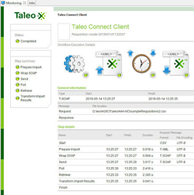
As you can see, I am looking to hire a philosopher. The above "Requisition" was created via the Taleo UI. But how could I leverage OIC to do the same?My first port of call was TCC. As per the previous post – I need a wrapsoap file describing the Requisition. Now I am just kicking the tyres – I have no sample input csv file, I don’t know what a Requisition looks like; so where do I start? Read the complete article here.

PaaS Partner Community

For regular information on Oracle PaaS become a member in the PaaS (Integration & Process) Partner Community please register here.

clip_image003 Blog clip_image005 Twitter clip_image004 LinkedIn image[7][2][2][2] Facebook clip_image002[8][4][2][2][2] Wiki

Technorati Tags: SOA Community,Oracle SOA,Oracle BPM,OPN,Jürgen Kress

OAuth Custom Three Legged Security Policy in REST Connection: Oracle Integration Cloud by Ankur Jain

image

In the previous article, we have described the OAuth Custom Two Legged Security Policy in REST Connection. This article will show how to create a connection with REST APIs which uses the three-legged OAuth security policy to access the APIs. For the demo purpose, we’ll take an example of LinkedIn REST API which uses the three-legged authentication to authenticate the REST APIs.
As a pre-requisite, we have to register an application in the LinkedIn developer portal which can be accessed here. During registration of the application provide the Redirect URLs in the below format:

https://<ICS-HOST:PORT>/icsapis/agent/oauth/callback

Once the application is registered it will provide the client id and client secret.

Let’s see how to create REST connection in oracle integration cloud which will use the three-legged authentication. Read the complete article here.

PaaS Partner Community

For regular information on Oracle PaaS become a member in the PaaS (Integration & Process) Partner Community please register here.

clip_image003 Blog clip_image005 Twitter clip_image004 LinkedIn image[7][2][2][2] Facebook clip_image002[8][4][2][2][2] Wiki

Technorati Tags: SOA Community,Oracle SOA,Oracle BPM,OPN,Jürgen Kress

A Simple Guide to Return Custom HTTP Error Response from REST based OIC Flows by Anuj Kaushal

image

The REST Adapter in the trigger (inbound) direction exposes an HTTP endpoint that HTTP clients can request for using an HTTP request, and returns an HTTP response.

If successful, the REST Adapter returns a success response. The REST Adapter returns an error response with an HTTP status belonging to the error family of codes depending on the situation. The following table describes the possible cause and the REST Adapter response.

In addition, there could be several situations where an integration developer wants to return a custom HTTP error response based on the business logic.

Let’s take one such example and illustrate how this can be done easily within the orchestration flow.

The REST adapter provides very basic type validation out of the box. Any other validation like schema or semantic validation is turned off as it has a significant performance overhead. 
This post demonstrates how integrations developers can include validation logic and raise a fault with a custom fault code from within the orchestration flow. This fault is returned as an HTTP error response back to the client by the REST Adapter.

Overview: In our example, we have a REST based trigger that takes a user input. The integration developer checks the user input and raises a fault which is returned as a HTTP response with an error code back to the caller. Step 1: Create a REST based trigger that takes a JSON input and a JSON response. Read the complete article here.

PaaS Partner Community

For regular information on Oracle PaaS become a member in the PaaS (Integration & Process) Partner Community please register here.

clip_image003 Blog clip_image005 Twitter clip_image004 LinkedIn image[7][2][2][2] Facebook clip_image002[8][4][2][2][2] Wiki

Technorati Tags: SOA Community,Oracle SOA,Oracle BPM,OPN,Jürgen Kress

Ordering Delivery with Oracle Integration by Antony Reynolds

image

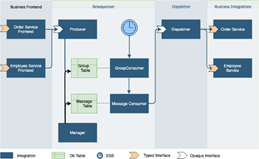
We often need to ensure that messages are processed in strict order, in this blog post I explain a pattern that enables this to be enforced using Oracle Integration.  The pattern also deals with the case where we need to limit the concurrency of calls to an endpoint system.

This article was co-written with Glenn Mi & David Craft

The Sequencing Problem

The basic problem is that I may issue a stream of requests that must be executed in order, for example create account, update account address, update account contacts.  The latter two activities cannot occur until the first has completed.

Before we can sequence messages we need to know the order in which they should be processed, so there must be some sort of sequencing ID which we can use.  This could be a timestamp or it could be an actual sequence ID.  If we are using timestamps then the closer to the message origin that the timestamp is applied the better, for example if we take the timestamp from when it arrives in Oracle Integration then a network delay may already have caused our messages to be out of order.

Typically we don’t want all messages to be in the same ordered sequence.  In our account example only messages for a given account need to be ordered.  Messages for different accounts can execute in parallel.  So we also need some sort of group id to identify different sequence streams within our message stream. Read the complete article here

PaaS Partner Community

For regular information on Oracle PaaS become a member in the PaaS (Integration & Process) Partner Community please register here.

clip_image003 Blog clip_image005 Twitter clip_image004 LinkedIn image[7][2][2][2] Facebook clip_image002[8][4][2][2][2] Wiki

Technorati Tags: SOA Community,Oracle SOA,Oracle BPM,OPN,Jürgen Kress

OIC-integration-with-Oracle ATP by Subhani Sahib Italapuram

image

ATP Adapter is available as part of feature flag. Please refer blog on feature flags.

The Oracle ATP Adapter enables you to run stored procedures or SQL statements on Oracle ATP CS as part of an integration in Oracle Integration.

Please note that you could use the ATP adapter to connect to Autonomous Data Warehouse as well.

The Oracle ATP Adapter provides the following benefits:

  • You can invoke a stored procedure.
  • You can run SQL statements.
  • You can perform the below operation on a Table.

o . Insert

o . Update

o . Insert or Update (Merge)

o . Select

The Oracle ATP Adapter is one of many predefined adapters included with Oracle Integration. You can configure the Oracle ATP Adapter as a connection in an integration in Oracle Integration.

Connections define information about the instances of each configuration you are integrating. Oracle Integration includes a set of predefined adapters, which are the types of applications on which you can base your connections, such as Oracle Sales Cloud, Oracle Eloqua Cloud, Oracle RightNow Cloud, ATP CS, and so on. Read the complete article here.

PaaS Partner Community

For regular information on Oracle PaaS become a member in the PaaS (Integration & Process) Partner Community please register here.

clip_image003 Blog clip_image005 Twitter clip_image004 LinkedIn image[7][2][2][2] Facebook clip_image002[8][4][2][2][2] Wiki

Technorati Tags: SOA Community,Oracle SOA,Oracle BPM,OPN,Jürgen Kress