Innovate, extend and integrate SaaS hands-on trainings for SaaS partners in Utrecht, Espoo and Palma

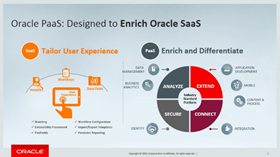
imageAre you working on Oracle SaaS implementations and want to integrate and extend them using PaaS?

Attend our 2 days hands-on training to understand how use Oracle PaaS service like Oracle Integration Cloud, Oracle Mobile Cloud Enterprise & Oracle Visual Builder Cloud Service in combination with Oracle SaaS solutions like Oracle ERP Cloud & Oracle Engagement Cloud. This session goes through extending SaaS services with PaaS.

The training is most suitable for developer and consultants who are trying to use SaaS and PaaS together. Though the example use case uses some basic banking services, methodology used in the use case is applicable to any domain having similar requirements.

We offer an all new innovate, extend and integrate SaaS hands-on training for partners. For details please visit the registration pages:

For additional information please see the integrate SaaS partner resource kit here.


PaaS Partner Community

For regular information on Oracle PaaS become a member in the SOA & BPM Partner Community for registration please visit www.oracle.com/goto/emea/soa (OPN account required) If you need support with your account please contact the Oracle Partner Business Center.

clip_image003 Blog clip_image005 Twitter clip_image004 LinkedIn image[7][2][2][2] Facebook clip_image002[8][4][2][2][2] Wiki

Technorati Tags: SOA Community,Oracle SOA,Oracle BPM,OPN,Jürgen Kress

Jarvis Pizzeria: Markers and Conditions by Richard Olrichs & Marcel van de Glind & Marc Kuijpers

image

In this post we do a deep dive into the fundamentals of markers and conditions. But first one step back, what are markers and conditions and what do they have to do with each other?
For Dynamic Processes we recognize the following markers:

  • Repeatable: controls whether a stage, activity or milestone is repeatable.
  • Auto Complete: controls the completion of a stage instance.
  • Manually Activated: controls the activation of a stage or activity instance.
  • Required: controls whether a stage, activity or milestone is required.

Next we have the following conditions:

  • Activation: additional entry criteria for a stage.
  • Enablement: additional entry criteria for a activity.
  • Termination: additional exit criteria for a stage or activity.
  • Completion: addition exit criteria for a milestone.

Markers

Below is some additional information about these markers. This text comes directly from the Oracle documentation.

Repeatable

The behavior of the repetition relies on the presence of entry criteria. If there is no entry criterion defined, then the repetition rule is evaluated by default in the transition into the COMPLETED state. Otherwise the repetition rule is only evaluated, when an entry criterion is satisfied and the task/stage transitions away from the state AVAILABLE into the next state.

Repetition on completion

To repeat a task or stage when it gets completed a repetition rule must be defined and the task or stage must not have any entry criteria. Whenever a task or stage instance transitions into the COMPLETED state, the repetition rule is evaluated and if it evaluates to true a new instance of the task or stage is created. The new instance transitions into the AVAILABLE state.

Repetition triggered by entry criteria

A trigger for a repetition of a milestone, stage or task is a satisfied sentry, that is referenced as entry criterion. Whenever an entry criterion is satisfied, the repetition rule is evaluated and if it evaluates to true, a new instance of the milestone, stage or task is created. The new instance transitions into the AVAILABLE state. The previous instance, in case of a milestone instance, transitions in state COMPLETED and, in case of a stage or task instance, into the ACTIVE or ENABLED state (depending on the manual activation rule) because the entry criterion is satisfied. Read the complete article here.


PaaS Partner Community

For regular information on Oracle PaaS become a member in the SOA & BPM Partner Community for registration please visit www.oracle.com/goto/emea/soa (OPN account required) If you need support with your account please contact the Oracle Partner Business Center.

clip_image003 Blog clip_image005 Twitter clip_image004 LinkedIn image[7][2][2][2] Facebook clip_image002[8][4][2][2][2] Wiki

Technorati Tags: SOA Community,Oracle SOA,Oracle BPM,OPN,Jürgen Kress
How to install the Oracle Integration Cloud on premises connectivity agent (18.1.3) by Jacco Cijsouw

image

Recapitulation on how to install the Oracle Integration Cloud on premises connectivity agent

Recently (april 2018) I gained access to the new Oracle Integration Cloud (OIC), version 18.1.3.180112.1616-762,  and wanted to make an integration connection to an on-premise database. For this purpose, an on premise connectivity agent needs to be installed, as is thoroughly explained by my colleague Robert van Mölken in his blog prepraring-to-use-the-ics-on-premises-connectivity-agent.

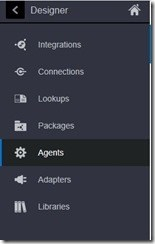
With the (new) Oracle Integration Cloud environment the installation of the connectivity agent has slightly changed though, as shown below. It gave me some effort to get the new connectivity agent working. Therefore I decided to recapture the steps needed in this blog. Hopefully, this will give you a headstart to get the connectivity agent up and running.

Prerequisites

Access to an Oracle Integration Cloud Service instance.

Rights to do some installation on a local / on-premise environment, Linux based (eg. SOA virtual box appliance). Read the complete article here.


PaaS Partner Community

For regular information on Oracle PaaS become a member in the SOA & BPM Partner Community for registration please visit www.oracle.com/goto/emea/soa (OPN account required) If you need support with your account please contact the Oracle Partner Business Center.

clip_image003 Blog clip_image005 Twitter clip_image004 LinkedIn image[7][2][2][2] Facebook clip_image002[8][4][2][2][2] Wiki

Technorati Tags: SOA Community,Oracle SOA,Oracle BPM,OPN,Jürgen Kress

Oracle Integration Cloud: New! The Data Mapper Activity by Jan Kettenis

image 

In a previous blog I discussed a work-around for not having a Script activity in Oracle Integration Cloud’s Process Builder. In this blog I will discuss another work-around which is actually not a work-around, but the real thing: the Data Mapper!
As you can read in a previous blog about the matter, not having the equivalent of the Script activity of the on-premise BPM Suite, was an omission that we often had to find a work-around for. The one I used was the Business Rule activity. However, some weeks ago the Business Rule activity got deprecated (you could clearly see that).

With the latest release of OIC (which may not yet be public available when you read this) the Business Rule activity has vanished. At the same time the Data Mapper activity has been added.

The Data Mapper activity has no properties other than that you can put it in draft mode. Read the complete article here.

PaaS Partner Community

For regular information on Oracle PaaS become a member in the SOA & BPM Partner Community for registration please visit www.oracle.com/goto/emea/soa (OPN account required) If you need support with your account please contact the Oracle Partner Business Center.

clip_image003 Blog clip_image005 Twitter clip_image004 LinkedIn image[7][2][2][2] Facebook clip_image002[8][4][2][2][2] Wiki

Technorati Tags: SOA Community,Oracle SOA,Oracle BPM,OPN,Jürgen Kress

Deploying OIC – Definitive Tip #9 By Phil Wilkins

image

When ICS was launched it delivered on of the values of PaaS namely you didn’t need to worry about setting up storage, database and compute, it was all sorted out for you. Admittedly it come with a lack of elasticity when it came to resilience and scaling. In contrast Services such as SOA CS which required you to go through each of the layers, but gave you a degree of flexibility. The whilst simpler than building SOA on-premises it still represents a laborious and fiddly process that took time.

When OIC (Oracle Integration Cloud) arrived and the introduction Universal Credits we had a pricing model that made it a lot easier to be elastic in terms of approach to resourcing, but a deployment model that following SOA CS rather than ICS. To an extend, one step forward, and another back.

Fortunately we are seeing head way that means we have recovered that backward step. This recovery comes in the form of Oracle Cloud Stack (CSM for short and sometimes referred to as PSM or PaaS Stack Manager). I’m not sure that Cloud Stack has garnered the attention it perhaps deserves. So let’s quickly look at what it does. In simple terms it provides an environment build automation capability. Cloud Stack takes a YAML (Yet Another Markup Language – rather appropriate name given the broad range of notations we find for describing Oracle product configuration) and uses it to then build an environment. The great thing about it is that you provide all the configuration (or script it) and describe the component dependency chain. The dependency chain ultimately forms part of the YAML file, but Cloud Stack includes a web interface which means configuration including defining dependencies can be done visually (as illustrated). For example a database is needed for JCS to support ADF, so you can create additional storage, then define the DB followed by JCS itself. The YAML file can accommodate the description of dependencies so it can create each component in the order needed. The composition of components in the YAML file are considered to be a Stack – hence the name. Read the complete article here.


PaaS Partner Community

For regular information on Oracle PaaS become a member in the SOA & BPM Partner Community for registration please visit www.oracle.com/goto/emea/soa (OPN account required) If you need support with your account please contact the Oracle Partner Business Center.

clip_image003 Blog clip_image005 Twitter clip_image004 LinkedIn image[7][2][2][2] Facebook clip_image002[8][4][2][2][2] Wiki

Technorati Tags: SOA Community,Oracle SOA,Oracle BPM,OPN,Jürgen Kress
Continuous Integration with Apiary, Dredd, and Wercker by Nick Montoya

image

There are many tools in the market to design, develop, and test API’s. Some of these tools could be used separately. Some others could be combined. Every time a change is introduced in the design or implementation of an API, it would be nice to have tests and builds run automatically. Continuous Integration (CI) is a software development practice that allows builds and tests to be triggered every time new code is pushed to the repository. There are may tools that could be used to build this CI pipeline. This blog will share the experience of building a CI pipeline using Apiary (bought by Oracle in January 2017) for API Design and Wercker (bought by Oracle in April 2017) to help achieve this CI goal.

  1. 1. Create an API definition in Apiary

Apiary (apiary.io) improves API development by promoting a documentation first approach. It is a platform for designing HTTP based web APIs. It starts with API documentation, then Apiary creates mock services and tests. Apiary support two formats for API description: API Blueprint and Swagger.

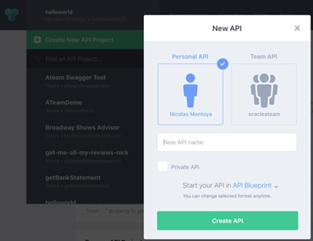
In Apiary, from the API dropdown select “Create New API Project” and the “New API” screen will popup. Read the complete article here.

PaaS Partner Community

For regular information on Oracle PaaS become a member in the SOA & BPM Partner Community for registration please visit www.oracle.com/goto/emea/soa (OPN account required) If you need support with your account please contact the Oracle Partner Business Center.

clip_image003 Blog clip_image005 Twitter clip_image004 LinkedIn image[7][2][2][2] Facebook clip_image002[8][4][2][2][2] Wiki

Technorati Tags: SOA Community,Oracle SOA,Oracle BPM,OPN,Jürgen Kress
Why API-led architecture is important to drive digital transformation by Sander Rensen

image


Many organizations have more than one application running to support their business processes. This is often driven by the fact that multiple divisions within the same organization have their own requirement to run their day-to-day operations. The IT landscape can quickly become a monstrous beast that is difficult to manage and tame. The different systems generate a lot of data that is stored in a variety of different locations with a common problem that the business doesn’t know where and how to access the data. Digital enablement to modernize your IT landscape becomes slow and painful. The key to drive digital transformation is to have the ability to quickly access the data with minimum effort.

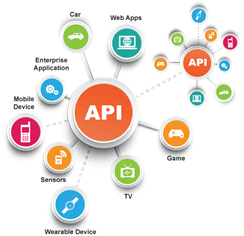
This is where an API-led architecture is key to access, manage and secure the data from one single entry-point with the use of APIs. There are several good API platforms on the market that can support an API led architecture. However, make sure when you select a product that it can support:

  • APIs can be accessed from anywhere on-premise and in the cloud.
  • APIs can be easily found in a central repository a bit like a shopping basket.
  • APIs can be configured to comply with the latest security rules like GDPR.
  • APIs should be polymorph meaning that the back-end services to retrieve the data can be fetched with any preferred programming language.
  • The throughput of requests when calling the API can be configured like throttling or rate limit to ensure back-end services are protected against DoS attacks.

These are a selection of the key features to think about. The Oracle API Platform CS, released last June, is mature enough to support an API-led architecture. Read the complete article here.

PaaS Partner Community

For regular information on Oracle PaaS become a member in the SOA & BPM Partner Community for registration please visit www.oracle.com/goto/emea/soa (OPN account required) If you need support with your account please contact the Oracle Partner Business Center.

clip_image003 Blog clip_image005 Twitter clip_image004 LinkedIn image[7][2][2][2] Facebook clip_image002[8][4][2][2][2] Wiki

Technorati Tags: SOA Community,Oracle SOA,Oracle BPM,OPN,Jürgen Kress

Oracle API Platform Cloud Service: using the Developer Portal for discovering APIs via the API Catalog and subscribing applications to APIs by Marc Lameriks

image 

At the Oracle Partner PaaS Summer Camps VII  in Lisbon last year, at the end of august, I attended the API Platform Cloud Service & Integration Cloud Service bootcamp.

In a series of article’s I will give a high level overview of what you can do with Oracle API Platform Cloud Service.

At the Summer Camp a pre-built Oracle VM VirtualBox APIPCS appliance (APIPCS_17_3_3.ova) was provided to us, to be used in VirtualBox. Everything needed to run a complete demo of API Platform Cloud Service is contained within Docker containers that are staged in that appliance. The version of Oracle API Platform CS, used within the appliance, is Release 17.3.3 — August 2017.

See https://docs.oracle.com/en/cloud/paas/api-platform-cloud/whats-new/index.html to learn about the new and changed features of Oracle API Platform CS in the latest release.

In this article in the series about Oracle API Platform CS, the focus will be on the Developer Portal, discovering APIs via the API Catalog and subscribing applications to APIs. As a follow-up from my previous article, at the end the focus is on validating the “Key Validation” policy of the “HumanResourceService”API.
[https://technology.amis.nl/2018/04/14/oracle-api-platform-cloud-service-using-the-management-portal-and-creating-an-api-including-some-policies/]

Be aware that the screenshot’s in this article and the examples provided, are based on a demo environment of Oracle API Platform CS and were created by using the Oracle VM VirtualBox APIPCS appliance mentioned above.

This article only covers part of the functionality of Oracle API Platform CS. For more detail I refer you to the documentation: https://cloud.oracle.com/en_US/api-platform.

Short overview of Oracle API Platform Cloud Service

Oracle API Platform Cloud Service enables companies to thrive in the digital economy by comprehensively managing the full API lifecycle from design and standardization to documenting, publishing, testing and managing APIs. These tools provide API developers, managers, and users an end-to-end platform for designing, prototyping. Through the platform, users gain the agility needed to support changing business demands and opportunities, while having clear visibility into who is using APIs for better control, security and monetization of digital assets.
[https://cloud.oracle.com/en_US/api-platform/datasheets]

Architecture: Read the complete article here.


PaaS Partner Community

For regular information on Oracle PaaS become a member in the SOA & BPM Partner Community for registration please visit www.oracle.com/goto/emea/soa (OPN account required) If you need support with your account please contact the Oracle Partner Business Center.

clip_image003 Blog clip_image005 Twitter clip_image004 LinkedIn image[7][2][2][2] Facebook clip_image002[8][4][2][2][2] Wiki

Technorati Tags: SOA Community,Oracle SOA,Oracle BPM,OPN,Jürgen Kress

Oracle Functions and Cloud Native – PaaS Partner Community Webcast January 25th 2019

Attend our January edition of the PaaS Partner Community Webcast live on January 25th 2019.image

Oracle Functions and Cloud Native Limited Availability

We announced Oracle Functions + Cloud Native Limited Availability Program at KubeCon North America 2018 on Dec 11, 2018. Join this session, presented by Oracle Functions Product Management, to get the latest information about the program and Oracle Functions service. Visit https://www.oracle.com/cloud/cloud-native to learn more and to sign up today!

Presenter: Sachin Pikle image

Director Product Management

Visit the registration page here.

Call ID: 5566478 and Passcode: 262896

UK: +44 (0) 208 118 1001 & United States: 140 877 440 73

More Local Numbers

Schedule:

Tuesday January 25th 2019 12:00-13:00 CET

Watch live here


Missed our PaaS Partner Community Webcast? – watch the on-demand versions:

· Cloud trials & community update December 18th 2018

· Oracle Integration Cloud Update November 22nd 2018

· Oracle OpenWorld 2018 Preview October 11th 2018

· Innovate, Extend and Integrate SaaS Overview and Pricing September 18th 2018

· Robotic Process Automation August 21st 2018

· Autonomous Mobile Cloud July 24th 2018

· PaaS Overview Webcast 2018

· Blockchain June 29th 2018

· API Platform Cloud Service part 2 May 30th 2018

· 3rd Generation API Gateways April 17th 2018

· Oracle JET February March 27th 2018

· Oracle Visual Builder Cloud Service February 28th 2018

· Container Native Application Development Platform January 23rd 2018

For the latest information please visit Community Updates Wiki page (Community membership required


PaaS Partner Community

For regular information on Oracle PaaS become a member in the SOA & BPM Partner Community for registration please visit www.oracle.com/goto/emea/soa (OPN account required) If you need support with your account please contact the Oracle Partner Business Center.

clip_image003 Blog clip_image005 Twitter clip_image004 LinkedIn image[7][2][2][2] Facebook clip_image002[8][4][2][2][2] Wiki

Technorati Tags: SOA Community,Oracle SOA,Oracle BPM,OPN,Jürgen Kress

API Platform Custom Host Name and Certificate by Greg Mally

image

Once you have provisioned an Oracle API Platform CS instance, one of the first things you will notice is the access to the various consoles are done via Public IP addresses:

Another issue you will come across is that the certificate used for the instance is “Not Secure”, and therefore HTTPS is disabled due to an invalid certificate:

The focus of this blog is to walk through the details of how to customize your APIPCS environment for your business, which includes defining a host name and changing the default demo certificate to one that matches your new host name. This will allow your consumers/users to leverage the APIPCS specific to your company vs. some random IP address/cryptic host name.

High-Level Steps/Checklist Read the complete article here.


PaaS Partner Community

For regular information on Oracle PaaS become a member in the SOA & BPM Partner Community for registration please visit www.oracle.com/goto/emea/soa (OPN account required) If you need support with your account please contact the Oracle Partner Business Center.

clip_image003 Blog clip_image005 Twitter clip_image004 LinkedIn image[7][2][2][2] Facebook clip_image002[8][4][2][2][2] Wiki

Technorati Tags: SOA Community,Oracle SOA,Oracle BPM,OPN,Jürgen Kress