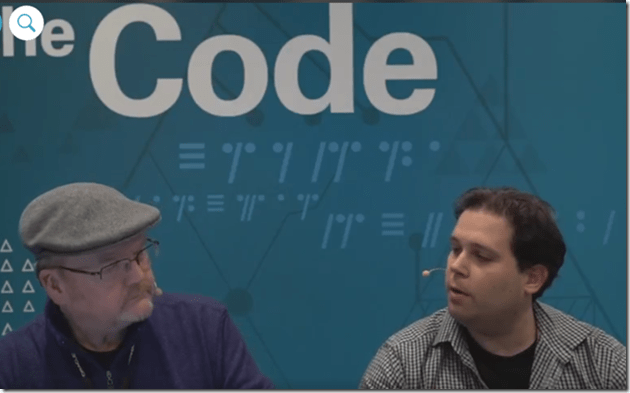
Building a Practical Blockchain by Robert van Mölken

image

Watch the video here.

PaaS Partner Community

For regular information on Oracle PaaS become a member in the SOA & BPM Partner Community for registration please visit www.oracle.com/goto/emea/soa (OPN account required) If you need support with your account please contact the Oracle Partner Business Center.

clip_image003 Blog clip_image005 Twitter clip_image004 LinkedIn image[7][2][2][2] Facebook clip_image002[8][4][2][2][2] Wiki

Technorati Tags: SOA Community,Oracle SOA,Oracle BPM,OPN,Jürgen Kress
Oracle Integration Cloud Tips & Tricks: Work-around for no Script Activity by Jan Kettenis

image

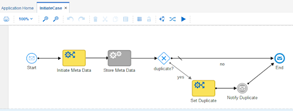
Oracle Process Cloud Services (PCS) nor the Process Builder in Oracle Integration Cloud (OIC) have a Script activity like there is in (on-premise) BPM Suite. In the BPM Suite you can use a Script activity for data mappings as well as Groovy. That OIC does not support Groovy is by design as the idea is to keep it as simple as possible. However missing the data mapping feature of the Script activity can make it even more complex than ever. Fortunately there is some data mapping activity on the road-map of some next version of OIC. Until then you can make use of the work-around below.
There can be several reasons why you may want to have an activity just for mapping data, among them:

  • Readability of the process model, making it clear which data is set where in the process.
  • Data mapping is conditional, making it too complex or impossible to do it in the Input or Output mapping of (for example) a Service activity.
  • A conditional mapping before a Gateway.
  • Iterative development, requiring (temporary) "hard-coding".

The work-around is to use a Rule activity which uses an input and output parameter of the type of the data object you want to map the data to.
A such the Rule activity is deprecated as it is superseded by the Decision activity, but as long as it is there (and a Mapping activity is not) we can make good use of it. Read the complete article here.

PaaS Partner Community

For regular information on Oracle PaaS become a member in the SOA & BPM Partner Community for registration please visit www.oracle.com/goto/emea/soa (OPN account required) If you need support with your account please contact the Oracle Partner Business Center.

clip_image003 Blog clip_image005 Twitter clip_image004 LinkedIn image[7][2][2][2] Facebook clip_image002[8][4][2][2][2] Wiki

Technorati Tags: SOA Community,Oracle SOA,Oracle BPM,OPN,Jürgen Kress

Jarvis Pizzeria: The PCS Mobile app by Richard Olrichs & Marcel van de Glind & Marc Kuijpers

image

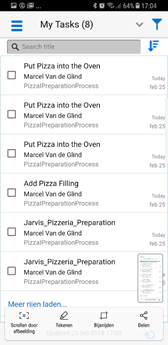
PCS also comes with a mobile app for the end users. It’s available for iOS and Android devices (search for ‘Oracle Process Mobile’ in the PlayStore or the AppStore) . The app provides access to tasks in both connected and disconnected mode.
Compared to the browser features, there are a few differences. These are listed in the table below (this table comes directly from the oracle documentation).

But let’s just have a look at how the app works. We have installed the app on an iPad 2017 and a Samsung Galaxy S8 phone. Note: we already installed the app and configured it.

When starting the app, first thing you need to do is sign in. Nothing unusual so far. After that the ‘MyTasks’ list appears. On the S8 the filters are available underneath a button. On the iPad there is more space available, here are the filters directly available on the left side of the screen. depending on whether you hold the ipad horizontally or vertically, the filter may or may not be opened immediately. Read the complete article here.


PaaS Partner Community

For regular information on Oracle PaaS become a member in the SOA & BPM Partner Community for registration please visit www.oracle.com/goto/emea/soa (OPN account required) If you need support with your account please contact the Oracle Partner Business Center.

clip_image003 Blog clip_image005 Twitter clip_image004 LinkedIn image[7][2][2][2] Facebook clip_image002[8][4][2][2][2] Wiki

Technorati Tags: SOA Community,Oracle SOA,Oracle BPM,OPN,Jürgen Kress

Oracle SOA Suite 12c – Purge Dirk Nachbar

image

Many people struggle with the configuration and execution of the SOA Purge functionality under Oracle SOA Suite 12c.
Oracle provided with SOA Suite 12c a nice web interface for enabling, and scheduling the AutoPurge functionality within the Enterprise Manager Fusion Middleware Control 12c.
But in case you just enable, schedule and define your retention time for the AutoPurge within this web interface nothing will be happen 😦 You have to modify in addition some MBeans in order to enable and execute your AutoPurge Schedules correctly.
Simply login to your Enterprise Manager Fusion Middleware Control 12c (usually http://servername:/em), open the Target Navigation, navigate to "SOA/soa-infra" (in case you got a clustered environment, simply pick one of the available soa-infra, changes will be valid for all cluster members):

Under your soa-infra open the menu "SOA Infrastructure / SOA Administration / Auto Purge". Read the complete article here.


PaaS Partner Community

For regular information on Oracle PaaS become a member in the SOA & BPM Partner Community for registration please visit www.oracle.com/goto/emea/soa (OPN account required) If you need support with your account please contact the Oracle Partner Business Center.

Blog Twitter LinkedIn image[7][2][2][2] Facebook clip_image002[8][4][2][2][2] Wiki

Technorati Tags: SOA Community,Oracle SOA,Oracle BPM,OPN,Jürgen Kress

Automate SOA Installation Using FlexDeploy by Dan Reynebeau

image

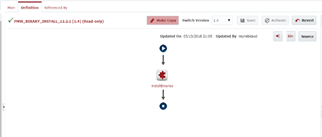
In this blog, I will show how to automate the installation of SOA, BPM, OSB and/or B2B using FlexDeploy. For 12c, there is only one installation jar file that you can download to install WebLogic.
First we need to create  and configure a Workflow within FlexDeploy.  Download the workflow source. Read the complete article here.

PaaS Partner Community

For regular information on Oracle PaaS become a member in the SOA & BPM Partner Community for registration please visit www.oracle.com/goto/emea/soa (OPN account required) If you need support with your account please contact the Oracle Partner Business Center.

Blog Twitter LinkedIn image[7][2][2][2] Facebook clip_image002[8][4][2][2][2] Wiki

Technorati Tags: SOA Community,Oracle SOA,Oracle BPM,OPN,Jürgen Kress

SOA Skills Have Value in a Microservice World by Rolando Carrasco


image

SOA architect Rolando Carrasco explains why SOA is alive and well in the age of microservices, and why your SOA skills are more valuable than ever. Watch the video here.


PaaS Partner Community

For regular information on Oracle PaaS become a member in the SOA & BPM Partner Community for registration please visit www.oracle.com/goto/emea/soa (OPN account required) If you need support with your account please contact the Oracle Partner Business Center.

Blog Twitter LinkedIn image[7][2][2][2] Facebook clip_image002[8][4][2][2][2] Wiki

Technorati Tags: SOA Community,Oracle SOA,Oracle BPM,OPN,Jürgen Kress

Creating REST APIs with Oracle Service Bus by Lykle Thijssen

image

When you think of Oracle Service Bus, you probably think about integration with SOAP and XML messages. However, since the introduction of REST adapters, it’s also possible to offer RESTful APIs with JSON messages to your service consumers. Since RESTful APIs tend to be more light-weight than SOAP services, they have certain advantages in performance, especially for mobile usage, while also simplifying the interaction with your service. In this blog, I will show you how to create such an API based on an XSD for internal XML processing and what things to pay specific attention to. In Github I have provided a sample application created in version 12.2.1.2.0: https://github.com/lthijssen/MyMusic

Step 1: create your project and XSD

First of all, you will need to create a Service Bus Application in JDeveloper and a project within that. From there, create a Schemas folder and within that folder a MyMusic.xsd XML Schema with the following content: Read the complete article here.


PaaS Partner Community

For regular information on Oracle PaaS become a member in the SOA & BPM Partner Community for registration please visit www.oracle.com/goto/emea/soa (OPN account required) If you need support with your account please contact the Oracle Partner Business Center.

Blog Twitter LinkedIn image[7][2][2][2] Facebook clip_image002[8][4][2][2][2] Wiki

Technorati Tags: SOA Community,Oracle SOA,Oracle BPM,OPN,Jürgen Kress

Extending analytics for Integration cloud using Elastic stack by Mani Krishnan

image

Introduction

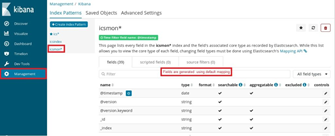
Oracle Integration Cloud (OIC) offers industry-leading SaaS integration capabilities.  It provides extensive monitoring, tracking and reporting features out-of-the-box. Occasionally, enterprises do have reporting and analysis needs those are better met by additional reporting and analytics products. This article discusses couple of such use cases and describes how to implement one of them using Elastic stack. Information in this article is applicable to release 18.1.3 of integration cloud.

Main article

Let’s consider these scenarios:

  • Customer’s integrations are deployed to multiple instances of OIC. Customer wants a consolidated view of all integrations on single dashboard.
  • Customer needs to customize several aspects of reporting such as type of charts and data retention.
  • Customer wants end-to-end view of transactions across multiple applications, including those deployed to OIC.

Use cases represented by these scenarios can be met by externalizing integration metrics from OIC into another platform specializing on analytics.  Let’s look at some recommended ways to extract metrics from OIC and importing them into ELK (Elastic-LogStash-Kibana). Elastic stack is a widely-used opensource platform for analytics and dashboards. Jump to one of the sections by click the link.

Why Elastic stack?

Elastic is among products that allow infinite scaling and support map-reduce for efficient distributed queries. Note that other products such as Oracle big-data analytics cloud service or Oracle log analytics can also meet aforementioned requirements.  Elastic is used in this blog for its simplicity for demonstration purposes.

For sake of simplicity, the post does not address deployment of ELK stack. Refer to Elastic web site for instructions. A simple installation could run on a laptop. More complex, distributed deployments will require careful planning of compute, storage resources and indexes. Read the complete article here.

PaaS Partner Community

For regular information on Oracle PaaS become a member in the SOA & BPM Partner Community for registration please visit www.oracle.com/goto/emea/soa (OPN account required) If you need support with your account please contact the Oracle Partner Business Center.

Blog Twitter LinkedIn image[7][2][2][2] Facebook clip_image002[8][4][2][2][2] Wiki

Technorati Tags: SOA Community,Oracle SOA,Oracle BPM,OPN,Jürgen Kress

AVIO Releases an ICS Maven Plugin by Kevin King

image

Released today, the AVIO ICS Maven plugin has been released to Maven Central.

Oracle ICS (Integration Cloud Service) is a cloud platform with a web-based interface used to quickly build integrations between cloud and on-premise applications.

The ICS Maven plugin helps make the software development lifecycle simpler by scripting exports, imports, activation and more, allowing developers to easily store their code in source control, and automate the promotion to other cloud environments. Read the complete article here.

PaaS Partner Community

For regular information on Oracle PaaS become a member in the SOA & BPM Partner Community for registration please visit www.oracle.com/goto/emea/soa (OPN account required) If you need support with your account please contact the Oracle Partner Business Center.

Blog Twitter LinkedIn image[7][2][2][2] Facebook clip_image002[8][4][2][2][2] Wiki

Technorati Tags: SOA Community,Oracle SOA,Oracle BPM,OPN,Jürgen Kress

Oracle Integration Cloud: Customer Managed & Patching by Jan Kettenis

image

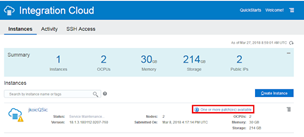
Currently the Oracle Integration Cloud (OIC) only comes as "customer managed". Among others this means that you as a customer have access to management consoles. It also means that you determine when to apply patches, as Oracle does not do that for you. The following describes how easy that is.
Oracle Cloud solutions can come in two flavors: Oracle Managed and Customer Managed. The first means that maintenance, including patching is done by Oracle. You don’t have to ask for nor to initiate it as it all happens "automatically", typically during non-business hours (like Friday evening). It also means that you don’t have any control over it. Now that probably is exactly what you want. However, in case of OIC that currently only comes as Customer Managed. This means that you have access to the Weblogic Service Console and the Fusion Middleware Console (although not with all the features that you for example would have with the on-premise version of the BPM Suite). I expect these consoles not to be available in the Oracle Managed flavor to come soon. Read the complete article here.


PaaS Partner Community

For regular information on Oracle PaaS become a member in the SOA & BPM Partner Community for registration please visit www.oracle.com/goto/emea/soa (OPN account required) If you need support with your account please contact the Oracle Partner Business Center.

Blog Twitter LinkedIn image[7][2][2][2] Facebook clip_image002[8][4][2][2][2] Wiki

Technorati Tags: SOA Community,Oracle SOA,Oracle BPM,OPN,Jürgen Kress