Filtering/grouping in BAM by ‘specific’ metrics (explored solutions) by Marcel van de Glind

image

Recently I did a POC with BAM 12c at the customer. In a series of post’s I will describe my findings/experiences.
In a previous post I described the initial situation (Impact of ACM Implementation on BAM). That post ended up with the following problem description.

Problem description

We have a ACM case consisting of about thirty Case Activities. The Case and the individual Case Activities are housed in a private composite (1 + ~30 composites).

Challenge: How can we group/filter in BAM by ‘specific’ metrics that are present in each composite. For example ‘Department’.

In this post I will describe solutions we have recognised/examined to make Management Information (MI) available for this ACM implementation.

Starting situation

There are per composite two data objects in BAM:

  1. Activity data for the specific BPM process
  2. Process data for the specific BPM process

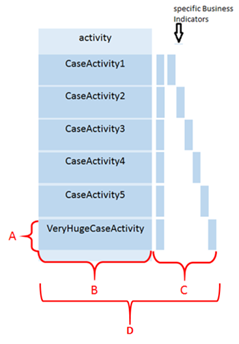
Each of these data objects is associated to a personal database view. Actually, under the hood all these views get their data from the same database tables. More details about this will follow in a separate post (<link to database post as soon as the post is their>). See figure below. Same goes for the ‘Process’ variant.

The views contain a subset of the rows and columns in the table.

  1. the rows of a BPM process
  2. Number of default columns that are the same for each process (generic part of e.g. BEAM_VIEW_116, BEAM_VIEW_11)
  3. Number of specific columns for the relevant BPM process (indicators) (specific part of e.g. BEAM_VIEW_116)
  4. Table where data is stored (e.g. BEAM_FLEX_11) Read the complete article here.

SOA & BPM Partner Community

For regular information on Oracle SOA Suite become a member in the SOA & BPM Partner Community for registration please visit www.oracle.com/goto/emea/soa (OPN account required) If you need support with your account please contact the Oracle Partner Business Center.

Blog Twitter LinkedIn image[7][2][2][2] Facebook clip_image002[8][4][2][2][2] Wiki

Technorati Tags: SOA Community,Oracle SOA,Oracle BPM,OPN,Jürgen Kress
Impact of ACM Implementation on BAM by Marcel van de Glind

image

Recently I did a POC with BAM 12c at the customer. In a series of post’s I will describe my findings/experiences.
This is the first post in the series.

As a starting point we have the following situation:

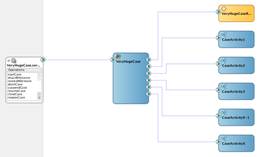
We have an ACM composite consisting of a case with associated BusinessRule component and different BPM processes implemented as Case Activities. See figure below.

This is one single composite application. This means that there are two objects for BAM (‘VeryHugeCase Activity’ and ‘VeryHugeCase Process’) generated in the ‘Process Analytics’ project. Read the complete article here.

SOA & BPM Partner Community

For regular information on Oracle SOA Suite become a member in the SOA & BPM Partner Community for registration please visit www.oracle.com/goto/emea/soa (OPN account required) If you need support with your account please contact the Oracle Partner Business Center.

Blog Twitter LinkedIn image[7][2][2][2] Facebook clip_image002[8][4][2][2][2] Wiki

Technorati Tags: SOA Community,Oracle SOA,Oracle BPM,OPN,Jürgen Kress

Oracle OpenWorld 2017 PaaS announcements

IMG_2775Oracle OpenWorld took place last week in San Francisco. Get the latest conference highlights:

SOA & BPM Partner Community

For regular information on Oracle SOA Suite become a member in the SOA & BPM Partner Community for registration please visit www.oracle.com/goto/emea/soa (OPN account required) If you need support with your account please contact the Oracle Partner Business Center.

Blog Twitter LinkedIn image[7][2][2][2] Facebook clip_image002[8][4][2][2][2] Wiki

Technorati Tags: SOA Community,Oracle SOA,Oracle BPM,OPN,Jürgen Kress
ADF Autogeneration from Oracle BPM Human Tasks by Dan Atwood

imageSomething we typically have to learn on our own is how to (1) auto-generate an ADF form and project from an Oracle BPM project and (2) how to reuse the ADF project when subsequently generating more ADF forms.

This has changed slightly in 12.2.1, and this provides step-by-step instructions on how to do this.  This is an excerpt from Lesson 3 of AVIO’s new Oracle BPM Developer Training for 12.2.1.

Create an ADF Project and Form from a Human Task

Because human tasks in Oracle BPM projects are associated with the interactive activities, ADF forms can be automatically generated from the information flowing into and out of the human  tasks.

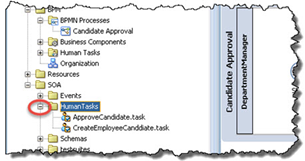
1. Inside the Applications tab, expand the SOA folder -> expand the Human Tasks folder. 
2. Double click ApproveCandidate.task.

3. As shown below, click the Form dropdown -> Launch Task Form Wizard. Read the complete article here.

SOA & BPM Partner Community

For regular information on Oracle SOA Suite become a member in the SOA & BPM Partner Community for registration please visit www.oracle.com/goto/emea/soa (OPN account required) If you need support with your account please contact the Oracle Partner Business Center.

Blog Twitter LinkedIn image[7][2][2][2] Facebook clip_image002[8][4][2][2][2] Wiki

Technorati Tags: SOA Community,Oracle SOA,Oracle BPM,OPN,Jürgen Kress
Actionable Email Templates in Oracle Process Cloud Service by Antonis Antoniou

image

Oracle Process Cloud Service provides you with a very convenient and easy way to configure notifications for your human tasks though the use of email notification templates.
These notification templates are defined using HTML and can include a variety of information such as payload data, task data, you can include links to perform an action on a task directly within the email and task comments. Furthermore a notification template can be re-used across your application processes.
So let’s see in practice how you can create and use an email notification template.
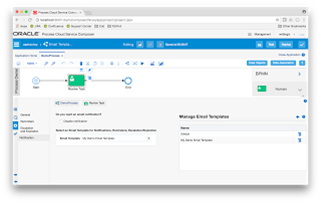
Create a new application in Oracle Process Cloud Service, give it a name and file it under a space (I’ve named it "Email Templates Demo Application" under a custom space called "aantoniou"). Read the complete article here.

SOA & BPM Partner Community

For regular information on Oracle SOA Suite become a member in the SOA & BPM Partner Community for registration please visit www.oracle.com/goto/emea/soa (OPN account required) If you need support with your account please contact the Oracle Partner Business Center.

Blog Twitter LinkedIn image[7][2][2][2] Facebook clip_image002[8][4][2][2][2] Wiki

Technorati Tags: SOA Community,Oracle SOA,Oracle BPM,OPN,Jürgen Kress
PCS Web Form Tips and Tricks – Part 1 by Derek Kam

image


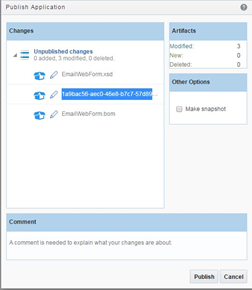
In this blog series, I will be discussing some useful tips and tricks that will be helpful to you when you are designing your form using the new PCS web form controls and events.

In one of my colleague’s blog, he has highlighted some of the features available in PCS web form.  In PCS official documentation, it described how to configure the controls.  In this blog, I will highlight some tips and tricks when you are designing the form.  There will be 3 parts in this blog series:

General Tips and Tricks

  • Before you start designing your form, I would strongly recommend you work with business users to define the requirement like form styles for different devices, form rules/events, data definition/business objects, and identify all integration requirement in the web form.
  • Document your web form design and events.
  • PCS Web Form allows you to drag existing business object to create a web form. However, it will create a standard layout that might not meet your requirement and you might end up spending more time rearranging the controls that PCS Form created for you.   In this scenario, you have an option to create our own form data definition using the business object and bind the controls to the data definition manually.
  • In PCS, the main form can contain 1 or more sub form. However, you will not be able to access the data definition in the sub form using event in the main form. If you have a requirement that you need to access the sub form data definition, you will need to detach the sub form in the main form. Read the complete article here.

SOA & BPM Partner Community

For regular information on Oracle SOA Suite become a member in the SOA & BPM Partner Community for registration please visit www.oracle.com/goto/emea/soa (OPN account required) If you need support with your account please contact the Oracle Partner Business Center.

Blog Twitter LinkedIn image[7][2][2][2] Facebook clip_image002[8][4][2][2][2] Wiki

Technorati Tags: SOA Community,Oracle SOA,Oracle BPM,OPN,Jürgen Kress
Getting Started with Oracle Process Cloud Service by Andreas Chatziantoniou

image

Coming from a Business Process Management (BPM) environment, the Oracle Process Cloud Service (PCS) certainly looks and feels different, and has a number of merits that might go unnoticed. This article shows how to discover the potential of PCS and put it to good use in your projects.

The World We Live In

For a number of years, budgets   having been moving away from IT departments and into the business organization.   This has led to a situation in which we encounter "citizen developers," typical business users who (at least in theory) write their own application.

Because many services now reside in the cloud, these citizen developers can start right away and do not need to wait weeks for the IT department to provision the systems. These cloud services are immediately accessible and provide an easy-to-use development environment for the quick release of small business applications.

So let’s have a look how a citizen developer might use PCS.

The Interface

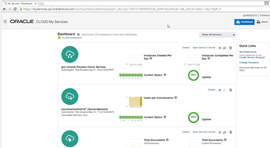
As with all Oracle Cloud Services, you will see a somewhat technical dashboard when first logging in to your domain. This is definitely aimed for developers and cloud administrators.

For somebody who has dealt with the typical Oracle Enterprise Manager Cloud Control, this certainly looks very dressed down. Remember that we are not — I repeat: NOT — managing the environment, which is in the cloud. What you see here is all you need to see — uptime and the number of instances/conversations/documents, etc.– that make up your cloud service. Read the complete article here.

SOA & BPM Partner Community

For regular information on Oracle SOA Suite become a member in the SOA & BPM Partner Community for registration please visit www.oracle.com/goto/emea/soa (OPN account required) If you need support with your account please contact the Oracle Partner Business Center.

Blog Twitter LinkedIn image[7][2][2][2] Facebook clip_image002[8][4][2][2][2] Wiki

Technorati Tags: SOA Community,Oracle SOA,Oracle BPM,OPN,Jürgen Kress

Process Cloud Service: New Features by Antonis Antoniou

image 

Introduction

Oracle Process Cloud Service (PCS) started a year ago as a lightweight process automation cloud tool that very quickly picked up momentum, adoption and technical capabilities. With Oracle adopting a cloud-first release approach, PCS quickly closed the gap with Oracle BPM Suite, with the majority of the on-premise features being ported to the cloud counterpart.

Released in September 2016, Oracle PCS  v.16.3.5 introduced some new features and enhancements to existing capabilities for all personas (Developer, Administrator, End User).

This article explores these new features and enhancements in detail and assumes prior basic knowledge of Oracle PCS.

New Forms Editor

The latest release introduced an entirely new web forms functionality called Web Forms, an alternative to its existing Frevvo web forms (renamed "Basic Forms"). The new Web Forms functionality is more business-user-friendly, promoting important development principles like multiple views, re-use, branding, list of values, and fetching data using REST connections.

The new Web Forms groups its functionality into three areas; the left area includes the Properties and Data sections, the right area includes the palettes (basic, advanced, forms and business types), and the main area is the drawing canvas.

Using drag-and-drop, you can design your form using any components from all four palettes.

  • Basic Palette: Basic components like the input text, button, checklist, radio button, date, etc.,
  • Advanced Palette: Includes components like image, video, section, tab, table, etc.
  • Forms Palette: Re-use previously created forms
  • Business Type Palette: Create a user interface using a "data-first" approach (Oracle PCS will automatically create a form using the data definitions of the business type)

Enabling Auto Binding will automatically create linked data attributes for each component you drag on your canvas under the Data section. You can also follow a Manual Binding approach, in which you manually create attributes (either simple or based on a business object) and then bind controls to them. Read the complete article here.

SOA & BPM Partner Community

For regular information on Oracle SOA Suite become a member in the SOA & BPM Partner Community for registration please visit www.oracle.com/goto/emea/soa (OPN account required) If you need support with your account please contact the Oracle Partner Business Center.

Blog Twitter LinkedIn image[7][2][2][2] Facebook clip_image002[8][4][2][2][2] Wiki

Technorati Tags: SOA Community,Oracle SOA,Oracle BPM,OPN,Jürgen Kress
Service Bus 12c QuickTip: Fix HTTP 403 on calling SOAP/REST Proxy Services by Sven Bernhardt

image

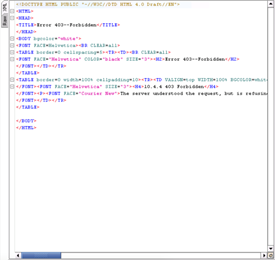
A few days ago, I faced a strange behaviour when I tried to test SOAP and REST services deployed to a fresh SOA Suite 12c (12.2.1.1) installation. Using SOAP UI for testing the services always gave me an response in a HTML format, which says ” Error 403 Forbidden”, like it is displayed in the screenshot below:

Going through all log files of the corresponding Managed Server, where Servicebus was installed to, I didn’t find any hint that even the request was delivered to the servers. The requests simply had no footprint in the access.log or the server’s diagnostics.log – which seemed to be very strange to me. Assuming that the behaviour might have been something to do with the security policies applied to the services, I disabled all security policies as a next step – without any success.

After testing the services successfully in another environment, it was quite clear to me that something was wrong with the domain setup and after some investigations, I found the root cause for the “Error 403 Forbidden” message: Using the deployments view in Weblogic Console, I noticed that “API Manager Starter Application” was targeted to the Servicebus Cluster. Like described in MOS Note 2087277.1, I un-targeted this application from the Cluster, restarted the corresponding Managed Servers and afterwards, I was able to test the services without receiving the mentioned exception. Like the MOS note described this behaviour might happen, if the wrong Template (Oracle API Manager Template) is chosen for Servicebus, when setting up a domain. Read the complete article here.

SOA & BPM Partner Community

For regular information on Oracle SOA Suite become a member in the SOA & BPM Partner Community for registration please visit www.oracle.com/goto/emea/soa (OPN account required) If you need support with your account please contact the Oracle Partner Business Center.

Blog Twitter LinkedIn image[7][2][2][2] Facebook clip_image002[8][4][2][2][2] Wiki

Technorati Tags: SOA Community,Oracle SOA,Oracle BPM,OPN,Jürgen Kress

Building OSB 12c releases on resource level using Maven by Mike Heeren

 image

A while ago I published a Whitebook (in Dutch) about building OSB 12c releases on resource level using Maven. In the Whitebook, you could read which functionality we were missing in the regular Oracle Service Bus plugin for Maven and how we were able to create this functionality using a custom Maven plugin.

I have added the code of this custom Maven plugin to the following public repository: https://bitbucket.org/whitehorsesbv/servicebusplugin

Used settings

The custom Maven plugin has been developed and tested on multiple environments, so we can confirm that the Maven plugin is working if you are using the following version(s):

Application

Version

Java

1.7.0_79, 1.8.0_101

Maven

3.3.9

Oracle Service Bus

12.1.3, 12.2.1

Installing the custom Maven plugin

First start to install the custom Maven plugin to your local Maven repository. To do this, you can download both the JAR and the POM file from the download page of the repository. After you have downloaded both files, you can execute the following commands to install it to you local Maven repository: Please read the complete article here.

SOA & BPM Partner Community

For regular information on Oracle SOA Suite become a member in the SOA & BPM Partner Community for registration please visit www.oracle.com/goto/emea/soa (OPN account required) If you need support with your account please contact the Oracle Partner Business Center.

Blog Twitter LinkedIn image[7][2][2][2] Facebook clip_image002[8][4][2][2][2] Wiki

Technorati Tags: SOA Community,Oracle SOA,Oracle BPM,OPN,Jürgen Kress