SLA and Pipeline Alerts in Oracle Service Bus – free online training

clip_image002

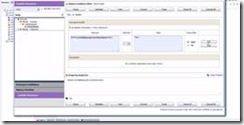
This video shows you how to configure Service Level Agreement and Pipeline alerts in Oracle Service Bus.

Attend the free online training here.

SOA & BPM Partner Community

For regular information on Oracle SOA Suite become a member in the SOA & BPM Partner Community for registration please visit www.oracle.com/goto/emea/soa (OPN account required) If you need support with your account please contact the Oracle Partner Business Center.

Blog Twitter LinkedIn image[7][2][2][2] Facebook clip_image002[8][4][2][2][2] Wiki

Technorati Tags: SOA Community,Oracle SOA,Oracle BPM,OPN,Jürgen Kress

Caching Business Service Results and Enabling Load Balancing in Oracle Service Bus- free online training


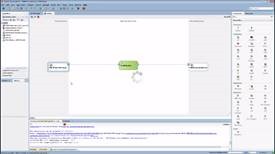
clip_image002This video shows you how to improve performance by enabling result caching and configuring load balancing in Oracle Service Bus.

Attend the free online training here.

SOA & BPM Partner Community

For regular information on Oracle SOA Suite become a member in the SOA & BPM Partner Community for registration please visit www.oracle.com/goto/emea/soa (OPN account required) If you need support with your account please contact the Oracle Partner Business Center.

Blog Twitter LinkedIn image[7][2][2][2] Facebook clip_image002[8][4][2][2][2] Wiki

Technorati Tags: SOA Community,Oracle SOA,Oracle BPM,OPN,Jürgen Kress

Get an Oracle E-Mail notification via User Messaging Service Running before your coffee gets cold by Benjamin Huskic


clip_image002I often get asked to help developers with setting up UMS, but in fact mostly focusing on the SMTP server.

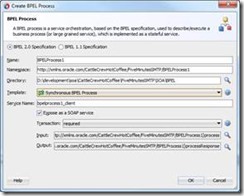
In the next steps I will show how you can setup a HelloWorld notification Service with reviewing the results in less than five minutes.

Prerequisites:

Installed SOA or BPM Quickstart. See Danilos post for details : https://thecattlecrew.wordpress.com/2014/06/28/oracle-bpm-12c-quick-start-installation-uncensored/

Get FakeSMTP.jar on your development machine: https://nilhcem.github.io/FakeSMTP/

Step 1 – Start WLS

Start the IntegratedWebLogicServer

Step 2 – Start the Fake SMTP

Enter in the command line:

java -jar fakeSMTP-2.0.jar

After the Application has started up click the “Start Server” button. Read the complete article here.

SOA & BPM Partner Community

For regular information on Oracle SOA Suite become a member in the SOA & BPM Partner Community for registration please visit www.oracle.com/goto/emea/soa (OPN account required) If you need support with your account please contact the Oracle Partner Business Center.

Blog Twitter LinkedIn image[7][2][2][2] Facebook clip_image002[8][4][2][2][2] Wiki

Technorati Tags: SOA Community,Oracle SOA,Oracle BPM,OPN,Jürgen Kress

Resolve JCA connection error in Oracle EBS to SAP integration with OSB 11g by Sven Bernhardt


clip_image002Doing a Oracle EBS to SAP integration with Oracle Service Bus 11g (OSB) I noticed a strange exception at runtime. During the establishment of a connection to the SAP system via the iWay SAP adapter the following error occurs in the adapter logs:

servicebus:/WSDL/ebs2sap-data-integration/Sap/v2.0/jca/BAPI_ORACLE_SYNCHRO_RESPONSE_invoke [ BAPI_ORACLE_SYNCHRO_RESPONSEPortType::BAPI_ORACLE_SYNCHRO_RESPONSE(input_BAPI_ORACLE_SYNCHRO_RESPONSE,output_BAPI_ORACLE_SYNCHRO_RESPONSE) ] – : The JCA Binding Component was unable to establish an outbound JCA CCI connection due to the following issue: java.lang.IllegalArgumentException: Adapter ‘MySAP’ not available. Names are case sensitive.
Please make sure that the JCA connection factory and any dependent connection factories have been configured with a sufficient limit for max connections. Please also make sure that the physical connection to the backend EIS is available and the backend itself is accepting connections.

At first glance I suspect a typo or a general error within the connection configuration of the adapter to be responsible for this error. After double checking the configuration I wasn’t able to detect a configuration issue, everything seems to be fine. I restarted the servers, the complete domain – nothing changed, the exception remains.

So I decided to double check the general adapter setup. Walking through all setup steps, I finally discovered the root of all evil: I simply forgot to copy the SAP JCO libraries to the $MW_HOME/user_projects/osb_domain/lib folder. After placing the libraries at the corresponding place and restarting the domain, everything worked as intended. Now the data could be transmitted to SAP without any problems. Read the complete article here.

SOA & BPM Partner Community

For regular information on Oracle SOA Suite become a member in the SOA & BPM Partner Community for registration please visit www.oracle.com/goto/emea/soa (OPN account required) If you need support with your account please contact the Oracle Partner Business Center.

Blog Twitter LinkedIn image[7][2][2][2] Facebook clip_image002[8][4][2][2][2] Wiki

How to use dynamic validate in Oracle Service Bus 12c by Jan van Zoggel


clip_image002One of the new features introduced in Oracle Service Bus 12c is the ability for dynamic validation. A feature which can be used to validate a message against a WSDL or XSD schema file which is both explained here by Oracle. The example on the Oracle website shows this XML code to validate against a XSD:

1

2

3

4

5

6

<validate xmlns="http://www.bea.com/wli/sb/context">

<schema>default/MySchema</schema>

<schemaElement>

<localname>MyElementType</localname>

</schemaElement>

</validate>

However I tried “playing” with the new feature but couldn’t get it to work. The error I got was:

1

2

3

4

5

6

7

8

9

10

11

12

13

14

15

16

17

<soap:Fault>

<soap:Code>

<soap:Value>soap:Receiver</soap:Value>

</soap:Code>

<soap:Reason>

<soap:Text xml:lang="nl">OSB-382524: Failed to perform validation</soap:Text>

</soap:Reason>

<soap:Detail>

<con:fault xmlns:con="http://www.bea.com/wli/sb/context">

<con:errorCode>OSB-382524</con:errorCode>

<con:reason>Failed to perform validation</con:reason>

<con:location>

..

</con:location>

</con:fault>

</soap:Detail>

</soap:Fault>

After contacting Oracle Support I received the following info:

  • BUG 20367846: Internal Documentation  – Validate action to dynamically select a schema – documentation is not clear
  • BUG 20380158: Validate action – Dynamic validation throws NPE

A patch for BUG 20380158 was then released for Oracle Service Bus 12.1.3, which then could be downloaded from Oracle Support: Read the complete article here.

SOA & BPM Partner Community

For regular information on Oracle SOA Suite become a member in the SOA & BPM Partner Community for registration please visit www.oracle.com/goto/emea/soa (OPN account required) If you need support with your account please contact the Oracle Partner Business Center.

Blog Twitter LinkedIn image[7][2][2][2] Facebook clip_image002[8][4][2][2][2] Wiki

Technorati Tags: SOA Community,Oracle SOA,Oracle BPM,OPN,Jürgen Kress

Virtual Technology Summit -Now available OnDemand free online training


Four times a year the Oracle Technology Network will be producing a Virtual Technology Summit. Hear from Oracle ACEs, Java Champions, and Oracle product experts as they share their insight and experience (through technical demo’s/presentations and hands on labs) in meeting today’s IT challenges in the upcoming Oracle Technology Network Virtual Technology Summit. These interactive, online events offers four technical tracks, each with a unique focus on specific tools, technologies, and tips – Java Track and Middleware Track.

Attend the free online training here

clip_image001

SOA & BPM Partner Community

For regular information on Oracle SOA Suite become a member in the SOA & BPM Partner Community for registration please visit www.oracle.com/goto/emea/soa (OPN account required) If you need support with your account please contact the Oracle Partner Business Center.

Blog Twitter LinkedIn image[7][2][2][2] Facebook clip_image002[8][4][2][2][2] Wiki

SOA Suite 12c & BPM Suite 12c Specialization available


We are excited to announce eProseed ae the first Oracle partner Specialized in SOA Suite 12c. EMEA is leading the global OPN Specialization program with more than 50% of the Middleware Specialized partners based in our region.

eProseed is an excellent example and super successful partner in adopting the complete red stack from Engineered Systems, database and the complete middleware portfolio – thanks for achieving 22 different Specializations. Jointly we continue our journey towards the cloud – with the support of our middleware partner communities. Platform as a Service (PaaS) customers can choose the same solutions on-premises in a private cloud or as a public cloud. You as an Oracle Partner can leverage the same skills from on-premises products in the Cloud. Join us and discover new consulting service opportunities with Oracle PaaS.

You as a Specialized partner are key for our customers to ensure successful implementations. Therefore we do recommend our customers to engage with these preferred partners and we advice sales teams to collaborate with Specialized partners in the sales process. Make sure that your service offerings are posted in our Solutions Catalog to ensure that our joint customers and the Oracle sales team can get engaged with you!

Top Resources to become SOA Suite 12c and BPM Suite 12c Specialized (membership required)

Resources Sales Pre-Sales Implementation
Online-training SOA Suite 12c Sales Specialist – free
BPM Suite 12c Sales Specialist – free
SOA Suite 12c PreSales Specialist – free
BPM Suite 12c  PreSales Specialist – free
SOA Suite 11c free on-demand Bootcamp – free
SOA Suite 12c & BPM Suite 12c – free training material
Certification SOA Suite 12c Sales Specialist Assessment – free
BPM Suite 12c Sales Specialist Assessment – free
SOA Suite 12c PreSales Specialist Assessment – free
BPM Suite 12c PreSales Specialist Assessment – free
SOA Suite 12c Implementation Specialist – $245
BPM Suite 12c Implementation Specialist – $245
Tips Sales kits for SOA Suite 12c and BPM Suite 12c (including ppt & cheat sheets) Demo Systems & GSE tips hosted at Oracle – free SOA Blackbelt cheat sheets

SOA & BPM Partner Community

For regular information on Oracle SOA Suite become a member in the SOA & BPM Partner Community for registration please visit www.oracle.com/goto/emea/soa (OPN account required) If you need support with your account please contact the Oracle Partner Business Center.

Blog Twitter LinkedIn image[7][2][2][2] Facebook clip_image002[8][4][2][2][2] Wiki

Want to try Oracle PaaS Services including Integration Cloud Service and Process Cloud Service? Get your GSE credentials today!


As Oracle’s primary demos organization, GSE leverages economies of scale to deliver great demos for sales use

· Provides demos Oracle Partners and Oracle internal to sales consultants

· Software builds for demo contexts, demo contents, scripts, user provisioning, environment cloning and refreshing

· Covers all Oracle software – Cloud, OnPrem Apps, Technology

· Hardware ops span 4 data centers, ~3000 demo environments

· Supports ~75,000 demos per year

· 24×5 + emergency weekend support

Get your GSE credential:

· Get your GSE credentials here (both cloud and on-premises)

· GSE tips and help at PaaS Demo Accounts

· Community webcast on-demand with GSE details

· You can also watch our short video here

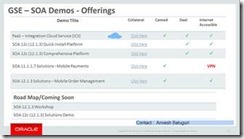
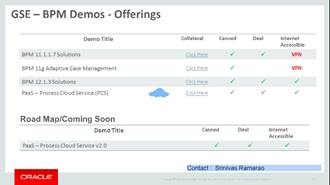
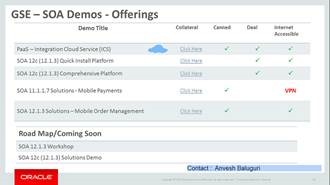
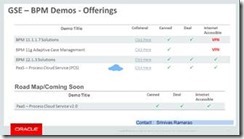
GSE SOA & BPM offerings:
clip_image002clip_image004

As you use GSE the first time some tips:

For your information we have valuable video for our partner users, go to demo store on our website http://www.demo.oracle.com and type "Navigating the Partner Demos Portal" as keyword search and it will take you through all below topics.
1. Information about using partner website demo.oracle.com
2. How to use the GSE Demo store
3. How to create a demo registration
4. How to get and use the f5 SSLVPN client which replaces Citrix
5. How to access internet and non-internet facing demos
6. How to create tickets and support resources for Oracle Partners
7. How to use Fusion archive and restore tools, and
8. How to add and remove Partner employees from your assigned GSE demo environment.

SOA & BPM Partner Community

For regular information on Oracle SOA Suite become a member in the SOA & BPM Partner Community for registration please visit www.oracle.com/goto/emea/soa (OPN account required) If you need support with your account please contact the Oracle Partner Business Center.

Blog Twitter LinkedIn image[7][2][2][2] Facebook clip_image002[8][4][2][2][2] Wiki

Integration Cloud Service free online training & free presales certification

clip_image002

Integration Cloud Service Guided Learning path was created to provide the presales consultant with a detailed understanding of key product features to prepare him/her to do product demos and be involved in proof-of-concept projects.

It starts with the ICS product overview and moves into technical details with short modules on:

· Integrating Applications with Oracle Integration Cloud Service (4 mins)

· Connecting to Applications with Oracle Integration Cloud Service (3 mins)

· Creating Connections in Oracle Integration Cloud Service (2 mins)

· Creating Integrations in Oracle Integration Cloud Service (3 mins)

· Mapping Data in Oracle Integration Cloud Service (2 mins)

· Mapping Data Between Applications with Oracle Integration Cloud Service (3 mins)

· Monitoring Integrations in Oracle Integration Cloud Service (2 mins)

· Monitoring Integrations (2 mins)

· Packaging Integrations with Oracle Integration Cloud Service (2 mins)

· Using Packages in Integration Cloud Service (4 mins)

· Using Lookups in Oracle Integration Cloud Service (2 mins)

· Integrating Oracle RightNow and Oracle Sales Cloud Using Oracle Integration Cloud Service (6 mins)

After going through these on-line modules, you can test what you learnt by taking the assessment test at the end. Attend the online training here.

SOA & BPM Partner Community

For regular information on Oracle SOA Suite become a member in the SOA & BPM Partner Community for registration please visit www.oracle.com/goto/emea/soa (OPN account required) If you need support with your account please contact the Oracle Partner Business Center.

Blog Twitter LinkedIn image[7][2][2][2] Facebook clip_image002[8][4][2][2][2] Wiki

PaaS free trial accounts ICS and PCS

clip_image002


As part of our communities we do offer free PaaS accounts (only for partners in Europe, Middle East and Africa. In case you are not part of EMEA please contact your local partner manager):

· Integration Cloud Service & Process Cloud Service PaaS Demo Accounts  (Community membership required)

· Java Cloud Service & Mobile Cloud Service PaaS Demo Accounts (Community membership required)

Watch the GSE Overview Video! Get an overview of what GSE is and how you can use GSE to help you sell. You can also get long running dedicated PaaS instances, therefore please send us details about your use cases. For instant access please request a sandbox demo

SOA & BPM Partner Community

For regular information on Oracle SOA Suite become a member in the SOA & BPM Partner Community for registration please visit www.oracle.com/goto/emea/soa (OPN account required) If you need support with your account please contact the Oracle Partner Business Center.

Blog Twitter LinkedIn image[7][2][2][2] Facebook clip_image002[8][4][2][2][2] Wiki