Patching JDeveloper 12.1.3 for OSB and SOA by Jon Petter Hjulstad Keeping your JDeveloper SOA/OSB Quickstart environment up to date

clip_image002


Oracle released new patches some weeks ago, and to keep your JDeveloper updated for SOA Suite and Oracle Service Bus there are three products you should patch:

  • Oracle SOA Suite
  • Oracle Service Bus
  • Weblogic

When you search My Oracle Support (MOS) for patches – you can see which ones are the recommended ones. There are also notes in MOS which are updated regularly:

  • OSB 11g and 12c: Bundle Patch Reference (Doc ID 1499170.1)
  • SOA 11g and 12c: Bundle Patch Reference (Doc ID 1485949.1)
  • Master Note on WebLogic Server Patch Set Updates (PSUs) (Doc ID 1470197.1)

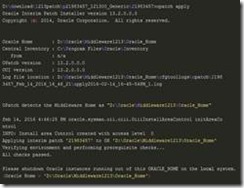
In the environment I used for this example. Patch 19707784: SOA Bundle Patch 12.1.3.0.1 was applied before. This will be detected by OPatch, and that patch will be rolled back.

The patching is simplified in the 12c-version, because now there is only one OPatch-folder to care about (in version 11 there were one per product). You can read more about it here: Oracle Documentation link

For each patch there is a README.txt, whick you should read. It contains Pre-Installation Instructions, Install and Post-Instructions. For the SOA-patch, you should look through the steps for the Post-steps

I use Windows environment in this example, so I set the environment variables first (run as Administrator): Read the complete article here.

SOA & BPM Partner Community

For regular information on Oracle SOA Suite become a member in the SOA & BPM Partner Community for registration please visit www.oracle.com/goto/emea/soa (OPN account required) If you need support with your account please contact the Oracle Partner Business Center.

Blog Twitter LinkedIn image[7][2][2][2] Facebook clip_image002[8][4][2][2][2] Wiki

Connect and consume data assets with OSB12c and WebCenter Sites 11g using the REST api by Fabio Persico

clip_image002


In one of the project I’ve worked on, I configured an automatic creation/update and delete of assets in WebCenter Sites 11g using its REST api via OSB.
The configuration is a bit tricky so I want to share the solution.
I am not giving the details step by step of how this can be implemented as I am sharing the code, btw I’ll explain the main important concept.

What it is needed for this tip:
  • JDeveloper 12.1.3 (SOA Quick start version)
  • An account with read/write right permission in a WebCenter Sites server
  • The AssetType created in Sites
OSB Services Implemented

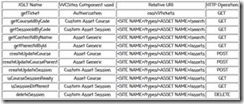
The Pipeline in the project contains the below services: Read the complete article here.

SOA & BPM Partner Community

For regular information on Oracle SOA Suite become a member in the SOA & BPM Partner Community for registration please visit www.oracle.com/goto/emea/soa (OPN account required) If you need support with your account please contact the Oracle Partner Business Center.

Blog Twitter LinkedIn image[7][2][2][2] Facebook clip_image002[8][4][2][2][2] Wiki

Service Bus 12.2.1 JVM Settings: PermSize, Heap, Non-Heap, and ResourceManagement by Frank Munz

clip_image002

Oracle Service Bus comes with JVM settings that cause questions to some customers. This posting provides answers to the most common questions I discussed in workshops or received so far.

Warning about PermSize Option

Question 1: “I see the following warning:

Java HotSpot(TM) 64-Bit Server VM warning: ignoring option MaxPermSize=1024m; support was removed in 8

Does that mean that Oracle generates the startup scripts with wrong JVM flags?”

Answer: With Oracle JVM 8 the permanent space was removed. Not having a perm space was a JRockit “feature” that has been ported over to the Oracle JVM. The warnings of course are harmless. Startup scripts for WebLogic only domains are generated correctly for WebLogic 12.2.1. So Oracle needs to change this for OSB domains and they know about it.

Heap Size

Question 2: “How big is Oracle Service Bus now? I used to be able to create and run a cluster on my laptop with earlier versions but now I run into resource problems.”

Answer: Default startup parameters are: -Xms1024m -Xmx2048m, i.e. minimum heap size is 1 GB, maximum heap size is 2 GB. Hence you should expect your process size to be larger than 1 GB right from the start. Read the complete article here.

SOA & BPM Partner Community

For regular information on Oracle SOA Suite become a member in the SOA & BPM Partner Community for registration please visit www.oracle.com/goto/emea/soa (OPN account required) If you need support with your account please contact the Oracle Partner Business Center.

Blog Twitter LinkedIn image[7][2][2][2] Facebook clip_image002[8][4][2][2][2] Wiki

Bug: Typed One Way Pipeline in Oracle Service Bus / OSB 12.2.1 by Frank Munz

clip_image002


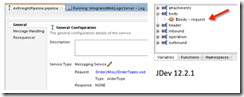
When creating a Service Bus pipeline in JDeveloper 12.2.1 for Oracle Service Bus 12.2.1, based on a typed, one-way business service (either one way WSDL based, or Messaging Service with XML request and XSD type with reply NONE business service) the pipeline won’t correctly use the request message type. It’s annoying because you cannot easily create expressions based on the request type, such as drilling open the $body variable, e.g. for an Order containing a shipping ID. All that is displayed within the pipeline is $body.

This happens although the pipeline configuration displays the correct XSD, eg. OrderType.xsd and the correct Type, eg. OrderType.

I am quite surprised because this is not a very unusual use case. Anyway I couldn’t find a work around for JDeveloper 12.2.1 (let me know if you know one!). Interestingly, testing a proxy service based on the business service works all right (so maybe the bug slipped in when the pipeline construct was separated from the proxy service? just guessing.)

It is possible to work with the good old Service Bus web console /sbconsole. There everything is fine, i.e. the correct structure of the request message is displayed. The working Service Bus console is another indication that the way JDeveloper does it is broken. Read the complete article here.

SOA & BPM Partner Community

For regular information on Oracle SOA Suite become a member in the SOA & BPM Partner Community for registration please visit www.oracle.com/goto/emea/soa (OPN account required) If you need support with your account please contact the Oracle Partner Business Center.

Blog Twitter LinkedIn image[7][2][2][2] Facebook clip_image002[8][4][2][2][2] Wiki

SOA 12c QuickTip: Enable Servicebus message tracing in DefaultDomain by Sven Bernhardt


clip_image001Messsage or execution tracing in Servicebus (SB) allows insight into the message exchange between Servicebus and it’s communication partners (Client applications and Service providers) as well as the message processing within  a pipeline. Informations about incoming and outgoing messages, the corresponding headers, the course of variable manipulations and other things are written to the diagnostic logs and can be inspected there, when the tracing is active. By default the message and execution tracing are disabled, due to performance reasons and so it should only be enabled in development environments for debugging purposes.

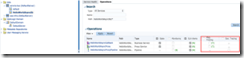
Enablement of message tracing for proxy or business service or execution tracing on the pipeline level, can be done using Fusion Middleware Control (Enterprise Manager).Under a specific SB project, the corresponding services and pipelines can be found. Enabling the tracing can be simply done by checking the options for message tracing respectively execution tracing in the Operations tab. Read the complete article here.

SOA & BPM Partner Community

For regular information on Oracle SOA Suite become a member in the SOA & BPM Partner Community for registration please visit www.oracle.com/goto/emea/soa (OPN account required) If you need support with your account please contact the Oracle Partner Business Center.

Blog Twitter LinkedIn image[7][2][2][2] Facebook clip_image002[8][4][2][2][2] Wiki

Custom Transports in Service Bus 12.2.1 by Ricardo Ferreira


clip_image002Oracle Service Bus (or Service Bus for short) provides a very powerful set of APIs that allow experienced Java developers to create custom transport providers. This is called Service Bus Transport SDK. By using this SDK, it is possible to create custom transport providers to handle both inbound and outbound message handling for specific protocols, without having to worry with the internal details of Service Bus.

The objective of this post is not about how the Service Bus Transport SDK works, neither about providing examples about how to use it. This is very detailed in the Service Bus documentation. Instead, we are going to cover the specifics about creating custom transport providers for Service Bus 12.2.1. Thus; this post will walk through the changes and challenges introduced by this new version, which may help people that want to port their custom transports from previous versions of Service Bus to 12.2.1.

Changes in the Classpath

No matter which IDE you commonly use to develop the code for custom transport providers, when you try to open your project you will face some annoying classpath issues. This will happen because the 12.2.1 version of Service Bus changed many of its JAR files, in an attempt to create a more consistent system library classpath. This is also true for some JAR files that belongs to WebLogic, and many others from the Fusion Middleware stack.

Therefore, you will have to adapt your classpath to be able to compile your source-code again, either compiling the code from the IDE or using the Ant javac task. The XML snippet below is an Eclipse user library export with some of the most important JARs that you might need while working with Service Bus 12.2.1. Read the complete article here.

SOA & BPM Partner Community

For regular information on Oracle SOA Suite become a member in the SOA & BPM Partner Community for registration please visit www.oracle.com/goto/emea/soa (OPN account required) If you need support with your account please contact the Oracle Partner Business Center.

Blog Twitter LinkedIn image[7][2][2][2] Facebook clip_image002[8][4][2][2][2] Wiki

Handling inbound Attachments by Service Bus by Apostolos Varsamis


clip_image002Introduction

Oracle Service Bus message context is a set of properties, so called context variables, that hold message content as well as information about messages as they are routed through Oracle Service Bus (OSB). The Message Context Schema specifies the element types for the predefined message context variables.

Such a predefined context variable is the variable attachments.

Fig. 1 shows in an excerpt of the Message Context Schema the definition of the element attachmens.

Obviously the attachment body can hold either a reference of the content or the content itself!

In this article we analyze what contains exactly the element /mc:attachments/mc:attachment/mc:body and how we can handle its contents.

First of all let us focus on the variables

  • Content-Types
  • Content-Transfer- Encoding

their meanings and their possible values.

Content-Type

According to the W3 specifications (s. [1]) Fig. 2 contains an excerpt of the main characteristics of the variable Content-Type: Read part 1 here and Read part 2 here

SOA & BPM Partner Community

For regular information on Oracle SOA Suite become a member in the SOA & BPM Partner Community for registration please visit www.oracle.com/goto/emea/soa (OPN account required) If you need support with your account please contact the Oracle Partner Business Center.

Blog Twitter LinkedIn image[7][2][2][2] Facebook clip_image002[8][4][2][2][2] Wiki

OSB 12c – Database Polling using DB adapter by Vivek Garg


clip_image001Oracle introduced couple of new features in 12c version which is recently launched. For OSB, the major shift that we saw in 12c is that now we can use Jdeveloper to do the development which we use to do through OEPE (Eclipse). With that change, we can leverage the existing technology adapter in OSB as well which we use to have in SOA. In OSB 11g version, in case of Database interaction, we use to create DB adapter in Jdeveloper and later import all required files to OEPE and generate required services from that, but in this new version-12c as we development in Jdeveloper itself so we need not to follow same steps again, we can add the DB adapter directly in OSB project and do required operations.

In this post, we show you how to use DB adapter in OSB project. For that we have created a table in database, we poll the data from that table and write that information to one file.

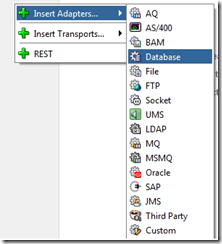
First of all we need to create a new OSB project, so first create a new project and then in composite.xml file, right click on proxy service lane, choose “Insert Adapters” and select Database to add DB adapter.

Provide name to adapter and click on next. In next window, choose DB connection (In our case it is local as we read the data from local table) and click on browse button to select the outbound connection pool created earlier for DB adapter. Read the complete article here.

SOA & BPM Partner Community

For regular information on Oracle SOA Suite become a member in the SOA & BPM Partner Community for registration please visit www.oracle.com/goto/emea/soa (OPN account required) If you need support with your account please contact the Oracle Partner Business Center.

Blog Twitter LinkedIn image[7][2][2][2] Facebook clip_image002[8][4][2][2][2] Wiki

Automated Unittesting of XQueries in Oracle OSB by Pascal Brokmeier


clip_image002In order to support a more agile project environment, OPITZ CONSULTING developed a Java/JUnit based SOA Unit Testing Framework. Among others, the framework was capable of using the Oracle libraries to run XQuery tests locally and verify their correctness. Over the course of time, Oracle released 12c and with it, changed its xquery files. A new extension (.xqy instead of .xq) was introduced and with it additional syntax. Oracle added a(:: OracleAnnotationVersion "1.0" ::) . After this, the testing framework needed to be updated to support such tags. Without an update, executing a query with the above annotation gave the following error: Read the complete article here.

SOA & BPM Partner Community

For regular information on Oracle SOA Suite become a member in the SOA & BPM Partner Community for registration please visit www.oracle.com/goto/emea/soa (OPN account required) If you need support with your account please contact the Oracle Partner Business Center.

Blog Twitter LinkedIn image[7][2][2][2] Facebook clip_image002[8][4][2][2][2] Wiki

Service Bus enabling API Management by Tshepo Madigage


clip_image002Two of the most important questions businesses are asking themselves when launching new application infrastructure projects are:

  1. What steps do we need to take to elevate our initial “services infrastructure” into a “shared services infrastructure” supporting spikes in loads, improving high service availability, introducing agility, and simplifying manageability?
  2. As our infrastructure begins to expand beyond our firewalls to incorporate more third-party cloud services into mission critical projects, are we prepared to manage the increase in service response latency time and risk?

Oracle Service Bus – an integral part of Oracle SOA Suite – is proven, lightweight integration Enterprise Service Bus (ESB), Oracle Service Bus simplifies integration and improves time-to-market for new business services by replacing complex point-to-point integration with a single service virtualisation connection. Instead of disparate integration tool kits throughout your enterprise, Oracle Service Bus delivers a common standards-based integration solution spanning public cloud, private cloud, and on-premises applications and services. Oracle Service Bus allows you to achieve value more quickly with simple, code-free, configuration-based integration and supports rapid mobile enablement of smartphones and tablets.

As mobile and the Internet of Things continue to digitize all kinds of products and services, APIs are an essential component in securely connecting applications with devices. The newly released Oracle API Manager provides easy-to-use facilities for annotating and publishing REST and SOAP services as APIs to a developer portal where application developers can discover, test, register and subscribe to these APIs, as well as track API performance. It is available on-premises today and will soon be available as a component of Oracle’s rapidly expanding cloud services portfolio. Additionally, Oracle API Catalog simplifies the publication of API services that are developed in Oracle and other sources. Read the complete article here.

SOA & BPM Partner Community

For regular information on Oracle SOA Suite become a member in the SOA & BPM Partner Community for registration please visit www.oracle.com/goto/emea/soa (OPN account required) If you need support with your account please contact the Oracle Partner Business Center.

Blog Twitter LinkedIn image[7][2][2][2] Facebook clip_image002[8][4][2][2][2] Wiki

Technorati Tags: SOA Community,Oracle SOA,Oracle BPM,OPN,Jürgen Kress