SOA 12c Service Bus Resequencer by Vivek Garg

clip_image002We often come under such situation when we receive message from source system which are not in proper sequence but target system need to receive that in proper sequence. To resolve this we need to re-sequence the messages and process them in proper sequence.   Re-sequencing is term used when we need to process incoming messages in sequence which are not coming in proper sequence. Design and developer need to think on this re-sequencing when they encounter such requirement as e described above. E.g. suppose we are receiving sales orders from source system, sales order contain one field with the name sales order number, suppose source system sends sales order in this sequence ( 1, 4,3,2,5,6,7 ) but target system need sales order in this sequence (1,2,3,4,5,6,7) , in this case we need to do re-sequencing of message.

In 11g version of Oracle SOA Suite, re-sequencing was there in Mediator component but this feature was not available for BPEL and Service Bus. In 12c release, this feature is provided for service bus. We can set this feature either at pipeline level or at operation level. In this post, we will discuss on that. We will only discuss about pipeline level re-sequencer.

We have three types of re-sequencing in Service Bus.

Standard:  This sequencer is used when incoming message contain numeric identifier.  This numeric identifier is termed as Sequence Id. We may specify message Group also, that means incoming order can be Sales Order or purchase order, in this case we will have separate group for both Sales Order and purchase order. When source system send out of order messages then it store out-of-order message until complete order is received this is based on sequence Id.

FIFO: This sequencer works based on message arrival time. Whichever message received first, will be processed first. Here you need to specify only Group. So all the messages which are there in one group processed based on message receive time.

Best Effort: It is used when we receive large number of messages in a short period of time and cannot provide information to the re-sequencer about the identifier to use for sequencing. Typically, the identifier used for sequencing in such scenarios is of a dateTime type or numeric type.

To configure re-sequencer in service bus, double click on the pipeline and choose configuration tab. Click on resequencer, to enable the resequencer check the “Enable Resequencer” checkbox. Once you enable the resequencer, you need to choose the resequencer level. Resequencer level can be set either pipeline or operation. Also choose the type of resequencer which you need to use.

Read the complete article here.

SOA & BPM Partner Community

For regular information on Oracle SOA Suite become a member in the SOA & BPM Partner Community for registration please visit www.oracle.com/goto/emea/soa (OPN account required) If you need support with your account please contact the Oracle Partner Business Center.

Blog Twitter LinkedIn image[7][2][2][2] Facebook clip_image002[8][4][2][2][2] Wiki

Creating a Mobile-Optimized REST API Using Oracle Service Bus – Part 1 by Steven Davelaar

clip_image002

Introduction

To build functional and performant mobile apps, the back-end data services need to be optimized for mobile consumption. RESTful web services using JSON as payload format are widely considered as the best architectural choice for integration between mobile apps and back-end systems. At the same time, most existing enterprise back-end systems provide a SOAP-based web service application programming interface (API) or proprietary file-based interfaces. In this article series we will discuss how Oracle Service Bus (OSB) 12c can be used to transform these enterprise system interfaces into a mobile-optimized REST-JSON API. This architecture layer is sometimes referred to as Mobile Oriented Architecture (MOA) or Mobile Service Oriented Architecture (MOSOA). A-Team has been working on a number of projects with OSB 12c to build this architecture layer. We will explain step-by-step how to build this layer, and we will  share tips, lessons learned and best practices we discovered along the way. In this first part we will discuss how to design the REST API.

Main Article

Design Considerations

Let’s start with the first challenge: how do you design an API that is truly optimized for mobile apps? A common pitfall is to start with the back-end web services, and take that back-end payload as a starting point. While that may limit the complexity of transformations you have to do in OSB 12c (you could even use the automated “Publish-As-REST” function on a SOAP business service) it leads to an API which is everything but optimized for mobile. This brings us to our first recommendation:

The REST API design should be driven by the mobile developer.

He (or she) is the only one who can combine all the requirements, information and knowledge required for a good design:

  • he designs and builds the various screens, knows the supported form factors and knows exactly which data should be retrieved for which screen.
  • he knows the requirements for working in offline mode, and knows how this can be supported and implemented using his mobile development tool set.
  • he is responsible for data caching strategies to optimize performance in both online and offline scenarios
  • he decides which read and write actions can be performed in a background thread not impacting the user-perceived performance.

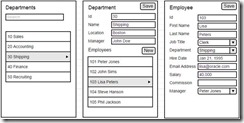
To illustrate how the above aspects impact the design of the API, we will introduce the sample “human resources” app that we will use throughout this article series. Lets start with the three screen mockups our API should support: Read the complete article here

SOA & BPM Partner Community

For regular information on Oracle SOA Suite become a member in the SOA & BPM Partner Community for registration please visit www.oracle.com/goto/emea/soa (OPN account required) If you need support with your account please contact the Oracle Partner Business Center.

Blog Twitter LinkedIn image[7][2][2][2] Facebook clip_image002[8][4][2][2][2] Wiki

Patching the Oracle Service Bus 12.1.3 unknown protocol deployment error by Jan van Zoggel

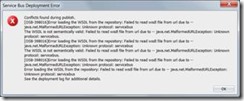
If you (already) created your first Oracle Service Bus 12c application/project with SOAP webservices and tried to deploy it to your IntegratedWeblogic server you might be familiar with this error.

clip_image002

Lucky for us Oracle quickly released a solution on their support website and also various blogs picked it up and posted a solution. The earliest reference I found was posted by Link. The solution to your problem was either:

  • Add felix.service.urlhandlers=false to the Init properties of OSGi frameworks bac-svnserver-osgi-framework factory implementation class
  • Remove the default server as a target for the framework

This worked like a charm and I was able to play around with my 12c Service Bus. However since it was stated that the solution could result into problems with BPM on your domain I reminded myself that I wanted to dive deeper into this when I had the time.

Google helped me out, and I discovered this information on the Apache Felix framework website.

Felix installs the URL Handlers service by default. If you do not want this service you can disable it, by setting the felix.service.urlhandlers property to false in the config.properties file. It is not recommended to disable this, but the main reason for doing so it because the URL Handlers implementation invokes methods to set the singleton factories for URL stream and content handler factories. Assuming that you want to use URL Handlers service, you must configure it if you aren’t running on the standard Sun JRE. Read the complete article here.

SOA & BPM Partner Community

For regular information on Oracle SOA Suite become a member in the SOA & BPM Partner Community for registration please visit www.oracle.com/goto/emea/soa (OPN account required) If you need support with your account please contact the Oracle Partner Business Center.

Blog Twitter LinkedIn image[7][2][2][2] Facebook clip_image002[8][4][2][2][2] Wiki

Create Service Bus Customization File using WLST by Ronald van Luttikhuizen

clip_image002For one of our Oracle Fusion Middleware projects we had the requirement that the IT Ops activities should be scripted as much as possible. These activities included things like packaging, deploying, and automated testing of Service Bus projects, SOA Composites, and BPM processes. One of the more challenging tasks to script was to create and extract the runtime configuration of services deployed on Oracle Service Bus 11g using customization files. There seems to be no WLST feature readily available for this purpose. Based on some resources that all contained part of the solution, we were able to construct a WLST script for this purpose which you can find in this blog.
This blog briefly explains the use of customization files, how to create a customization file using the Service Bus Console, includes the WLST script to execute this task, and provides a brief conclusion.

Customization Files

Customization files are XML files that contain the configuration of Service Bus resources and projects. Examples of such configurations are Service URIs, JCA settings, Retry Settings, and so on. Customization files provide a convenient way to apply environment-specific configuration during deployment. You can both apply, as well as create and extract the runtime configuration of Service Bus resources and projects into customization files using the Service Bus Console. Read the complete article here.

SOA & BPM Partner Community

For regular information on Oracle SOA Suite become a member in the SOA & BPM Partner Community for registration please visit www.oracle.com/goto/emea/soa (OPN account required) If you need support with your account please contact the Oracle Partner Business Center.

Blog Twitter LinkedIn image[7][2][2][2] Facebook clip_image002[8][4][2][2][2] Wiki

SOA12c -Service Bus Resequencer by Vivek Garg

clip_image002We often come under such situation when we receive message from source system which are not in proper sequence but target system need to receive that in proper sequence. To resolve this we need to re-sequence the messages and process them in proper sequence.   Re-sequencing is term used when we need to process incoming messages in sequence which are not coming in proper sequence. Design and developer need to think on this re-sequencing when they encounter such requirement as e described above. E.g. suppose we are receiving sales orders from source system, sales order contain one field with the name sales order number, suppose source system sends sales order in this sequence ( 1, 4,3,2,5,6,7 ) but target system need sales order in this sequence (1,2,3,4,5,6,7) , in this case we need to do re-sequencing of message.

In 11g version of Oracle SOA Suite, re-sequencing was there in Mediator component but this feature was not available for BPEL and Service Bus. In 12c release, this feature is provided for service bus. We can set this feature either at pipeline level or at operation level. In this post, we will discuss on that. We will only discuss about pipeline level re-sequencer. 

We have three types of re-sequencing in Service Bus.

Standard:  This sequencer is used when incoming message contain numeric identifier.  This numeric identifier is termed as Sequence Id. We may specify message Group also, that means incoming order can be Sales Order or purchase order, in this case we will have separate group for both Sales Order and purchase order. When source system send out of order messages then it store out-of-order message until complete order is received this is based on sequence Id.

FIFO: This sequencer works based on message arrival time. Whichever message received first, will be processed first. Here you need to specify only Group. So all the messages which are there in one group processed based on message receive time.

Best Effort: It is used when we receive large number of messages in a short period of time and cannot provide information to the re-sequencer about the identifier to use for sequencing. Typically, the identifier used for sequencing in such scenarios is of a dateTime type or numeric type.

– See more at: http://www.soawork.com/2014/09/soa12c-service-bus-resequencer.html#sthash.CJJjVYly.dpuf

Read the complete article here.

SOA & BPM Partner Community

For regular information on Oracle SOA Suite become a member in the SOA & BPM Partner Community for registration please visit www.oracle.com/goto/emea/soa (OPN account required) If you need support with your account please contact the Oracle Partner Business Center.

Blog Twitter LinkedIn image[7][2][2][2] Facebook clip_image002[8][4][2][2][2] Wiki

Resolving deployment issues with Service Bus 12c – OSB-398016 – Error loading WSDL by Lucas Jellema

I was completely stuck with Service Bus 12c project deployment from JDeveloper to the Service Bus run time. Every deployment met with the same fate: Conflicts found during publish – OSB-398016, Error loading the WSDL from the repository: The WSDL is not semantically valid: Failed to read wsdl file from url due to — java.net.MalformedURLException: Unknown protocol: servicebus.

I was completely lost and frustrated – not even a simple hello_world could make it to the server.
Then, Google and Daniel Dias from Link Consulting to the rescue: http://middlewarebylink.wordpress.com/2014/07/17/soa-12c-end-to-end-e2e-tutorial-error-deploying-validatepayment/. He had run into the same problem – and he had a fix for it! Extremely hard to find if you ask me, but fairly easy to apply.
It turns out this is a known bug (18856204). The bug description refers to BPM and SB being installed in the same domain.
The resolution:
Open the Administration Console for the WebLogic Domain. From the Services node, select service OSGi Frameworks: Read the complete article here.

SOA & BPM Partner Community

For regular information on Oracle SOA Suite become a member in the SOA & BPM Partner Community for registration please visit www.oracle.com/goto/emea/soa (OPN account required) If you need support with your account please contact the Oracle Partner Business Center.

Blog Twitter LinkedIn image[7][2][2][2] Facebook clip_image002[8][4][2][2][2] Wiki

JDeveloper 12.1.3 for SOA Suite and OSB 12c Crashing? By Frank Munz

Today at the Oracle Fusion Middleware Summer Camp in Lisboa I experiencedsome SIGSEGV JVM crashes. It happened when trying to use JDeveloper 12.1.3 under MacOS with the SOA Suite Development installer – right after the installation when starting up the server from within JDeveloper. (Most of the experienced SOA Suite developers went the beaten path using Windows).

My installation used a fairly recent JDK 1.7_45, but SOA Suite 12c is supported on MAC OS only for a single user development installation starting with JDK 1.7_51.
Upgrading to JDK 1.7_65 and recreating the JDeveloper default domain fixed the issue. Read the complete article here.

SOA & BPM Partner Community

For regular information on Oracle SOA Suite become a member in the SOA & BPM Partner Community for registration please visit www.oracle.com/goto/emea/soa (OPN account required) If you need support with your account please contact the Oracle Partner Business Center.

Blog Twitter LinkedIn image[7][2][2][2] Facebook clip_image002[8][4][2][2][2] Wiki


Mobile Integration Using Oracle Service Bus 12c

Mobile Integration Using Oracle Service Bus Oracle Service Bus 12c enables enterprises to deliver on mobile as an extension of the integration platform . Developers can create REST /JSON APIs and simplify the process of creating customizable applications from reusable components. Oracle Service Bus 12c makes it easy to extend onpremise and cloud applications to the mobile channel. Read the datasheet here.

Oracle Service Bus 12c enables enterprises to deliver on mobile as an extension of the integration platform. Developers can create REST/JSON APIs and simplify the process of creating customizable applications from reusable components. Oracle Service Bus 12c makes it easy to extend on-premise and cloud applications to the mobile channel.
The Oracle Mobile Suite utilizes standard technologies and tools to expose many data formats for exchange data and functions with any mobile application and includes Oracle Service Bus and Oracle Mobile Application Framework. Oracle Service Bus supports all types of connections between applications on mobile devices and back end business systems including the popular REST/JSON.
Using Service Bus, organizations can shield front-end mobile applications from changes that might occur in the backend. They can also shield mobile developers from often intricate and complex details of underlying implementations of back-end applications, such as legacy protocols. In addition, Service Bus can simplify and reduce the information exposed by API interfaces to ensure both optimization of bandwidth and greater control on information shared with mobile users.
Oracle Service Bus is a part of Oracle SOA Suite 12c. It introduces a REST binding within JDeveloper to simplify mobile enablement by exposing traditional SOAP services, Enterprise Java Beans (EJBs), JCA adapters connecting backend applications or just about any other underlying implementation through REST/JSON. The REST binding is available for SOA composites and Oracle Service Bus services and allows the configuration of REST interactions as exposed service or proxy service. It also allows the invocation of externally available REST services.

To learn more on Oracle Service Bus 12c for Mobile Integration:
Datasheet for Mobile Integration using Oracle Service Bus 12c
Screencast on Mobile Enablement with SOA by Suhash Uliyar, VP of Mobile Strategy at Oracle
Customer Stories:
Agilent Delivers on Mobile Strategy with Oracle SOA
Ricoh Differentiates Business with Mobile Enablement
Blog Series on Simplifying Mobile Integration with SOA:
1. Simplifying Enterprise Mobile Integration
2. Mobile Service Enablement with Oracle Service Bus
3. API Management as a Solution to Mobile Enablement

SOA & BPM Partner Community

For regular information on Oracle SOA Suite become a member in the SOA & BPM Partner Community for registration please visit www.oracle.com/goto/emea/soa (OPN account required) If you need support with your account please contact the Oracle Partner Business Center.

Blog Twitter LinkedIn image[7][2][2][2] Facebook clip_image002[8][4][2][2][2] Wiki

You’ve Got Mail: Inbound Email Processing in WLS/OSB integration scenarios by The Cattle Crew

In an integration project we are currently replacing an available integration platform using Oracle Service Bus 11g. Different incoming and outgoing message formats and protocols (HTTP, FTP, SMTP, etc.) are used from the external partners of our customer and therefore have to be supported. With OSB no problem at all, but polling a MS Exchange server for new e-mails is simply not possible with OSB standard tooling. Debt is a bug in MS Exchange server, which advertises that it supports plain authentification for login, but it does not ([1], search for AUTH=PLAIN). So when trying to access an exchange inbox from a proxy service ends up with failures, which cannot be worked around.
So we decided to implement a custom Java service that does the polling, because with plain Java the bug can be worked around by setting the corresponding Java Mail session parameters described in [1]. The challenge from a implementation perspective is that in a clustered environment, a service is in general active on all cluster nodes and so parallel access and therefore multi processing for one specific e-mail is possible. So the service has to be implemented as a Weblogic Singleton service [2] to avoid this. A Singleton service is physically deployed to the cluster and so available on all nodes, but it is only active on one specific cluster node. In case of problems on the node where the service is active, it might be activated on another node in the cluster automatically, depending on the failover configuration in the cluster. Read the complete article here.

SOA & BPM Partner Community

For regular information on Oracle SOA Suite become a member in the SOA & BPM Partner Community for registration please visit www.oracle.com/goto/emea/soa (OPN account required) If you need support with your account please contact the Oracle Partner Business Center.

Blog Twitter LinkedIn image[7][2][2][2] Facebook clip_image002[8][4][2][2][2] Wiki

What’s New in SOA Suite 12c – Unified Interface for Service Bus and Event Processing By Bruce Tierney

10gTo11gThis second in a blog series on "What’s New in SOA Suite 12c" focuses on another new feature of this major release of Oracle SOA Suite. In Oracle SOA Suite 11g, the user interface was unified across most of the components with the exception of Oracle Service Bus and Oracle Event Processing. When I talk to existing customers and Oracle technical specialists, I hear a wide range of responses when asked "What is your favorite feature of Oracle SOA Suite 12c". Cloud and Mobile integration are at the top of the list, but one of the other common responses is "Oracle Service Bus" using the same JDeveloper interface as Oracle SOA Suite. This major enhancement has been in the works for years and is now delivered in 12c to allow users to learn one interface for all the components of integration, simplifying integration and providing faster time to integrate, especially when projects span many components of integration.
Here is an excerpt from the "What’s New in Oracle SOA Suite 12c" White Paper by Oracle’s Simone Geib on the unified interface. Download it now to learn about this and many other features:
A key differentiator of Oracle SOA Suite 11g relative to other integration platforms has always been the unified design interface across most of the components for Oracle SOA Suite. Oracle SOA Suite 12c takes this differentiator a big step forward by integrating the remaining major components for Oracle SOA Suite, Oracle Service Bus and Oracle Event Processing, into a single unified experience. This feature simplifies integration by eliminating the need to train developers, administrators, architects and others on separate components for every aspect of integration, which lowers cost and provides a faster time to integrate.
The images below show the main component palette for Oracle SOA Suite which now includes "Service Bus" at the top as well as adapters for technology components, on-premise and cloud applications and other advanced features. On the right, is the same JDeveloper drag and drop component palette showing the objects to be used for Oracle Event Processing. Read the complete article here.

SOA & BPM Partner Community

For regular information on Oracle SOA Suite become a member in the SOA & BPM Partner Community for registration please visit www.oracle.com/goto/emea/soa (OPN account required) If you need support with your account please contact the Oracle Partner Business Center.

Blog Twitter LinkedIn image[7][2][2][2] Facebook clip_image002[8][4][2][2][2] Wiki