Creating a Mobile-Optimized REST API Using Oracle Service Bus – Part 2 by Steven Davelaar


Introduction

clip_image002To build functional and performant mobile apps, the back-end data services need to be optimized for mobile consumption. RESTful web services using JSON as payload format are widely considered as the best architectural choice for integration between mobile apps and back-end systems. At the same time, most existing enterprise back-end systems provide a SOAP-based web service application programming interface (API) or proprietary file-based interfaces. In this article series we will discuss how Oracle Service Bus (OSB) 12c can be used to transform these enterprise system interfaces into a mobile-optimized REST-JSON API. This architecture layer is sometimes referred to as Mobile Oriented Architecture (MOA) or Mobile Service Oriented Architecture (MOSOA). A-Team has been working on a number of projects with OSB 12c to build this architecture layer. We will explain step-by-step how to build this layer, and we will  share tips, lessons learned and best practices we discovered along the way. In part 1 we discussed the design of the REST API, in this second part we will discuss the implementation of the “read” (GET) RESTful services in service bus by transforming ADF BC SDO SOAP service methods

Getting Started

As of release 12.1.3 you can develop and test service bus applications inside JDeveloper. For this you need to download and install a separate “SOA Suite Quick Start” version of JDeveloper. Download page is here, installation instructions can be found here.

The SOA Suite Quick Start release of JDeveloper 12.1.3 has the same version number as the “vanilla” JDeveloper 12.1.3 release. This means that by default they will use the same system directory. This can cause weird and unexpected behavior. You need to make sure both JDeveloper releases use their own system directory by setting the JDEV_USER_HOME environment variable in the executable file that you use to launch JDeveloper (custom .bat file on Windows, JDeveloper Unix executable file inside package contents on Mac).

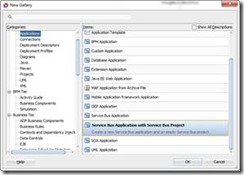
After starting the JDeveloper 12.1.3 release that comes with the SOA Suite Quick Start, you go to the File -> New -> Application gallery and choose Service Bus Application with Service Bus Project. Read the complete article here.

SOA & BPM Partner Community

For regular information on Oracle SOA Suite become a member in the SOA & BPM Partner Community for registration please visit www.oracle.com/goto/emea/soa (OPN account required) If you need support with your account please contact the Oracle Partner Business Center.

Blog Twitter LinkedIn image[7][2][2][2] Facebook clip_image002[8][4][2][2][2] Wiki

Create Service Bus Customization File using WLST by Ronald van Luttikhuizen

clip_image002For one of our Oracle Fusion Middleware projects we had the requirement that the IT Ops activities should be scripted as much as possible. These activities included things like packaging, deploying, and automated testing of Service Bus projects, SOA Composites, and BPM processes. One of the more challenging tasks to script was to create and extract the runtime configuration of services deployed on Oracle Service Bus 11g using customization files. There seems to be no WLST feature readily available for this purpose. Based on some resources that all contained part of the solution, we were able to construct a WLST script for this purpose which you can find in this blog.
This blog briefly explains the use of customization files, how to create a customization file using the Service Bus Console, includes the WLST script to execute this task, and provides a brief conclusion.

Customization Files

Customization files are XML files that contain the configuration of Service Bus resources and projects. Examples of such configurations are Service URIs, JCA settings, Retry Settings, and so on. Customization files provide a convenient way to apply environment-specific configuration during deployment. You can both apply, as well as create and extract the runtime configuration of Service Bus resources and projects into customization files using the Service Bus Console. Read the complete article here.

SOA & BPM Partner Community

For regular information on Oracle SOA Suite become a member in the SOA & BPM Partner Community for registration please visit www.oracle.com/goto/emea/soa (OPN account required) If you need support with your account please contact the Oracle Partner Business Center.

Blog Twitter LinkedIn image[7][2][2][2] Facebook clip_image002[8][4][2][2][2] Wiki

SOA12c -Service Bus Resequencer by Vivek Garg

clip_image002We often come under such situation when we receive message from source system which are not in proper sequence but target system need to receive that in proper sequence. To resolve this we need to re-sequence the messages and process them in proper sequence.   Re-sequencing is term used when we need to process incoming messages in sequence which are not coming in proper sequence. Design and developer need to think on this re-sequencing when they encounter such requirement as e described above. E.g. suppose we are receiving sales orders from source system, sales order contain one field with the name sales order number, suppose source system sends sales order in this sequence ( 1, 4,3,2,5,6,7 ) but target system need sales order in this sequence (1,2,3,4,5,6,7) , in this case we need to do re-sequencing of message.

In 11g version of Oracle SOA Suite, re-sequencing was there in Mediator component but this feature was not available for BPEL and Service Bus. In 12c release, this feature is provided for service bus. We can set this feature either at pipeline level or at operation level. In this post, we will discuss on that. We will only discuss about pipeline level re-sequencer. 

We have three types of re-sequencing in Service Bus.

Standard:  This sequencer is used when incoming message contain numeric identifier.  This numeric identifier is termed as Sequence Id. We may specify message Group also, that means incoming order can be Sales Order or purchase order, in this case we will have separate group for both Sales Order and purchase order. When source system send out of order messages then it store out-of-order message until complete order is received this is based on sequence Id.

FIFO: This sequencer works based on message arrival time. Whichever message received first, will be processed first. Here you need to specify only Group. So all the messages which are there in one group processed based on message receive time.

Best Effort: It is used when we receive large number of messages in a short period of time and cannot provide information to the re-sequencer about the identifier to use for sequencing. Typically, the identifier used for sequencing in such scenarios is of a dateTime type or numeric type.

– See more at: http://www.soawork.com/2014/09/soa12c-service-bus-resequencer.html#sthash.CJJjVYly.dpuf

Read the complete article here.

SOA & BPM Partner Community

For regular information on Oracle SOA Suite become a member in the SOA & BPM Partner Community for registration please visit www.oracle.com/goto/emea/soa (OPN account required) If you need support with your account please contact the Oracle Partner Business Center.

Blog Twitter LinkedIn image[7][2][2][2] Facebook clip_image002[8][4][2][2][2] Wiki

Pondering the Oracle Service Bus by René van Wijk

What we are going to do in this post, is present some real-life problems and show how to obtain the necessary data, analyze it, and make corrective actions. Oracle Service Bus architecture is centered around an Enterprise Service Bus. The bus provides message delivery services, based on standards including SOAP, HTTP and Java Messaging Service (JMS). It is typically designed for high-throughput, guaranteed message delivery to a variety of service producers and consumers. It supports XML as a native data type, while also offering alternatives for handling other data types. Oracle Service Bus is policy driven and enables us to establish loose coupling between service clients and business services, while maintaining a centralized point of security control and monitoring. It stores persistent policy, proxy service, and related resource configurations in metadata, that can be customized and propagated from development through staging to production environments required. The message-brokering engine accesses this configuration information from its metadata cache. freezecpuusage
Oracle Service Bus is an intermediary that processes incoming service request messages, determines routing logic, and transforms these messages for compatibility with other service consumers. It receives messages through a transport protocol such as HTTP(S), JMS, File, and FTP, and sends messages through the same or a different transport protocol. Service response messages follow the inverse path. Thne message processing by Oracle Service Bus is driven by metadata, specified in the message flow definition of a proxy service.
The processing of messages occurs in the following sequence of events:

  • Processing of the inbound transport
  • Message flow execution
  • Processing of the outbound transport

After a message is sent to an endpoint (either a business service or another proxy service), Oracle Service Bus processes the response message in a similar model as that described in the preceding sequence of events.
No response? How is that possible?
In this case the Oracle Service Bus came to a ‘stand-still’ for a particular interval. Read the complete article here.

SOA & BPM Partner Community

For regular information on Oracle SOA Suite become a member in the SOA & BPM Partner Community for registration please visit www.oracle.com/goto/emea/soa (OPN account required) If you need support with your account please contact the Oracle Partner Business Center.

Blog Twitter LinkedIn image[7][2][2][2] Facebook clip_image002[8][4][2][2][2] Wiki

Using Split-Joins in OSB Services for parallel processing of messages. By Rutger Van Iperen

For-Each settingsThe Split-Join can be a very useful tool in your OSB services yet seems to be underestimated. When I did some asking around it turned out not many developers use this, even though I can come up with plenty of uses for the Split-Join. The Split-Join’s strength is in numbers, meaning it is the most powerful when you need to process a lot of pieces of similar data. For this example I used a simplified version of a project I am working on. In this project mobile devices are set to send data about rainfall to a database. The data is collected at a regular interfal creating a record and sent to the database per session which contains a large set of records. Instead of processing these records one at time I can process them concurrently and save a lot of processing (and waiting) time.

I created the XML Schema files and WSDL’s for the two services using JDeveloper and not Eclipse/OEPE because its design interface for these files is a lot more userfriendly (although this is of course personal preference). Read the complete article here.

SOA & BPM Partner Community

For regular information on Oracle SOA Suite become a member in the SOA & BPM Partner Community for registration please visit www.oracle.com/goto/emea/soa (OPN account required) If you need support with your account please contact the Oracle Partner Business Center.

Blog Twitter LinkedIn image[7][2][2][2] Facebook clip_image002[8][4][2][2][2] Wiki

OSB, Service Callouts and OQL – Part 1 by Vijay Kumar

Oracle Fusion Middleware customers use Oracle Service Bus (OSB) for virtualizing Service endpoints and implementing stateless service orchestrations. Behind the performance and speed of OSB, there are a couple of key design implementations that can affect application performance and behavior under heavy load. One of the heavily used feature in OSB is the Service Callout pipeline action for message enrichment and invoking multiple services as part of one single orchestration. Overuse of this feature, without understanding its internal implementation, can lead to serious problems.
This post will delve into OSB internals, the problem associated with usage of Service Callout under high loads, diagnosing it via thread dump and heap dump analysis using tools like ThreadLogic and OQL (Object Query Language) and resolving it. The first section in the series will mainly cover the threading model used internally by OSB for implementing Route Vs. Service Callouts.

OSB Pipeline actions for Service Invocations

A Proxy is the inbound portion of OSB that can handle the incoming request, transform/validate/enrich/manipulate the payload before invoking co-located or remote services. The execution logic is built using the proxy pipeline actions. For executing the remote (or even local) business service, OSB provides three forms of service invocations within a Proxy pipeline:

  • Route – invoke a single business service endpoint with (or without) a response. This happens entirely at end of a proxy service pipeline execution and bridges the request and response pipeline. The route can be treated as the logical destination to reach or final service invocation. There can be only one Route action (there can be choices of Route actions – but only one actual execution) in a given Proxy execution.
  • Publish – invoke a business service without waiting for result or response (like 1-way). The caller does not care much about the response. Just interested in sending out something (and ensuring it reaches the other side).
  • Service Callout – invoke one or more business service(s) as part of message augmentation or enrichment or validation but this is not the primary business service for a given Proxy, unlike the Route action. The service callouts can be equivalent to credit card validation, address verification while Route is equivalent to final order placement. There can be multiple Service Callouts inside a Proxy pipeline. Read the complete article here.

SOA & BPM Partner Community

For regular information on Oracle SOA Suite become a member in the SOA & BPM Partner Community for registration please visit www.oracle.com/goto/emea/soa (OPN account required) If you need support with your account please contact the Oracle Partner Business Center.

Blog Twitter LinkedIn image[7][2][2][2] Facebook clip_image002[8][4][2][2][2] Wiki

OSB 11g – A Hands-on Tutorial by Sivakumar Gonugunta

I published a OSB11g tutorial considering the use case described in my earlier blog posts. The tutorial can be accessed from here as I am not sure on how to place it in OTN. I would like to know your valuable comments on this. The WSDLs and other material used in this tutorial can be downloaded from here.

SOA & BPM Partner Community

For regular information on Oracle SOA Suite become a member in the SOA & BPM Partner Community for registration please visit www.oracle.com/goto/emea/soa (OPN account required) If you need support with your account please contact the Oracle Partner Business Center.

Blog Twitter LinkedIn image[7][2][2][2] Facebook clip_image002[8][4][2][2][2] Wiki

Oracle Service Bus JMS Deployments Utility by Mike Muller

For proxy services utilizing the JMS transport, OSB receives messages from destinations by using an MDB. These MDBs get generated and deployed during activation of the service configuration. OSB creates a random, unique name for the J2EE application that gets deployed to WLS. The name starts with “_ALSB_” and ends in a unique series of digits. The EAR files are written to the sbgen subdirectory of the domain home directory. You will see these applications on the WLS console page for “Deployments”.

For various operational reasons, there are times when the application name for a given proxy service needs to be determined. Since the generated name of the application doesn’t reflect the name of the service, it becomes difficult to determine the relationship between the service and its EAR file. In fact, it can not be discerned from either the OSB or WLS consoles.Read the full article here.

SOA & BPM Partner Community

For regular information on Oracle SOA Suite become a member in the SOA & BPM Partner Community for registration please visit www.oracle.com/goto/emea/soa (OPN account required) If you need support with your account please contact the Oracle Partner Business Center.

Blog Twitter LinkedIn image[7][2][2][2] Facebook clip_image002[8][4][2][2][2] Wiki Mix Forum