SOA 12c – Using Maven for SOA Projects deployment by Silva
July 24, 2015 Leave a comment
 In this post, we will see creation of SOA application/projects using the maven archetypes. And we will use local Maven Repository for the demonstration.
Navigate to %MW_HOME%\oracle_common\plugins\maven\com\oracle\maven\oracle-maven-sync\12.1.3 and use following commands to sync your local repository:
mvn install:install-file -Dfile=oracle-maven-sync-12.1.3.jar -DpomFile=oracle-maven-sync-12.1.3.pom
mvn com.oracle.maven:oracle-maven-sync:push -Doracle-maven-sync.oracleHome=%MW_HOME%
Update your archetype catalog using:
mvn archetype:crawl -Dcatalog=C:\Users\<<uname>>\.m2\archetype-catalog.xml
Generate SOA Application and project as shown below. This generates SOA application test-soa-application with project test-soa-project.
mvn archetype:generate -DarchetypeGroupId=com.oracle.soa.archetype -DarchetypeArtifactId=oracle-soa-application -DarchetypeVersion=12.1.3-0-0 -DgroupId=org.my.test -DartifactId=test-soa-application -DprojectName=test-soa-project -Dversion=1.0-SNAPSHOT
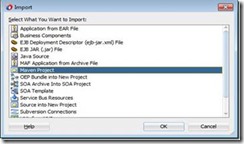
Import this maven project in JDeveloper using File –> Import and select the Maven Project option as shown below. Click OK.
Give your application directory as Root Directory which brings up all POMs and select other options as shown below. Click OK. Read the complete article here.
For regular information on Oracle SOA Suite become a member in the SOA & BPM Partner Community for registration please visit www.oracle.com/goto/emea/soa (OPN account required) If you need support with your account please contact the Oracle Partner Business Center.


![image[7][2][2][2]](https://paascommunity.com/wp-content/uploads/2013/04/image7222.png?w=20&h=20 "image[7][2][2][2]")
![clip_image002[8][4][2][2][2]](https://paascommunity.com/wp-content/uploads/2013/04/clip_image00284222.jpg?w=26&h=23 "clip_image002[8][4][2][2][2]")


 PaaS Community Blog