Oracle Integration Cloud Taleo EE (OTAC) – Create Requisition by Niall Commiskey

image

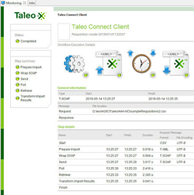
As you can see, I am looking to hire a philosopher. The above "Requisition" was created via the Taleo UI. But how could I leverage OIC to do the same?My first port of call was TCC. As per the previous post – I need a wrapsoap file describing the Requisition. Now I am just kicking the tyres – I have no sample input csv file, I don’t know what a Requisition looks like; so where do I start? Read the complete article here.

PaaS Partner Community

For regular information on Oracle PaaS become a member in the PaaS (Integration & Process) Partner Community please register here.

clip_image003 Blog clip_image005 Twitter clip_image004 LinkedIn image[7][2][2][2] Facebook clip_image002[8][4][2][2][2] Wiki

Technorati Tags: SOA Community,Oracle SOA,Oracle BPM,OPN,Jürgen Kress
OAuth Custom Three Legged Security Policy in REST Connection: Oracle Integration Cloud by Ankur Jain

image

In the previous article, we have described the OAuth Custom Two Legged Security Policy in REST Connection. This article will show how to create a connection with REST APIs which uses the three-legged OAuth security policy to access the APIs. For the demo purpose, we’ll take an example of LinkedIn REST API which uses the three-legged authentication to authenticate the REST APIs.
As a pre-requisite, we have to register an application in the LinkedIn developer portal which can be accessed here. During registration of the application provide the Redirect URLs in the below format:

https://<ICS-HOST:PORT>/icsapis/agent/oauth/callback

Once the application is registered it will provide the client id and client secret.

Let’s see how to create REST connection in oracle integration cloud which will use the three-legged authentication. Read the complete article here.

PaaS Partner Community

For regular information on Oracle PaaS become a member in the PaaS (Integration & Process) Partner Community please register here.

clip_image003 Blog clip_image005 Twitter clip_image004 LinkedIn image[7][2][2][2] Facebook clip_image002[8][4][2][2][2] Wiki

Technorati Tags: SOA Community,Oracle SOA,Oracle BPM,OPN,Jürgen Kress

A Simple Guide to Return Custom HTTP Error Response from REST based OIC Flows by Anuj Kaushal

image

The REST Adapter in the trigger (inbound) direction exposes an HTTP endpoint that HTTP clients can request for using an HTTP request, and returns an HTTP response.

If successful, the REST Adapter returns a success response. The REST Adapter returns an error response with an HTTP status belonging to the error family of codes depending on the situation. The following table describes the possible cause and the REST Adapter response.

In addition, there could be several situations where an integration developer wants to return a custom HTTP error response based on the business logic.

Let’s take one such example and illustrate how this can be done easily within the orchestration flow.

The REST adapter provides very basic type validation out of the box. Any other validation like schema or semantic validation is turned off as it has a significant performance overhead. 
This post demonstrates how integrations developers can include validation logic and raise a fault with a custom fault code from within the orchestration flow. This fault is returned as an HTTP error response back to the client by the REST Adapter.

Overview: In our example, we have a REST based trigger that takes a user input. The integration developer checks the user input and raises a fault which is returned as a HTTP response with an error code back to the caller. Step 1: Create a REST based trigger that takes a JSON input and a JSON response. Read the complete article here.

PaaS Partner Community

For regular information on Oracle PaaS become a member in the PaaS (Integration & Process) Partner Community please register here.

clip_image003 Blog clip_image005 Twitter clip_image004 LinkedIn image[7][2][2][2] Facebook clip_image002[8][4][2][2][2] Wiki

Technorati Tags: SOA Community,Oracle SOA,Oracle BPM,OPN,Jürgen Kress

Ordering Delivery with Oracle Integration by Antony Reynolds

image

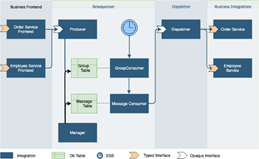
We often need to ensure that messages are processed in strict order, in this blog post I explain a pattern that enables this to be enforced using Oracle Integration.  The pattern also deals with the case where we need to limit the concurrency of calls to an endpoint system.

This article was co-written with Glenn Mi & David Craft

The Sequencing Problem

The basic problem is that I may issue a stream of requests that must be executed in order, for example create account, update account address, update account contacts.  The latter two activities cannot occur until the first has completed.

Before we can sequence messages we need to know the order in which they should be processed, so there must be some sort of sequencing ID which we can use.  This could be a timestamp or it could be an actual sequence ID.  If we are using timestamps then the closer to the message origin that the timestamp is applied the better, for example if we take the timestamp from when it arrives in Oracle Integration then a network delay may already have caused our messages to be out of order.

Typically we don’t want all messages to be in the same ordered sequence.  In our account example only messages for a given account need to be ordered.  Messages for different accounts can execute in parallel.  So we also need some sort of group id to identify different sequence streams within our message stream. Read the complete article here

PaaS Partner Community

For regular information on Oracle PaaS become a member in the PaaS (Integration & Process) Partner Community please register here.

clip_image003 Blog clip_image005 Twitter clip_image004 LinkedIn image[7][2][2][2] Facebook clip_image002[8][4][2][2][2] Wiki

Technorati Tags: SOA Community,Oracle SOA,Oracle BPM,OPN,Jürgen Kress
OIC-integration-with-Oracle ATP by Subhani Sahib Italapuram

image

ATP Adapter is available as part of feature flag. Please refer blog on feature flags.

The Oracle ATP Adapter enables you to run stored procedures or SQL statements on Oracle ATP CS as part of an integration in Oracle Integration.

Please note that you could use the ATP adapter to connect to Autonomous Data Warehouse as well.

The Oracle ATP Adapter provides the following benefits:

  • You can invoke a stored procedure.
  • You can run SQL statements.
  • You can perform the below operation on a Table.

o . Insert

o . Update

o . Insert or Update (Merge)

o . Select

The Oracle ATP Adapter is one of many predefined adapters included with Oracle Integration. You can configure the Oracle ATP Adapter as a connection in an integration in Oracle Integration.

Connections define information about the instances of each configuration you are integrating. Oracle Integration includes a set of predefined adapters, which are the types of applications on which you can base your connections, such as Oracle Sales Cloud, Oracle Eloqua Cloud, Oracle RightNow Cloud, ATP CS, and so on. Read the complete article here.

PaaS Partner Community

For regular information on Oracle PaaS become a member in the PaaS (Integration & Process) Partner Community please register here.

clip_image003 Blog clip_image005 Twitter clip_image004 LinkedIn image[7][2][2][2] Facebook clip_image002[8][4][2][2][2] Wiki

Technorati Tags: SOA Community,Oracle SOA,Oracle BPM,OPN,Jürgen Kress

OIC Integration with Netsuite – initial setup and basic troubleshooting by Niall Commiskey

image

It’s always good to try new things,
so here I am checking out OIC integration with Netsuite. This post covers the following –
1. Creating a new user in Netsuite, giving them login permissions and assigning roles.
2. Activating that user in Netsuite for web services access.
3. Creating a connection to Netsuite in OIC, leveraging the user created.
4. Creating a simple integration to Netsuite – Contact Creation.
5. Troubleshooting – what permissions does my user need to create a contact in Netsuite.
6. Validating the result via the Netsuite Web Services Usage Log
I begin with a discussion of the OIC connection to Netsuite –

Connecting to Netsuite from OIC

For those who like reading Oracle documentation -OIC Netsuite adapter documentation is here
Pre-requisite is naturally a Netsuite account/user. Creating a Netsuite user is discussed in the next section. Read the complete article here

PaaS Partner Community

For regular information on Oracle PaaS become a member in the PaaS (Integration & Process) Partner Community please register here.

clip_image003 Blog clip_image005 Twitter clip_image004 LinkedIn image[7][2][2][2] Facebook clip_image002[8][4][2][2][2] Wiki

Technorati Tags: SOA Community,Oracle SOA,Oracle BPM,OPN,Jürgen Kress

Demystifying Oracle Integration Cloud (OIC) by Eduardo Barra Cordeiro

image

In my previous article, I gave some input about the Oracle API Platform as a digital transformation enabler. Today I am going to walk you through another product, Oracle Integration Cloud, and try to demystify what the product is and who benefits from it. I will also provide some use cases for this platform.

Why do I need an integration system in the cloud?

In a hybrid cloud environment with applications hosted in different places (clouds and/or on premise), the integration between them can become a challenge. Especially considering security, accessibility and latency.

A cloud integration solution can be a good way to resolve that. Even better, if it is simple to use and contains multiple adapters for different targets, allowing business teams to easily implement applications themselves (for the most of the part with almost zero-coding). This is the Oracle Integration Cloud.

Which components does the OIC have?

Oracle Integration Cloud consists of three parts. Combined, they provide a set of solutions that help you design business processes, integrations, orchestrations and web/mobile applications. You can use each one independently if you prefer.

Process Builder: made to design your business processes using a friendly interface and zero coding (yes, it is not a joke… you can code if you want, or if you have any specific requirements). You can also use the platform to execute activities related to your process, like task approvals, monitoring, and reports. Read the complete article here.

PaaS Partner Community

For regular information on Oracle PaaS become a member in the PaaS (Integration & Process) Partner Community please register here.

clip_image003 Blog clip_image005 Twitter clip_image004 LinkedIn image[7][2][2][2] Facebook clip_image002[8][4][2][2][2] Wiki

Technorati Tags: SOA Community,Oracle SOA,Oracle BPM,OPN,Jürgen Kress

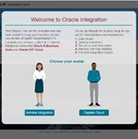
Avatar-Guided Oracle Integration Simulator Demo

image

This interactive simulator leads you through the Oracle Integration experience. Configure connectors, build an integration flow, map data, and activate your dashboard. We highly encourage you to share this demo with prospects; it is available on oracle.com/integration and in Sales Central. Try it now

PaaS Partner Community

For regular information on Oracle PaaS become a member in the PaaS (Integration & Process) Partner Community please register here.

clip_image003 Blog clip_image005 Twitter clip_image004 LinkedIn image[7][2][2][2] Facebook clip_image002[8][4][2][2][2] Wiki

Technorati Tags: SOA Community,Oracle SOA,Oracle BPM,OPN,Jürgen Kress
Oracle Integration Cloud (OIC) – Tips & Tricks by Anthony Hobart

image

While working with Oracle Integration Cloud (OIC) on a number of customer projects recently, I’ve come across a few handy tips and tricks to make life easier.

TIP-1 : Accessing Variables Across Scopes
TIP-2 : REST Adapter PATCH Verb Support
TIP-3 : REST Inbound Message Size
TIP-4 : Convert CSV as String to XML

PaaS Partner Community

For regular information on Oracle PaaS become a member in the PaaS (Integration & Process) Partner Community please register here.

clip_image003 Blog clip_image005 Twitter clip_image004 LinkedIn image[7][2][2][2] Facebook clip_image002[8][4][2][2][2] Wiki

Technorati Tags: SOA Community,Oracle SOA,Oracle BPM,OPN,Jürgen Kress
PaaS (Process & Integration) Partner Community Newsletter December 2019

Dear PaaS Partner Community,

We published the first hands-on SaaS Integration Bootcamps for 2020. Locations include Chicago, Mexico City, Chennai and a virtual class, additional locations will be announced in the community training calendar (membership required). To become a certified expert attend the Oracle Application Integration Cloud Sales Specialist (free) and Oracle Application Integration Cloud Platform for Solution Engineer (free) online training and after you attended a hands-on Bootcamp take the Oracle Application Integration Cloud 2019 Associate exam.

imageWatch John Sim how JSECOIN Oracle’s Chatbot answers cryptocurrency questions. Anyone with a web browser or website can now mine cryptocurrency. … Accept cryptocurrency payments online with simple to setup "Buy with crypto" buttons. For more information please visit https://jsecoin.com. We want to promote also your customer success, submit your story via the customer reference program.

Oracle Integration is recognized by Ovum as a leader for Hybrid Integration Platforms. A great example of this success is the CooP implementation by our partner Capgemini. Read this customer success story Help Wanted: How A Grocer Finds Workers Willing To ‘Do It All’ With A Smile in Forbes. The latest version of Oracle Integration is now available on Oracle Cloud Infrastructure Gen 2. Thanks to the community for sharing all the integration articles: Calling JD Edwards Orchestrations from Oracle Integration: Quickly and Easily & Oracle Autonomous Transaction Processing Adapter in OIC & OIC SOA Suite Adapter available as feature flag & Oracle Integration Cloud Navigation Walkthrough & OIC – CPQ Integration & OIC – CPQ Integration part II & Using the next generation Activity Stream & Oracle Integration Cloud REST Adapter capabilities & Simplified OAuth Config for Oracle Integration Cloud REST API using Postman! & API Management for Cloud Native Development & Notifications from Oracle API Platform Cloud Service & API Platform – Developer Portal Delegated Authentication.

In the process & innovation section Jan published an article about Auto-Mapping Elements in the Data Mapper and Marcel three new Jarvis Pizzeria articles: Input and Output Storage of Decision Model Invokes & Managing DM Masterdata Validity Period & XSLT parameters that are not found but are being used?

For a short summery of our monthly key information watch the PaaS Partner Updates on YouTube. The December edition highlights the resources to become a certified Oracle Integration Expert and our Slack channel to support you! This month’s you have the opportunity to watch all community webcasts free on-demand.

Want to publish your best practice article & news in the next community newsletter? Please feel free to send it via Twitter @soaCommunity #PaaSCommunity!

To read the newsletter please visit www.tinyurl.com/PaaSNewsDecember2019

Please like and share the newsletter at Twitter and LinkedIn

Jürgen Kress

PaaS Partner Adoption
Oracle HQ
Tel. +49 89 1430 1479
E-Mail: juergen.kress@oracle.com
clip_image003Blog clip_image004LinkedIn clip_image005 Twitter

PaaS Newsletter December 2019

PaaS Partner Community

For regular information on Oracle PaaS become a member in the PaaS (Integration & Process) Partner Community please register here.

clip_image003 Blog clip_image005 Twitter clip_image004 LinkedIn image[7][2][2][2] Facebook clip_image002[8][4][2][2][2] Wiki

Technorati Tags: newsletter,SOA Community newsletter,SOA Community,Oracle,OPN,Jürgen Kress