PaaS Partner YouTube Update October 2018

The October edition of the PaaS & Middleware Partner Update contains three topics:

• Innovate, Extend and Integrate SaaS

• Oracle OpenWorld 2018

• PaaS Community Webcast OOW Preview

For regular updates please subscribe to our YouTube channel here. Thanks for your likes and sharing the video on YouTube and LinkedIn. For the latest PaaS Community information please visit our Community update wiki here (Community membership required).

Blog Twitter LinkedIn image[7][2][2][2] Facebook clip_image002[8][4][2][2][2] Wiki

Technorati Tags: YouTube,SOA Community,Oracle SOA,Oracle BPM,Jürgen Kress,Middleware Update,Partner Update

Jarvis Pizzeria: First step in Implementing the Order Processing, Interface Definition by Richard Olrichs & Marcel van de Glind & Marc Kuijpers

image

In post Functional description of the pizza preparation process we gave a functional description of the pizza preparation process. For this we used the image below. Till now we only have implemented the bottom part ‘the preparation of a single pizza’.

In this post we will do the next step. The preparation of a complete order, containing potentially multiple pizzas. We will do this in a separate process. So let’s start by creating a new process in the preparation application. We gave it the self explaining name OrderPreparationProcess.

Next we created the process flow. We used the baby-step approach to implement to flow, for this reason we start with all components in draft mode. Read the complete article here.

PaaS Partner Community

For regular information on Oracle PaaS become a member in the SOA & BPM Partner Community for registration please visit www.oracle.com/goto/emea/soa (OPN account required) If you need support with your account please contact the Oracle Partner Business Center.

Blog Twitter LinkedIn image[7][2][2][2] Facebook clip_image002[8][4][2][2][2] Wiki

Technorati Tags: SOA Community,Oracle SOA,Oracle BPM,OPN,Jürgen Kress

Jarvis Pizzeria: Deploying and reverting to Snapshots by Richard Olrichs & Marcel van de Glind & Marc Kuijpers

image

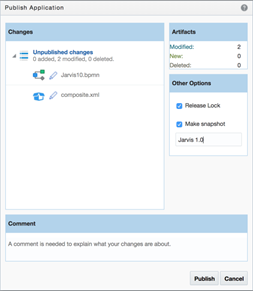
When working on a PCS application, you save and publish your changes often. However, when you publish a certain state of the application, you can decide to create a snapshot of this state of the application.
This can be very helpful if the publish represents a certain version of the application. Later these snapshots can be deployed or reverted to in case you want to roll back to a previous version. It is also possible to see what was in the application at the time of the snapshot creation.
In this blog we will show you how to work with snapshots.

When publishing, in the popup on the right hand side there is an option to ‘Make Snapshot’, when this checkbox is checked you can enter a name for the snapshot, in this case the snapshot will represent Jarvis 1.0! Read the complete article here.

PaaS Partner Community

For regular information on Oracle PaaS become a member in the SOA & BPM Partner Community for registration please visit www.oracle.com/goto/emea/soa (OPN account required) If you need support with your account please contact the Oracle Partner Business Center.

Blog Twitter LinkedIn image[7][2][2][2] Facebook clip_image002[8][4][2][2][2] Wiki

Technorati Tags: SOA Community,Oracle SOA,Oracle BPM,OPN,Jürgen Kress
OSB: Disable Chunked Streaming Mode recommendation by Martien van den Akker

image
Intro

These weeks I got involved in a document generation performance issue. This ran for several months, maybe years even. But it stayed quite unclear what the actual issue was.
Often we got complaints that document generation from the front-end application (based on Siebel) was taking very long. End users often hit the button several times, but with no luck. Asking further, it did not mean that there appeared a document in the content management system (Oracle UCM/WCC). So, we concluded that it wasn’t so much a performance issue, but an exception along the process of document generation. Since we upgraded BI Publisher to 12c, it was figured that it might got something to do with that. But we did not find any problems with BI Publisher, itself. Also, there was an issue with Siebel it’s self, but that’s also out of the scope of this article.

The investigation

First, on OSB the retry interval of the particular Business Service was decreased from 60 seconds to 10. And the performance increased. Since the retry interval was shorter, OSB does a retry on shorter notice. But of course this did not solve the problem.
As Service developers we often are quite laconical about retries. We make up some settings. Quite default is an interval of 30 seconds and a retry count of 3. But, we should actually think about this and figure out what the possible failures could be and what a sensible retry setting would be. For instance: is it likely that the remote system is out of order? What are the SLA’s for hoisting it back up again? If the system startup is 10 minutes, then a retry count of 3 and interval of 30 seconds is not making sense. The retries are done long before the system’s up again. But of course, in our case sensible settings for system outage would cause delays being too long. We apparently needed to cater for network issues.
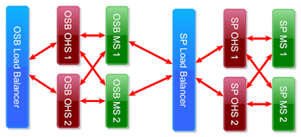
Last week our sysadmins encountered network failures, so they changed the LoadBalancer of BIP Publisher, to get chunks/packets of one requests routed to the same BI Publisher node. I found SocketReadTimeOuts in the logfiles. And from the Siebel database a query was done and plotted out in Excel showing lots of request in the  1-15 seconds range, but also some plots in ranges around 40 seconds and 80 seconds. We wondered why these were. Read the complete article here.

PaaS Partner Community

For regular information on Oracle PaaS become a member in the SOA & BPM Partner Community for registration please visit www.oracle.com/goto/emea/soa (OPN account required) If you need support with your account please contact the Oracle Partner Business Center.

Blog Twitter LinkedIn image[7][2][2][2] Facebook clip_image002[8][4][2][2][2] Wiki

Technorati Tags: SOA Community,Oracle SOA,Oracle BPM,OPN,Jürgen Kress
Undeploy non default, retired or inactive soa suite composites using java by Hugo Hendriks

image

When building a lot of soa suite composites, your environments end up with many different versions. So we might end up with 3 LocationService composites with versions[1.0.0.0], [1.0.1.0] and [1.0.2.0] which is the default. This takes up resources and clutters the EM. So you might want to have a way to remove these easily with having to go to the EM and manually uninstalling all of them with the risk of mis-clicking. In this blog I will show an easy way to undeploy old soa composites using java.

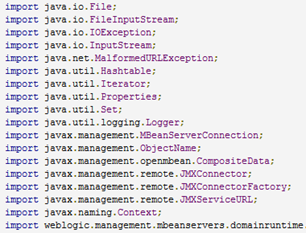
At first I looked at WLST and there is a sca_undeployComposite but we don’t want to specify each composite seperate. We just want to look through al composites and see which ones aren’t default and then undeploy them. There is also a sca_listDeployedComposites but I couldn’t find a way to pipe the output of this to an array to be able to work with it. So I just did what I know best and write it in Java. It basically does the same. Just connect through JMX, look up all the composites and check if they are: Read the complete article here.

PaaS Partner Community

For regular information on Oracle PaaS become a member in the SOA & BPM Partner Community for registration please visit www.oracle.com/goto/emea/soa (OPN account required) If you need support with your account please contact the Oracle Partner Business Center.

Blog Twitter LinkedIn image[7][2][2][2] Facebook clip_image002[8][4][2][2][2] Wiki

Technorati Tags: SOA Community,Oracle SOA,Oracle BPM,OPN,Jürgen Kress
Virtual Box VM for SOA Suite 12.2.1.3.0

image

with Cloud Adapters, Managed File Transfer (MFT), Real-Time Integration Business Insight and Stream Analytics on Oracle Technology Network!


We are pleased to announce the SOA Suite 12.2.1.3.0 Virtual Box VM for testing and demos through the Oracle Technology Network (OTN).

This VM includes the following products:

· Oracle Linux (64-bit) EL 6 Update 8

· Oracle Database, Enterprise Edition 12.1.0.2

· Oracle SOA Suite 12.2.1.3.0 (includes Service Bus, B2B, Oracle Enterprise Scheduler (ESS) and Business Activity Monitoring)

· Oracle Cloud Adapter for RightNow 12.2.1.3.0

· Oracle Cloud Adapter for Eloqua 12.2.1.3.0

· Oracle Cloud Adapter for Oracle ERP Cloud 12.2.1.3.0

· Oracle Cloud Adapter for Oracle Sales Cloud 12.2.1.3.0

· Oracle Cloud Adapter for Salesforce.com 12.2.1.3.0

· Oracle Cloud Adapter for NetSuite 12.2.1.3.0

· Oracle Real-Time Integration Business Insight 12.2.1.3.0

· Oracle Managed File Transfer 12.2.1.3.0

· Oracle Stream Analytics 12.2.1.3.0

· Oracle JDeveloper 12.2.1.3.0

· Java JDK 1.8.0_144(64-bit)

NOW AVAILABLE for trial, training and demos: http://bit.ly/soavm122130


PaaS Partner Community

For regular information on Oracle PaaS become a member in the SOA & BPM Partner Community for registration please visit www.oracle.com/goto/emea/soa (OPN account required) If you need support with your account please contact the Oracle Partner Business Center.

Blog Twitter LinkedIn image[7][2][2][2] Facebook clip_image002[8][4][2][2][2] Wiki

Technorati Tags: SOA Community,Oracle SOA,Oracle BPM,OPN,Jürgen Kress

Migrating to the Cloud and Side-by-Side Upgrade in the Cloud for Oracle SOA Cloud Service and Oracle MFT Cloud Service

image

This guide describes how to migrate on-premises SOA and MFT applications to the

cloud. It also describes how to do side-by-side upgrade in the cloud for SOA Cloud

Service and MFT Cloud Service: This guide is intended for administrators who want to migrate on-premises SOA and MFT applications to the cloud. It is also intended for administrators who want to do side-by-side upgrade of SOA Cloud Service or MFT Cloud Service: Get the guide here (community membership required)

PaaS Partner Community

For regular information on Oracle PaaS become a member in the SOA & BPM Partner Community for registration please visit www.oracle.com/goto/emea/soa (OPN account required) If you need support with your account please contact the Oracle Partner Business Center.

Blog Twitter LinkedIn image[7][2][2][2] Facebook clip_image002[8][4][2][2][2] Wiki

Technorati Tags: SOA Community,Oracle SOA,Oracle BPM,OPN,Jürgen Kress
Using Business Events in Fusion-based SaaS with Oracle Integration Cloud Service – Part 3: Event Filter Expressions by Stefan Koser

image

In the previous two posts, Part 1 and Part 2, we gave an overview which Business Events are available in R13 and how you can subscribe to events with external applications using Oracle ICS/OIC. In this part, we will show how to filter events using XPath expressions.

Use Cases for Filtering Business Events

The approach on sending a message in case of every creation/update/deletion of a Business Object is not what might be required in a specific use case. In our previous example we showed how to publish an “Item Creation” event in case an new item has been created in SCM Cloud.

One use case could be that an external system needs to have this information – but only for a specific ItemClass only. In our example we will send the “Item Creation” event only in case the item class is “Smartphones”  (using a Vision demo instance of R13 GSI).

Some examples of other potential use cases:

  • In a multi-national organization with subsidiaries, events should be sent only to specific countries/regions. For example, an organization could have Oracle Sales Cloud as world-wide CRM solution, but regional different fulfillment systems, for example different for US and EMEA.
  • In a Customer Data Management solution (using Oracle Customer Data Management Cloud) you want to send updates to all other participating system – but one external system covers only a subset of customers – for example business customers (B2B).
  • Similar use case in a Product Master Data Management solution (using Oracle Product Master Data Management Cloud)

In the next chapter, we will show two examples – for filtering Item Creation events (in SCM) and for filtering Contact Creation Events (in CRM/Sales Cloud).

Defining a Filter for Business Events in Integration Cloud Service

As first step, deactivate the integration previously created in Oracle Integration Cloud Service to enable editing: Read the complete article here.

PaaS Partner Community

For regular information on Oracle PaaS become a member in the SOA & BPM Partner Community for registration please visit www.oracle.com/goto/emea/soa (OPN account required) If you need support with your account please contact the Oracle Partner Business Center.

Blog Twitter LinkedIn image[7][2][2][2] Facebook clip_image002[8][4][2][2][2] Wiki

Technorati Tags: SOA Community,Oracle SOA,Oracle BPM,OPN,Jürgen Kress

Top tweets PaaS Partner Community – September 2018

image

September 2018  top tweets by PaaSCommunity

Send your tweets @soacommunity #PaaSCommunity and follow us at http://twitter.com/soacommunity. Make sure you share your content with the community!

SOA & BPM Partner Community

For regular information on Oracle SOA Suite become a member in the SOA & BPM Partner Community for registration please visit www.oracle.com/goto/emea/soa (OPN account required) If you need support with your account please contact the Oracle Partner Business Center.

Blog Twitter LinkedIn image[7][2][2][2] Facebook clip_image002[8][4][2][2][2] Wiki

Technorati Tags: twitter,SOA Community,Oracle SOA,Oracle BPM,OPN,Jürgen Kress,SOA Community twitter

Using Business Events in Fusion-based SaaS with Oracle Integration Cloud Service – Part 2: Step-by-Step Example by Stefan Koser

image

Following the overview in Part 1, I will now show detailed steps how to create the event subscriptions. In our example, we will use an “Item Creation” event (from SCM cloud).

Prerequisite: Register CSF Key in SaaS

In a FA-based SaaS instance, the outbound call of a webservice uses a OWSM security policy which retrieves the credentials for the call from a CSF Key. This means that you need to register a CSF key for every connection to an external system. In our case we need to register a CSF key for the ICS/OIC instance:

  • The name of the CSF key must match the ICS instance name or OIC account name
  • The user must be an ICS/OIC user
  • The password must be the password of this ICS/OIC user

You create this CSF key via SOA composer – accessible through the URL   <base_fa_url>/soa/composer

Enter the details and press “Register”. Read the complete article here.

PaaS Partner Community

For regular information on Oracle PaaS become a member in the SOA & BPM Partner Community for registration please visit www.oracle.com/goto/emea/soa (OPN account required) If you need support with your account please contact the Oracle Partner Business Center.

Blog Twitter LinkedIn image[7][2][2][2] Facebook clip_image002[8][4][2][2][2] Wiki

Technorati Tags: SOA Community,Oracle SOA,Oracle BPM,OPN,Jürgen Kress