Bug: Typed One Way Pipeline in Oracle Service Bus / OSB 12.2.1 by Frank Munz

clip_image002


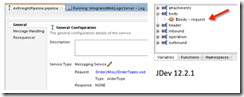
When creating a Service Bus pipeline in JDeveloper 12.2.1 for Oracle Service Bus 12.2.1, based on a typed, one-way business service (either one way WSDL based, or Messaging Service with XML request and XSD type with reply NONE business service) the pipeline won’t correctly use the request message type. It’s annoying because you cannot easily create expressions based on the request type, such as drilling open the $body variable, e.g. for an Order containing a shipping ID. All that is displayed within the pipeline is $body.

This happens although the pipeline configuration displays the correct XSD, eg. OrderType.xsd and the correct Type, eg. OrderType.

I am quite surprised because this is not a very unusual use case. Anyway I couldn’t find a work around for JDeveloper 12.2.1 (let me know if you know one!). Interestingly, testing a proxy service based on the business service works all right (so maybe the bug slipped in when the pipeline construct was separated from the proxy service? just guessing.)

It is possible to work with the good old Service Bus web console /sbconsole. There everything is fine, i.e. the correct structure of the request message is displayed. The working Service Bus console is another indication that the way JDeveloper does it is broken. Read the complete article here.

SOA & BPM Partner Community

For regular information on Oracle SOA Suite become a member in the SOA & BPM Partner Community for registration please visit www.oracle.com/goto/emea/soa (OPN account required) If you need support with your account please contact the Oracle Partner Business Center.

Blog Twitter LinkedIn image[7][2][2][2] Facebook clip_image002[8][4][2][2][2] Wiki

Oracle Open World PaaS Partner Update Webcast – today September 27th 2016 16:0 CET

imageAttend our September edition of the SOA & BPM Partner Community Webcast live on September 27th 2016 at 16:00 CET.

Get the latest news from Oracle Open World 2016. A detailed update on new features of Oracle Platform as a Service and how to position them at your customers. As part of the Webcast we will introduce the Oracle Open World kit, an opportunity to you to run a minimagei conference for your customers!

Ed Zou

Vice President Product Management, Oracle Cooperation

Visit the registration page here.

Call ID: 5566478 Call Passcode: 333111

Austria: +43 (0) 192 865 12
Belgium: +32 (0) 240 105 28
Denmark: +45 327 292 22
Finland: +358 (0) 923 193 923
France: +33 (0) 15760 2222
Germany: +49 (0) 692 222 161 06
Ireland: +353 (0) 124 756 50
Italy: +39 (0) 236 008 198

Netherlands: +31 (0) 207 143 543
Spain: +34 914 143 755
Sweden: +46 (0) 856 619 465
Switzerland: +41 (0) 445 804 003
UK: +44 (0) 208 118 1001
United States: 140 877 440 73
More Local Numbers

Schedule:

August 30th 2016 at 16:00-17:00 CET

Visit the registration page here.

Missed our SOA & BPM Partner Community Webcast? – watch the on-demand versions:

· BPM Suite & PCS Update July 26th 2016

· Integration Cloud Service June 28th 2016

· Sales Plays Webcast June 9th 2016

· Real-Time Integration Business Insight May 31st 2016

· Integration Strategy sales and marketing campaign update

· Microservices

· Stream Explorer

· Process Cloud Service V2

· SOA Suite 12.2.1

· Oracle OpenWorld 2015 update

· SOA & API Cloud Service

· Solutions Catalog & Cloud Marketplace

· GSE demo systems

· Hybrid sales plays

For the latest information please visit Community Updates Wiki page (SOA Community membership required).

SOA & BPM Partner Community

For regular information on Oracle SOA Suite become a member in the SOA & BPM Partner Community for registration please visit www.oracle.com/goto/emea/soa (OPN account required) If you need support with your account please contact the Oracle Partner Business Center.

Blog Twitter LinkedIn image[7][2][2][2] Facebook clip_image002[8][4][2][2][2] Wiki

Technorati Tags: Ed Zou,OOW 2016,Oracle OpenWorld,Community webcast,SOA Community,Oracle SOA,Oracle BPM,OPN,Jürgen Kress

Export and Import Oracle BAM Projects by Waslley Souza

clip_image001


In the real world, you’ll create your Oracle BAM projects in a development environment, and when all is well, you will export it to a test or production environment. Export and import actions are easy to perform using BAMCommand command-line utility.

In this post, we will learn how to export Oracle BAM projects from a source environment and then import it to a target environment.
Download the sample application: BlogProject.zip.

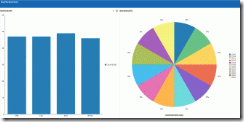
I created an Oracle BAM project called Blog that has Data Object, Business Query, Business Views and Dashboard.

First of all, edit the BAMCommand configuration file, defining the information about the source environment.
It is located at <FMW_HOME>/soa/bam/bin/BAMCommandConfig.xml.

Now you can execute the BAMCommand command-line utility to export your BAM project artifacts.
I could export all Oracle BAM objects in the system, but I have other projects and I just want to export the project called Blog. Read the complete article here.

SOA & BPM Partner Community

For regular information on Oracle SOA Suite become a member in the SOA & BPM Partner Community for registration please visit www.oracle.com/goto/emea/soa (OPN account required) If you need support with your account please contact the Oracle Partner Business Center.

Blog Twitter LinkedIn image[7][2][2][2] Facebook clip_image002[8][4][2][2][2] Wiki

Connecting Stream Explorer and BAM by Waslley Souza

clip_image001


When you are working with Oracle Stream Explorer and you need analytical data about the events, the easiest way is using Oracle BAM. The connection between the Oracle Stream Explorer and Oracle BAM is simple to create. In this post we will learn how to do this connection using JMS.

This is the structure of my CSV file.

In the Oracle Stream Explorer, go to the Exploration that you want to use.
Click Configure a Target.

Complete the form with information about your BAM server and click Finish.

This is the necessary setting in Oracle Stream Explorer.
Now, go to Oracle WebLogic Server and navigate to JMS Modules.

Click BAMJMSSystemResource, and then click New.
Create a new Queue with the same information you entered in Oracle Stream Explorer and click Next. Read the complete article here.

SOA & BPM Partner Community

For regular information on Oracle SOA Suite become a member in the SOA & BPM Partner Community for registration please visit www.oracle.com/goto/emea/soa (OPN account required) If you need support with your account please contact the Oracle Partner Business Center.

Blog Twitter LinkedIn image[7][2][2][2] Facebook clip_image002[8][4][2][2][2] Wiki

Matt Brasier for Oracle Technology Network – Monitoring Oracle SOA Suite

clip_image002Matt Brasier, C2B2 Head of Consulting and the co-author of the Oracle SOA Suite 11g Performance Tuning Cookbook (Packt Publishing) discusses Oracle SOA Suite monitoring in this 2 Minute Oracle Technology Network Tech Tip recorded at the UKOUG Tech15 Conference. Watch the video here.

SOA & BPM Partner Community

For regular information on Oracle SOA Suite become a member in the SOA & BPM Partner Community for registration please visit www.oracle.com/goto/emea/soa (OPN account required) If you need support with your account please contact the Oracle Partner Business Center.

Blog Twitter LinkedIn image[7][2][2][2] Facebook clip_image002[8][4][2][2][2] Wiki

Resiliency: Circuit Breaker

clip_image002

Circuit Breaker is a new resiliency feature in 12.2.1 that helps to simplify operations and ensure system stability when downstream endpoints become unavailable.

This post is meant to be a quick introduction to this new feature so you can start testing it out.

Circuit Breaker overview

Circuit Breaker enables you to configure the system to automatically suspend upstream endpoints when a downstream system is down or unreachable from a SOA composite. This prevents faults from building up in the server and relieves you from having to bulk-recover faulted instances. The upstream endpoints are automatically resumed after the downstream endpoint comes back up.

The circuit breaker feature works by monitoring downstream system failures and after x number of failures over y minutes (where x and y are configurable) any upstream web service, subscriber, or adapter where the failed messages originated from will be suspended.  For adapters and subscribers the messages will not be lost but will not be processed until the downstream system comes back up. Web Service requests will be rejected and it is up to the client program to handle these failures.

Suspended services will show up in the EM dashboard (below),  by clicking on the "Suspended since …" link another dialog will pop up that will allow you to jump to the error in the Error Hospital and/or re-enable the service. 

Once a service is suspended messages are allowed to "trickle" through periodically in order to test the downstream system.  If the downstream invocation succeeds then the upstream service is resumed.

Configuration

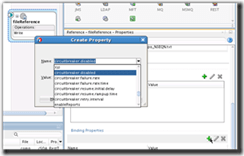
Circuit Breaker can be configured globally and overridden at the downstream endpoint. There may be situations where you don’t want downstream failures to cause services to be suspended, in this case you would disable the circuit breaker at the endpoint level, it is also possible to override the number of failures and failure window at the endpoint level. Conversely you can disable globally and enable at the endpoint level.  It is also possible to set the circuit breaker properties on an endpoint when designing the composite in JDev.

Global configuration

To display the configuration dialog go to SOA Infrastructure -> SOA Administration -> Resiliency Configuration. Read the complete article here.

SOA & BPM Partner Community

For regular information on Oracle SOA Suite become a member in the SOA & BPM Partner Community for registration please visit www.oracle.com/goto/emea/soa (OPN account required) If you need support with your account please contact the Oracle Partner Business Center.

Blog Twitter LinkedIn image[7][2][2][2] Facebook clip_image002[8][4][2][2][2] Wiki

What is SOA 12c ? by Tutorial Diary

clip_image002


Oracle SOA Suite 12c is new version of SOA Suite tool from Oracle. Oracle has introduced lot of new features in this new version. This new version is based upon 4 themes as show below. First two themes (Developer productivity and Industrial SOA) comes as outcome of user/developers feedback and other two themes (Mobile and Cloud) introduced as per industry trend.

SOA 12c Themes

Developer Productivity

This theme is outcome of the community that currently using SOA Suite 11g. Oracle has introduced couple of improvements in this version based upon the feedback from that community. As the name suggest, this theme helps developer to improve their productivity and that comes from the new features introduced.

Industrial SOA

This theme is also a outcome of the community that currently using SOA Suite 11g. Oracle has introduced couple of improvements in this version based upon the feedback from that community.

Mobile & Cloud

These themes has been introduced by seeing current industry trend. Currently everyone talking about mobile & cloud enablement that comes under these themes.

Major Enhancements in SOA 12c

Below are the major enhancements done in this new version (SOA 12c).

• Earlier Service Bus is separate tool from SOA Suite tool and we use to have Eclipse as IDE for service bus development. In this 12c version, Service Bus become part of SOA 12c only i.e. we can do Service Bus development using JDeveloper only, there is no need to use Eclipse anymore.
• As Service Bus become part of SOA 12c so all the adapters becomes accessible to Service Bus also.
• ESS (Enterprise Service Scheduler) is new component introduced in this version that provide scheduling capabilities.
• 1 Single Installer has been introduced that can used to install all the components like Database, Weblogic, SOA Suite, Service Bus etc.
• MFT (Managed File Transfer) has been introduced that does not come by default with SOA 12c but this can be downloaded as separate package that helps to do file transfer.
• Free License for developer on single machine. Read the complete article here.

SOA & BPM Partner Community

For regular information on Oracle SOA Suite become a member in the SOA & BPM Partner Community for registration please visit www.oracle.com/goto/emea/soa (OPN account required) If you need support with your account please contact the Oracle Partner Business Center.

Blog Twitter LinkedIn image[7][2][2][2] Facebook clip_image002[8][4][2][2][2] Wiki

What about to upgrade to Oracle SOA Suite 12.2.1? by Rolando Carrasco

clip_image001

This is my last post of the year.
Strangely this was the year with less posts here in Oracle Radio. And not only that, but I started to do it in English.
Since 2007 I’ve been feeding this blog in Spanish, but for some specific posts I just decided to do it in English to get to a greater audience.
So what about to upgrade to Oracle SOA Site 12.2.1? Is the name of this post.
For the last 7 weeks or so I’ve been upgrading, together with one of my colleagues, around 5 domains of SOA Suite 12.1.3 to 12.2.1. It’s been quite an effort, because those very same domains, were upgraded from 11.1.1.7, so there is a lot of history in them.
They’ve been serving a large SOA implementation, a mission critical implementation that is part of the core for this institution. So the challenge was an important one.
To fail and not be able to rollback was not an option, the maintenance window for the production environment was not that large.
But I insist: what about upgrading it? Does it really work? Is it well documented? Why doing so? 
Well, it is definitely documented by Oracle. It really works. That is the reality. Doing this must be something to have in mind for anyone using 12.1.3.x, I really encourage you to do it. Do not hesitate to do it. It will give you much more stability to your SOA platform.
If you are using Oracle BAM 12c, then this is something you need to do, a lot of bugs were solved with this upgrade. Same thing with BPM. The UI has changed for the ADF ALTA version, which is very clean and even elegant, I would say:
If you are already using Oracle Cloud products, this will be very familiar for you. Oracle Enterprise Manger – Fusion Middleware Control has been always an slow UI. Now is not the exception, but seems to be little less slow. But it is definitive much more intuitive and easy to use, take a look at this: Read the complete article here.

SOA & BPM Partner Community

For regular information on Oracle SOA Suite become a member in the SOA & BPM Partner Community for registration please visit www.oracle.com/goto/emea/soa (OPN account required) If you need support with your account please contact the Oracle Partner Business Center.

Blog Twitter LinkedIn image[7][2][2][2] Facebook clip_image002[8][4][2][2][2] Wiki

I don’t like the Mediator by Luc Gorissen

clip_image002

Ok, so there you have it: I just don’t like the Mediator. I don’t really know why. But now that it’s in the open, let’s discuss it.

I often see a pattern where a composite with a synchronous operation is implemented with a Mediator and BPEL component:

I think that in most of these cases, it would be better to either leave out the Mediator component completely. Or replace it with a BPEL component that is run transient, i.e. in-memory.

This article discusses some of the aspects around using a Mediator.

We need to discuss…

Some of the reasons to avoid a Mediator:

  • It adds another ‘technology’ to your developer’s skillset
  • It adds more tasks for system administration
  • It’s bad for performance

Arguments in favor of using the Mediator:

  • One end-point for a composite with multiple operations
  • One external interface hides composite-internal changes

Let’s go.

Yet another developer skill

As developer has to learn a lot when trying to master the SOA Suite completely. Learning all the aspects of BPEL is already a big task. And the Mediator is yet another skill. Arguably, not a big skill. Even more, developers are often inclined to say ‘ah … not hard at all’. But … are you as a developer familiar with all the features of Mediators? Like the resequencing rules? The routing rules priorities? When to specify sequential and parallel execution?

I like simple things.

More tasks for system administration

Like for the developer, the Mediator also introduces new topics for the system administrator: purging and tuning.

Both should not be a big issue, as enough information is available on how to handle them . But … does your system administrator know that there is a Mediator engine that needs to be tuned? Just challenge your system administrators to have a look at  Mediator tuning and ask them how they handled it.

Performance

At the beginning of the article, it was argued that a Mediator with synchronous operation(s) can be replaced with a BPEL component. That BPEL component can then be made transient, i.e. it will run in memory. That would save the DB access by the Mediator engine. Read the complete article here.

SOA & BPM Partner Community

For regular information on Oracle SOA Suite become a member in the SOA & BPM Partner Community for registration please visit www.oracle.com/goto/emea/soa (OPN account required) If you need support with your account please contact the Oracle Partner Business Center.

Blog Twitter LinkedIn image[7][2][2][2] Facebook clip_image002[8][4][2][2][2] Wiki

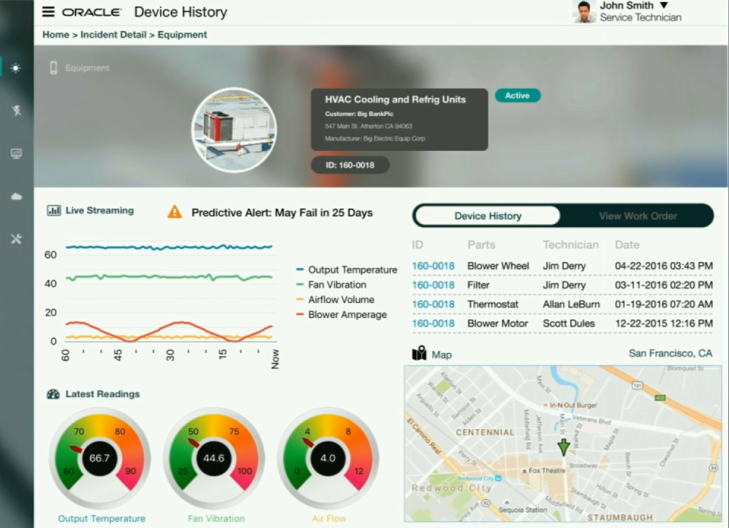
Thomas Kurian PaaS Oracle OpenWorld 2016 keynote summery

During Oracle OpenWorld 2016 keynote Thomas Kurian showcased the Oracle IaaS, PaaS and SaaS portfolio in many live demos. Some of the highlights include key PaaS solutions:

Paas1Paas2paas3paas4paas5paas6paas7paas9

Slides and demos will become available for partners via the communities in the next weeks. Please see partner community details. below.

Want to try the Oracle PaaS Service?

Want to know how you can position your services around Oracle PaaS?

Watch the on-demand PaaS Partner Webcast www.tinyurl.com/salesPaaS

Make us of the sales Oracle kits and learn how to position your services:

clip_image002

Want to learn more about Oracle PaaS Services?

Join the Partner Communities free of charge:

SOA & BPM Partner Community

For regular information about Oracle’s PaaS and Middleware solutions become a member in the SOA & BPM Partner Community for registration please visit www.oracle.com/goto/emea/soa (OPN account required) If you need support with your account please contact the Oracle Partner Business Center.

WebLogic Partner Community

For regular information about Oracle’s PaaS and Middleware solutions  become a member in the WebLogic Partner Community please visit: http://www.oracle.com/partners/goto/wls-emea ( OPN account required). If you need support with your account please contact the Oracle Partner Business Center.


Enjoy Oracle OpenWorld 2016!

Jürgen Kress

SOA & BPM Partner Community

For regular information on Oracle SOA Suite become a member in the SOA & BPM Partner Community for registration please visit www.oracle.com/goto/emea/soa (OPN account required) If you need support with your account please contact the Oracle Partner Business Center.

Blog Twitter LinkedIn image[7][2][2][2] Facebook clip_image002[8][4][2][2][2] Wiki