Process Cloud Service – Applications by Marcel van de Glind

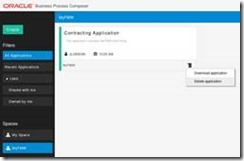
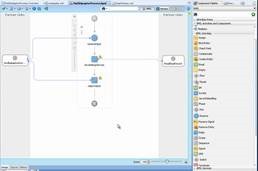
clip_image002In my previous post I wrote about spaces (PCS – Spaces). In this post I will go into the next step: ‘Applications’. I will describe how to create, download, import, export, deploy, delete, etc. an application.

Create a new Application

Click the Create button at the top-left corner of the home page and select New Application from the choices. The following window appears:

In here you have to specify a name for the application and in which space to create it. Optionally you can also enter a description. After that click the Create button. The new Empty application is created in the specified space.
Delete an Application

On the top level in the Business Process Composer the Applications in the currently selected space are shown. From here it is possible to delete an Application. For this click the Options button in the bottom right corner of the Application. A menu pop’s up from where you can select ‘Delete application’. Note: this options it only available if you are the owner of the space.

Read the complete article here.

SOA & BPM Partner Community

For regular information on Oracle SOA Suite become a member in the SOA & BPM Partner Community for registration please visit www.oracle.com/goto/emea/soa (OPN account required) If you need support with your account please contact the Oracle Partner Business Center.

Blog Twitter LinkedIn image[7][2][2][2] Facebook clip_image002[8][4][2][2][2] Wiki

4 Reasons You Should Look at Process Management in the Cloud by Kris Nelsonnter a post title

clip_image001


Process management in the cloud offers several compelling advantages for both the business and IT teams. I see the pressure to move faster, innovate faster and deliver value immediately to our customers all around us.  Process management in the cloud offers some great ways to enable that agility in your organization. In addition to the reasons you should be looking at this, I will offer a few common use cases we are seeing as Oracle’s Process Cloud Service (PCS) begins to roll out.

Reason 1:  Business-Focused

Cloud solutions like PCS provide a comprehensive process development platform, from modeling to form development through to deployment. This is in a zero-code environment, allowing the business to define, create and manage their own business processes. One example from PCS is the play, test and validate cycle. This allows allows users to see the end-to-end application and walk through the various activities in different process roles. Features like these will allow the business to bring common business processes to market quickly. 

Reason 2:  Zero Footprint

This reason is usually listed #1, as it is one of the main drivers to move applications and systems to the cloud. Being able to quickly provision and standup a process management tool in the cloud has some compelling benefits:

  • Reduced cost to get started:  Reduce the initial capital outlay or help to move dollars from capital to expense spending, depending on your organization’s needs.
  • Faster time to provision: Zero installation means increased speed to market so that you can take advantage of opportunities to either reduce costs with process or differentiate in the marketplace. You can start in a more agile fashion, start smaller and prove things out quickly. Read the complete article here.

SOA & BPM Partner Community

For regular information on Oracle SOA Suite become a member in the SOA & BPM Partner Community for registration please visit www.oracle.com/goto/emea/soa (OPN account required) If you need support with your account please contact the Oracle Partner Business Center.

Blog Twitter LinkedIn image[7][2][2][2] Facebook clip_image002[8][4][2][2][2] Wiki

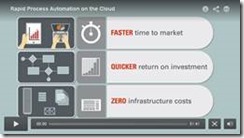
Rapid Process Automation on the Cloud


A Business Process Management SaaS cloud service that helps rapidly design, manage, and automate business processes, while keeping strategic business goals and IT digitalization aligned.

clip_image002

Watch the video here.

clip_image004

Watch the video here

SOA & BPM Partner Community

For regular information on Oracle SOA Suite become a member in the SOA & BPM Partner Community for registration please visit www.oracle.com/goto/emea/soa (OPN account required) If you need support with your account please contact the Oracle Partner Business Center.

Blog Twitter LinkedIn image[7][2][2][2] Facebook clip_image002[8][4][2][2][2] Wiki

FlexDeploy 2.1 Released – Oracle Cloud, Built-in CI, Dashboards, and more! By Dan Goerdt


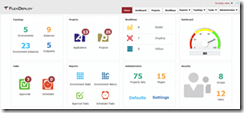
clip_image002We are happy to announce the availability of FlexDeploy 2.1, extending an already robust DevOps solution for automating the build, deploy, test, and release lifecycle for Oracle and non-Oracle software.  This new release offers additional features which help speed the delivery of high quality software, including Cloud, Continuous Integration, and Dashboards. 

FlexDeploy 2.1 Summary of Enhancements

Video: Setting Up Your Raspberry Pi for Iot by Luc Bors


clip_image002The Raspberry Pi isn’t pastry! It’s a tiny, fully programmable computer you can use in all manner of IoT projects. In his second 2 Minute Tech Tip Oracle ACE Director Luc Bors gives a quickie introduction to setting up this remarkable little device. Luc’s tip is a precursor to the IoT Hackathon in Utrecht, NL on September 15–16, 2015. Click here for more information. If you want a more in-depth introduction to setting up your Raspberry Pi, check out Luc’s blog post: IoT Hackathon Part I : Setting up your Raspberry Pi. For up to date information on hackathons and design jams, make sure you visit the APPS UX Innovation Events blog.

Want more 2 Minute Tech Tips? Click here. Have an idea for a 2 Minute Tech Tip? Contact me: @OTNArchBeat

Watch the video here.

SOA & BPM Partner Community

For regular information on Oracle SOA Suite become a member in the SOA & BPM Partner Community for registration please visit www.oracle.com/goto/emea/soa (OPN account required) If you need support with your account please contact the Oracle Partner Business Center.

Blog Twitter LinkedIn image[7][2][2][2] Facebook clip_image002[8][4][2][2][2] Wiki

Create a SOA Application in JDeveloper 12c Using Maven SOA Plug-In by Daniel Rodriguez


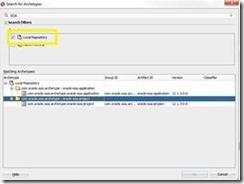
clip_image002Maven is a commonly used build system for java projects. It provide benefits ranging from standardizing project layouts, to automated dependency fetching, to automated builds and Maven.  Oracle provides a pretty comprehensive document outlining how to build and create Oracle SOA and BPM projects using Maven. See this article that documents some simple steps to get up and running using Maven. However, when running my first Maven project I encountered some unexpected errors. Maven could not find any SOA archetypes and was also unable to load every dependency. As I found, being able to create, build, and deploy SOA and BPM projects using Maven requires some initial pre-work. Once the set-up is done, the Oracle doc mentioned above will make more sense and will execute successfully.

Why Maven in SOA Applications?

Unlike Ant, Maven does not require developers to specify every command to achieve a goal. Moreover, Maven’s structure in the form of a POM file allows dependencies to be managed easily. However, the biggest benefit is that Maven in JDeveloper provides complete a life-cycle process. Each goal incorporates the previous one and adds functionality. For example, if we run the mvn test command, it will execute the compile, package and deploy commands before running each test on the composite. The idea is to provide a foundation for continuous development and integration. A single command can compile, package, deploy and run all test cases: saving you time.

Gradle provides much of the same functionality of Maven but on a different format. It is implemented using Groovy and, as a result, some of its scripts are much shorter than Maven’s. Unfortunately, Gradle is not native to JDeveloper at this moment.

Maven Goals

Documentation lists five goals for the SOA Maven Plug-in. However, The plug-in itself lists six goals.

  1. compile: Compiles the Application
  2. package: Creates a SAR file of the composite
  3. deploy: Deploys the SOA composite
  4. test: Runs all test created for the SOA composite
  5. undeploy: Removes the composite
  6. help: Provides a list of goals and their corresponding commands.

The help goal is the only goal not listed in the actual Oracle document but displayed on the plug-in itself. While the “help” command may not be a “Goal”, It provides useful information regarding goals, commands, and what each command tries to achieve. Read the complete article here.

SOA & BPM Partner Community

For regular information on Oracle SOA Suite become a member in the SOA & BPM Partner Community for registration please visit www.oracle.com/goto/emea/soa (OPN account required) If you need support with your account please contact the Oracle Partner Business Center.

Blog Twitter LinkedIn image[7][2][2][2] Facebook clip_image002[8][4][2][2][2] Wiki

SOA Suite 12c monitoring with EM 12c Cloud Control by Michel Schildmeijer


clip_image002Good monitoring is knowing how your systems and application are doing at past, present and future time. There are many  monitoring tools & solutions at the market, all with pro’s and cons. Building monitoring takes time and effort but in the end gives you the benefit of less disturbance and more guarantee of business continuity.

At the customers I work for, I often implemented Oracle’s Enterprise manager 12c Cloud Control to build a monitoring framework. In this blog I will tell about what needs to be done to build such a framework.

Pre Requirements

Before start building a solution, make sure you have:

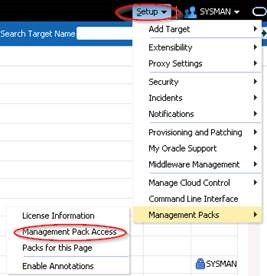
  • The proper monitoring pack licenses; for SOA Suite that will be:
    • The WebLogic Diagnostics & Monitoring Pack
    • The SOA Suite Diagnostics & Montitoring Pack
  • Agents installed on every physical (or virtual ) host where WebLogic / SOA is running

Building Steps

Deploying Agents to Targets

If not already done so, agents need to be deployed to the hostst were middleware is running. I will not discuss this any further because this is more Enterprise Manager generic.

Discover Middleware Targets

Discovering Middleware Targets is just as it is as with other Targets. Read the complete article here.

SOA & BPM Partner Community

For regular information on Oracle SOA Suite become a member in the SOA & BPM Partner Community for registration please visit www.oracle.com/goto/emea/soa (OPN account required) If you need support with your account please contact the Oracle Partner Business Center.

Blog Twitter LinkedIn image[7][2][2][2] Facebook clip_image002[8][4][2][2][2] Wiki

MTOM using SoapUI and OSB by Martien van den Akker


clip_image001MTOM (Message Transmission Optimization Mechanism) is incredibly hard… to find practical information about, on SoapUI and OSB. There are loads of articles. Like:

But I need to process documents that are send using MTOM to my service. And to be able to test it, I need to create a working example of a SoapUI project to do exactly that. Also about SoapUI and MTOM there are loads of examples, and it is quite simple really. But I had a more complex wsdl that I was able to use for Soap with Attachments (SwA) wich is also simple really. But how to connect those two in a simple working example? Well, actually, it turns out not so hard either… So bottom-line, MTOM with SoapUI and OSB is not so hard. If you know how, that is.
So let’s work this out on a step-by-step basis.

XSD/WSDL

I’ll start with a simple XSD: Read the complete article here.

SOA & BPM Partner Community

For regular information on Oracle SOA Suite become a member in the SOA & BPM Partner Community for registration please visit www.oracle.com/goto/emea/soa (OPN account required) If you need support with your account please contact the Oracle Partner Business Center.

Blog Twitter LinkedIn image[7][2][2][2] Facebook clip_image002[8][4][2][2][2] Wiki

Why does DB-adapter return duplicate rows? by Jon Petter Hjulstad


clip_image002Here are some DB adapter tips regarding duplicate rows.

The DB Adapter has some nice features, but sometimes you can get fooled. One of my colleagues experiences this one day. The query returned the same row – just repeated many times.

The reason for this is because the primary key was not defined correctly.

The good thing is that the documentation describes this – and more: Oracle documentation

For tables where primary key is defined – this should not be a problem, but in cases where it is not defined or you are querying a view – you would need to specify a primary key yourself. A couple of relevant notes here:

  • If you do not provide a valid primary key, then the unique constraint is not guaranteed, and this could result in possible loss of messages at runtime. That is, rows with duplicate primary key values are likely to be lost.
  • You should ensure that you primary key is less than 100 bytes.
  • Oracle recommends that you use varchar instead of char for primary key columns

Read the complete article here.

SOA & BPM Partner Community

For regular information on Oracle SOA Suite become a member in the SOA & BPM Partner Community for registration please visit www.oracle.com/goto/emea/soa (OPN account required) If you need support with your account please contact the Oracle Partner Business Center.

Blog Twitter LinkedIn image[7][2][2][2] Facebook clip_image002[8][4][2][2][2] Wiki

My private Corner – Merry Christmas

clip_image002

Our little family wish’s you all a Merry Christmas. Get some time to rest with your family. Enjoy your traditional Christmas meal with a good bottle of wine.

Whish you a great start in 2016 and see you all in Valencia!

Bandit & Jürgen

SOA & BPM Partner Community

For regular information on Oracle SOA Suite become a member in the SOA & BPM Partner Community for registration please visit www.oracle.com/goto/emea/soa (OPN account required) If you need support with your account please contact the Oracle Partner Business Center.

Blog Twitter LinkedIn image[7][2][2][2] Facebook clip_image002[8][4][2][2][2] Wiki