Fusion Middleware 12C: Deploy the MDS using Maven by Hugo Hendriks


clip_image002In two previous posts here and here, I demonstrated how you can setup CI for OFM 12C projects. One of the things I hadn’t figured out yet was how I could deploy the MDS using Maven. After a vague hint on the internet, Oracle’s response that this feature wasn’t officially supported yet and some trial and error I came across the solution. It is actually quite simple.

Basically it comes down to this:

  • Create a zip file of the files you want to stick into the MDS
  • Use the com.oracle.soa.plugin:oracle-soa-plugin:deploy maven goal to deploy it

That wasn’t that hard as you can see clip_image003Let’s go into a bit more detail. You can use a command line to create the zip or use the maven-assembly-plugin to give you a bit more flexibility. I used the last option because I wanted to filter certain files. Within my Jenkins job, I checked out my MDS files and zipped them using the package goal into a file called sca-MDS_rev1.0.jar. Look in the plugin section in the pom file down below to see about the configuration of the assembly plugin. The pom file is just a copy of a normal soa composite project. Read the whole article here.

SOA & BPM Partner Community

For regular information on Oracle SOA Suite become a member in the SOA & BPM Partner Community for registration please visit www.oracle.com/goto/emea/soa (OPN account required) If you need support with your account please contact the Oracle Partner Business Center.

Blog Twitter LinkedIn image[7][2][2][2] Facebook clip_image002[8][4][2][2][2] Wiki

Accessing Oracle B2B metadata from your application by Tiago Teixeira


For some time now, Oracle B2B has exposed several methods of accessing it’s partner and message metadata from a custom application. This has been improved even further with B2B 12c.
In this post I’ll guide you through the 2 most common ways of accessing B2B’s metadata programmatically and some news of the 12c version.
The 2 main ways of accessing the metadata stored in B2B are:

  • Web Services exposed by B2B
  • Java API

Web Services exposed by B2B

You can access the WSDL’s for the available web services at the following URL:

http://host_name:port_number/b2b/services/

The most common services are:

  • Outbound Web Service – Works as an internal Listening Channel. Based on the details and headers in the soap:body, the agreement identification is done and the message is routed to the partner.
  • Translation Web Service – Allows to translate documents such as EDI and HL7 from Native to XML format (NativeToXMLService) and from XML to Native format (XMLToNativeService)
  • Query API (GetTPAConfigService) – Allows for retrieval of different metadata such as active agreements for a Trading Partner or checking if a Trading Partner has an agreement for a specific Document.

Read the complete article here.

SOA & BPM Partner Community

For regular information on Oracle SOA Suite become a member in the SOA & BPM Partner Community for registration please visit www.oracle.com/goto/emea/soa (OPN account required) If you need support with your account please contact the Oracle Partner Business Center.

Blog Twitter LinkedIn image[7][2][2][2] Facebook clip_image002[8][4][2][2][2] Wiki

Yes, Oracle API Gateway Can Protect Your Web Application, Too by Marcelo Parisi


clip_image001This article by Marcelo Parisi examines basic concepts of web application security using Oracle API Gateway, using an XSS Injection issue and an SQL Injection issue to demonstrate how Oracle API Gateway can bring value to these scenarios.

The topic of Web application security never gets old. Some of the main associated challenges are related to detection and prevention of XSS Injection and SQL Injection. Such vulnerabilities are usually exploited through web application url parameters or user input fields in HTML forms.

While Oracle API Gateway has been used mainly to protect Web Services, RESTFul APIs and other kinds of services, its filtering and hardening mechanisms make it a powerful tool in a web application protection scenario.

In this article we’ll examine some basic concepts of web application security using Oracle API Gateway. We’ll work on an XSS Injection issue and on a SQL Injection issue to demonstrate how Oracle API Gateway can bring value to these scenarios.

The applications used here to demonstrate the issues were custom made for this article and are deployed in an Oracle WebLogic Server 12c environment with no clustering. The SQL Injection demonstration application uses a datasource connected to an Oracle Database 11gR2. The application reads data from the database’s simple three-column table and prints in the screen. The XSS Injection application prints only the user form input field value in the screen. These applications have no real-life use and are only some code samples for demonstration purposes.

We’ll not be covering infrastructure installation in this article. We’ll be using two servers, one with Oracle API Gateway installed on it, and the other one with the application running on Oracle WebLogic Server 12c.

Infrastructure

As mentioned before, building the infrastructure is out of this document’s scope. In this section we’ll just see what the infrastructure used to demonstrate the concepts looks like. Read the complete article here.

SOA & BPM Partner Community

For regular information on Oracle SOA Suite become a member in the SOA & BPM Partner Community for registration please visit www.oracle.com/goto/emea/soa (OPN account required) If you need support with your account please contact the Oracle Partner Business Center.

Blog Twitter LinkedIn image[7][2][2][2] Facebook clip_image002[8][4][2][2][2] Wiki

API Manager – OSB/OAC/OAG Integration Demo by Sharath Kumar


clip_image002Oracle API Manager is a new product which is built on the proven service virtualization capabilities of Oracle Service Bus to provide Creation, annotation and publication of APIs in the Oracle Service Bus console and Discovery, subscription and usage monitoring of APIs by developers in a new API Portal.

The demo image size is compressed: 23 GB and uncompressed: 42 GB please let myself know if you want to download the files are contact a local middleware pre-sales expert.

SOA & BPM Partner Community

For regular information on Oracle SOA Suite become a member in the SOA & BPM Partner Community for registration please visit www.oracle.com/goto/emea/soa (OPN account required) If you need support with your account please contact the Oracle Partner Business Center.

Blog Twitter LinkedIn image[7][2][2][2] Facebook clip_image002[8][4][2][2][2] Wiki

SOA Suite Handbook preview by Lucas Jellema


clip_image002Part I – “Setting the Stage” – introduces the case of Saibot Airport and the business and IT challenges it faces. The path the airport has laid down for itself in order to create its future and the IT architecture and technology it has selected is discussed along with the core concepts that make up Service-Oriented Architecture. The history of Oracle Fusion Middleware is described as well as its current status. The focus then moves to a detailed overview of SOA Suite 12c, its main constituents and closely associated products such as Managed File Transfer, API Catalog, API Manager, B2B and Healthcare. This part concludes with a very quick start-up instruction which includes the installation of SOA Suite 12c development environment, ready for the creation and deployment of the HelloWorld equivalent in SOA applications.

Chapter 1 – Saibot Airport reaching for the Future

This chapter introduces Saibot Airport as an organization with a vision and a business strategy, and one that depends heavily on IT to fulfill the strategy. The IT department itself is confronted by changing industry trends, new technology and an evolution in the way it organizes its processes. From all of these, architecture consequences are derived. And finally, technology products have to be selected to start the realization of the information and application architecture designed to enable the IT and business objectives. Read more about Lucas upcoming book here. Looking for additional SOA Suite book? Visit our wiki here.

SOA & BPM Partner Community

For regular information on Oracle SOA Suite become a member in the SOA & BPM Partner Community for registration please visit www.oracle.com/goto/emea/soa (OPN account required) If you need support with your account please contact the Oracle Partner Business Center.

Blog Twitter LinkedIn image[7][2][2][2] Facebook clip_image002[8][4][2][2][2] Wiki

SOA Suite 12c – What You Need to Know by Matt Brasier

clip_image002

Complete webinar series now available to watch on-demand!

Oracle SOA Suite 12c has changed many of the components of SOA Suite and introduced some completely new ones. This webinar, delivered by the Oracle SOA Suite expert Matt Brasier, will take a look at Oracle SOA Suite 12c, focussing on the new and changed features and which of these really matter for a new or existing SOA infrastructure.

The pace of new business projects continues to grow; from increasing customer self-service to seamlessly connecting all your back office and in-the-field applications. At the same time, there is an urgency to mobile-enable existing applications, integrate with the cloud and begin development on the latest trend of connecting Internet of Things (IoT) devices to your existing infrastructure. When companies address each of these new integration challenges independently, using a patchwork of niche specialty integration toolsets, the original goals of faster business integration, increased application infrastructure flexibility, and reduced costs are no longer achievable.

This is why Oracle SOA Suite 12c was developed – to simplify IT by unifying the disparate requirements of mobile, cloud, and IoT integration into one unified and standards-based platform.

Oracle SOA Suite 12c enables you to:

Watch the on-demand webcast here

For more information please visit: Oracle SOA Suite 12c Upgrade Roadmap & Oracle SOA Suite Resources Library & C2B2 Oracle SOA Suite Case Study – Leading UK Insurance Company

SOA & BPM Partner Community

For regular information on Oracle SOA Suite become a member in the SOA & BPM Partner Community for registration please visit www.oracle.com/goto/emea/soa (OPN account required) If you need support with your account please contact the Oracle Partner Business Center.

Blog Twitter LinkedIn image[7][2][2][2] Facebook clip_image002[8][4][2][2][2] Wiki

Eine für alles: Cloud Integration statt Anwendungs-Chaos

OpitzDie IT eines Unternehmens wächst mit dessen Bedürfnissen, nicht nach einem Masterplan. Klar, dass dann irgendwann jeder Unternehmensbereich mit eigenen, speziellen Anwendungen arbeitet – von lokalen Business-Applikationen bis zur SaaS-Lösung in der Cloud. Probleme entstehen dann, wenn der Austausch zwischen all den Systemen nicht reibungslos läuft: das kostet unnötig Zeit, Nerven und Geld.

Viele Firmen nutzen bereits Integrationsplattformen als Schnittstellen zwischen einzelnen Systemen. Aber kann eine solche verzweigte Integrationslandschaft in Sachen Datenvolumen und Dynamik mit den neusten Entwicklungen mithalten?

Wie Sie sich den Überblick zurückholen, ihre Prozesse optimieren und bei der Integration wieder auf eigenen Beinen stehen können – darüber informiert Opitz Consulting ganz aktuell unter http://www.auf-eigenen-beinen.de. Neben einem Überblick zu möglichen cloud-basierten Integrationslösungen, zum Beispiel zur Oracle SOA-Suite, haben Sie dort auch die Möglichkeit, einen individuellen Beratungstermin mit den Integrations-Experten von Opitz zu vereinbaren. Ein kleiner Schritt für Ihre IT-Fachleute – vielleicht aber ein großer für Ihr Unternehmen!

http://bit.ly/auf-eigenen-beinen

You are an Oracle partner and also want to run a joint campaign? Get more details here.

SOA & BPM Partner Community

For regular information on Oracle SOA Suite become a member in the SOA & BPM Partner Community for registration please visit www.oracle.com/goto/emea/soa (OPN account required) If you need support with your account please contact the Oracle Partner Business Center.

Blog Twitter LinkedIn image[7][2][2][2] Facebook clip_image002[8][4][2][2][2] Wiki

Stream Explorer – configuring REST target By Jernej Kaše


clip_image002I’ve blogged about how to consume REST with Oracle Stream Explorer in previous posts Exploring data streams with Oracle Stream Explorer – part 1 and Exploring data streams with Oracle Stream Explorer – part 2.

This time we are going to take a look how to configure stream explorer to send events to a REST service.

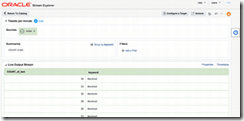
We’ll start by creating an exploration which summarizes tweets per minute per each of the keywords we have: Configuring a REST target

Configuring a target is as simple as a few clicks. Just click the "Configure a target" button, select REST from the dropdown and enter your REST service url. Note that building the service is not in the scope of this blog, suffice to say it should expect parameters which your exploration emits. Read the complete article here.

SOA & BPM Partner Community

For regular information on Oracle SOA Suite become a member in the SOA & BPM Partner Community for registration please visit www.oracle.com/goto/emea/soa (OPN account required) If you need support with your account please contact the Oracle Partner Business Center.

Blog Twitter LinkedIn image[7][2][2][2] Facebook clip_image002[8][4][2][2][2] Wiki

Stream Explorer and JMS for both inbound and outbound interaction by Lucas Jellema


clip_image002In this article, we will look at the very common interaction between Stream Explorer and JMS. JMS is a commonly used channel for decoupled exchange of messages or events. Stream Explorer can both consume messages from a JMS destination (through Stream) and publish findings to a JMS destination (with a target). The use case we discuss here is about temperature sensors: small devices distributed over a building, measuring the local room temperature every few seconds and reporting it over JMS. The Stream Explorer application has to look out for rooms with quickly increasing temperatures and report those over a second JMS queue. Note: this article describes the Java (SE) code used for generating temperature signals. This class generates temperature values (in Celsius!) for a number of rooms, and publishes these to the queue temperatureMeasurements. At some random point, the class will start a fire in a randomly selected room. In this room, temperatures will soon be over 100 degrees. Also in this article is Java class HotRoomAlertProcessor  that consumes messages from a second JMS Queue. Any message received on that queue is reported to the console.

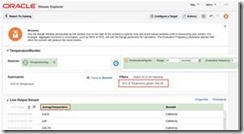
Our objective in this article is to read the temperature measurements from the JMS Queue into a Stream Explorer application, calculate the average value per room and then detect the room on fire. This hot room should then be reported to the JMS Queue.

Open Stream Explorer and from the Stream Explorer Catalog page, create a new item of type Stream. Select JMS as the source type. Read the whole article here.

SOA & BPM Partner Community

For regular information on Oracle SOA Suite become a member in the SOA & BPM Partner Community for registration please visit www.oracle.com/goto/emea/soa (OPN account required) If you need support with your account please contact the Oracle Partner Business Center.

Blog Twitter LinkedIn image[7][2][2][2] Facebook clip_image002[8][4][2][2][2] Wiki