Using Pagination with the OIC Shopify adapter by Niall Commiskey

image

Introduction

Starting point is the OIC Shopify adapter doc here Quotes from the doc in italics.
In this simple example I will paginate thru my product list – I have ca. 600 products. The number of products returned per page by Shopify can range from 50 to 250. I will set this value in the Shopify invoke mapping. The OIC integration will use the Shopify Adapter to retrieve all products. The structure returned will have the following format. the page_info value is a link to the next page of results.
So the processing logic is very simple – process all pages! This I will do in a WHILE loop – condition is – while there are still more pages available.

Implementing Shopify Pagination in OIC

I will use a scheduled orchestration – first step in that orchestration is to
Assign the following variables – Read the complete article here.

PaaS Partner Community

For regular information on Oracle PaaS become a member in the PaaS (Integration & Process) Partner Community please register here.

clip_image003 Blog clip_image005 Twitter clip_image004 LinkedIn image[7][2][2][2] Facebook clip_image002[8][4][2][2][2] Wiki

Technorati Tags: SOA Community,Oracle SOA,Oracle BPM,OPN,Jürgen Kress

See how OIC integrations are behaving at runtime by Ankur Jain

image

One of the most inevitable tasks for administrators and developers to monitor the Integrations and see how OIC integrations are behaving in runtime. It’s really important to check the health of Integration regularly to avoid bad situations.

Integration Cloud provides a rich dashboard that helps different personas to monitor the running integrations.

Few Important Links

HCM Data loader in Oracle Integration

Oracle Integration Cloud HCM adapter

Monitor Integrations

The monitoring dashboard provides information and tools to monitor the integration through a rich set of interactive screens. One of the screens of the dashboard allows you to manage the failed integration and take further action upon it. Read the complete article here.

PaaS Partner Community

For regular information on Oracle PaaS become a member in the PaaS (Integration & Process) Partner Community please register here.

clip_image003 Blog clip_image005 Twitter clip_image004 LinkedIn image[7][2][2][2] Facebook clip_image002[8][4][2][2][2] Wiki

Technorati Tags: SOA Community,Oracle SOA,Oracle BPM,OPN,Jürgen Kress

OIC integrating BigCommerce with Netsuite #784 Using Pagination with the OIC Shopify adapter by Niall Commiskey

image

Big Commerce is a very popular SaaS eCommerce platform, used by many Netsuite customers. Ergo, integration between the two is necessary and easy with Oracle Integration (OIC). Welcome to my Hare of the Dog shop on Big Commerce – I add a couple of top quality products – Hare of the Dog T-Shirts – handmade by medieval philosophy students. The material is 100% recycled and recyclable, and is also edible. Read the complete article here.

PaaS Partner Community

For regular information on Oracle PaaS become a member in the PaaS (Integration & Process) Partner Community please register here.

clip_image003 Blog clip_image005 Twitter clip_image004 LinkedIn image[7][2][2][2] Facebook clip_image002[8][4][2][2][2] Wiki

Technorati Tags: SOA Community,Oracle SOA,Oracle BPM,OPN,Jürgen Kress
PeopleSoft Integration using Oracle Integration – Part 2 by Prakash Masand & Jin Park

image

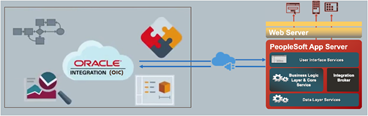
Now we’re ready to create connections and integration in Oracle Integration. Oracle Integration is capable of hybrid integrations. Therefore, you can use Oracle Integration for SaaS integration scenarios such as SaaS and SaaS or SaaS and on-premises. You may need to set up a virtual private network (VPN) between your data centre and Oracle Integration using VPNaaS (VPN as a Service from Oracle) or install Oracle Integration connectivity agent inside your organisation network. It really depends upon the network / security policy of your organisation.

For PeopleSoft, it’s normally located behind corporate firewall. Therefore, make sure you’ve got VPN working or connectivity agent installed. Make sure that you’ve got a successful web service call from public internet using the SOAP / REAT API test client such as Soap UI / Postman. That saves lots of time debugging connectivity issues later. Don’t forget to enable web service request logging. PeopleSoft provides excellent internal tools to monitor web service request which I will explain in the next section. Read the complete article here.

PaaS Partner Community

For regular information on Oracle PaaS become a member in the PaaS (Integration & Process) Partner Community please register here.

clip_image003 Blog clip_image005 Twitter clip_image004 LinkedIn image[7][2][2][2] Facebook clip_image002[8][4][2][2][2] Wiki

Technorati Tags: SOA Community,Oracle SOA,Oracle BPM,OPN,Jürgen Kress
PeopleSoft Integration using Oracle Integration Cloud – Part 1 by Prakash Masand & Jin Park

image

Customers at events, at forums, and through field requests have indicated that they want to integrate PeopleSoft with Oracle and non-Oracle Cloud applications using Oracle Integration. PeopleSoft provides a great integration framework tool set that simplifies, standardizes, and supports a variety of integration patterns. We want to share the enlightened experience that our integration champion Jin Park from Australia had when integrating PeopleSoft with Oracle Integration.

Here is part 1 of Jin Park’s journey.

I’ve got a chance to look at PeopleSoft integration with other SaaS app using OIC (Oracle Integration Cloud) and decided to share what I learned.

If you’re not familiar with PeopleSoft, please visit PeopleSoft Information Portal. You will see that it covers lots of things. Read the complete article here.

PaaS Partner Community

For regular information on Oracle PaaS become a member in the PaaS (Integration & Process) Partner Community please register here.

clip_image003 Blog clip_image005 Twitter clip_image004 LinkedIn image[7][2][2][2] Facebook clip_image002[8][4][2][2][2] Wiki

Technorati Tags: SOA Community,Oracle SOA,Oracle BPM,OPN,Jürgen Kress

User Friendly Names in Mapper by Ishruthilaya Malarvizhi

image

In this blog, we will look at a new integration feature, User Friendly Names in the Mapper UI and see how the Mapper UI has changed with the introduction of this feature. The new feature will become available shortly. The Source and Target tree elements displayed in the Mapper UI are based on the application schemas. Many application schemas define their interfaces with extremely cryptic technical names that are not easy to correlate to the user friendly display names you would see in the end point application’s UI.
This feature provides the option to show display label instead of the technical name directly in the trees and expression builder.

The feature is supported for all types of integration. Currently the below application adapters are supported with the user friendly names generation when configuring the trigger/invoke:

  • Oracle HCM Cloud
  • Oracle Engagement Cloud
  • Oracle ERP Cloud
  • REST
  • Salesforce

Mapper UI Displaying Technical Names (Developer Mode): Read the complete article here.

PaaS Partner Community

For regular information on Oracle PaaS become a member in the PaaS (Integration & Process) Partner Community please register here.

clip_image003 Blog clip_image005 Twitter clip_image004 LinkedIn image[7][2][2][2] Facebook clip_image002[8][4][2][2][2] Wiki

Technorati Tags: SOA Community,Oracle SOA,Oracle BPM,OPN,Jürgen Kress

Real World SOA Modernization with Keste & Oracle free on-demand Webcast

Upgrade your Oracle SOA Suite to modern Oracle Integration in the Cloudon-demand Keste SOA Uplift webcast 10.2020

In this 30-minute webcast Oracle partner Keste will talk about the real-world advantages of SOA modernization, best practices to achieve exceptional results, and some of the benefits their customers have seen from moving to Oracle Integration in the Cloud. Learn how to turn your existing Oracle Integration platform into a highly scalable, cost-effective solution that provides better performance at lower cost.

Agenda Webcast

SOA Modernization
Real World Advantages
Real World Best Practices
Recommended approach to Modernization
Customer Modernization Success Stories
Questions & Answers

Watch the free on-demand webcast here.

PaaS Partner Community

For regular information on Oracle PaaS become a member in the PaaS (Integration & Process) Partner Community please register here.

clip_image003 Blog clip_image005 Twitter clip_image004 LinkedIn image[7][2][2][2] Facebook clip_image002[8][4][2][2][2] Wiki

Technorati Tags: SOA Community,Oracle SOA,Oracle BPM,OPN,Jürgen Kress

Convert Basic Routing style Integration to Orchestration style by Renukaradhya Dakshinamurthy

image

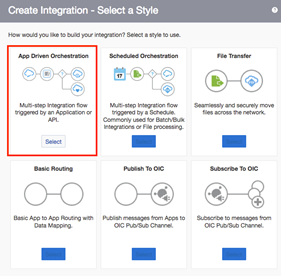
Convert Integrations Style from Basic Routing to App Driven Orchestration.

The Basic Routing Integrations are deprecated now and currently, there is no way to convert a Basic Routing Integration to Orchestration. With this new feature, the user will be able to do the conversion from Basic Routing to App Driven Orchestration as the latter has more flexibility. The convert can be done with the help of "convert" action provided in the actions menu which is explained in detail in the below sections.

Prerequisites:

The minimum Oracle Integration version required for the feature is “20.36330”.

What happens during the conversion of Basic Routing style to Orchestration

During the conversion of Basic routing to Orchestration, the process goes through each and every entity of the ProjectModel( or flow) of Basic Routing and does a conversion to the corresponding entity of Orchestration style. The below table gives a brief mapping of the entities. Read the complete article here.

PaaS Partner Community

For regular information on Oracle PaaS become a member in the PaaS (Integration & Process) Partner Community please register here.

clip_image003 Blog clip_image005 Twitter clip_image004 LinkedIn image[7][2][2][2] Facebook clip_image002[8][4][2][2][2] Wiki

Technorati Tags: SOA Community,Oracle SOA,Oracle BPM,OPN,Jürgen Kress
Enhanced Integration with your Business Partners using OIC AS2 Adapter by Michael Meiner

image

Introduction to B2B Integration using AS2

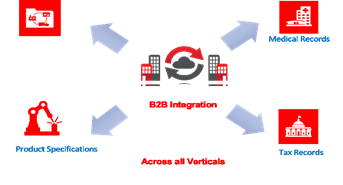
What is B2B integration? Business-to-business (B2B) integration is the automation of business processes and communication between two or more organizations. It allows them to trade more effectively with their customers, suppliers, vendors and business partners by automating key business processes using B2B based data exchange including EDI. Electronic Data Interchange (EDI) is a standard means of exchanging data between companies so that they can transact business electronically.

As part of the B2B Data exchange customers and their partners mutually agree on a:

· Document format like X12, UN/EDIFACT

· Transport protocol like AS2, sFTP

AS2 is a key transport protocol that is very popular worldwide used for B2B data exchange. It is a specification for Electronic Data Interchange (EDI) between organizations using the internet. AS2 uses Secure/Multipurpose Internet Mail Extensions (S/MIME), which secures data with authentication, nonrepudiation and encryption. The transportation protocol for this specification is HTTP and HTTPS for real-time communication. S/MIME secures data with authentication, message integrity and nonrepudiation. Read the complete article here.

PaaS Partner Community

For regular information on Oracle PaaS become a member in the PaaS (Integration & Process) Partner Community please register here.

clip_image003 Blog clip_image005 Twitter clip_image004 LinkedIn image[7][2][2][2] Facebook clip_image002[8][4][2][2][2] Wiki

Technorati Tags: SOA Community,Oracle SOA,Oracle BPM,OPN,Jürgen Kress
Oracle Integration Connectivity Updates by Prakash Masand

image

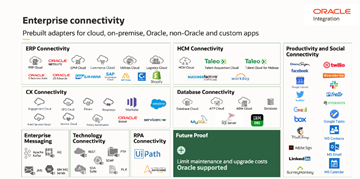
Oracle Integration continues to enhance the connectivity portfolio by building a new set of adapters as well as enriching the existing adapters with the key customer focused enhancements. Oracle Integration adapters are the corner stone for connecting and automating application business processes. Oracle Integration Adapter abstracts communication with diverse applications on a single pane, simplify integration interfaces as business resources and supports rapid development through configuration and declarative model rather than complex coding.

In the endeavour of building robust and diverse connectivity portfolio, Oracle Integration August release will offer two brand new adapters viz. PayPal Adapter & OCI Streaming Service.

New Adapters
Paypal Adapter

Paypal Adapter is the newest addition to the E-commerce segment of adapters and shall enable Oracle Integration customers to connect and automate their web store business processes. In the stated release Paypal Adapter shall support outbound invoke to execute the REST APIs enabling Integration developer to perform CRUD operations on the Paypal exposed business resources. As an example while order is being manufactured you may want to authorize a payment that you can capture later on successful delivery of the order.

Paypal Adapter connection page requires two sets of information to establish connection with the Paypal environment. First you would need to select the environment type i.e. Sandbox / Live so that adapter can connect to the appropriate endpoint. Read the complete article here.

PaaS Partner Community

For regular information on Oracle PaaS become a member in the PaaS (Integration & Process) Partner Community please register here.

clip_image003 Blog clip_image005 Twitter clip_image004 LinkedIn image[7][2][2][2] Facebook clip_image002[8][4][2][2][2] Wiki

Technorati Tags: SOA Community,Oracle SOA,Oracle BPM,OPN,Jürgen Kress