Enable Notification in Process Cloud Service by Ankur Jain

image

The video will show how to enable email notification and how to use Notify activity to send notification. Watch the video here.

PaaS Partner Community

For regular information on Oracle PaaS become a member in the PaaS (Integration & Process) Partner Community please register here.

clip_image003 Blog clip_image005 Twitter clip_image004 LinkedIn image[7][2][2][2] Facebook clip_image002[8][4][2][2][2] Wiki

Technorati Tags: SOA Community,Oracle SOA,Oracle BPM,OPN,Jürgen Kress

My private Corner – thanks to Bob!

image

Dear Bob Thanks for the wonderful collaboration over more than a decade. Each time it was a pleasure to meet you during Oracle OpenWorld in San Francisco. Many will remember your interviews and panel sessions – some of them recorded in a hotel (bed) room. Your support was key to the ACE & groundbreaker community to drive Oracle’s products and cloud services. Enjoy your retirement and looking forward to hear from you!

PaaS Partner Community

For regular information on Oracle PaaS become a member in the PaaS (Integration & Process) Partner Community please register here.

clip_image003 Blog clip_image005 Twitter clip_image004 LinkedIn image[7][2][2][2] Facebook clip_image002[8][4][2][2][2] Wiki

Technorati Tags: SOA Community,Oracle SOA,Oracle BPM,OPN,Jürgen Kress

Expose T3 protocol for managed servers in SOA Domain on Kubernetes by Ravi Pinto

image

T3 ports for Managed Servers in Oracle SOA deployed in WebLogic Kubernetes operator Environment are not available by default.

This document provides steps to create T3 channel and the corresponding Kubernetes Service to expose the T3 protocol for Managed Servers in SOA Domain.

Exposing SOA Managed Server T3 Ports

With the following steps you will be creating T3 port at 30014 on all Managed Servers for soa_cluster with below details:

· Name: T3Channel_MS

· Listen Port: 30014

· External Listen Address: <Master IP Address>

· External Listen Port: 30014

· Read the complete article here.

PaaS Partner Community

For regular information on Oracle PaaS become a member in the PaaS (Integration & Process) Partner Community please register here.

clip_image003 Blog clip_image005 Twitter clip_image004 LinkedIn image[7][2][2][2] Facebook clip_image002[8][4][2][2][2] Wiki

Technorati Tags: SOA Community,Oracle SOA,Oracle BPM,OPN,Jürgen Kress
Connect, Innovate & Extend SaaS Partner on-demand Kickoff Webcast 2020

image

Want to increase the Oracle Cloud business? Create new service offerings and solutions for Oracle SaaS solution based on the Oracle Cloud Platform? Watch the webcast with Suhas Uliyar, Vice President Oracle Product Management.
SaaS solutions like HCM, CX and ERP Cloud need to be integrated and customized:

· Oracle Integration connects SaaS solutions with out of the box adapters.

· Oracle Digital Assistant innovates SaaS solutions with pre-build chatbots.

· Oracle Process and Visual Builder extends SaaS solutions with customized UIs and workflows.

Speaker: Suhas Uliyar Vice President Product Management Digital Assistant, AI & Integration Oracle HQ

Watch the free webcast on-demand here

PaaS Partner Community

For regular information on Oracle PaaS become a member in the PaaS (Integration & Process) Partner Community please register here.

clip_image003 Blog clip_image005 Twitter clip_image004 LinkedIn image[7][2][2][2] Facebook clip_image002[8][4][2][2][2] Wiki

Technorati Tags: SOA Community,Oracle SOA,Oracle BPM,OPN,Jürgen Kress

Deploying SOA Composites from Oracle JDeveloper to Oracle SOA in WebLogic Kubernetes Operator Environment by Ravi Pinto Inputs provided by Ashageeta Rao and Vivek Raj

image

This post provides steps to deploy Oracle SOA composites/applications from Oracle JDeveloper (that runs outside the Kubernetes network) to the SOA instance in WebLogic Kubernetes Operator Environment.

Pre-requisities

Note: Replace entries inside <xxxx> specific to your environment

  1. Get the Kubernetes Cluster Master Address and verify the T3 port which will be used for creating application server connections. You can use below kubectl command to get the T3 port:

kubectl get service <domainUID>-<AdministrationServerName>-external -n  <namespace>-o jsonpath='{.spec.ports[0].nodePort}’

  1. JDeveloper need to access Managed Server during deployment. In WebLogic operator Environment each Managed Servers are pods and cannot be accessed directly by JDeveloper. Hence we need to configure the Managed Server’s reachability:
    1. Decide on external IP address to be used to configure access of Managed Server ( soa cluster). Master or worker node IP address can be used to configure Managed Server accessibility. In case you decide to use some other external IP address, that need to be accessible from Kubernetes Cluster. Here we will be using Kubernetes Cluster Master IP.
    2. Get the pod names of Administration and Managed Servers (i.e. "<domainUID>-<server name>") which will be used to map in /etc/hosts. Read the complete article here.

PaaS Partner Community

For regular information on Oracle PaaS become a member in the PaaS (Integration & Process) Partner Community please register here.

clip_image003 Blog clip_image005 Twitter clip_image004 LinkedIn image[7][2][2][2] Facebook clip_image002[8][4][2][2][2] Wiki

Technorati Tags: SOA Community,Oracle SOA,Oracle BPM,OPN,Jürgen Kress

Announcing Early Access of SOA Suite for Kubernetes by Ravi Pinto

image

The SOA Suite Team is excited to announce the early access availability of Oracle SOA Suite on Containers and Kubernetes. This program will lead to certification of SOA Suite deployment using Containers on Kubernetes in Production environments

Scope

The scope of eventual deliverable is as follows

  • Provide Container images for Oracle SOA Suite including Oracle Service Bus
  • Certify these Container images for deployment on Kubernetes for Production workloads

In later phases, we will expand certification to additional components based on feedback received from the Early Access program

Objective

With growing adoption of Containers and Kubernetes in Datacenters, this effort targets

  • Supporting Oracle SOA Suite and Oracle Service Bus Containers in Production environments
  • Enable Datacenter consolidation/modernization efforts
  • Enable SOA Suite’s co-existence with cloud native applications

Features

Following are the salient features of this release

  • Container images created using Oracle SOA Suite 12.2.1.3 release
  • Certified deployment using Weblogic Operator (2.4) to deploy and manage Oracle SOA Suite and Oracle Service Bus with ease
  • Support for searching and analyzing logs with ease using the ELK Stack
  • Integration to Powerful metrics collection and alerting system with Prometheus and Graphana
  • Support for multiple Load Balancers like Traefik, Voyager, and NGINX. Read the complete article here.

PaaS Partner Community

For regular information on Oracle PaaS become a member in the PaaS (Integration & Process) Partner Community please register here.

clip_image003 Blog clip_image005 Twitter clip_image004 LinkedIn image[7][2][2][2] Facebook clip_image002[8][4][2][2][2] Wiki

Technorati Tags: SOA Community,Oracle SOA,Oracle BPM,OPN,Jürgen Kress

Use Data Stitch to simplify integrations by Thomas Hora

image

In this blog, we will look at a new integration feature, Data Stitch, and show how it can simplify integrations to help us reduce maintenance costs.  Data Stitch allows us to make assignments to complex type variables.

Prerequisite

Enable following features:

  • oic.ics.console.integration.stitch-action
  • oic.ics.console.integration.complex-variables

To enable feature flags – Refer to Blog Enabling Feature Flags in Oracle Integration

The minimum Oracle Integration version required for the feature is 200113.1400.33493

Use case: 

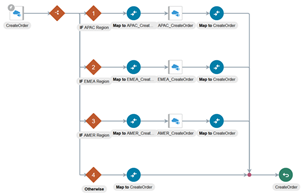
  • We have deployed 3 instances of the application service in 3 regions (APAC, EMEA, AMER).
  • 3 separate REST connections are used to handle 3 separate endpoint URIs and credentials for each region.
  • We have an integration with 3 invokes to the CreateOrder REST API using the 3 connections.
  • The payloads to these invokes are identical, only difference is the connection used. Read the complete article here.

PaaS Partner Community

For regular information on Oracle PaaS become a member in the PaaS (Integration & Process) Partner Community please register here.

clip_image003 Blog clip_image005 Twitter clip_image004 LinkedIn image[7][2][2][2] Facebook clip_image002[8][4][2][2][2] Wiki

Technorati Tags: SOA Community,Oracle SOA,Oracle BPM,OPN,Jürgen Kress
Integrate HCM PaaS Partner Community Webcast on-demand

Watch the free on-demand webcast here.

Want to connect HCM applications with each other and on-premises? For SaaS consultants we offer free SaaS Integration partner kit to become a hands-on expert:

Free on-demand training

Attend the free on-demand training:

· Oracle Application Integration Cloud Platform 2019 Sales Specialist including free online exam!

· Oracle Application Integration Cloud Platform 2019 Solution Engineer Specialist including free online exam!

Live Webtraining

For Oracle partners we offer free on-line classes to Integrate SaaS:

For additional location please visit our website here.

Training material

At our community workspace (membership required) we published the latest training material OIC Bootcamp 04.2020

Cloud Trial:

Please request your free Oracle cloud trial here. To attend the hands-on trainings please make sure you have access to the Oracle cloud platform. You need to create a Service Request to provision Oracle Integration.

Documentation

Get Started documentation is published here.

Sales kit

Our Sales Central pages are loaded with new content to equip our sellers with all the materials they need. Sales kits include elevator pitch, cheat sheet, reference and customer presentation in ppt format: Connect and Extend Apps with PaaS & Integration

Certification

Get recognized become a certified Oracle expert:

· Oracle Application Integration Cloud Platform 2019 Sales Specialist free online exam!

· Oracle Application Integration Cloud Platform 2019 Solution Engineer Specialist free online exam!

· Oracle Cloud Platform Application Integration 2020 Specialist | 1Z0-1042-20

Questions?

Please post your questions in the community discussion forums:

PaaS Partner Community

For regular information on Oracle PaaS become a member in the PaaS (Integration & Process) Partner Community please register here.

clip_image003 Blog clip_image005 Twitter clip_image004 LinkedIn image[7][2][2][2] Facebook clip_image002[8][4][2][2][2] Wiki

Technorati Tags: SOA Community,Oracle SOA,Oracle BPM,OPN,Jürgen Kress

OIC Space Management simplified by Sindhu Suresh

image

OIC empowers customers to create numerous integration/process flows and send multiple requests to each one of them, all within one instance of OIC, creating a considerable amount of runtime data. And the space within said instance that holds the runtime data and makes all of this possible is, although substantial, not unlimited. Therefore managing the runtime data within an instance, so it continues to function at a optimal level, is a key requirement. With the help of this blog, I would like to illustrate how easily one can achieve ideal data/space management for any OIC instance.

Prerequisite

Enable following feature:

  • oic.suite.settings.dbspace  (This feature will enable customer to define/execute purge for OIC from Suite/Setting page)

To enable feature flags – Refer to Blog on Enabling Feature Flags in Oracle Integration

The minimum Oracle Integration version required for the feature is 190924.1600.31522

Data Retention Settings :

OIC provides the user with an easy tool for managing data, through the Data Retention page under Settings menu. Everytime the user saves the settings on the page, OIC runs an automated job, after each pre-defined interval of time, with the saved settings to purge the older runtime data. Read the complete article here.

PaaS Partner Community

For regular information on Oracle PaaS become a member in the PaaS (Integration & Process) Partner Community please register here.

clip_image003 Blog clip_image005 Twitter clip_image004 LinkedIn image[7][2][2][2] Facebook clip_image002[8][4][2][2][2] Wiki

Technorati Tags: SOA Community,Oracle SOA,Oracle BPM,OPN,Jürgen Kress

Invoke a Co-located Integration from a Parent Integration by Daniel Martins Teixeira

image

The capability to ‘Invoke an Integration from another Integration’ is now GA – in other words, the ability to easily implement Modular Design is now GA.

This topic has already been covered some time ago here, but now the feature is GA, available to every OIC user, and it’s worthwhile a refresh!

What did it really change?

Before this feature, we could achieve the same result, but that would require to expose the desired Integration with a REST Trigger and we would need to create a Connection to enable calls to that Integration.

Now we can simply call the Integration and avoid the need to handle the Connection and the endpoint changes in different environments.

There is no need to configure the Connection in the Integration , where we would need to define request/response payloads, headers, parameters and many other settings available in the REST connector.

It is much more practical! Read the complete article here.

PaaS Partner Community

For regular information on Oracle PaaS become a member in the PaaS (Integration & Process) Partner Community please register here.

clip_image003 Blog clip_image005 Twitter clip_image004 LinkedIn image[7][2][2][2] Facebook clip_image002[8][4][2][2][2] Wiki

Technorati Tags: SOA Community,Oracle SOA,Oracle BPM,OPN,Jürgen Kress