SOA Suite 12c Essentials Exam available

clip_image002
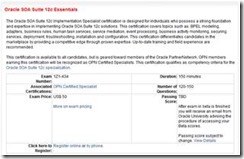
SOA Suite 12c Exam (1Z1-434) is now closed for registrations as the beta testing finished, it is now available. This certification covers topics such as: BPEL modeling, adapters, business rules, human task services, service mediation, event processing, business activity monitoring, securing services, deployment, troubleshooting, installation and configuration. It qualifies as competency criteria for the Oracle SOA Suite 12c specialization.
Check-out the Oracle SOA Suite 12c Essentials Exam Study Guide, which can help you prepare for the exam!


SOA & BPM Partner Community

For regular information on Oracle SOA Suite become a member in the SOA & BPM Partner Community for registration please visit www.oracle.com/goto/emea/soa (OPN account required) If you need support with your account please contact the Oracle Partner Business Center.

Blog Twitter LinkedIn image[7][2][2][2] Facebook clip_image002[8][4][2][2][2] Wiki

SOA 12c – Using Maven for SOA Projects deployment by Silva


clip_image002In this post, we will see creation of SOA application/projects using the maven archetypes. And we will use local Maven Repository for the demonstration.

Navigate to %MW_HOME%\oracle_common\plugins\maven\com\oracle\maven\oracle-maven-sync\12.1.3 and use following commands to sync your local repository:

mvn install:install-file -Dfile=oracle-maven-sync-12.1.3.jar -DpomFile=oracle-maven-sync-12.1.3.pom

mvn com.oracle.maven:oracle-maven-sync:push -Doracle-maven-sync.oracleHome=%MW_HOME%

Update your archetype catalog using:

mvn archetype:crawl -Dcatalog=C:\Users\<<uname>>\.m2\archetype-catalog.xml

Generate SOA Application and project as shown below. This generates SOA application test-soa-application with  project test-soa-project.

mvn archetype:generate -DarchetypeGroupId=com.oracle.soa.archetype -DarchetypeArtifactId=oracle-soa-application -DarchetypeVersion=12.1.3-0-0 -DgroupId=org.my.test -DartifactId=test-soa-application -DprojectName=test-soa-project -Dversion=1.0-SNAPSHOT

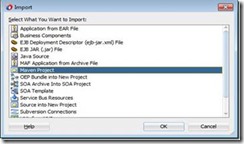
Import this maven project in JDeveloper using File –> Import and select the Maven Project option as shown below. Click OK.

Give your application directory as Root Directory which brings up all POMs and select other options as shown below. Click OK. Read the complete article here.

SOA & BPM Partner Community

For regular information on Oracle SOA Suite become a member in the SOA & BPM Partner Community for registration please visit www.oracle.com/goto/emea/soa (OPN account required) If you need support with your account please contact the Oracle Partner Business Center.

Blog Twitter LinkedIn image[7][2][2][2] Facebook clip_image002[8][4][2][2][2] Wiki

Document Editor – Defining a custom message (Part 1 of 3) b2b SOA Suite by Bernardo Cabaços


clip_image002Oracle Document Editor is an application used for creating and testing document definitions for Oracle B2B.

The document definition (ECS) file is required in B2B for translating and validating documents.

With Document Editor you are able to create new guideline documents or use a template from the comprehensive library of standards available for download. You can download Document Editor and the standard definitions available here.

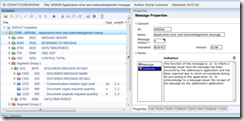
The available document guideline templates include EDI, HL7, positional flat file (which includes some SAP iDocs), XMLSchema and so on, as seen below.

Thanks to the countless templates available you can easily and quickly create a message definition (ECS) and respective XSD to import to B2B. Making the necessary changes if needed.

Below is an example of a message definition from the template library.

However, specially with Positional Flat File (PFF) messages, you might have to create a custom definition.

In this post I will go through the steps needed to create a custom PFF document definition in Document Editor. This post will be divided in 3 parts, in the first part I will focus on Message Segments’, afterwards I’ll cover the Field’s types and properties, finalizing with testing and XSD generation.

Let’s start by creating an empty definition. Read part I here and read part II here.

SOA & BPM Partner Community

For regular information on Oracle SOA Suite become a member in the SOA & BPM Partner Community for registration please visit www.oracle.com/goto/emea/soa (OPN account required) If you need support with your account please contact the Oracle Partner Business Center.

Blog Twitter LinkedIn image[7][2][2][2] Facebook clip_image002[8][4][2][2][2] Wiki

Purging and partitioned schemas by Christian

SOA Suite 11g and 12c both require regular database maintenance for optimal performance. A key task in managing your SOA Suite database is a regular purging strategy. You should be doing this, so read the Oracle SOA Suite database growth management strategy if you haven’t already: http://www.oracle.com/technetwork/middleware/bpm/learnmore/soa11gstrategy-1508335.pdf

One of the best practices for managing large SOA Suite applications is to use Oracle Database partitioning. In 11g this is usually a fairly ad-hoc setup, though the whitepaper has everything you need to know about setting it up; in 12c, the “LARGE” RCU profile is partitioned (with monthly partitions).

Purging a partitioned schema usually involves running the check and move scripts, to ensure your partitions don’t contain “LIVE” data (based on your retention policy), followed by dropping the “OLD” partitions and rebuilding the indexes.

However, there are times where you may want to run a purge to clean up data that doesn’t neatly align with the partitions, for example in a load testing environment. The purge scripts, by default, won’t touch any table that is partitioned. If your favourite table isn’t mentioned in the purge debug log output (example below), then it is probably because it is partitioned.

To force the purge scripts to consider partitioned tables, you need to enable the “purge_partitioned_component” flag to the “delete instances” purge function (see below). The purge script will then purge partitioned tables.

Obviously, this is not intended for regular production use and it should never be used there.

An example invocation with the flag set:
soa.delete_instances(max_runtime => 300, min_creation_date => to_timestamp('2000-01-01','YYYY-MM-DD'), max_creation_date => to_timestamp('2000-12-31','YYYY-MM-DD'), purge_partitioned_component=TRUE);

The example output below is from a soa.delete_instances run that has a partition on composite_instance. Note that there is no mention of composite_instance in the output. Read the complete article here.

SOA & BPM Partner Community

For regular information on Oracle SOA Suite become a member in the SOA & BPM Partner Community for registration please visit www.oracle.com/goto/emea/soa (OPN account required) If you need support with your account please contact the Oracle Partner Business Center.

Blog Twitter LinkedIn image[7][2][2][2] Facebook clip_image002[8][4][2][2][2] Wiki

CI using Oracle Fusion Middleware 12C: Part 2. Building a SB and SOA project using maven and the MDS by Hugo Hendriks


clip_image001In the part 1 I have shown how to setup a simple CI environment and how to build a Service Bus project using Maven. In this part I will try to make a release pipeline which builds, deploys, tests, packages and release a whole service using Jenkins and if all successful and finally install the artifact in Nexus.

Lets start where we left of. Startup Tomcat and log into Jenkins. We need some sort of plugin to be able to run multiple actions in a sequence. Jenkins has alot of plugins but the one which I am going to use is the MultiJob one. Go to Manage Jenkins->Manage plugins, choose the available tab, check the Multijob plugin and click Install without restart.

The multi-job plugin can chain jobs together and share variables and artifact between jobs. You can make very intricate jobs but for now I will keep it simple. I will make 1 job that will:

  1. Build the service bus component which also refers to a SharedObjects project and deploy it to my server
  2. Build the soa component which also refers to the MDS and deploy it to my server
  3. Run the matching soap ui test
  4. If succesfull, install the artifact to nexus

I have created a simple HelloService which first goes to the SB and then routes to a SOA component. The SB component makes use of a SharedObjects SB project which holds the WSDL and XSD. This project is setup so you don’t have to sync between this project and the MDS. This because the SB isn’t able yet to access the MDS. The SOA component does nothing else the return a string response. So the setup will look like this: Read the complete article here.

SOA & BPM Partner Community

For regular information on Oracle SOA Suite become a member in the SOA & BPM Partner Community for registration please visit www.oracle.com/goto/emea/soa (OPN account required) If you need support with your account please contact the Oracle Partner Business Center.

Blog Twitter LinkedIn image[7][2][2][2] Facebook clip_image002[8][4][2][2][2] Wiki

How to use the Domain Value Map (DVM) in Oracle Service Bus 12c by Jan van Zoggel


Introduction

clip_image002Due to the tighter integration of Oracle Service Bus 12c in the whole Oracle SOA Suite product it’s now much easier for developers to use general SOA Suite components like the Domain Value Map (DVM).

Getting Started

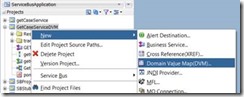
First I use the OSB 12c clone project ability to copy th earlier created/blogged OSB 12c Database adapter project and create a project named GetCaseServiceDVM. In the new project we add a Domain Value Map (DVM):

The file name and description speak for themself. The Initial DVM Entries forces us to define the minimum amount of 2 domain names (source and target of our value) and if we want we can inmediately configure the 1st record here.

The result is a DVM file in our project which we can easily edit within JDeveloper 12c.
For this blogpost we will add 2 records which will allow us to translate the value “1” and “2” which we receive from the database to a basic description of that value. Read the complete article here.

SOA & BPM Partner Community

For regular information on Oracle SOA Suite become a member in the SOA & BPM Partner Community for registration please visit www.oracle.com/goto/emea/soa (OPN account required) If you need support with your account please contact the Oracle Partner Business Center.

Blog Twitter LinkedIn image[7][2][2][2] Facebook clip_image002[8][4][2][2][2] Wiki

Managing Idempotence in SOA Suite by Waslley Souza

clip_image002According to the SOA Suite 12c documentation, an idempotent activity is an activity that can be safely retried. It means if your BPEL Process fails, a rollback operation will be executed and all data won’t be persisted in the database. OK, but sometimes you want to persist some data even your BPEL Process fails. How can you achieve it? Set the operation as nonidempotent and the Dehydration will occur after this operation.

In this post, you will learn how to set an operation as nonidempotent.
As a starting point, let’s use the application created here: Using DB Adapter in SOA Suite 12c.
We will add a new Database Adapter to manage the jobs table, and when we try to add a new employee with a new job, the job will be persisted even if the BPEL Process fails.

Download the sample application: SOAIdempotentApp.zip.

Open the EmployeeProject file.
To create the Database Adapter, right-click External References section, and choose Insert > Database.
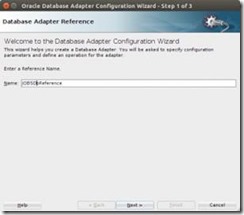
In Step 1, set the name as JOBSDbReference and click Next.

hIn Step 2, choose the Database Connection, set the JNDI Name and click Next.
In Step 3, choose Insert Only and Select By Primary Key options, and click Next. Read the complete article here.

SOA & BPM Partner Community

For regular information on Oracle SOA Suite become a member in the SOA & BPM Partner Community for registration please visit www.oracle.com/goto/emea/soa (OPN account required) If you need support with your account please contact the Oracle Partner Business Center.

Blog Twitter LinkedIn image[7][2][2][2] Facebook clip_image002[8][4][2][2][2] Wiki

Upgrading to SOA 12c and details of the next UKOUG Middleware SIG by Simon Haslam


clip_image002SOA 12c is the most important release of Oracle’s flagship integration product set that we’ve seen for 5 years (when 11g was launched). Oracle has also now produced the first SOA 12c bundle patch-set (12.1.3.0.1) so in my opinion any new SOA installations should definitely be using 12c, and existing 11g users should be seriously considering upgrading to take advantage of the many new features.

For administrators what is particularly nice about this release is that a lot of work has clearly een put into the upgrade process, building on some of the changes introduced in WebLogic 12.1.2. The upgrade is actually surprisingly straightforward – in outline you have to:

  • Carefully review pre-requisites and do any purging of old instances
  • Install Fusion Middleware Infrastructure and SOA Suite 12c into a new Oracle home
  • Shut down SOA 11g, backup repository and domain home
  • Run RCU to install the new 12c schemas into the existing repository alongside the 11g ones
  • Run the Upgrade Assistant to upgrade the 11g schemas, including running instance data, to 12c format
  • Run the new Reconfiguration Wizard against the 11g domain home to rewire for the 12c home
  • Run the Upgrade Assistant a second time to upgrade some infrastructure components
  • If you have modified setDomainEnv,sh etc you will need to re-apply the changes
  • Backup repository and domain home, then start up SOA

Of course you may only have short-lived processes so be able to drain down the old SOA 11g system and switch over to a brand new SOA 12c system running in parallel, in which case the above upgrade is probably unnecessary.

The above does not consider migration from SOA Suite 10g to 11g/12c which is much more complicated and, if you’ve not already done it by now, a project in itself. Plus I’ve not mentioned Service Bus or BAM yet but we’ll describe in more detail in a week’s time… Read the complete article here.

SOA & BPM Partner Community

For regular information on Oracle SOA Suite become a member in the SOA & BPM Partner Community for registration please visit www.oracle.com/goto/emea/soa (OPN account required) If you need support with your account please contact the Oracle Partner Business Center.

Blog Twitter LinkedIn image[7][2][2][2] Facebook clip_image002[8][4][2][2][2] Wiki

Getting Started with Oracle Stream Explorer free online training at Oracle Learning Library

clip_image002

A Tour of Oracle Stream Explorer clip_image003This tutorial will give you a tour of the basic concepts, artifacts and features of Oracle Stream Explorer.
Integrating Simulated Data as an Input Stream in Oracle Stream Explorer clip_image003[1]This tutorial will show you how to integrate a CSV file, add data context from a database table, and use this as an input stream in Oracle Stream Explorer.
Integrating with HTTP Publish & Subscribe in Oracle Stream Explorer clip_image003[2]This tutorial will show you how to use a CSV file as an input stream into Oracle Stream Explorer. This helps you model and simulate different use cases with many different event types for different scenarios.

Using the Event Delivery Network in Oracle Stream Explorer clip_image003[3]This tutorial will show you how to use the Event Delivery Network in Oracle Stream Explorer in a fraud detection scenario. The Event Delivery Network is part of the SOA Suite infrastructure.

Leveraging JMS Integration in Oracle Stream Explorer clip_image003[4]This tutorial will show you how to use a JMS in Oracle Stream Explorer.

Using Exploration Chaining in Oracle Stream Explorer clip_image003[5]This tutorial will show you how to use previously published Explorations as an input stream to other Explorations in Oracle Stream Explorer.
Customizing Explorations using Oracle Stream Explorer and the Oracle JDeveloper Java Development Environment clip_image003[6] This tutorial will show you how to export Explorations and augment the functionality provided using the Oracle Stream Explorer and the Oracle JDeveloper Java development environment.
IOT Sensor integration with Raspberry Pi clip_image003[7]This Tutorial will walk you through the steps to use an Internet of Things (IOT) Gateway device, such as a Raspberry Pi processing REST messages using the Oracle™ Stream Explorer.

SOA & BPM Partner Community

For regular information on Oracle SOA Suite become a member in the SOA & BPM Partner Community for registration please visit www.oracle.com/goto/emea/soa (OPN account required) If you need support with your account please contact the Oracle Partner Business Center.

Blog Twitter LinkedIn image[7][2][2][2] Facebook clip_image002[8][4][2][2][2] Wiki

Oracle introduces API Manager! By Maarten Smeets


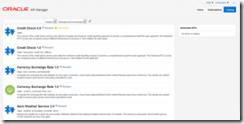
clip_image001Oracle has introduced a new product; API Manager (you can find the official documentation here). API Manager is an important addition to the already impressive Oracle SOA stack. In this article I’ll explain what this new product does and how it helps in managing your API’s. I will focus on the features and benefits you can have of this product and also elaborate a little about my current experiences with it.

API Manager

What does API Manager do?

API Manager is a product which extends the Service Bus functionality and provides an API Manager Portal to manage API’s and browse analytics. API Manager allows you to save certain metadata as part of a Service Bus proxy service. This metadata is used to allow access to an API and provide data on their usage. SOAP and REST API’s are supported (HTTP API’s). Read the complete article here.

SOA & BPM Partner Community

For regular information on Oracle SOA Suite become a member in the SOA & BPM Partner Community for registration please visit www.oracle.com/goto/emea/soa (OPN account required) If you need support with your account please contact the Oracle Partner Business Center.

Blog Twitter LinkedIn image[7][2][2][2] Facebook clip_image002[8][4][2][2][2] Wiki