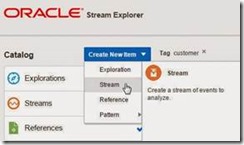
Stream Explorer article series by Niall Commiskey

clip_image002


Thanks to Niall for the first blog posts:

· Stream Explorer Installation Get the Software
· First steps with Oracle Stream Explorer
· Oracle Stream Explorer / OEP basics
· Stream Explorer – References

SOA & BPM Partner Community

For regular information on Oracle SOA Suite become a member in the SOA & BPM Partner Community for registration please visit www.oracle.com/goto/emea/soa (OPN account required) If you need support with your account please contact the Oracle Partner Business Center.

Blog Twitter LinkedIn image[7][2][2][2] Facebook clip_image002[8][4][2][2][2] Wiki

Setting up Oracle Stream Explorer 12.1.3 by Patrick Sinke


clip_image001Oracle Stream Explorer is available now for download. For those unfamiliar with the product, it is a new tool based on Oracle Event Processing (OEP, formerly known as Complex Event Processing). It’s a graphical interface on OEP, hiding the rather daunting CQL (Continuous Query Language) from the user. Read the complete article here.

SOA & BPM Partner Community

For regular information on Oracle SOA Suite become a member in the SOA & BPM Partner Community for registration please visit www.oracle.com/goto/emea/soa (OPN account required) If you need support with your account please contact the Oracle Partner Business Center.

Blog Twitter LinkedIn image[7][2][2][2] Facebook clip_image002[8][4][2][2][2] Wiki

Oracle Stream Explorer by Andreas Chatziantoniou


At the recent Oracle SOA Suite community forum in Budapest I had a hands-on experience with the Oracle Streams Explorer. Having worked with the Oracle Complex Event Processing and also some hands-on exercises with the new
Oracle Event Processing, the Oracle Streams Explorer is a very easy to handle and useful addition to the area of near-real-time data insight and analysis.
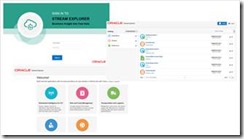
The user interface comes along in the new Oracle look-and-feel. You can select a number of areas like IOT, Risk and Fraud Management, Transportation and Logistics, Customer Experience and Analysis and Telecommunications.
Within that you get a number of predefined patterns and resources. Defining your own solution can therefore be based on an existing solution in your catalog or simply by combining input streams and defining filters on them.
Now plenty of examples can (and will) be named.
The essence for me – and this is a message that I will convey to customers – is the fact that by using Oracle Streams Explorer you can get a very tangible feeling of SOA environments.
A lot of data comes along, and you might want to be alerted when a certain event occurs. For example a RFID tag of a valuable item leaving the warehouse is something you want to know right away.
Put this into an HTTP Publisher or call a REST service that in effect sends out a notification to your smartphone will be a nice goodie for any logistics company. The beauty of the Oracle Streams Explorer
is the ease with which you can build such an application. Read the complete article here.

SOA & BPM Partner Community

For regular information on Oracle SOA Suite become a member in the SOA & BPM Partner Community for registration please visit www.oracle.com/goto/emea/soa (OPN account required) If you need support with your account please contact the Oracle Partner Business Center.

Blog Twitter LinkedIn image[7][2][2][2] Facebook clip_image002[8][4][2][2][2] Wiki

A First Glance at Oracle Stream Explorer 12c by Arturo Viveros


clip_image002The brand new Oracle Stream Explorer 12c has been released today. The idea behind this product, which gives it a lot of relevance, is to bring simplicity, usability and enterprise readiness to Event Processing.
We have talked before about Industrial SOA, and the impact that such concepts as: IoT, Social Media, Mobile, Fast Data bring to the table. With this in mind, we have to acknowledge that enterprises nowadays, constantly find themselves dealing with huge, endless amounts of data in motion.
Oracle’s pitch in this sense, with Oracle SX, is to put this Real Time Streaming Intelligence in the hands of Business Users and Integrators, who can instantly determine the business value of the information and its relevance as business opportunities and threats.
So let’s take a look at the product istself:

As you can see, Oracle SX looks really cool!!, and the first thing we must say in this regard, is that the product’s user interface has been entirely built using Alta UI. Hence we are practically guaranteed a very favorable user experience which is not only nice, but will also help us position the tool in our clients.
Functionality-wise, SX abstracts event processing capabilities to a degree in which the user requires no knowledge whatsoever of Real Time Event Driven Architectures, Continuous Query Language (CQL), Java Event Server or the semantics of Event Stream Processing Application Models.
Basically, Stream Explorer introduces three main concepts that we must understand in order to configure the scenarios we want: Read the complete article here.

SOA & BPM Partner Community

For regular information on Oracle SOA Suite become a member in the SOA & BPM Partner Community for registration please visit www.oracle.com/goto/emea/soa (OPN account required) If you need support with your account please contact the Oracle Partner Business Center.

Blog Twitter LinkedIn image[7][2][2][2] Facebook clip_image002[8][4][2][2][2] Wiki

Quick Introduction to Oracle Stream Explorer Part Two– Business User friendly processing of real time events (enrichment, calculation) by Lucas Jellema


clip_image002Very recently, Oracle released the Oracle Stream Explorer product, available from OTN. With Oracle Stream Explorer, business users and citizen developers as well as hard core developers can create explorations on top of live streaming data to filter, enrich, aggregate, inspect them and detect patterns. Stream Explorer provides a business user friendly browser based user interface in which streams are configured, explorations are composed, enrichment is set up and publication to external consumers is defined. Note that Stream Explorer is built on top of Oracle Event Processor – any Stream Explorer exploration is in fact an OEP application. It can be exported as such and refined in JDeveloper. As such, Stream Explorer is also a great way to get going with OEP.

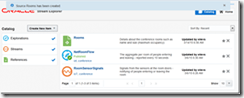
In a previous article, I introduced the very first steps with Stream Explorer. In this article, I set up a stream of events that report people entering or leaving the rooms of a small conference event. The use case is: we are organizing a small conference. In three rooms, sessions take place simultaneously. Our attendees are free to decide which session to attend. We would like to know at virtually any moment how many people are in each room. We have set up simple detectors at the doors of the rooms that produce a signal whenever someone enters or leaves the room. This signal consists of the room identifier (1,2 or 3) and an IN/OUT flag (values +1 or -1). Read the complete article here.

SOA & BPM Partner Community

For regular information on Oracle SOA Suite become a member in the SOA & BPM Partner Community for registration please visit www.oracle.com/goto/emea/soa (OPN account required) If you need support with your account please contact the Oracle Partner Business Center.

Blog Twitter LinkedIn image[7][2][2][2] Facebook clip_image002[8][4][2][2][2] Wiki

Debra Lilley talking about PaaS for SaaS Cloud Services

image

Debra Lilley talking about PaaS for SaaS Cloud Services and tips how to sell more middleware, watch the video here

For additional Middleware Updates please visit out YouTube Channel here.

To learn more about Integration Cloud Service please visit our blog here.

To learn more about Process Cloud Service please visit our blog here.

To learn more about Java Cloud Service please visit our blog here.

Cloud Partners: Looking for a SOA & BPM & WebLogic Specialized Partner which can support you with your ICS implementation? Visit the solutions catalog here, and search for your local SOA Specialized partner have trained & certified consultants and implemented successful SOA customer projects. Across EMEA more than 1000 companies are Specialized in SOA! Find local Specialized partners by product www.oracle.com/specialized & learn more about ICS here

SOA & BPM Partner Community

For regular information on Oracle SOA Suite become a member in the SOA & BPM Partner Community for registration please visit www.oracle.com/goto/emea/soa (OPN account required) If you need support with your account please contact the Oracle Partner Business Center.

Blog Twitter LinkedIn image[7][2][2][2] Facebook clip_image002[8][4][2][2][2] Wiki

Antonis Antoniou talking about Integration Cloud Service

image

Antonis Antoniou talking about Integration Cloud Service and tips how to sell more middleware, watch the video here

For additional Middleware Updates please visit out YouTube Channel here.

ICS demo system: We are in process to make the PaaS Services available via GSE. Please make sure that you request our GSE access here. SOA Specialized Partners and member of the SOA & BPM Partner Community can access ICS demo viewlets here.

ICS presentation, whitepaper, video, datasheet & marketing kit At our SOA Community Workspace (SOA Community membership required) we posted

ICS ppt presentation

ICS click demo

ICS video

ICS white paper-use-cases

ICS data sheet

ICS marketing kit

ICS Partners: Looking for a SOA Specialized Partner which can support you with your ICS implementation? Visit the solutions catalog here, and search for your local SOA Specialized partner have trained & certified consultants and implemented successful SOA customer projects. Across EMEA more than 1000 companies are Specialized in SOA! Find local Specialized partners by product www.oracle.com/specialized & learn more about ICS here

SOA & BPM Partner Community

For regular information on Oracle SOA Suite become a member in the SOA & BPM Partner Community for registration please visit www.oracle.com/goto/emea/soa (OPN account required) If you need support with your account please contact the Oracle Partner Business Center.

Blog Twitter LinkedIn image[7][2][2][2] Facebook clip_image002[8][4][2][2][2] Wiki

Technorati Tags: ICS,Cloud,Integration Cloud Service,PaaS,SOA Suite 12c,SOA Community,Oracle SOA,Oracle BPM,OPN,Jürgen Kress

SOA 12c – EDN Articles by Silva

 
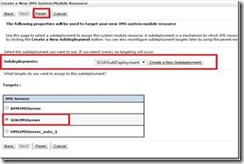
SOA 12c – EDN – Mapping to Custom Topic with Weblogic JMS

EDN documentation says:

You can create additional JMS topics (Oracle WebLogic Server JMS or AQ JMS) and map different event types to these additional JMS topics in Oracle Enterprise Manager Fusion Middleware Control.

In this post, we will see how to do this mapping of Business Event to Custom Topic.

This involves 2 steps:

  • Create a new Topic.
  • Modify the business event mapping in EM.

Creating a new Topic

Navigate to Services –> Messaging –> JMS Modules –> SoaJMSModule in Weblogic Administration console. Read the complete article here .

SOA & BPM Partner Community

For regular information on Oracle SOA Suite become a member in the SOA & BPM Partner Community for registration please visit www.oracle.com/goto/emea/soa (OPN account required) If you need support with your account please contact the Oracle Partner Business Center.

Blog Twitter LinkedIn image[7][2][2][2] Facebook clip_image002[8][4][2][2][2] Wiki

Installation of Oracle B2B 12c by Tiago Teixeira


clip_image002In this post I will quickly go through the steps that are necessary in order to install Oracle B2B and create a SOA domain that you can use.
I will consider that the installation will be used for a development environment and that it is done on the Linux machine.
Note that prior to the installation of B2B you will need to have machine running a Database and perform the installation of Oracle Fusion Middleware 12c Infrastructure and of the Oracle Fusion Middleware 12c SOA Suite and Business Process Management on the same machine where you will be installing B2B. You will also need to have the latest Oracle JDK 7 Update installed on that same machine.
The necessary software can be downloaded using Oracle eDelivery:

  • V44959-01.zip – Latest Oracle JDK 7 Update for Linux x86-64 (Prerequisite)
  • V44416-01.zip – Oracle Fusion Middleware 12c (12.1.3.0.0) Infrastructure (Prerequisite)
  • V44420-01.zip – Oracle Fusion Middleware 12c (12.1.3.0.0) SOA Suite and Business Process Management (Prerequisite)
  • V44421-01.zip – Oracle Fusion Middleware 12c (12.1.3.0.0) B2B and Healthcare

To install Oracle Fusion Middleware 12c Infrastructure please refer to:
Oracle Fusion Middleware Installing and Configuring the Oracle Fusion Middleware Infrastructure
To install Oracle Fusion Middleware 12c SOA Suite and Business Process Management please refer to:
Oracle Fusion Middleware Installing and Configuring Oracle SOA Suite and Business Process Management
I’m considering that a new domain will be configured from scratch. If a SOA domain was already created previously a few of the next steps can be ignored and the existing domain can be extend to include B2B. If that is the case, for the next steps, remember to shutdown any running instances of Weblogic Server.

     1. The first part of the installation will be to install the software:

After you have downloaded the V44421-01.zip file unzip it: Read the complete article here.

SOA & BPM Partner Community

For regular information on Oracle SOA Suite become a member in the SOA & BPM Partner Community for registration please visit www.oracle.com/goto/emea/soa (OPN account required) If you need support with your account please contact the Oracle Partner Business Center.

Blog Twitter LinkedIn image[7][2][2][2] Facebook clip_image002[8][4][2][2][2] Wiki

Inside Fusion Middleware 12c: Increasing Scalability with JMS Adapter 12c by Stefan Koser


clip_image002JMS Adapter (also known as Oracle JCA Adapter for JMS) is a component available with Oracle SOA Suite or Oracle Service Bus (OSB) which provides a very powerful way to use  the Java Messaging Service (JMS) for sending or receiving messages.

The most important goals for optimizing an SOA Suite or OSB environment are to make sure that

  • Each node of the cluster makes effective use of Java threads and other resources.
  • The cluster will be able to scale efficiently when adding new nodes.

In this article, we will show how JMS Adapter in the new release 12c can be configured in high throughput scenarios to use much fewer threads that in earlier versions. This means, that adding new nodes to the cluster will not require additional threads in all other nodes. As a result, a cluster with many nodes will perform and scale much better.

There are 2 main use cases of JMS Adapter with SOA Suite or OSB:

  • Inbound activation of a composite by receiving messages from a JMS destination (queue or topic)
  • Publishing messages from a composite to a JMS destination

We will focus in this article on the first use case for receiving messages. Only in that scenario – for listening to a queue, the activation framework of the Java EE Connector Architecture (JCA) layer will start a number of threads for JMS Adapter.

First, we will describe how many threads will be created by default or in versions prior to 12c, and then how this changes when using the new feature available with 12c.

Default thread creation for JMS Adapter

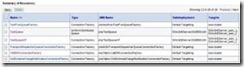
For the first example, we will assume a scenario with a 2-node SOA cluster where a Uniform Distributed Queue (UDQ) “jms/TestQueue” is defined and one SOA composite with an inbound JMS Adapter is listening to this queue. See line 2 of the JMS destination overview in Weblogic server in the following table:

With the default behavior, the number of threads used to read messages from this queue in each Java Virtual Machine (JVM) is one. This is derived from the default of the corresponding configuration parameter: Read the complete article here.

SOA & BPM Partner Community

For regular information on Oracle SOA Suite become a member in the SOA & BPM Partner Community for registration please visit www.oracle.com/goto/emea/soa (OPN account required) If you need support with your account please contact the Oracle Partner Business Center.

Blog Twitter LinkedIn image[7][2][2][2] Facebook clip_image002[8][4][2][2][2] Wiki