SOA Suite 12c and the OPSS Keystore Service by Adam Desjardin


clip_image002When working with a colleague on a sample SOA 12c project recently I noticed a change in 12c that I had not seen mentioned anywhere yet.  In the sample project we were integrating with the Atlassian OnDemand service in order to provision users for Confluence and JIRA.  The integration is performed using a SOAP service over SSL.  In this situation, like at many of our customers, we needed to import additional trusted certificates into the trust store in order to make the service call over SSL.  At many of our customers this is an internal Root CA they use to sign their own certificates for internal use.

When looking at the default settings of the IntegratedServer in JDeveloper 12c we can now see below that it is configured by default to use the OPSS Keystore Service and not a JKS Trust Store.

You can see above that instead of a filesystem URI to a JKS file you now see a kss:// URI.  This URI shows that we are using the trust store called "trust" in the system strip of the Keystore Service.

The OPSS Keystore Service is meant to provide a single location for Keystores and Trust stores for all applications running within the Weblogic domain.  The only pre-requisite for using the service is that the JRF templates have been applied to your domain, which should be the case for any SOA 12c domain.

Using this service you can now manage all of your certificates through Fusion Middleware Control and WLST.  You can navigate to the Security -> Keystore menu under your domain in FMW Control as shown below. Read the complete article here.

SOA & BPM Partner Community

For regular information on Oracle SOA Suite become a member in the SOA & BPM Partner Community for registration please visit www.oracle.com/goto/emea/soa (OPN account required) If you need support with your account please contact the Oracle Partner Business Center.

Blog Twitter LinkedIn image[7][2][2][2] Facebook clip_image002[8][4][2][2][2] Wiki

SOA Suite 12c New Features: Creating SOA Project Templates for Reusing SOA Composite Designs by Joe Greenwald

clip_image002In SOA Suite 12c, we create application integrations and business processes designed as services composed of processing logic, data transformation and routing, dynamic business rules and human tasks in the form of XML-based metadata. The graphical representations of these services are created in JDeveloper using its graphical editors. Since these services are composed of individual, separately configurable components, we call this a composite service. Once deployed to and hosted by Oracle SOA Suite, this service looks and acts like any other web service to its clients.
It would be highly productive and desirable to be able to easily create templates for service designs that could be reused across teams and projects. Using quality designs and tested patterns as the starting point for new services speeds up development while also supporting widespread adoption of quality and standards in service design.

SOA Suite 12c automates creation and management of templates of service composites, as well as individual service components. The service project templates we create will be stored and managed in the file-based MDS, so they can easily be shared with other developers.
We have an existing service composite that we would like to clone or use as the basis of new service composite. Once we create the new service based on the template, we’ll be able to make modifications to it as needed.
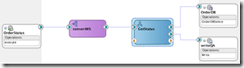
Here is the current Service:
The service exposes a web service entry point, OrderStatus whose interface is implemented by convertWS mediator. ConvertWS transforms the incoming message as needed and routes the message to be processed by GetStatus, a Business Process Execution Logic (BPEL)-based component. The BPEL process accesses the database through the database adapter, OrderDB, to check order status and then writes the status to a flat file via the file adapter, writeQA.

Read the complete article here

SOA & BPM Partner Community

For regular information on Oracle SOA Suite become a member in the SOA & BPM Partner Community for registration please visit www.oracle.com/goto/emea/soa (OPN account required) If you need support with your account please contact the Oracle Partner Business Center.

Blog Twitter LinkedIn image[7][2][2][2] Facebook clip_image002[8][4][2][2][2] Wiki

SOA Suite 11g and 12c: Determining composite dependencies to the level of operations by Maarten Smeets

clip_image001In large companies, often there are many services and dependencies between services. It is important to track service dependencies in order to for example estimate the impact of changes. Design documents or architecture views can be used for this but as everybody knows, there is often a gap between theory and practice (design and implementation).

In this blog post I provide code to determine dependencies between composites to the level of operation calls. In order to achieve this, I’ll parse the composite.xml files, JCA files (used by adapters) and also the BPEL and BPMN files in order to determine the operations. The script can be used for SOA Suite 11g and 12c composites.

The above picture shows different parts of which a composite is composed and how they are linked. The script first determines references. The references specify which external services are called. Then by using wires, the relevant components are determined. Based on the component type, specific logic is used to extract the operation. Not shown in this picture is how database dependencies can also be determined by the script by parsing the JCA files specified in the reference. If you’re in a hurry, you can go to the ‘Executing the script’ part directly and skip the explanation.

Composites

This blog will focus on composites (which can contain components like BPEL and BPM) using the shared SOA infrastructure and not on for example the Service Bus. Composites use the Software Component Architecture (http://www.oasis-opencsa.org/sca) to wire different components together in a consistent way. Oracle uses XML files to describe composites, components and references. These files can easily be parsed and correlated.

Introduction composite.xml

The main file describing a composite is the composite.xml file. Below is a small sample of a HelloWorld composite containing a single component, a BPEL process. Read the complete article here.

SOA & BPM Partner Community

For regular information on Oracle SOA Suite become a member in the SOA & BPM Partner Community for registration please visit www.oracle.com/goto/emea/soa (OPN account required) If you need support with your account please contact the Oracle Partner Business Center.

Blog Twitter LinkedIn image[7][2][2][2] Facebook clip_image002[8][4][2][2][2] Wiki

Fusion Middleware Partner Community Forum 2015

clip_image002clip_image004Our Fusion Middleware Partner Community Forum 2015 is almost booked out! Please make sure you register asap if you want to attend! We are excited to announce the keynote speakers Andrew Sutherland and Amit Zavery. In the case you build a solution based on Fusion Middleware like o-box SOA Suite for ODA and you want to promote this solution to our Fusion Middleware Partner Community you can showcase this solution at our conference. All partners we offer to exhibit at our Partner Exchange your solutions, frameworks or partnerships. Partners who are interested to exhibit please contact Jürgen Kress. Part of the exhibition will be also demo points for our fusion middleware products and an Internet of Things (IoT) playground!

For our Java Cloud and Developer Cloud Service and the Multichannel Enablement Bootcamp we do have free seats! The Multichannel Enablement Bootcamp showcase the integration between cloud and on-premises for applications like eBusiness Suite, Siebel for Taleo and RightNow. For more details please visit our remigration page here.

SOA & BPM Partner Community

For regular information on Oracle SOA Suite become a member in the SOA & BPM Partner Community for registration please visit www.oracle.com/goto/emea/soa (OPN account required) If you need support with your account please contact the Oracle Partner Business Center.

Blog Twitter LinkedIn image[7][2][2][2] Facebook clip_image002[8][4][2][2][2] Wiki

Top SOA articles at OTN –thanks to the Community

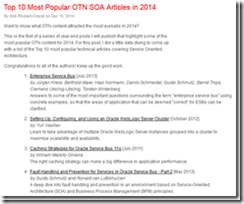
Thanks for all the SOA Community articles in the top 10 of OTN SOA Articles in 2014clip_image001. See the Top 10 Most Popular OTN SOA Articles in 2014 here. Special thanks to Bob for the excellent work & collaboration! Make sure you also contribute in 2015. Please send me your articles via E-mail – see my LinkedIn profile here or best via twitter #soaCommunity. We love to promote your middleware articles at our Oracle blogs, Community newsletter and social media. Thanks for sharing and Happy Holiday! Jürgen Kress

SOA & BPM Partner Community

For regular information on Oracle SOA Suite become a member in the SOA & BPM Partner Community for registration please visit www.oracle.com/goto/emea/soa (OPN account required) If you need support with your account please contact the Oracle Partner Business Center.

Blog Twitter LinkedIn image[7][2][2][2] Facebook clip_image002[8][4][2][2][2] Wiki

A Dirty Dozen Questions on Oracle SOA 12c You Need Answered, but Feared to Ask….

clip_image002SOA 12c Webcast Q&A   
Last month’s webcast  “Simplify Multichannel Integration with Oracle SOA Suite 12c” was a tremendous success. Once again, we’d like to thank Oracle’s Robert Wunderlich for his insight and excellent demo.

As usual, we’re happy to bring you a transcript of the Q&A session of the webcast. But as interest in these questions goes far beyond the webcast audience, we’re taking the poetic license of calling them “A Dirty Dozen Questions on Oracle SOA 12c You Need Answered, but Feared to Ask….”
1. Does Oracle SOA 12c support batch-processing using OSB, without the need to purchase an additional ETL tool like ODI?
There are a couple of things we need to take into account when we are discussing batching. If you are talking about large payloads, like GBs or Tbs in a file, it is not recommended to go with OSB (Oracle Service Bus). That is the reason Oracle recommends ODI (Oracle Data Integrator): ODI will extract the data, chunk the file into to smaller pieces and hand it over to the OSB layer, and the OSB layer will take the data and process it.
2. Is XSLT 2.0 supported in both OSB and SOA? Today in 11g it’s only supported in SOA and not in OSB?
Yes, XSLT  (Extensible Stylesheet Language Transformations) are supported in both, and Oracle made many improvements on the XSLT mapper. The other thing to point out is on the XQuery side – using XQuery on both SOA Composite and Service BUS, and we have a mapper for that as well. The idea is that now, it becomes a developer’s choice in working between the two. Do you want to use XSLT or XQuery? You can use either one.
3. How much data volume can SOA handle? Read the complete article here.

SOA & BPM Partner Community

For regular information on Oracle SOA Suite become a member in the SOA & BPM Partner Community for registration please visit www.oracle.com/goto/emea/soa (OPN account required) If you need support with your account please contact the Oracle Partner Business Center.

Blog Twitter LinkedIn image[7][2][2][2] Facebook clip_image002[8][4][2][2][2] Wiki

JSON is flowing through SOA’s veins by Laurens van der Starre

This year’s Oracle Open World is again all about Cloud and Mobile. However, this year it is getting more and more concrete. Apart from all the announcements of Process Cloud and integration cloud services there will be more JSON support in Oracle’s SOA Suite.

In Oracle SOA Suite 12C (12.1.3) the REST Adapter already made its appearance. This adapter makes it make your SCA component available as, and leverage REST services, using JSON. This JSON support starts and end with the REST adapter. Inside your SCA components, it is still XML.

In the second release of Oracle SOA Suite 12C (12.1.4) there will be JSON flowing through all the veins of the SCA components. In Service Bus, you will be able to have JSON context variables. Instead of only having xpath operations on your context variables, you have the ability to use JavaScript. There will also be a JavaScript activity which lets you write JavaScript “transformations” on your context variables.

The same goes for BPEL. BPEL is heavily based on XML, but here also the JSON support will be end-to-end. Pretty exiting, but also scary because of the “unstructuredness” of JSON.

Oracle SOA Suite 12.1.4 will probably available in H1 of 2015.

SOA & BPM Partner Community

For regular information on Oracle SOA Suite become a member in the SOA & BPM Partner Community for registration please visit www.oracle.com/goto/emea/soa (OPN account required) If you need support with your account please contact the Oracle Partner Business Center.

Blog Twitter LinkedIn image[7][2][2][2] Facebook clip_image002[8][4][2][2][2] Wiki

SOA 12c Service Bus Resequencer by Vivek Garg

clip_image002We often come under such situation when we receive message from source system which are not in proper sequence but target system need to receive that in proper sequence. To resolve this we need to re-sequence the messages and process them in proper sequence.   Re-sequencing is term used when we need to process incoming messages in sequence which are not coming in proper sequence. Design and developer need to think on this re-sequencing when they encounter such requirement as e described above. E.g. suppose we are receiving sales orders from source system, sales order contain one field with the name sales order number, suppose source system sends sales order in this sequence ( 1, 4,3,2,5,6,7 ) but target system need sales order in this sequence (1,2,3,4,5,6,7) , in this case we need to do re-sequencing of message.

In 11g version of Oracle SOA Suite, re-sequencing was there in Mediator component but this feature was not available for BPEL and Service Bus. In 12c release, this feature is provided for service bus. We can set this feature either at pipeline level or at operation level. In this post, we will discuss on that. We will only discuss about pipeline level re-sequencer.

We have three types of re-sequencing in Service Bus.

Standard:  This sequencer is used when incoming message contain numeric identifier.  This numeric identifier is termed as Sequence Id. We may specify message Group also, that means incoming order can be Sales Order or purchase order, in this case we will have separate group for both Sales Order and purchase order. When source system send out of order messages then it store out-of-order message until complete order is received this is based on sequence Id.

FIFO: This sequencer works based on message arrival time. Whichever message received first, will be processed first. Here you need to specify only Group. So all the messages which are there in one group processed based on message receive time.

Best Effort: It is used when we receive large number of messages in a short period of time and cannot provide information to the re-sequencer about the identifier to use for sequencing. Typically, the identifier used for sequencing in such scenarios is of a dateTime type or numeric type.

To configure re-sequencer in service bus, double click on the pipeline and choose configuration tab. Click on resequencer, to enable the resequencer check the “Enable Resequencer” checkbox. Once you enable the resequencer, you need to choose the resequencer level. Resequencer level can be set either pipeline or operation. Also choose the type of resequencer which you need to use.

Read the complete article here.

SOA & BPM Partner Community

For regular information on Oracle SOA Suite become a member in the SOA & BPM Partner Community for registration please visit www.oracle.com/goto/emea/soa (OPN account required) If you need support with your account please contact the Oracle Partner Business Center.

Blog Twitter LinkedIn image[7][2][2][2] Facebook clip_image002[8][4][2][2][2] Wiki

SOA Suite 12c Developer Productivity Enhancements – One-click Install by Rick Cromer

Oracle recently released a new version of the Oracle SOA Suite 12c. This release is built around 4 themes; Industrial SOA, Developer Productivity, Mobile and Cloud. The theme of developer productivity is the topic for this multi-series blog. Each blog in this series will describe one or more of these new and interesting changes.  When deciding which feature to cover first, it made sense to start with the first feature that would affect developers starting to use 12c, and that is the new one-click install. In reality, there are several clicks, but new for this release, all of the files required for a developer install comes from a single installation file.

When installing prior versions of the Oracle SOA Suite, several potentially error prone steps where required in order to set up a development environment.  For example, the Oracle Database and WebLogic server had to be installed before you started installing the SOA runtime and created the database schemas. Besides making sure you had compatible versions, they had to be set up correctly for all of the parts to work correctly.

For this blog post, the installation was performed on Windows 7.  Steps for Linux install and other platforms can be found on the JDeveloper download web page referenced in the URL below:

http://www.oracle.com/technetwork/developer-tools/jdev/downloads/index.html

The installation will be done in two parts, the first is to install the software onto your computer. The second part is to start JDeveloper and the integrated Weblogic Server and Service Bus and configure the domain.

clip_image002Part 1 – JDeveloper Studio Installation

Download the Windows 64-bit Install for Oracle JDeveloper 12c Studio Edition from the download page referenced above.  Downloading the Generic Installer jar file is smaller and can be used on other operating systems, but will need additional features added to complete the installation.  The Windows Installer contains the required JDK for JDeveloper Studio.

Included in this install file are the necessary components for development with the core SOA Suite including BPEL, rules engine, human work flow, adapters and the Mediator.  Also new to the 12c release, the installer includes the service bus. Note that this installer doesn’t include Oracle BPM but is available as separate installation.  Another feature you might require which is not part of the installation file is BAM since BAM requires an Oracle Database.

After the install file has been download, browse to the download location in Windows Explorer and right click on the file, select “Run as administrator” to run the installer.  This is an important step and if this file is run without doing this an error will occur during the installation.  There are several forum post with people who have tried this and ran into this error. Read the complete article here.

SOA & BPM Partner Community

For regular information on Oracle SOA Suite become a member in the SOA & BPM Partner Community for registration please visit www.oracle.com/goto/emea/soa (OPN account required) If you need support with your account please contact the Oracle Partner Business Center.

Blog Twitter LinkedIn image[7][2][2][2] Facebook clip_image002[8][4][2][2][2] Wiki

Multichannel enablement for Applications ? hands-on workshop at OFM Forum 2015 March 3rd – 6th 2015

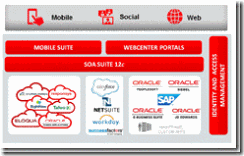
Plan to integrate Eloqua, Fusion Applications, Taleo, RightNow, Responsys, BigMachines, Salesforce, NetSuite, workday, Peoplesoft, Siebel, E-Business Suite, JDE? Attend our hands-on training part of the Fusion Middleware Partner Community Forum 2015.

Multichannel Enablement for Applications – hands-on workshop at OFM Forum 2015

clip_image002Agenda Highlights

74% consumers use at least 3 channels when interacting with an enterprise about customer service issues. – Gartner

Multichannel Strategy Overview

Business scenario and demo walkthrough

  • Lab: Service Virtualization with Service Bus
  • Lab: Composite Portal with WebCenter Suite
  • Lab: Mobile App Integration with Mobile Suite
  • Securing multi-channel experience with Oracle Identity & Access Mgmt Suite

For details please visit our registration page here.

SOA & BPM Partner Community

For regular information on Oracle SOA Suite become a member in the SOA & BPM Partner Community for registration please visit www.oracle.com/goto/emea/soa (OPN account required) If you need support with your account please contact the Oracle Partner Business Center.

clip_image003Blog clip_image005Twitter clip_image007LinkedIn clip_image009Facebook clip_image010Wiki

Technorati Tags: OFM Forum,training,education,AppAdvantage,SOA Suite 12c,SOA Community,Oracle SOA,Oracle BPM,OPN,Jürgen Kress,SOA