SOA Suite 12.2.1: A first look at end-to-end JSON and JavaScript support in SOA Composites by Maarten Smeets


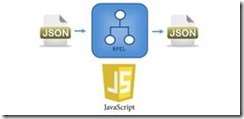
clip_image002SOA Suite 12.2.1 introduces end-to-end JSON support in composites and support for JavaScript in composites. The REST-binding (which can be used by Service Bus, BPEL, BPM) can receive and send untyped JSON without the need to translate it to XML. In BPEL, JavaScript can be used as expression language in various activities and there is a JavaScript embedding activity available.

In this article I’ll show some examples on what you can do with this end-to-end JSON support and give some examples on how to use JavaScript in your BPEL process.

About the implementation

Oracle has used the Mozilla Rhino JavaScript engine which is embedded in Java SE 6 and 7. WebLogic Server 12.2.1 and thus also SOA Suite 12.2.1, runs on Java SE 8 (Java EE 7). Java SE 8 has a new JavaScript engine Nashorn embedded (see here). A possible reason of Oracle for choosing Rhino could be that Nashorn is not thread safe. See here. You can imagine you need thread safety in an environment like SOA Suite.

SOAIncomingRequests_maxThreads is a property indicating the number of threads available to handle incoming requests. It is by default set to the same value as the connection pool size of the SOADataSource. This might not be enough for REST/JSON services. You can find this setting by going to the MBean browser, Configuration MBeans, com.bea, SelfTuning, (domain), MaxThreadsConstraint.

Use untyped JSON

You can use untyped JSON in various BPEL activities such as assign and assert activities. Since the JSON is untyped, you can assign values to elements which do not exist yet and they will be created; there is no message definition. Payload validation will cause a NullPointerException. Read the complete article here.

SOA & BPM Partner Community

For regular information on Oracle SOA Suite become a member in the SOA & BPM Partner Community for registration please visit www.oracle.com/goto/emea/soa (OPN account required) If you need support with your account please contact the Oracle Partner Business Center.

Blog Twitter LinkedIn image[7][2][2][2] Facebook clip_image002[8][4][2][2][2] Wiki

SOA Suite 12.2.1: Resiliency updates on the operations side of life by Robert van Molken

clip_image002

On the 25th of October at Open World 2015, Oracle released the 12.2.1 version of SOA Suite 12c. This release is full of resiliency updates on the operation side of life.

The operations of integration are critical and Oracle listened to the business requirement of customers while developing this release. Here are few of these operations.

  • Usually many hardware/software systems are managed by a small team.
  • With minimum need for admin intervention an integration needs to run silently, automatically and smoothly.
  • When things do go wrong, a console is needed that quickly allows identification and resolution of exceptions.
  • Without a lot of admin training it should be relatively simple to manage integrations.
  • An integration needs to scale, perform and provide continuous availability to process high workloads.
  • Ability to patch applications/composites for emergency fixes.

It isn’t the first time in the life cycle of SOA Suite 12c that Oracle is working on the operations of the product.

SOA Operations in 12.1.3

In the previous 12.1.3 release Oracle already targeted the IT operations. Read my blog about it for more details. But for a quick reference, here are the major updates.

  • Automated Operations
    • Auto Purge: Old data past the retention point are periodically on schedule to be automatically be purged.
  • Performance
    • Modularity Profile: Startup time and memoty is reduced by starting up components that are used (depends on the selected profile).
    • Lazy Loading: Startup time is reduced by loading composites only on first use.
  • Problem Identification & Resolution
    • Centered Error Hospital: The EM is reworked to be centered around exception conditions instead of business as usual, including a centralised Error Hospital.
    • Better Flow Trace: A flow trace with multiple composites shows both in a single trace for better troubleshooting.
  • Simplified Tuning
    • Work Managers: Simplify and improve thread tuning by switching to work managers. In 12.1.3 it is possible to assign a work manager per soa-infra partition.

SOA Operations in 12.2.1

Now in this 12.2.1 release Oracle has targeted the IT operations again, but with more focus on resiliency. First lets look at the major updates.

  • Resiliency
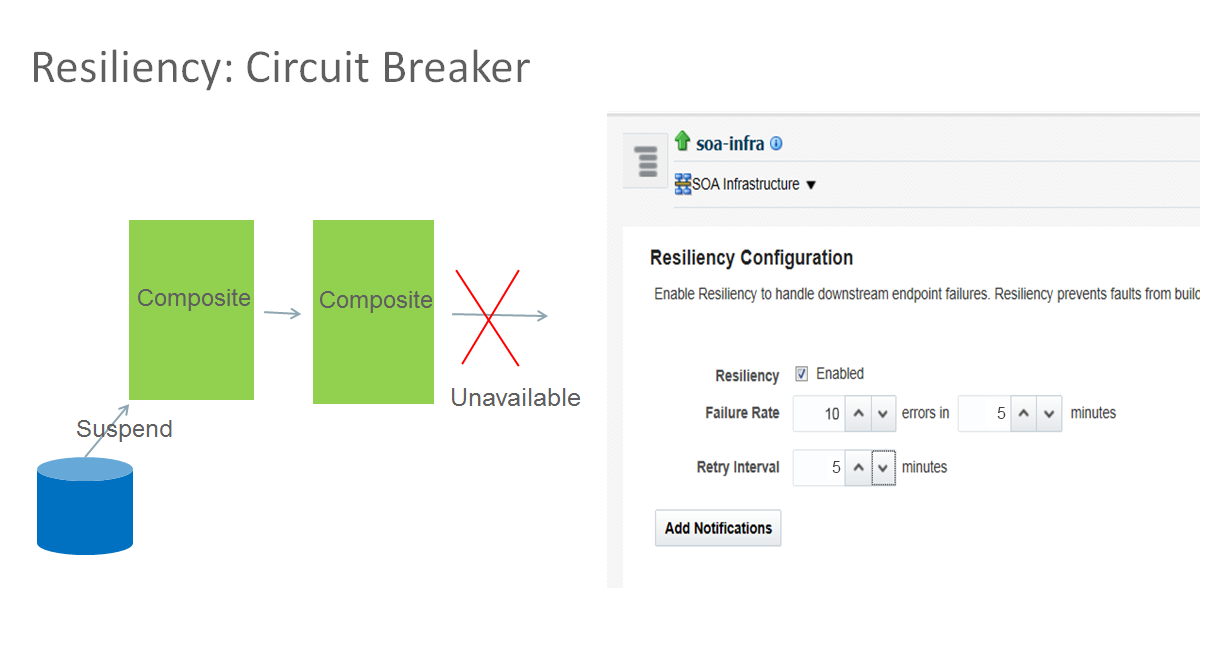
    • Circuit Breaker: Improved resiliency when downstream services go down by suspending inbound services.
  • Performance
    • In-Memory SOA: Optimize performance and scalability by reducing database growth.
    • Integration Workload Statistics: Diagnostic tool for analysing performance similar to DB AWR.
    • Parallel Deployment: Faster SOA and Service Bus startup time.
  • Availability
    • Composite Instance Patching: Patch (long running) instances immediately without redeploying new composite version and stalling instances.
    • Automatic Service Migration (ASM): Reduce the failover time and amount of machine resources needed for deployment.

Lets look at them in more details in same order as above.

Resiliency

Circuit Breaker

A problem we all have experienced is when services more downstream get unavailable cause instances to failt and fill up the error hospital. Manual recovery is sometimes difficult and time consuming. These failing instances consume unnecessary resources.

Because of these failing instances the operational costs to recover instances in the error hospital are greater. There is also a potential instability of the system due to the errors on business critical instances.

In the 12.2.1 release Oracle introduces Circuit Breaker. It automatically suspend upstream inbound services and the messages are added in queues on disk for later processing. The inbound services automatically resume when the downstream service endpoint is up. Read the complete article here.

SOA & BPM Partner Community

For regular information on Oracle SOA Suite become a member in the SOA & BPM Partner Community for registration please visit www.oracle.com/goto/emea/soa (OPN account required) If you need support with your account please contact the Oracle Partner Business Center.

Blog Twitter LinkedIn image[7][2][2][2] Facebook clip_image002[8][4][2][2][2] Wiki

Technorati Tags: SOA Community,Oracle SOA,Oracle BPM,OPN,Jürgen Kress,SOA Suite 12c,SOA Suite 12.2.1

Quick overview of SOA Suite 12.2.1 new features by Maarten Smeets

clip_image002Oracle has just released SOA Suite 12.2.1 which contains several exciting new features. The below entries have shamelessly copied from the developers guide in order to provide a quick overview of highlights for this release of the SOA Suite. Also at the end of the article some links for new features of WebLogic Server 12.2.1 which has also been released.

Patching running instances

See Patching Running Instances of a SOA Composite

Oracle SOA Suite 12c (12.2.1) supports Composite Instance Patching, which enables you to patch running instances of a composite and recover faulted instances after patching the runtime. You can only include those fixes in the patch that are compatible with Composite Instance Patching. Use the SOA Patch Developer role in Oracle JDeveloper to make the fixes and create the patch.

Composite Instance Patching enables you to deliver urgent composite fixes that can be picked up by long running instances. You can make compatible/allowed changes without aborting in-flight instances. If a patched running instance comes across a business process that has been fixed by the patch, say a BPEL transformation, then it picks up the fixes applied to the business process.

When designing the patch, the SOA Patch Developer mode in JDeveloper automatically disables changes that cannot be made to the patch. Some of the compatible changes that you can make include:

  • Non-schema related XSLT changes, changes to fault policy, sensor data, and analytics data.
  • Compatible BPEL changes such as transformation activity, assign operations, etc.
  • JCA Adapter configuration properties.

In-Memory SOA

See Using In-Memory SOA to Improve System Performance

You can leverage the Coherence cache associated with WebLogic Server to run your non-transactional business processes in memory. This improves performance and scalability for these business processes, as read and write operations are performed out of the cache. Database performance and management also improves, as the costs associated with continuous disk reads and writes are significantly reduced.

In-memory SOA enables short-running processes to live in memory. The process state gets written to the database only when faulted, or at regular, deferred intervals using a write-behind thread. The BPEL state information is dehydrated and rehydrated to/from the Coherence cache.

Support for debugging XSLT maps

See Debugging the XSLT Map

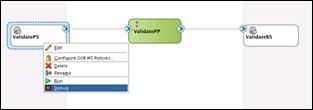
Starting in 12.2.1, you can debug your XSLT maps using the SOA Debugger. You can add breakpoints at strategic locations in the XSLT map. When debugging, the debugger halts execution at the breakpoints, enabling you to verify the data and output.

XSLT maps can be complex, making them difficult to debug. For example, you may have a Java function, or other functionality, that is best tested in the application server. Also, you might find it easier to debug in the application environment, as the XSLT may be invoked from many different applications in the server. The SOA debugger provides remote debugging capability for XSLT maps that have been deployed in the application server.

You can also use the debugger with your Oracle Service Bus projects.

Support for End-to-End JSON and JavaScript

See Integrating REST Operations in SOA Composite Applications

Starting in 12.2.1, your SOA composites can use end-to-end JSON. This means that the REST service can receive the REST request and route it to the BPEL engine without translating it to XML. The BPEL component can use the JavaScript action, and also use JavaScript in conditional and iterative constructs, to work on JSON objects directly. The REST reference can receive the REST message from the BPEL engine and route it to an external REST endpoint without translation. Read the complete article here.

SOA & BPM Partner Community

For regular information on Oracle SOA Suite become a member in the SOA & BPM Partner Community for registration please visit www.oracle.com/goto/emea/soa (OPN account required) If you need support with your account please contact the Oracle Partner Business Center.

Blog Twitter LinkedIn image[7][2][2][2] Facebook clip_image002[8][4][2][2][2] Wiki

Technorati Tags: SOA Community,Oracle SOA,Oracle BPM,OPN,Jürgen Kress,SOA Suite 12c,SOA Suite 12.2.1

SOA Suite 12.2.1 free update Bootcamp for Oracle Partners, May 11th, Utrecht


imageAbstract:

Become hands-on trained in the latest features of SOA Suite 12.2.1.

You will learn in one comprehensive day all about the latest new features of SOA Suite 12.2.1 including live demos of the Integration Cloud Service.

Goal after the workshop is to sell your customers additional services e.g. upgrade them to the latest release.

Agenda:

09h00 – 09h30: Registration

09h30 – 10h00: Overview SOA Suite

10h00 – 11h00: What’s new in SOA Suite 12.2.1

11h00 – 11h15: Break

11h15 – 12h00: Hands-on Labs

12h00 – 13h00: Lunch

13h00 – 15h00: Hands-on Labs

15h00 – 16h00: Integration Cloud Service & Demo

Logistics:

Oracle will provide the laptops to support this training and hands-on lab

Location: Oracle Nederland-  Hertogswetering 163-167, 3543 Utrecht

For details please visit the registration page here


For additional partner trainings please visit our community training calendar here (membership required).

In case you can not attend one of the upcoming trainings please take a look at the SOA Suite 12c Integration Success Workshop training material here (membership required).

SOA & BPM Partner Community

For regular information on Oracle SOA Suite become a member in the SOA & BPM Partner Community for registration please visit www.oracle.com/goto/emea/soa (OPN account required) If you need support with your account please contact the Oracle Partner Business Center.

Blog Twitter LinkedIn image[7][2][2][2] Facebook clip_image002[8][4][2][2][2] Wiki

SOA Suite 12.2.1 Workshops in Istanbul, Nairobi and Moscow

Get the latest update on SOA Suite 12.2.1 and visit one of our upcoming trainings:

image25-28.04.2016 SOA Suite Workshop  Istanbul, Turkey
26-29.04.2016 SOA Suite 12c Workshop  Nairobi, Kenya
29.04.2016 SOA Suite 12.2.1 update  Moscow, Russia


For additional partner trainings please visit our community training calendar here (membership required).

In case you can not attend one of the upcoming trainings please take a look at the SOA Suite 12c Integration Success Workshop training material here (membership required).

SOA & BPM Partner Community

For regular information on Oracle SOA Suite become a member in the SOA & BPM Partner Community for registration please visit www.oracle.com/goto/emea/soa (OPN account required) If you need support with your account please contact the Oracle Partner Business Center.

Blog Twitter LinkedIn image[7][2][2][2] Facebook clip_image002[8][4][2][2][2] Wiki

SOA Suite 12c: Best practices for project structure and deployment by Maarten Smeets


clip_image002Efficient usage of version control has specific requirements to allow identification of versions and synchronous development on different branches. Design time you will want to have your Service Bus projects in a single application in order to allow usage of shared objects. At deploy-time or when creating a release, you want to group SCA composites together with Service Bus projects. How do you combine these different requirements?

In this article I’ll describe several practices and considerations which can help you structuring your version control and artifact repository. The main challenge is finding a workable balance between the amount/complexity your deployment scripts and developer productivity / focus on business value. A lot of scripts (large investment) can make it easy for developers on the short term, however those scripts can easily become a burden.

If you are just looking for some good practices to structure your version control and artifact repository, look at the list below. If however you want to know why I think certain things are good and bad practice, read on.

Development

Use a per technology structure

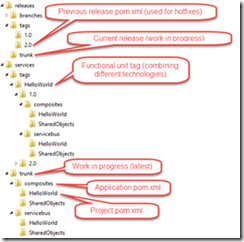
SCA composites can use customizable MDS directories (you can update the path in adf-config.xml and even use variables. See here for example). In order to use shared objects in your Service Bus project however, they should be part of the same application (in order to avoid compilation errors in JDeveloper). The application poms for the Service Bus and SCA composites use the Maven module structure to refer to their projects. This means the application should be able to find the projects. When creating a new application with a new project for SCA composites and Service Bus, the application has the projects as sub-directories. SCA composites and Service Bus projects require separate applications. Thus there are several reasons why you would want to group projects per technology. This makes development more easy, avoids the dirty fixes needed for a custom directory structure and is more in line with the default structure provides when creating a new project.

Version control structure

A version control system (VCS) should allow you to identify different versions. The versions of the software also live in the artifact repository. If you want to create a fix on a specific version of the software, it is usual to create a tag from that version, branch the tag and fix it there since the trunk might have evolved further and sometimes contains changes you do not want yet. Read the complete article here.

SOA & BPM Partner Community

For regular information on Oracle SOA Suite become a member in the SOA & BPM Partner Community for registration please visit www.oracle.com/goto/emea/soa (OPN account required) If you need support with your account please contact the Oracle Partner Business Center.

Blog Twitter LinkedIn image[7][2][2][2] Facebook clip_image002[8][4][2][2][2] Wiki

Technorati Tags: SOA Community,Oracle SOA,Oracle BPM,OPN,Jürgen Kress

Building SOA 12c Projects that Include Java Code with Maven by Adam Desjardin


clip_image002While testing the Maven build scripts I shared in my previous post, I found a few issues while building more complex composite projects.  Both of the issues I found were related to included Java code in the project. One of which has a work around while the other does not.

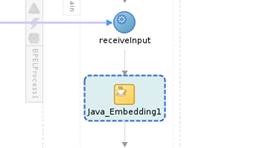
The first issue was with using the Java Embedding activity in a BPEL process.  This results in a Java class being generated for the BPEL process, which then was failing to compile.

The second issue was with custom Java classes in the SOA composite project which were then used in a Spring component.  These classes were not being compiled, causing an exception at run time when the spring bean was invoked.

BPEL and Java Embedding

Inside that activity I put a simple System.out.prinln as shown: Read the complete article here.

SOA & BPM Partner Community

For regular information on Oracle SOA Suite become a member in the SOA & BPM Partner Community for registration please visit www.oracle.com/goto/emea/soa (OPN account required) If you need support with your account please contact the Oracle Partner Business Center.

Blog Twitter LinkedIn image[7][2][2][2] Facebook clip_image002[8][4][2][2][2] Wiki

Technorati Tags: SOA Community,Oracle SOA,Oracle BPM,OPN,Jürgen Kress

SOA Suite 12c: Collect & Deploy SCA composites & Service Bus artifacts using Maven by Maarten Smeets


clip_image002An artifact repository has many benefits for collaboration and governance of artifacts. In this blog post I will illustrate how you can fetch SCA composites and Service Bus artifacts from an artifact repository and deploy them. The purpose of this exercise is to show that you do not need loads of custom scripts to do these simple tasks. Why re-invent a wheel when Oracle already provides it?

This example has been created for SOA Suite 12.1.3. This will not work as-is for 11g and earlier since they lack OOTB Maven support for SOA Suite artifacts. In order to start using Maven to do command-line deployments, you need to have some Oracle artifacts in your repository. See http://biemond.blogspot.nl/2014/06/maven-support-for-1213-service-bus-soa.html on how to put them there. I have used two test projects which were already in the repository. A SCA composite called HelloWorld_1.0 and a Service Bus project also called HelloWorld_1.0. In my example, the SCA composite is in the GroupId nl.amis.smeetsm.composite and the Service Bus project is in the GroupId nl.amis.smeetsm.servicebus. You can find information on how to deploy to an artifact repository (e.g. Nexus) here.

SCA Composite

Quick & dirty with few dependencies

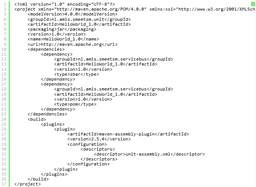
I have described getting your SCA composite out of Nexus and into an environment here. The process described there has very few dependencies. First you manually download your jar file using the repository API and then you deploy it using a Maven command like:

mvn com.oracle.soa.plugin:oracle-soa-plugin:deploy -DsarLocation=HelloWorld-1.0.jar -Duser=weblogic -Dpassword=Welcome01 -DserverURL=http://localhost:7101

In order for this to work, you need to have a (dummy) pom.xml file in the current directory. You cannot use the project pom file for this. The only requisites (next to a working Maven installation) are;

  • the sar file
  • serverUrl and credentials of the server you need to deploy to

Notice that you do not even need an Oracle home location for this. In order to build the project from sources however, you do need an Oracle home. Read the complete article here.

SOA & BPM Partner Community

For regular information on Oracle SOA Suite become a member in the SOA & BPM Partner Community for registration please visit www.oracle.com/goto/emea/soa (OPN account required) If you need support with your account please contact the Oracle Partner Business Center.

Blog Twitter LinkedIn image[7][2][2][2] Facebook clip_image002[8][4][2][2][2] Wiki

Technorati Tags: SOA Community,Oracle SOA,Oracle BPM,OPN,Jürgen Kress

Composite Sensors in Oracle SOA Suite 12c by Jennie DeRosa


clip_image002Overview

Implementing composite sensors within a SOA solution provides the ability to define trackable fields on messages and enables you to find a specific composite instance by searching for a field or fields within a message. For example, a sensor could be defined for an invoice number within a message, thus allowing us to search and find the instance where the invoice number in question is found.

While this functionality is not new within Oracle SOA Suite 12c, there are some improved capabilities that have been included in this release, which will be covered in this article.

Composite Sensors Review

Composite sensors can be defined within a SOA composite application in several components:

  • Service component (exposed service)
  • Reference component (external reference)
  • Mediator or BPEL component that have subscribed to a business event (publishing an event cannot have a sensor)

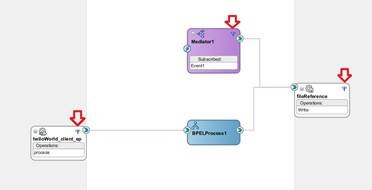
Within these components, a composite sensor can be defined in a couple of different ways. One way is to specify an existing variable as the sensor (as shown below). Another way is to define by an expression with the help of the expression builder. The third way is to define using properties (e.g. message header properties). Read the complete article here.

SOA & BPM Partner Community

For regular information on Oracle SOA Suite become a member in the SOA & BPM Partner Community for registration please visit www.oracle.com/goto/emea/soa (OPN account required) If you need support with your account please contact the Oracle Partner Business Center.

Blog Twitter LinkedIn image[7][2][2][2] Facebook clip_image002[8][4][2][2][2] Wiki

Technorati Tags: SOA Community,Oracle SOA,Oracle BPM,OPN,Jürgen Kress

SOA Suite on Docker by Jorge Quilcate


clip_image002

Visit Docker here

SOA & BPM Partner Community

For regular information on Oracle SOA Suite become a member in the SOA & BPM Partner Community for registration please visit www.oracle.com/goto/emea/soa (OPN account required) If you need support with your account please contact the Oracle Partner Business Center.

Blog Twitter LinkedIn image[7][2][2][2] Facebook clip_image002[8][4][2][2][2] Wiki

Technorati Tags: SOA Community,Oracle SOA,Oracle BPM,OPN,Jürgen Kress